
1. Introduction
The JBL Cruise X is a robust, high-performance Bluetooth streaming multi-element audio system designed for versatile mounting in various environments, such as UTVs. Its plug-and-play design simplifies installation, allowing for quick setup. This system includes an amplified Bluetooth unit, four speakers, and a wired remote control, offering a comprehensive audio solution with expandability options.
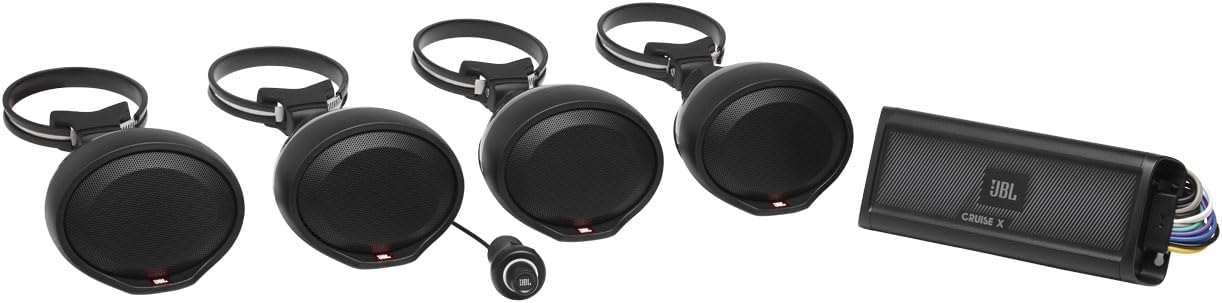
Figure 1.1: Overview of the JBL Cruise X system components, including the four enclosed speakers, the main amplifier unit, and the wired remote control.
2. Setup and Installation
2.1 Package Contents
Before beginning installation, verify that all components are present in the package:
- 4x Enclosed speakers
- 4x Vehicle mounting brackets
- 4x 3-meter speaker cables with connectors
- Bluetooth® amplifier unit
- Wired remote control with blue LED and cable
- Remote control surface mount hardware and under-dash bracket
- Mounting hardware
- 4x Bracket protection covers
- 16x Zip ties for wire retention
- 2x JBL stickers
- Quick Start Guide
2.2 Speaker Mounting
The JBL Cruise X speakers are designed for easy installation using the included clamp-style mounting brackets. These brackets allow for secure attachment to various bars or frames on your vehicle.
- Select a suitable mounting location for each speaker, ensuring they are securely fastened and do not obstruct vehicle operation or visibility.
- Attach the speaker to its respective mounting bracket.
- Secure the bracket to the desired bar or frame using the provided hardware. Ensure the clamp is tightened sufficiently to prevent movement.
- Utilize the bracket protection covers as needed to prevent scratching or damage to the mounting surface.

Figure 2.1: A single JBL Cruise X speaker demonstrating the integrated clamp mounting bracket for easy attachment to vehicle frames.
2.3 Amplifier Placement and Wiring
The Bluetooth amplifier unit should be placed in a location that is protected from direct exposure to extreme elements, although it features an IPX5 marine rating for water resistance. Ensure adequate ventilation around the unit.

Figure 2.2: Top view of the JBL Cruise X amplifier, showing its compact design suitable for various mounting locations.
Connect the speaker cables, power, and remote wires to the amplifier unit. The system includes a comprehensive wiring harness for simplified connections.
- Connect the four speaker cables from the speakers to the corresponding outputs on the amplifier's wiring harness. Ensure correct polarity (positive to positive, negative to negative).
- Connect the main power wire (+12V) to a fused constant 12V power source.
- Connect the ground wire to a clean, unpainted metal chassis point on the vehicle.
- Connect the remote turn-on wire to a switched 12V source (e.g., ignition).
- If utilizing the RCA input/output for system expansion, connect your source device or additional amplifier accordingly.
- Use the provided zip ties to neatly secure all wiring, preventing interference or damage.
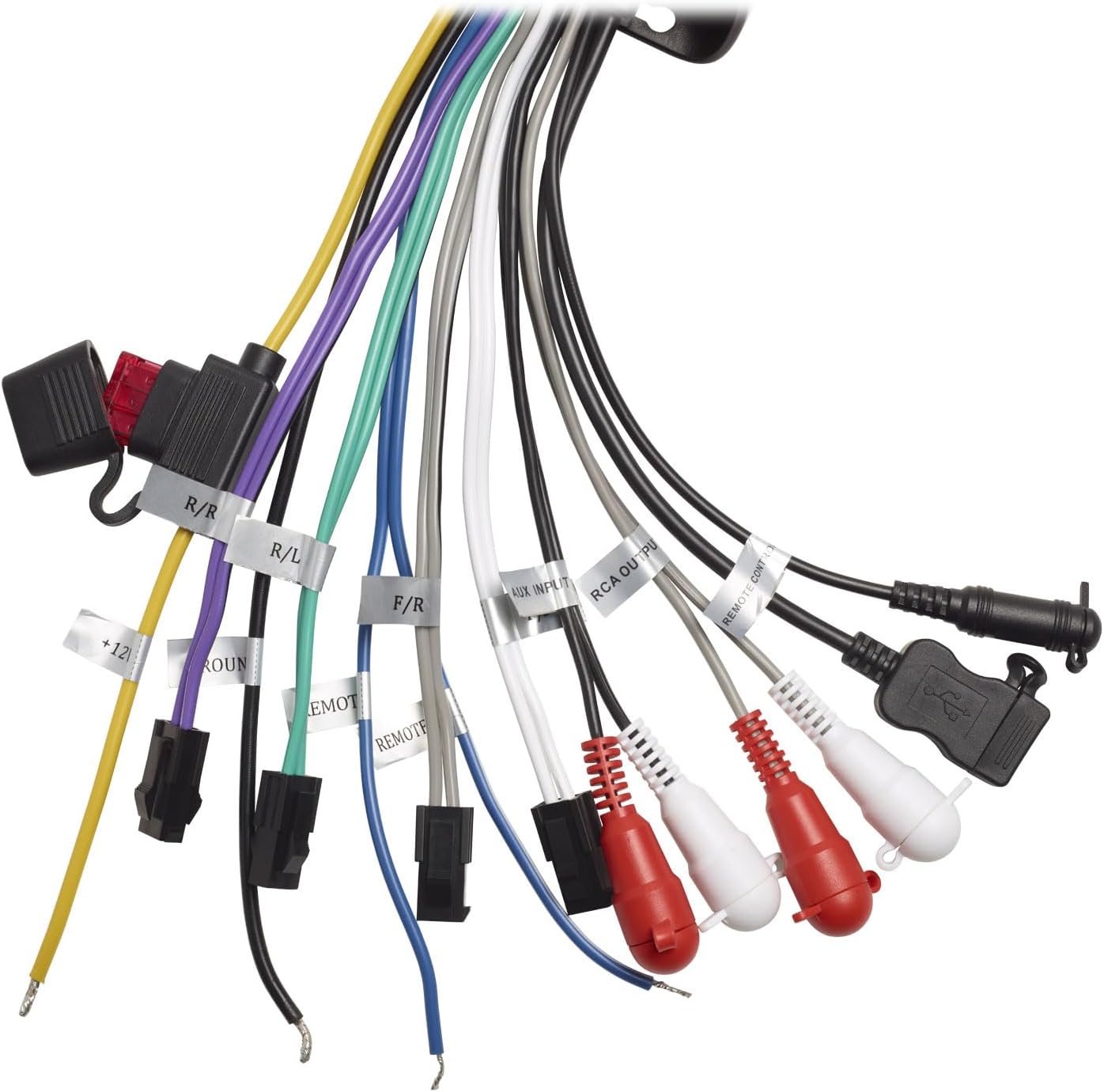
Figure 2.3: Detailed view of the JBL Cruise X wiring harness, showing various labeled connections for power, speakers, remote, and RCA inputs/outputs.

Figure 2.4: Rear panel of the JBL Cruise X amplifier, illustrating the wiring ports and the 'REAR SPEAKERS' level switch (0, -3dB, -6dB) for adjusting rear speaker output.
2.4 Remote Control Installation
The wired remote control provides convenient access to system functions. It can be surface-mounted or installed under the dash using the provided hardware.
- Choose an accessible location for the remote control that does not interfere with vehicle operation.
- Use the surface mount hardware or under-dash bracket to secure the remote control.
- Route the remote control cable to the amplifier unit and connect it to the designated port on the wiring harness.

Figure 2.5: Side profile of the JBL Cruise X wired remote control, highlighting its threaded body designed for secure panel mounting.
3. Operation
3.1 Powering On/Off
The JBL Cruise X system powers on automatically when the remote turn-on wire receives 12V (typically with vehicle ignition) and powers off when the 12V signal is removed.
3.2 Bluetooth Pairing
To connect your Bluetooth-enabled device to the JBL Cruise X:
- Ensure the JBL Cruise X amplifier is powered on.
- On your mobile device, navigate to the Bluetooth settings.
- Search for available devices and select "JBL Cruise X" from the list.
- Once paired, the blue LED on the wired remote control will indicate a successful connection, and audio from your device will play through the speakers.
3.3 Using the Wired Remote Control
The wired remote control provides convenient access to essential audio functions:
- Volume Control: Rotate the knob clockwise to increase volume, counter-clockwise to decrease.
- Play/Pause: Press the center button once to play or pause audio.
- Track Skip: Press and hold the center button to skip tracks (functionality may vary by device).
- Bluetooth Status Indicator: The blue LED illuminates when a Bluetooth device is connected.
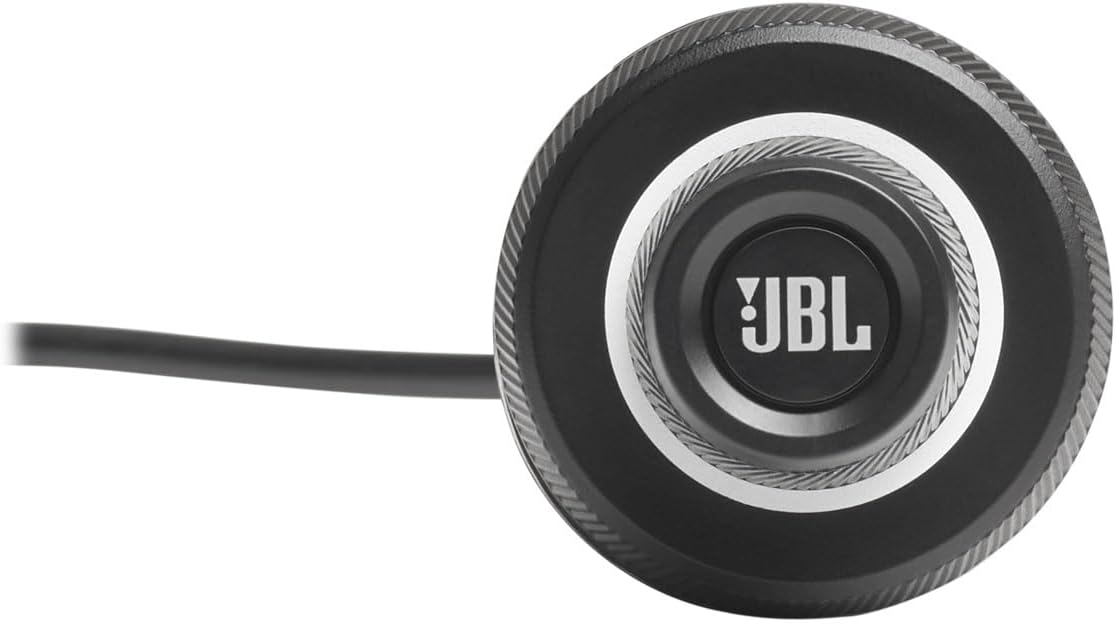
Figure 3.1: Front view of the JBL Cruise X wired remote control, featuring the central control knob and the blue LED indicator.
3.4 System Expansion
The JBL Cruise X features RCA input and output connections, allowing for system expansion. You can connect additional audio sources via the RCA input or send the audio signal to another amplifier or subwoofer via the RCA output for enhanced sound.
4. Care and Maintenance
To ensure the longevity and optimal performance of your JBL Cruise X system, follow these maintenance guidelines:
- Cleaning: Use a soft, damp cloth to clean the speakers, amplifier, and remote control. Avoid using harsh chemicals, solvents, or abrasive cleaners, as these can damage the finish or components.
- Water Exposure: While the system has an IPX5 marine rating, meaning it is protected against low-pressure water jets from any direction, it is not designed for submersion. Avoid prolonged exposure to heavy rain or direct high-pressure water sprays.
- Connections: Periodically check all wiring connections to ensure they are secure and free from corrosion. Loose connections can lead to poor audio quality or system malfunction.
- Storage: If the system will not be used for an extended period, store it in a cool, dry place, protected from extreme temperatures and direct sunlight.
5. Troubleshooting
If you encounter issues with your JBL Cruise X system, refer to the following common problems and solutions:
| Problem | Possible Cause | Solution |
|---|---|---|
| No power/System not turning on | Loose power connection; Blown fuse; No 12V remote signal. | Check power and ground connections. Inspect the fuse on the power wire and replace if necessary. Verify the remote turn-on wire is receiving 12V when the vehicle is on. |
| No audio output | Incorrect speaker wiring; Bluetooth not paired; Source device volume too low; Amplifier in protect mode. | Verify speaker wire connections and polarity. Ensure your Bluetooth device is successfully paired and its volume is up. Check the 'POWER/PROTECT' indicator on the amplifier (Figure 2.4); if lit red, consult the manual or contact support. |
| Distorted sound | Volume too high; Loose speaker connections; Damaged speaker. | Reduce volume. Check all speaker connections for tightness. Inspect speakers for physical damage. |
| Bluetooth connection issues | Device too far; Interference; Previously paired device connected. | Ensure your device is within 10 meters (33 feet) of the amplifier. Turn off Bluetooth on other nearby devices. Try unpairing and re-pairing the device. |
| Weak sound / Lack of bass | Source device volume low; Incorrect rear speaker level setting. | Increase volume on your source device. Check the 'REAR SPEAKERS' switch on the amplifier (Figure 2.4) and ensure it is set to '0' for full output, or adjust as desired. Consider adding a subwoofer via the RCA output for enhanced bass. |
6. Technical Specifications
Detailed specifications for the JBL Cruise X system:
| Feature | Specification |
|---|---|
| Model Name | CRUISEX |
| Item Model Number | CRUISEXAM |
| Brand | JBL |
| Speaker Type | Component |
| Surround Sound Channel Configuration | 4 |
| Speaker Maximum Output Power | 20 Watts |
| Connectivity Technology | Bluetooth |
| Wireless Communication Technology | Bluetooth |
| Bluetooth Range | 10 Meters (33 feet) |
| Water Resistance Level | IPX5 (Water Resistant) |
| Power Source | Corded Electric |
| Product Dimensions | 17"D x 15.25"W x 9.75"H |
| Item Weight | 4.2 Pounds (1.91 kg) |
| UPC | 050036365352 |
7. Warranty Information
The JBL Cruise X system comes with a Limited Warranty. For specific details regarding the terms, conditions, and duration of your warranty, please refer to the warranty card included in your product packaging or visit the official JBL website. Retain your proof of purchase for warranty claims.
8. Customer Support
For further assistance, technical support, or service inquiries regarding your JBL Cruise X system, please contact JBL customer support through their official website or the contact information provided in your product documentation. You can visit the JBL Store on Amazon for additional product information and resources: JBL Store.


