
1. Introduction
Welcome to the user manual for your AIDITIYMI N2QAYB000197 replacement remote control. This remote is designed to function as a direct replacement for original Panasonic DVD Recorder remotes, offering seamless control over your device without the need for complex programming.
2. Product Overview
The AIDITIYMI N2QAYB000197 remote control provides all essential functions for operating your compatible Panasonic DVD Recorder. Its ergonomic design ensures comfortable handling.
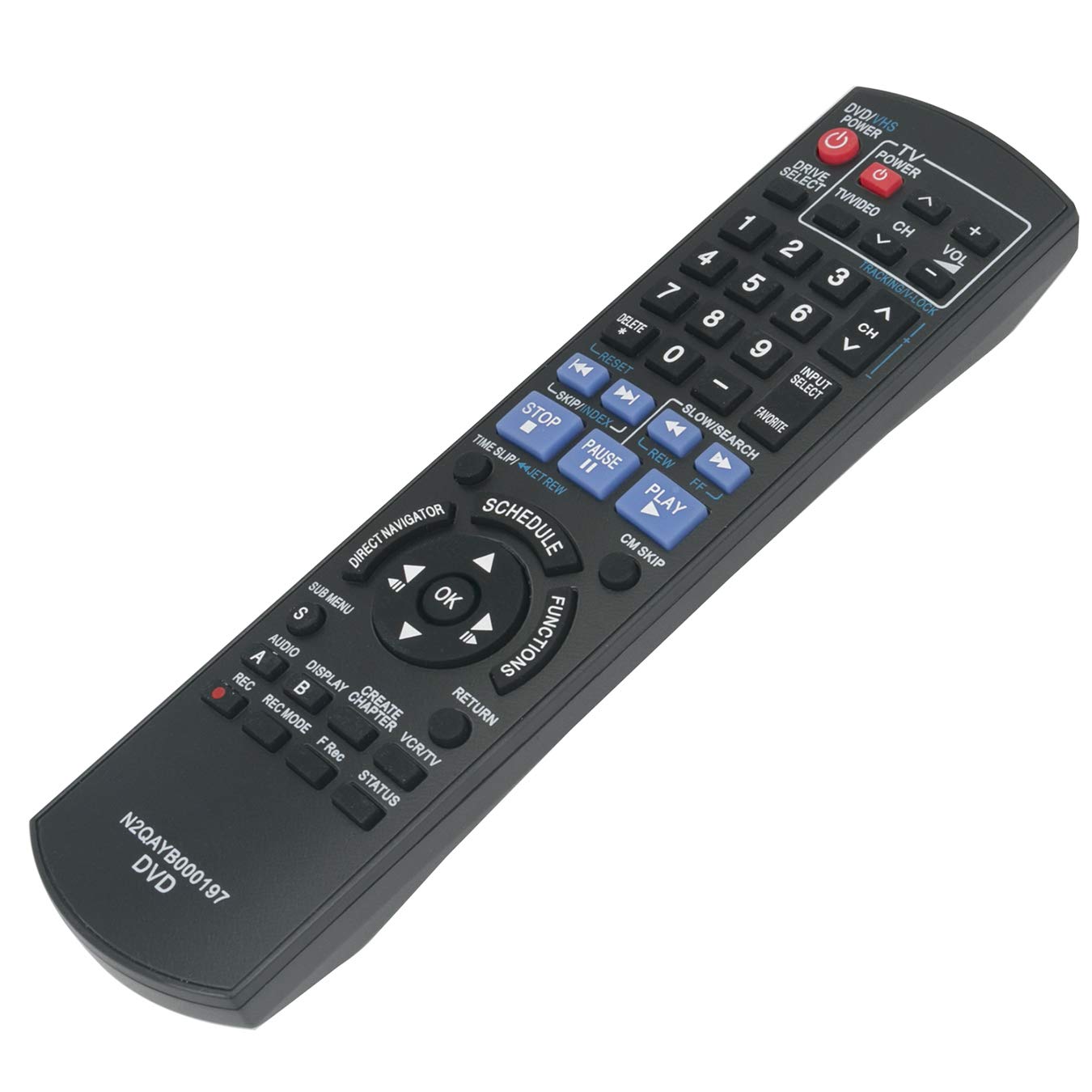
Figure 2.1: Angled view of the AIDITIYMI N2QAYB000197 remote control, showing its overall shape and button layout.
Key Features
- Direct replacement for original Panasonic N2QAYB000197 remote controls.
- No programming or pairing required; ready to use after battery installation.
- Comprehensive control over DVD recorder functions.
- Ergonomic design for comfortable grip.
3. Setup: Battery Installation
Your remote control requires two AAA alkaline batteries (not included). Follow these steps to install them correctly:
- Locate the battery compartment cover on the back of the remote control.
- Press down on the tab and slide the cover off in the direction indicated by the arrow.
- Insert two AAA alkaline batteries, ensuring the positive (+) and negative (-) terminals match the diagrams inside the compartment.
- Slide the battery compartment cover back into place until it clicks securely.

Figure 3.1: View of the remote control's battery compartment with the cover removed, showing where to insert two AAA batteries.
Important: Ensure batteries are inserted with correct polarity. Do not mix old and new batteries, or different types of batteries. Remove batteries if the remote will not be used for an extended period to prevent leakage.
4. Operating Instructions
This remote control is pre-programmed and requires no setup. Simply insert batteries and begin using it with your compatible Panasonic DVD Recorder.
Compatible Models
This remote is compatible with various Panasonic DVD Recorder models, including but not limited to:
- DMR-EZ485VK
- DMR-EZ37V
- DMR-EZ485V
- DMR-EZ48V
- DMR-EZ48
- DMR-EZ485
- Dmrez485v
- Dmr-ez48vk
Button Functions
Refer to the diagram below for an overview of the remote control's buttons and their primary functions.

Figure 4.1: Front view of the AIDITIYMI N2QAYB000197 remote control, detailing the layout and labels of all buttons.
- DVD/VHS Power: Turns the DVD/VHS recorder on or off.
- TV Power: Turns the connected television on or off.
- Drive Select: Switches between DVD and VHS modes on the recorder.
- TV/VIDEO: Switches the TV input source (e.g., between TV tuner and external video input).
- CH ^/v: Changes channels up or down.
- VOL +/-: Adjusts the volume level.
- Number Buttons (0-9): For direct channel input or menu selection.
- PLAY, PAUSE, STOP, FF (Fast Forward), REW (Rewind): Standard media playback controls.
- REC (Record): Initiates recording.
- SCHEDULE: Accesses the recording schedule menu.
- FUNCTIONS: Accesses various function menus specific to your DVD recorder.
- OK / Directional Arrows: Used for menu navigation and confirming selections.
- RETURN: Returns to the previous screen or menu.
- SUB MENU: Accesses sub-menus within certain functions.
- AUDIO: Changes audio tracks or modes (e.g., stereo, mono).
- DISPLAY: Shows on-screen display information (e.g., current time, track number).
- CHAPTER: Navigates between chapters on a DVD.
- VCR/TV: Switches between VCR and TV modes.
- STATUS: Displays current status information of the recorder.
5. Troubleshooting
- Remote not responding:
- Check battery orientation.
- Replace old batteries with new AAA alkaline batteries.
- Ensure there are no obstructions between the remote and the DVD recorder's infrared sensor.
- Confirm the remote is pointed directly at the DVD recorder.
- Remote controls some functions but not others:
- Verify that your Panasonic DVD Recorder model is listed as compatible in Section 4.
- Some advanced functions may require specific settings on your DVD recorder itself. Consult your DVD recorder's original manual.
- If you are unsure about compatibility:
- Contact AIDITIYMI customer support for assistance.
6. Specifications
- Model: N2QAYB000197
- Power Supply: 2 x AAA Alkaline Batteries (not included)
- Connectivity: Infrared (IR)
- Dimensions: Approximately 8.46 x 1.97 x 0.75 inches (21.5 x 5 x 1.9 cm)
- Weight: Approximately 2.89 ounces (82 grams) (without batteries)
- Compatible Devices: Panasonic DVD Recorders (specific models listed in Section 4)
7. Warranty and Support
For any questions, concerns, or assistance with your AIDITIYMI N2QAYB000197 remote control, please contact AIDITIYMI customer support. Refer to your product packaging or retailer's website for specific warranty information and contact details.
Note: This remote is a replacement unit and is designed to replicate the primary functions of the original remote. It may not include all features or functions of the original manufacturer's remote for all listed models, especially highly specialized or rarely used functions.