
1. Introduction
This manual provides essential instructions for the safe and effective use of your FUJIFILM EF-60 TTL Flash. The EF-60 is a powerful, compact clip-on flash designed for FUJIFILM GFX and X-series cameras, offering both TTL automatic exposure and manual control, along with radio-controlled wireless capabilities. It features a maximum Guide Number of 60 (ISO100·m at 200mm flash coverage) and supports FP High-Speed Sync up to 1/8000 sec.
2. Safety Information
Please read all safety precautions carefully before using the flash to prevent injury or damage to the product. Keep this manual in a safe place for future reference.
- Do not disassemble or modify the flash unit.
- Keep the flash away from water and moisture.
- Do not operate the flash in the presence of flammable gases or liquids.
- Avoid direct eye exposure to the flash, especially at close range.
- Use only specified batteries (4 AA batteries).
- Ensure proper battery polarity when inserting.
3. Package Contents
Verify that all items are present in the package:
- FUJIFILM EF-60 Shoe Mount Flash
- Owner's Manual (this document)
- Flash Stand
- Soft Case
4. Product Overview
Familiarize yourself with the components of the EF-60 flash unit.

Figure 4.1: Front view of the FUJIFILM EF-60 TTL Flash. This image shows the main flash head and the control panel area.

Figure 4.2: Side view of the FUJIFILM EF-60 TTL Flash, illustrating the hot shoe mount for camera attachment.
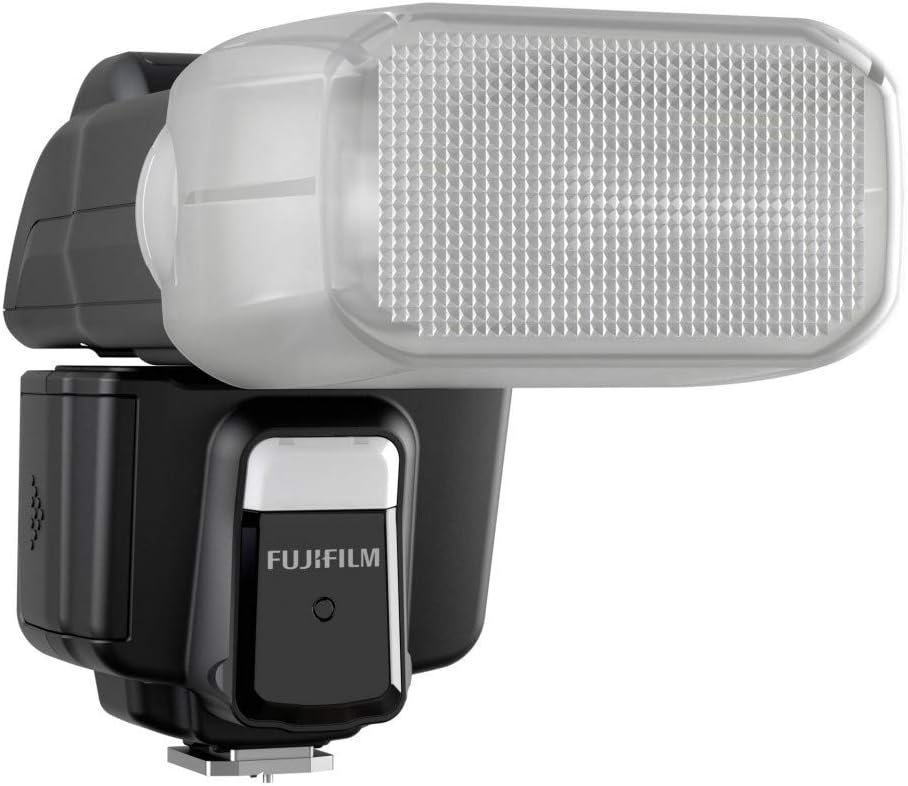
Figure 4.3: The FUJIFILM EF-60 TTL Flash with its built-in wide-angle diffuser extended, which expands flash coverage to approximately 16mm.
Key Components:
- Flash Head: Rotates 90 degrees upward and 180 degrees left/right for bounce flash.
- Control Panel: LCD display and buttons for mode selection and settings adjustment.
- Hot Shoe Mount: For attaching the flash to a compatible camera.
- Battery Compartment: Holds 4 AA batteries.
- Built-in Diffuser: Extends flash coverage for wider angles.
- Built-in Catchlight Panel: For adding a sparkle to subjects' eyes.
5. Setup
5.1. Installing Batteries
- Open the battery compartment cover.
- Insert 4 AA batteries, ensuring correct polarity (+/-).
- Close the battery compartment cover securely.
5.2. Attaching to Camera
The EF-60 is compatible with FUJIFILM GFX and X-series cameras, including GFX100, GFX 50S, GFX 50R, X-H1, X-Pro3, X-Pro2, X-T4, X-T3, X-T2, X-T1, X-T30, X-T20, X-E3, X100V, and X100F.
- Ensure both the camera and flash are powered off.
- Slide the flash's hot shoe mount into the camera's hot shoe slot.
- Secure the flash by locking the hot shoe lock/unlock button or lever (if present on your flash model).
6. Operating Instructions
6.1. Powering On/Off
Press and hold the power button to turn the flash on or off.
6.2. Flash Modes
- TTL Mode: Automatically adjusts flash output for optimal exposure.
- Manual Mode: Allows users to manually set flash output levels.
- Multi Mode: For stroboscopic flash effects (refer to camera manual for detailed use).
- Wireless Mode (Radio Control): Enables off-camera flash control via radio signals.
6.3. Adjusting Flash Head Position
The flash head can be rotated 90 degrees upward and 180 degrees left or right. This allows for bounce flash photography, where light is reflected off a ceiling or wall to create softer, more natural illumination and reduce harsh shadows.
6.4. Auto Zoom Function
The EF-60 features an Auto Zoom function that automatically adjusts the flash coverage (24mm to 200mm) to match the focal length of the mounted lens. This ensures even light distribution and prevents vignetting.
6.5. Using the Built-in Diffuser
Pull out the built-in diffuser from the flash head to extend flash coverage to approximately 16mm. This is useful for wide-angle lenses to ensure full illumination.
6.6. High-Speed Sync (FP Mode)
The EF-60 supports FP High-Speed Sync, allowing flash synchronization at shutter speeds faster than the camera's native sync speed, up to 1/8000 sec. This enables wider aperture use in bright conditions or freezing fast motion with flash.
7. Maintenance
7.1. Cleaning
- Wipe the flash body with a soft, dry cloth.
- For stubborn dirt, use a cloth lightly dampened with water or a mild cleaning solution, then wipe dry.
- Do not use organic solvents like thinner or benzene.
7.2. Storage
- Remove batteries if the flash will not be used for an extended period.
- Store the flash in a cool, dry place, away from direct sunlight and extreme temperatures.
- Use the provided soft case for protection during storage and transport.
8. Troubleshooting
If you encounter issues, refer to the following common problems and solutions:
| Problem | Possible Cause | Solution |
|---|---|---|
| Flash does not fire. |
|
|
| Flash output is too weak/strong. |
|
|
| Wireless flash not working. |
|
|
If the problem persists, contact FUJIFILM customer support or your dealer.
9. Specifications
| Feature | Detail |
|---|---|
| Model | EF-60 |
| Guide Number | 60 (ISO100·m, 200mm coverage) |
| Flash Coverage | 24mm - 200mm (16mm with built-in diffuser) |
| Flash Modes | TTL, Manual, Multi, Wireless (Radio Control) |
| High-Speed Sync (FP) | Supported (up to 1/8000 sec) |
| Power Source | 4 AA batteries |
| Dimensions (W x H x D) | Approx. 2.87 x 4.45 x 4.45 inches (7.3 x 11.3 x 11.3 cm) |
| Weight | Approx. 10.6 ounces (300g) without batteries |
| Compatible Mountings | Fujifilm hot shoe |
| Battery Life | Up to 10 hours (depending on usage and battery type) |
10. Warranty Information
FUJIFILM products are covered by a limited warranty. Please refer to the warranty card included with your product or visit the official FUJIFILM website for detailed warranty terms and conditions specific to your region. Keep your proof of purchase for warranty claims.
11. Customer Support
For further assistance, technical support, or service inquiries, please contact FUJIFILM customer support through their official website or the contact information provided in your region's warranty documentation.
Official FUJIFILM Website: www.fujifilm.com


