
1. Product Overview
The Runleader RL-HM028A is a versatile digital meter designed for gasoline engines. It integrates an inductive tachometer, an hour meter, and a thermometer, all displayed on a backlit LCD screen. This device helps monitor engine performance, track operational hours, and measure engine temperature, making it suitable for a wide range of applications including ATVs, UTVs, dirt bikes, motorcycles, outboards, snowmobiles, and marine engines.
Key Features:
- Real-time RPM Measurement: Displays current engine revolutions per minute.
- Total and Partial Hour Tracking: Accumulates total running hours (TOT) and allows tracking of partial hours (JOB) for specific tasks.
- Temperature Monitoring: Measures current engine temperature (-20°C to +300°C) with adjustable units and sensor types.
- Maximum Value Records: Records and displays maximum RPM, temperature, and voltage.
- Alert Functions: Features warnings for overspeed (RPM), overheating (temperature), and overvoltage.
- Backlit LCD Display: Green backlight for clear visibility in various conditions.
- Waterproof Design: IP65 rated for durability in challenging environments.
- Replaceable Battery: Uses a CR2450 battery, with automatic data storage upon replacement.
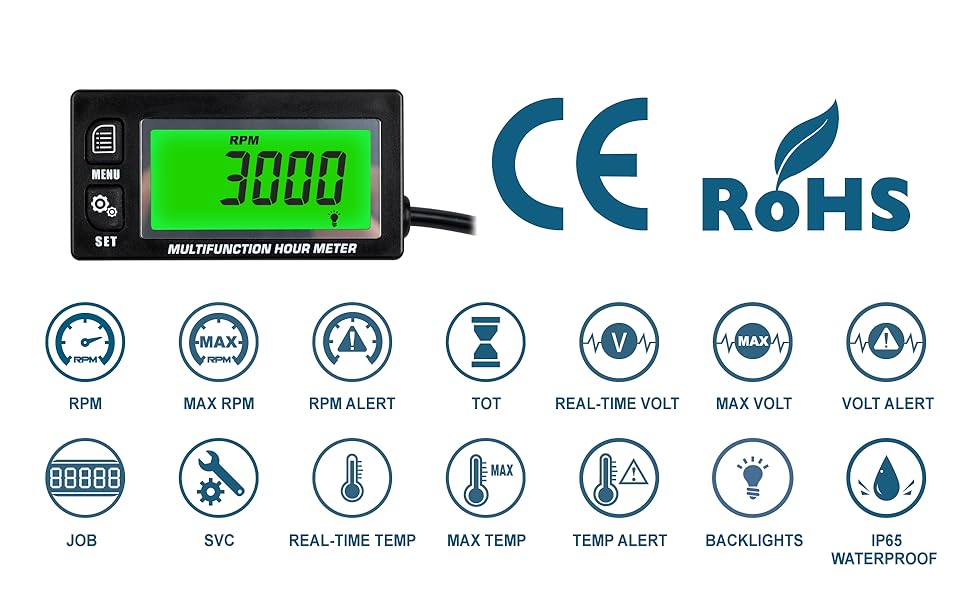
Image 1: Overview of the digital multifunctional meter displaying various parameters like RPM, temperature, total hours, and voltage.
2. Setup and Installation
The RL-HM028A is designed for easy installation on any gasoline engine. Follow these steps for proper setup:
2.1 Mounting the Device
The meter can be mounted using its stick-on feature. Ensure the mounting surface is clean, dry, and flat for secure adhesion.
2.2 Engine Signal Connection
The device operates by sensing the spark plug's ignition signal. Wrap the inductive wire around the spark plug wire of your engine. The number of wraps may vary depending on engine type and signal strength. Typically, 3-5 wraps are sufficient. Ensure the connection is secure and protected from moving parts or excessive heat.
2.3 External Power Connection (Optional)
While the unit includes a replaceable CR2450 battery, it can also be connected to an external power source (DC 8V to 30V) to extend battery life during prolonged usage. Connect the power cord assembly to the designated terminals on the meter and to your vehicle's power supply.
2.4 Temperature Sensor Installation
For temperature measurement, install the PT100 temperature sensor. Securely attach the sensor to the engine component you wish to monitor, such as the cylinder head or radiator hose, ensuring good thermal contact. Connect the sensor wire to the meter's temperature input.
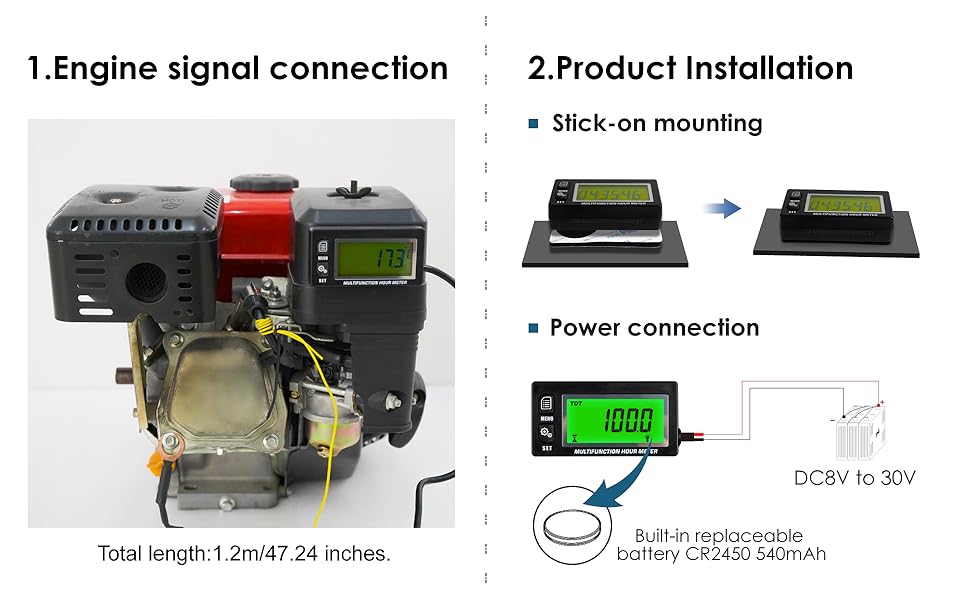
Image 2: Illustration of the installation methods, including stick-on mounting, external power connection, and engine signal pickup from the spark plug wire.
3. Operating Instructions
The RL-HM028A features two main display operating systems (DSP1 and DSP2) to suit different user preferences. Use the 'MENU' and 'SET' buttons to navigate and configure the device.
3.1 Display Modes (DSP1 & DSP2)
- DSP1: Displays all functions (Hours, RPM, Temp, Volt) in a single channel, cycling through them automatically or manually.
- DSP2: Allows grouping of functions into 4 individual channels, providing more focused displays. You can select which parameters are continuously visible.
Refer to the detailed diagram below for navigation and setting adjustments within each DSP mode.

Image 3: Detailed view of the DSP1 and DSP2 operating systems, showing menu navigation and available settings for each mode.
3.2 Tachometer Functions
- Real-time RPM: The display shows the current engine RPM when the engine is running. The refresh rate is 0.5 seconds.
- Max RPM: The device records and displays the maximum RPM achieved since the engine started or the last reset.
- Overspeed Warning: Set a custom RPM alert value. If the engine RPM exceeds this value, the display will flash a red backlight to warn the user.
3.3 Hour Meter Functions
- Total Hours (TOT): Accumulates total engine running hours up to 99999 hours. This value cannot be reset.
- Partial Hours (JOB): Allows tracking of operational hours for a single working period. This can be reset as needed.
- Clock: Displays the current time.
3.4 Thermometer Functions
- Current Temperature: Displays the real-time engine temperature when the sensor is connected.
- Max Temperature: Records and displays the maximum temperature reached since the last reset.
- Overheat Warning: Set a custom temperature alert value. If the engine temperature exceeds this value, the display will flash a red backlight.
- Unit Selection: Temperature units can be set to Celsius (°C) or Fahrenheit (°F).
- Sensor Type Selection: The type of temperature sensor can be configured by the user.
3.5 Voltage Functions
- Real-time Voltage: Displays the current voltage when connected to external power or battery.
- Max Voltage: Records and displays the maximum voltage detected.
- Overvoltage Warning: Set a custom voltage alert value. If the voltage exceeds this value, the display will flash a red backlight.

Image 4: Examples of maximum value displays for RPM, temperature, and voltage.

Image 5: Visual representation of the reminder and alert functions, indicated by a red backlight and flashing display.
4. Maintenance
4.1 Battery Replacement
The RL-HM028A uses a replaceable CR2450 lithium metal battery. When the battery level is low, replace it with a new one. All accumulated data is automatically stored and will not be lost during battery replacement.
4.2 Service Reminders (SVC)
The device includes two groups of maintenance reminders (SVC1 and SVC2) for different engine components. These reminders can be set to alert you when a specific operating hour threshold is reached, helping you keep track of scheduled maintenance. The display will flash to indicate an upcoming service.
4.3 Cleaning
Clean the device with a soft, damp cloth. Do not use harsh chemicals or abrasive cleaners, as they may damage the display or casing. Ensure the device is dry before operation.
5. Troubleshooting
If you encounter issues with your Runleader RL-HM028A, refer to the following common problems and solutions:
- No Display/Unit Not Powering On:
- Check the CR2450 battery. Ensure it is correctly installed and has sufficient charge. Replace if necessary.
- If using external power, verify the connection (DC 8V-30V) and ensure the power source is active.
- Inaccurate RPM Reading:
- Ensure the inductive wire is securely wrapped around the spark plug wire. Try increasing the number of wraps (e.g., 5-7 wraps).
- Verify that the spark plug wire is not damaged or excessively shielded, which could interfere with the signal.
- Check the engine's firing pattern setting in the device menu to ensure it matches your engine type (e.g., 2-stroke 1/2/3/6 cylinders, 4-stroke 1/2/3/4/5/6/12/16 cylinders).
- Incorrect Temperature Reading or 'Err' Display:
- Ensure the temperature sensor (PT100) is properly connected to the meter and securely attached to the engine part.
- Verify that the temperature sensor itself is not damaged. Some user reports indicate sensor fragility.
- Check the temperature sensor type setting in the device menu.
- Display Mode Issues (e.g., constantly returning to total hours):
- Familiarize yourself with the DSP1 and DSP2 operating systems. Some modes may automatically revert to a default display after a period.
- Adjust settings in the menu to select your preferred continuous display mode, if available.
- Backlight Not Working:
- Check backlight settings in the menu.
- Ensure sufficient battery power or external power supply.
If the problem persists after attempting these solutions, please contact customer support.
6. Product Specifications
| Feature | Specification |
|---|---|
| Model Number | RL-HM028A |
| Material | Acrylonitrile Butadiene Styrene (ABS) |
| Dimensions (L x W x H) | 79.00mm (3.11 inches) x 41.00mm (1.61 inches) x 21.60mm (0.85 inches) |
| Display Screen Size | 52.00mm (2.05 inches) x 24.50mm (0.96 inches) |
| Weight | 180 Grams |
| Battery Type | 1 x CR2450 Lithium Metal (included) |
| External Power Supply | DC 8V to 30V |
| Waterproof Rate | IP65 |
| RPM Refresh Rate | 0.5 seconds |
| Temperature Range | -20°C to +300°C |
| Total Hour Capacity | 99999 Hours |
| Spark Plug Wire Length | 1.2m (47.24 inches) |
| Applicable Engine Types | 2-stroke (1/2/3/6 cylinders), 4-stroke (1/2/3/4/5/6/12/16 cylinders) |

Image 6: Detailed dimensions of the RL-HM028A and a list of included accessories.

Image 7: The meter demonstrating its IP65 water resistance, suitable for outdoor use.

Image 8: Examples of equipment where the RL-HM028A can be applied, such as lawnmowers, generators, motorcycles, boats, chainsaws, and ATVs.
7. Warranty and Support
7.1 Warranty Information
Specific warranty details for the Runleader RL-HM028A are not provided in the available product information. Please refer to the product packaging or contact the seller/manufacturer directly for warranty terms and conditions.
7.2 Customer Support
For technical assistance, troubleshooting beyond this manual, or inquiries regarding your product, please contact Runleader customer support or the retailer from whom you purchased the device. Keep your purchase receipt and product model number (RL-HM028A) handy when contacting support.
