
RCA RCD12BKA
RCA RCD12BKA Alarm Clock User Manual
Model: RCD12BKA
Brand: RCA
Introduction
The RCA RCD12BKA is a compact and portable digital alarm clock designed for reliability and ease of use. Featuring a 4-inch LCD display with a timed color backlight, it is encased in a durable, impact-proof silicone shell, making it suitable for various environments including bedrooms, dorms, and travel. This manual provides detailed instructions to help you set up and operate your alarm clock effectively.

Image: Front view of the RCA RCD12BKA Alarm Clock, displaying the time 12:01 PM on its clear digital screen. The clock is black with a silicone casing.
Key Features
- Durable Design: Features an impact-proof silicone outer shell for protection against minor falls.
- Clear Display: Equipped with a 4-inch LCD easy-read display.
- Timed Backlight: Color backlight illuminates for 5 seconds when activated, conserving battery and preventing sleep disruption.
- Easy Alarm Setting: Simple controls for setting the alarm.
- Snooze Function: Large-button snooze for convenience.
- Portability: Compact design makes it ideal for travel, bedrooms, dorms, and workspaces.

Image: The RCA RCD12BKA Alarm Clock, highlighting its impact-proof design with a magnified view of the silicone casing and the text 'Impact Proof'.

Image: The RCA RCD12BKA Alarm Clock, illustrating its timed backlit display feature with a lightbulb icon and the text 'Timed Backlit Display'.
Setup
1. Battery Installation
The RCA RCD12BKA Alarm Clock operates on batteries (not included). To install batteries:
- Locate the battery compartment on the back or bottom of the clock.
- Open the battery compartment cover.
- Insert the required batteries (e.g., AAA or AA, refer to the compartment markings) ensuring correct polarity (+ and -).
- Close the battery compartment cover securely.
2. Initial Power On
Once batteries are installed, the clock should power on automatically. The display may show a default time or flash, indicating it's ready for time setting.
Operating Instructions
Familiarize yourself with the buttons on your alarm clock. Typically, these include Hour (H), Minute (M), Snooze/Light, and On/Off buttons.
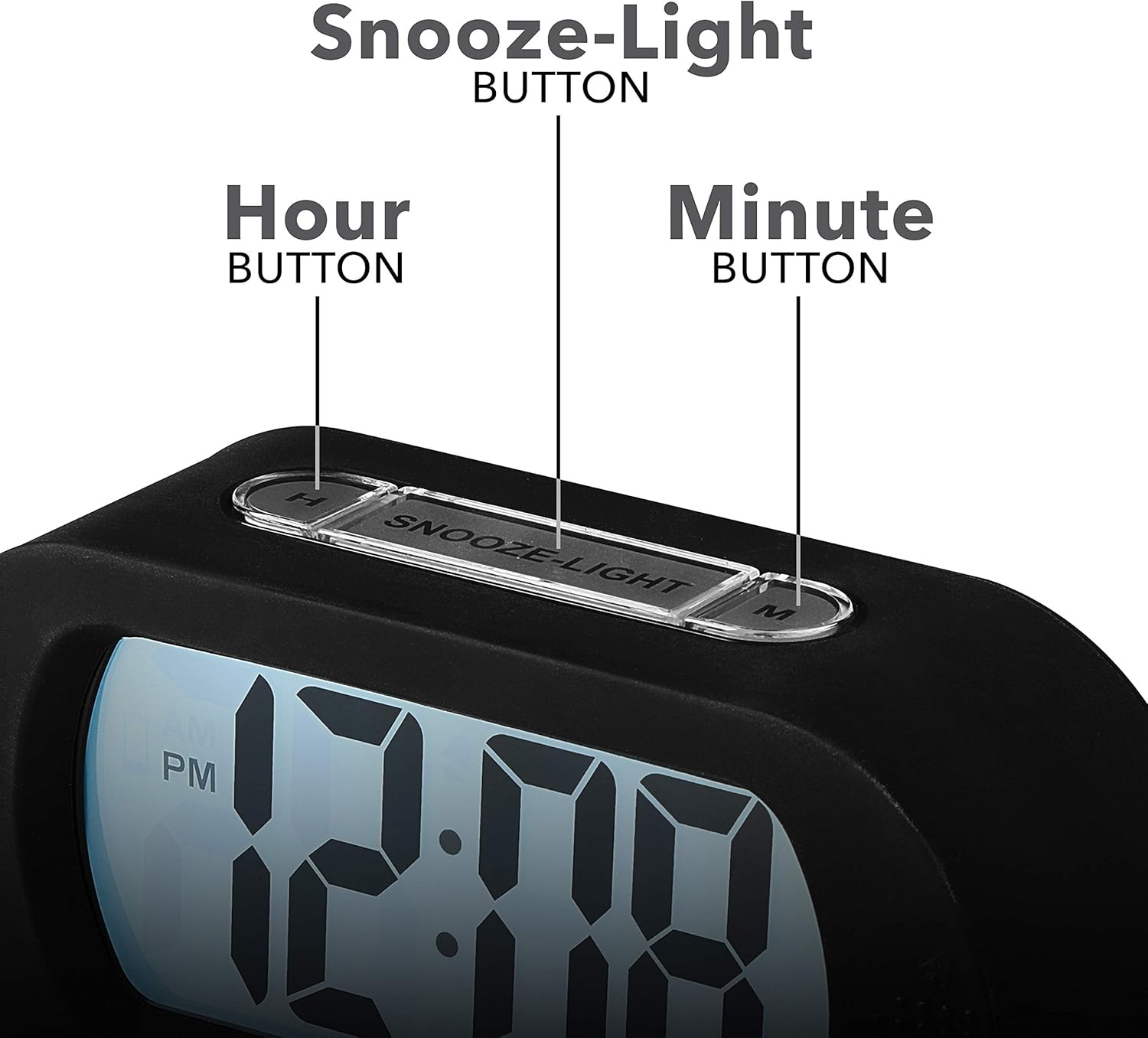
Image: A detailed view of the top control panel of the RCA RCD12BKA Alarm Clock, clearly labeling the 'Hour Button', 'Snooze-Light Button', and 'Minute Button'.
1. Setting the Time
- Press the 'SET' button (usually on the side or back) to enter time setting mode. The hour digits will likely flash.
- Use the 'H' (Hour) button to adjust the hour. Pay attention to AM/PM indicators if present.
- Press 'SET' again to move to minute setting. The minute digits will flash.
- Use the 'M' (Minute) button to adjust the minutes.
- Press 'SET' one more time or wait a few seconds for the clock to exit setting mode and save the time.
2. Setting the Alarm
- Press the 'ALARM SET' button (or similar, often labeled with an alarm icon) to enter alarm setting mode. The alarm hour digits will flash.
- Use the 'H' (Hour) button to set the desired alarm hour.
- Press 'ALARM SET' again to move to alarm minute setting. The alarm minute digits will flash.
- Use the 'M' (Minute) button to set the desired alarm minutes.
- Press 'ALARM SET' again or wait for the clock to exit setting mode. An alarm icon will typically appear on the display to indicate the alarm is active.

Image: A hand is shown pressing a button on the RCA RCD12BKA Alarm Clock, accompanied by a checkmark icon and the text 'Easy To Set', emphasizing its user-friendly setup.
3. Activating/Deactivating the Alarm
Look for an 'ON/OFF' switch or button specifically for the alarm. Toggle it to activate or deactivate the alarm. The alarm icon on the display will indicate its status.
4. Using the Snooze/Light Function
When the alarm sounds, press the large 'SNOOZE-LIGHT' button on top of the clock. This will temporarily silence the alarm for a few minutes (typically 5-9 minutes) and activate the backlight for 5 seconds. The alarm will sound again after the snooze period. To turn off the alarm completely, use the alarm ON/OFF switch.
Maintenance
Cleaning
To clean your alarm clock, gently wipe the surface with a soft, dry cloth. For stubborn marks on the silicone casing, a slightly damp cloth can be used, but ensure no moisture enters the electronic components. Do not use abrasive cleaners or solvents.
Battery Replacement
When the display dims or the clock functions become erratic, it's time to replace the batteries. Follow the battery installation steps outlined in the 'Setup' section. Always use fresh batteries of the specified type.
Troubleshooting
- Clock display is blank or dim:
Check battery installation. Ensure batteries are fresh and inserted with correct polarity. Replace batteries if necessary. - Alarm does not sound:
Ensure the alarm is set and activated (check for the alarm icon on the display). Verify the alarm time is correctly set. - Backlight is too short:
The backlight is designed to illuminate for approximately 5 seconds to conserve battery life and avoid disrupting sleep. This is a normal function of the clock. - Time is incorrect:
Re-set the time following the 'Setting the Time' instructions. Ensure AM/PM is correctly selected if applicable.
Specifications
| Feature | Detail |
|---|---|
| Brand | RCA |
| Model Number | RCD12BKA |
| Color | Black |
| Display Type | Digital |
| Style | Compact |
| Special Feature | Alarm, Backlight |
| Power Source | Battery Powered |
| Room Type | Bedroom |
| Shape | Rectangular |
| Indoor/Outdoor Usage | Indoor |
| Material | Silicone |
| Frame Material | silicone |
| Batteries Included | No |
| Mounting Type | Tabletop |
| Item Weight | 6.4 ounces (181 Grams) |
| Alarm Clock | Yes |
| Number of Items | 1 |
| Operation Mode | Electrical |
| Manufacturer | Voxx International, Inc |
| UPC | 044476138928 |
| Package Dimensions | 6 x 3 x 2.25 inches |
| Date First Available | July 26, 2020 |
Warranty and Support
For warranty information and customer support, please refer to the documentation included with your purchase or visit the official RCA website. Keep your purchase receipt as proof of purchase for any warranty claims.
For additional assistance, you may contact RCA customer service directly. Contact details are typically available on the manufacturer's website or product packaging.
Ask a question about this manual
Ask about setup, troubleshooting, compatibility, parts, safety, or missing instructions. Manuals+ will review the question and use this page’s manual context to help answer it.