
1. Introduction
Thank you for choosing the Mcdodo 15W Qi Wireless Car Charger. This device provides a convenient and efficient way to charge your compatible smartphone wirelessly while driving, featuring automatic clamping and flexible mounting options. Please read this manual carefully before use to ensure proper installation and operation.
2. Package Contents
Verify that all items listed below are included in your package:
- Mcdodo 15W Qi Wireless Car Charger Unit
- Suction Cup Mount
- Air Vent Mount
- USB-A to USB-C Charging Cable
- Instruction Manual (this document)

Figure 2.1: Contents of the Mcdodo 15W Qi Wireless Car Charger package. Shown are the main charger unit, a suction cup mount, an air vent mount, and a USB-A to USB-C charging cable.
3. Product Features
- 15W Fast Wireless Charging: Supports various fast charging protocols for compatible devices, including 15W for LG G7 ThinQ/V30+, 10W for Samsung Note 10/S10 series, and 7.5W for iPhone 8/X/11 series. A QC 3.0 car charger adapter (not included) is required for fast charging modes.
- Automatic Infrared Induction Clamping: Built-in infrared sensor detects your phone and automatically opens/closes the clamping arms for secure holding.
- Dual Mounting Options: Includes both a suction cup mount for dashboard/windshield and an air vent mount for versatile placement.
- 360-Degree Rotation: Allows for optimal viewing angles in both portrait and landscape orientations.
- Indicator Display: Provides clear visual feedback on the charging status.
- USB-C Connectivity: Utilizes a modern USB-C port for power input.

Figure 3.1: A close-up view of the Mcdodo wireless car charger, highlighting the indicator display at the bottom, which shows the working status.

Figure 3.2: An illustration comparing the Mcdodo charger's 'Smart Induction' mechanism, which firmly locks the phone, with a generic 'Infrared Induction' system that may have a weaker clamping force.
4. Setup
Follow these steps to set up your Mcdodo Wireless Car Charger:
- Choose Your Mount:
- Suction Cup Mount: Ideal for dashboards or windshields. Clean the surface thoroughly before attaching. Press the suction cup firmly against the surface and engage the lock lever.
- Air Vent Mount: Insert the air vent clip into a suitable car air vent slat. Ensure it is securely fastened.

Figure 4.1: A detailed view of the air vent mount, showing its clamping mechanism designed to securely attach to car air conditioning vents.
- Attach Charger Unit to Mount: Connect the main charger unit to the chosen mount using the ball joint. Tighten the collar to secure the unit in place.
- Install in Car: Position the mounted charger in a location that does not obstruct your view or interfere with driving controls.
- Connect Power: Plug the provided USB-A to USB-C cable into the charger unit's USB-C port and the other end into a car charger adapter (a QC 3.0 adapter is recommended for fast charging, sold separately). The indicator light on the charger will illuminate, indicating it is powered on.

Figure 4.2: The Mcdodo wireless car charger securely mounted on a car dashboard, actively charging a smartphone at 15W fast charge speed.

Figure 4.3: The Mcdodo wireless car charger installed in a car's air vent, holding and charging a smartphone.
5. Operating Instructions
- Placing Your Phone: When the charger is powered on, the clamping arms will be open or will open automatically when the infrared sensor detects your phone approaching. Place your phone onto the charging pad. The arms will automatically close and secure your phone.
- Wireless Charging: Once your phone is securely clamped, wireless charging will begin automatically if your phone is Qi-compatible. The indicator light will change to confirm charging status.
- Removing Your Phone: To release your phone, touch the sensor area (usually on the side or bottom of the charger). The clamping arms will open, allowing you to safely remove your device.
- Adjusting Viewing Angle: Loosen the collar on the ball joint, adjust the charger to your desired angle (360-degree rotation is supported), and then tighten the collar to lock it in place.

Figure 5.1: A hand demonstrating the placement of a smartphone into the Mcdodo wireless car charger, which automatically clamps the device.

Figure 5.2: A smartphone being wirelessly charged by the Mcdodo car charger, illustrating the fast charging capability with an estimated 50% charge in 1 hour.
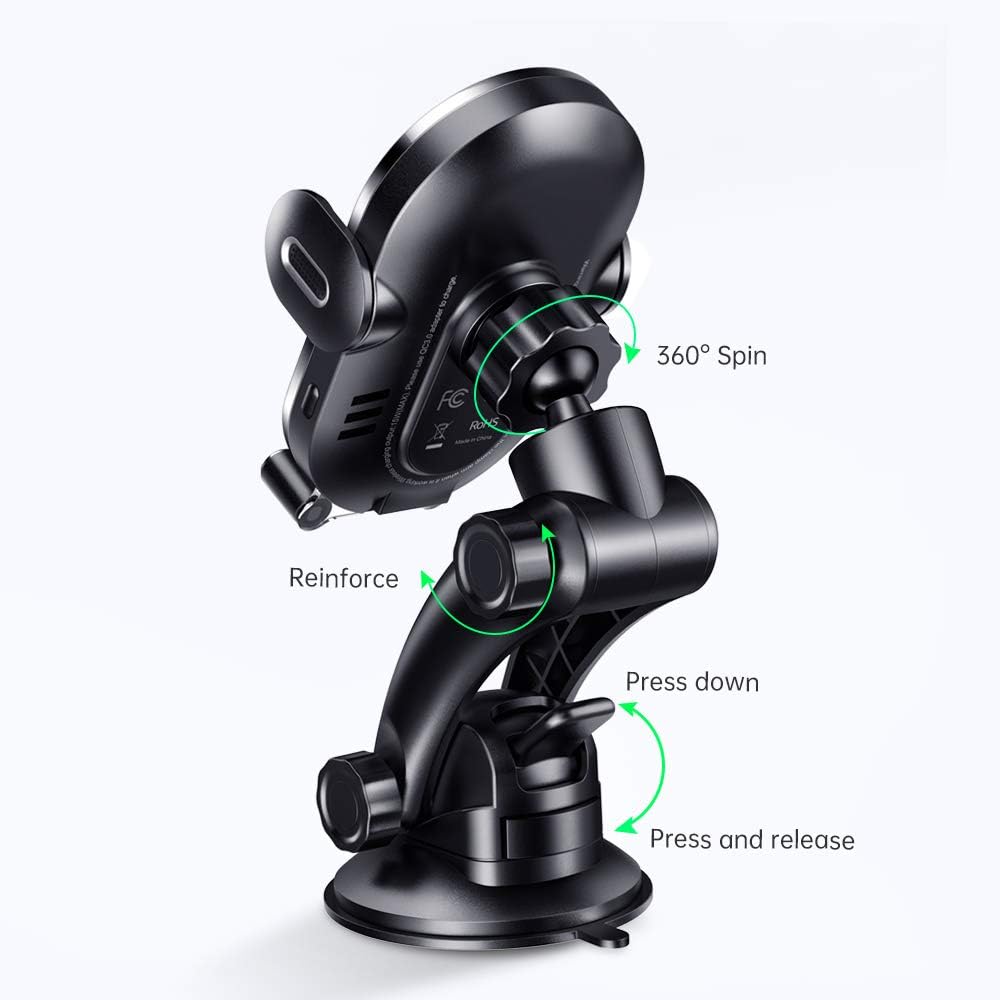
Figure 5.3: A diagram illustrating the 360-degree rotation capability of the Mcdodo car charger, allowing for flexible viewing angles.
6. Maintenance
- Keep the charger clean and free from dust and debris. Use a soft, dry cloth for cleaning.
- Avoid exposing the device to extreme temperatures, direct sunlight for prolonged periods, or moisture.
- Do not attempt to disassemble or repair the unit yourself, as this will void the warranty.
7. Troubleshooting
- Charger not powering on:
- Ensure the USB-C cable is securely connected to both the charger and the car adapter.
- Verify that the car adapter is properly inserted into the car's power outlet and that the outlet is functional.
- Try a different USB-C cable or car adapter to rule out cable/adapter issues.
- Phone not charging wirelessly:
- Ensure your phone is Qi-compatible.
- Check if your phone case is too thick or contains metal, which can interfere with wireless charging. Remove the case and try again.
- Ensure the phone is centered on the charging pad.
- Confirm the charger is receiving adequate power (a QC 3.0 adapter is recommended for optimal performance).
- Clamping arms not opening/closing:
- Ensure the charger is powered on.
- Check for any obstructions in the clamping mechanism.
- Clean the infrared sensor area if it appears dirty.
8. Specifications
| Feature | Specification |
|---|---|
| Brand | Mcdodo |
| Model | B08DMQJ8S8 |
| Connectivity Technology | Infrared, Wireless |
| Special Features | Fast Charging, Wireless Charging |
| Input Voltage | 9 Volts |
| Wattage | 7.5 Watts (Max 15W output with compatible adapter) |
| Total USB Ports | 1 (USB-C input) |
| Specification Met | Qi |
| Compatible Devices | Smartphones (Qi-enabled) |
| Color | Black |
| Item Weight | 11.2 ounces |
| Package Dimensions | 6 x 2.5 x 2.5 inches |
9. Warranty and Support
Mcdodo products are designed and manufactured to the highest quality standards. For warranty information or technical support, please refer to the contact details provided on the product packaging or visit the official Mcdodo website. Keep your purchase receipt as proof of purchase.
