
TURBRO Suburbs TS25
TURBRO Suburbs TS25 Electric Fireplace Infrared Heater User Manual
Model: Suburbs TS25 | Brand: TURBRO
1. Safety Information
Please read and understand this entire owner's manual, including all safety information, before plugging in or using this product. Failure to do so could result in fire, electric shock, or serious personal injury.
- For indoor use only.
- For safety concerns, please DO NOT use an extension cord or power strip.
- You should check the power cord during the first 30 minutes of operation to ensure it is not too hot. If hot to touch, unplug and discontinue use of the power cord.
- Avoid Burns: Do not allow bare skin to touch the air outlet of the heater.
- Automatically shuts the heater off if the internal temperature gets too hot. The TURBRO Suburbs heater is CSA certified for safe use in North America.
2. Package Contents
Ensure all items are present and undamaged before assembly and operation.
- 1 x Electric Fireplace Stove
- 16 x Screw (Packaged with the User Manual)
- 4 x Leg
- 1 x Remote Control
- 1 x User Manual

3. Specifications
| Feature | Specification |
|---|---|
| Model | Suburbs TS25 |
| Rated Power | 1400W / 4777BTU |
| Power Supply | 110-120V / 60Hz |
| Power Consumption | 11.67A at 120V |
| Power Cord Length | 6ft. |
| Heating Method | Infrared Heater |
| Flame Brightness | High – Medium – Low (3 levels) |
| Lighting Effect | LED (Red, Orange) |
| Timer Range | 30 min to 6 Hrs. |
| Noise Level | ≤37dBA |
| Certifications | North America CSA |
| Dimension (D x W x H) | 14"D x 24"W x 25"H |
| Unit Weight | 31.7lbs (14.4kg) |
| Material | Metal |
| Installation Type | Freestanding |
| Heating Coverage | 100 square feet |

4. Setup
Attaching the Legs
The TURBRO Suburbs TS25 Electric Fireplace comes with detachable legs that need to be attached before use. Follow these steps:
- Carefully unbox the main fireplace unit and the four legs.
- Gently lay the fireplace unit on its side or back on a soft, protected surface to avoid scratching.
- Align each leg with the designated screw holes on the bottom corners of the fireplace unit.
- Secure each leg using the provided screws. Ensure they are tightened firmly but do not overtighten.
- Once all four legs are securely attached, carefully lift the fireplace unit and place it upright in its desired location.
5. Operating Instructions
Control Panel and Remote Control
The fireplace can be operated using the control panel located behind the door or with the included remote control.
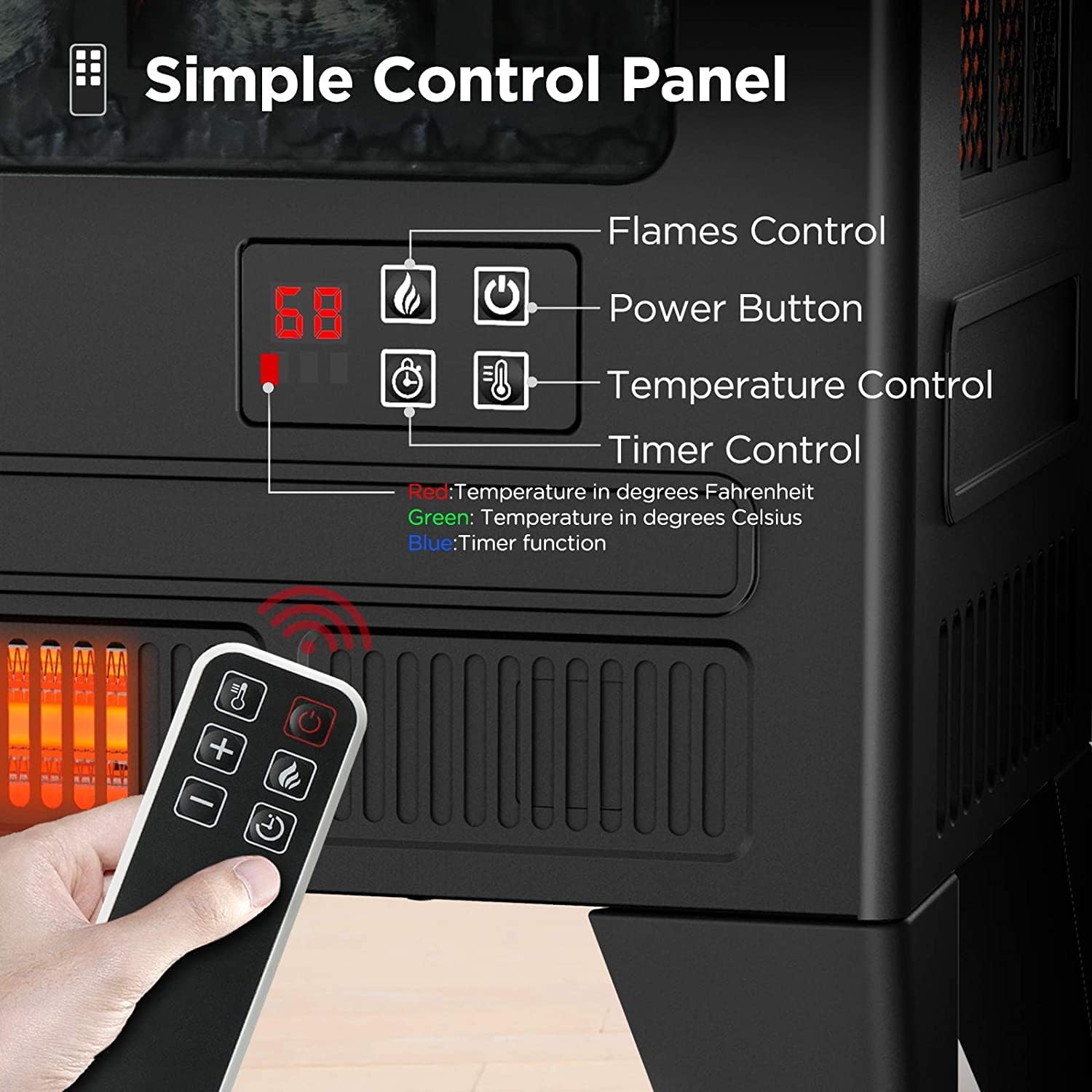
- Power On/Off: Press the power button on the control panel or remote to turn the unit on or off.
- Flame Effects: The flame effect can be used independently of the heating function. Adjust the 3 brightness levels (High, Medium, Low) using the flame control button. (Note: When using the heating function, the flames cannot be turned off separately).
- Heating Function: Activate the heating element by pressing the heat button. Set the thermostat between 62-82°F (17-28°C) using the temperature control buttons on the remote or the control panel.
- Timer Function: Use the timer button to set an automatic shut-off time. The timer range is from 30 minutes up to 6 hours.
- Simulated Sound: To turn on the crackling sound, long press the sound button on the remote for 5 seconds. Short press to switch the sound volume.
6. Maintenance
Regular maintenance ensures optimal performance and longevity of your electric fireplace.
- Cleaning: Always unplug the heater before cleaning. Use a soft, damp cloth to wipe the exterior surfaces. Do not use abrasive cleaners or sprays.
- Air Inlet/Outlet: Keep the air inlet and outlet areas clear of dust and debris to ensure proper airflow and prevent overheating.
- Storage: If storing the heater for an extended period, keep it in a dry, cool location, preferably in its original packaging.
7. Troubleshooting
If you encounter issues with your fireplace, refer to the following common troubleshooting tips:
- No Power: Ensure the power cord is securely plugged into a working 110-120V outlet. Check your household circuit breaker.
- Heater Not Working: Verify that the thermostat setting is higher than the current room temperature. Check for any obstructions around the air outlet. The overheating protection may have activated; unplug the unit, wait 10-15 minutes, and plug it back in.
- Flames Not Visible: Ensure the flame effect is turned on via the control panel or remote. Check if the LED lights are functioning.
- Remote Control Not Working: Check and replace the batteries in the remote control. Ensure there are no obstructions between the remote and the fireplace sensor.
8. Warranty and Support
The TURBRO Suburbs TS25 Electric Fireplace Infrared Heater comes with a Limited Warranty. For specific details regarding warranty coverage, duration, and how to make a claim, please refer to the warranty card included in your package or contact TURBRO customer support.
For technical assistance, troubleshooting not covered in this manual, or to order replacement parts, please visit the official TURBRO website or contact their customer service department.
Related documentsSuburbs TS25


Ask a question about this manual
Ask about setup, troubleshooting, compatibility, parts, safety, or missing instructions. Manuals+ will review the question and use this page’s manual context to help answer it.