
1. Introduction
The T'nB Mood in-ear headphones (Model ESMOODBK) are designed for audio playback and hands-free communication. Featuring an integrated universal microphone and a flat, tangle-free cable, these earphones offer a convenient and reliable audio experience for various devices with a 3.5mm audio jack.

Image 1: T'nB Mood in-ear headphones showing the earbuds, inline microphone, and 3.5mm audio jack.
2. Package Contents
Please check the package for the following items:
- 1 x T'nB Mood In-Ear Headphones (Model ESMOODBK)
- 1 x User Guide
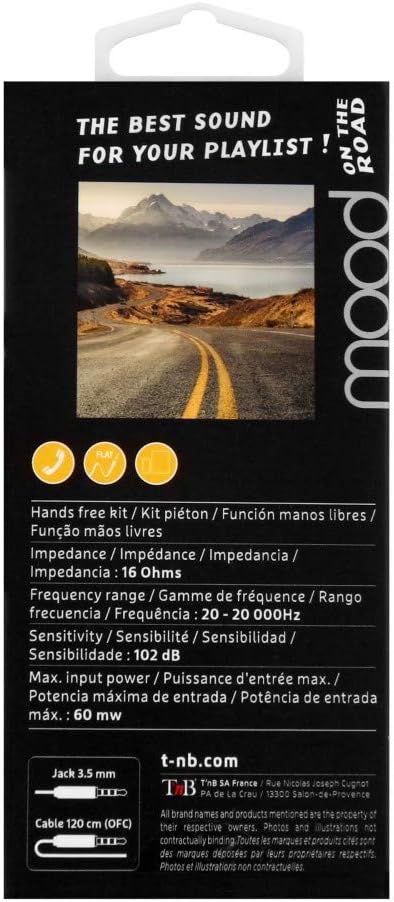
Image 2: Retail packaging for T'nB Mood headphones, highlighting key features and specifications.
3. Product Features
- Integrated Universal Microphone: For hands-free calling and voice commands.
- Flat OFC Cable: Designed to prevent tangles and enhance durability.
- 3.5mm Jack Connector: Compatible with a wide range of audio devices.
- 10mm Driver Diameter: Delivers clear audio output.
- Wide Frequency Range: 20 - 20,000 Hz for comprehensive sound reproduction.
- Optimal Impedance: 16 Ohms for efficient power usage.
- 120 cm Cable Length: Provides ample reach for comfortable use.
4. Setup
- Unpack the Headphones: Carefully remove the T'nB Mood headphones and user guide from the packaging.
- Connect to Audio Device: Insert the 3.5mm audio jack firmly into the headphone port of your smartphone, tablet, computer, or other compatible audio device.
- Position Earbuds: Place the earbuds comfortably into your ears. Ensure a snug fit for optimal sound quality and bass response.
- Adjust Volume: Adjust the volume on your connected device to a comfortable listening level before playing audio.
5. Operating Instructions
5.1 Audio Playback
- Once connected, play audio from your device. Sound will be routed through the headphones.
- Control playback (play/pause, skip tracks) and volume directly from your connected device.
5.2 Using the Universal Microphone
The T'nB Mood headphones feature an inline universal microphone for hands-free communication.
- Answering/Ending Calls: When a call comes in, press the button on the inline microphone to answer. Press it again to end the call.
- Voice Commands: Depending on your device, you may be able to activate voice assistants (e.g., Siri, Google Assistant) by pressing and holding the microphone button. Refer to your device's manual for specific instructions.
- Microphone Placement: Ensure the microphone is positioned close to your mouth for clear voice transmission during calls.
6. Maintenance
Proper care will extend the life of your headphones.
- Cleaning Earbuds: Gently wipe the earbuds with a soft, dry, lint-free cloth. Do not use harsh chemicals or abrasive materials.
- Cable Care: Avoid excessive pulling, twisting, or bending of the cable. The flat design helps prevent tangles, but proper handling is still recommended.
- Storage: When not in use, store the headphones in a clean, dry place, away from extreme temperatures and direct sunlight. Avoid wrapping the cable too tightly.
- Avoid Moisture: Do not expose the headphones to water or excessive moisture.
7. Troubleshooting
If you encounter issues with your T'nB Mood headphones, please refer to the following common solutions:
- No Sound or Low Volume:
- Ensure the 3.5mm jack is fully inserted into your device's audio port.
- Check the volume level on your connected device and ensure it is not muted.
- Test the headphones with another audio device to rule out a device-specific issue.
- Poor Sound Quality (Distortion, Static):
- Ensure the earbuds are clean and free of debris.
- Verify the earbuds are properly seated in your ears for a good seal.
- Try a different audio source or file to check if the issue is with the content.
- Microphone Not Working:
- Ensure the 3.5mm jack is fully inserted. A loose connection can affect microphone functionality.
- Check your device's audio input settings to ensure the external microphone is selected.
- Test the microphone with another application or device.
8. Specifications
| Brand | T'nB |
| Model Number | ESMOODBK |
| Color | Black |
| Form Factor | In-Ear |
| Connectivity Technology | Wired |
| Headphone Jack | 3.5 mm Jack |
| Driver Diameter | 10 mm |
| Frequency Range | 20 - 20,000 Hz |
| Impedance | 16 Ohms |
| Max Input Power | 60 mW |
| Sensitivity | 102 dB |
| Cable Length | 120 cm |
| Material | Plastic |
| Components Included | 1 x MOOD Earphones, 1 x User Guide |
9. Warranty & Support
Specific warranty details for the T'nB Mood headphones are not provided within this manual. For information regarding warranty coverage, terms, and conditions, please refer to the documentation included with your purchase or contact T'nB customer support directly.
For technical support or further assistance, please visit the official T'nB website or contact their customer service department.