
Introduction
Thank you for choosing the T'nB Feat True Wireless Bluetooth Earbuds. This manual provides essential information for the proper setup, operation, and maintenance of your device. Please read it carefully before use and retain it for future reference.
Package Contents
Ensure all items are present in the package:
- T'nB Feat True Wireless Bluetooth Earbuds (Left and Right)
- Charging Case
- Micro USB Charging Cable
- User Manual (this document)
Product Overview
The T'nB Feat earbuds are designed for comfortable, wire-free audio. The compact charging case protects your earbuds and recharges them on the go.
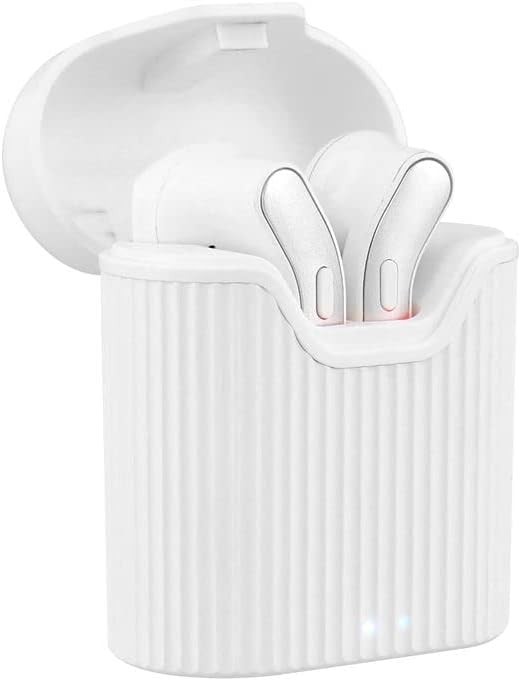
Image: T'nB Feat True Wireless Earbuds placed inside their open charging case, showing the earbuds and the interior of the case.

Image: The T'nB Feat True Wireless Earbuds charging case in a closed position, displaying its compact and portable design.
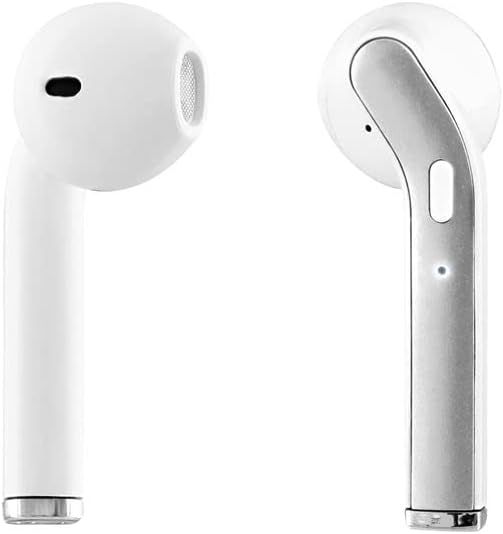
Image: A close-up view of the individual T'nB Feat True Wireless Earbuds, highlighting their ergonomic in-ear design.
Setup
1. Charging the Earbuds and Case
Before first use, fully charge the earbuds and the charging case.
- Place the earbuds into the charging case. Ensure they are correctly seated to make contact with the charging pins.
- Connect the Micro USB charging cable to the charging port on the case and the other end to a USB power source (e.g., computer USB port, wall adapter).
- The indicator lights on the case and/or earbuds will show the charging status. Refer to the indicator light section for details (if applicable, otherwise assume standard behavior).
- Once fully charged, disconnect the charging cable.
Note: A full charge provides approximately 5 hours of operating time for the earbuds.
2. Pairing with a Bluetooth Device
The earbuds use Bluetooth 5.0 for a stable wireless connection.
- Ensure the earbuds are charged.
- Open the charging case and remove both earbuds. They will automatically power on and enter pairing mode. You may hear an audio prompt or see flashing indicator lights.
- On your Bluetooth-enabled device (smartphone, tablet, etc.), go to the Bluetooth settings and turn Bluetooth on.
- Search for available devices. You should see "T'nB FEAT" or a similar name appear in the list.
- Select "T'nB FEAT" to connect. Once connected, you will hear a confirmation tone or the indicator lights will change.
- The earbuds are now paired and ready for use. They will automatically reconnect to the last paired device when removed from the case, if Bluetooth is enabled on the device.
Operating the Earbuds
Power On/Off
- Power On: Remove the earbuds from the charging case. They will power on automatically.
- Power Off: Place the earbuds back into the charging case. They will power off automatically and begin charging.
Music Playback
The earbuds feature intuitive controls for music management. (Specific control actions may vary slightly based on earbud design, typically involving taps or presses on the earbud surface.)
- Play/Pause: Tap once on either earbud.
- Next Track: Double-tap the right earbud.
- Previous Track: Double-tap the left earbud.
Call Management
With the built-in microphone, you can manage calls directly from your earbuds.
- Answer/End Call: Tap once on either earbud during an incoming call or an active call.
- Reject Call: Press and hold either earbud for approximately 2 seconds during an incoming call.
Maintenance
To ensure the longevity and optimal performance of your T'nB Feat earbuds, follow these maintenance guidelines:
- Cleaning: Use a soft, dry, lint-free cloth to clean the earbuds and charging case. Do not use abrasive cleaners, alcohol, or chemical solvents.
- Storage: When not in use, store the earbuds in their charging case to protect them from dust and damage. Store in a cool, dry place.
- Avoid Water: The earbuds are not waterproof. Avoid exposure to water, moisture, or extreme temperatures.
- Charging: Charge the device regularly, even if not in frequent use, to maintain battery health.
Troubleshooting
If you encounter issues with your earbuds, refer to the following common solutions:
| Problem | Solution |
|---|---|
| Earbuds not pairing/connecting |
|
| No sound from earbuds |
|
| Earbuds disconnect frequently |
|
| Charging case not charging |
|
Specifications
- Model Name: EBFEATWH
- Connectivity: True Wireless Bluetooth 5.0
- Form Factor: In-Ear
- Impedance: 32 Ohms
- Sensitivity: 95 dB
- Operating Time: Approximately 5 hours
- Microphone: Built-in Universal Microphone
- Charging Port: Micro USB (for case)
- Special Features: Universal application, Cable-free design

Image: The retail packaging for the T'nB Feat True Wireless Earbuds, displaying key features and specifications.
Warranty and Support
T'nB products are covered by a manufacturer's warranty. For specific warranty terms and conditions, please refer to the documentation provided with your purchase or visit the official T'nB website. For technical support or further assistance, please contact T'nB customer service through their official channels.


