Introduction
The Avantree Orbit is a versatile Bluetooth 5.0 audio transmitter designed to enhance your TV viewing experience. It allows you to wirelessly stream audio from your television to Bluetooth headphones or speakers, providing clear sound without disturbing others. Featuring an intuitive LCD screen, wide compatibility with various audio inputs, and support for aptX Low Latency, the Orbit ensures synchronized audio with minimal delay. Its pass-through function enables simultaneous audio output to both headphones and external speakers, catering to diverse listening needs.

Image: The Avantree Orbit Bluetooth Transmitter, a compact device with an LCD screen displaying connection information.
Box Contents
Please check the package for the following items:
- Avantree Orbit Bluetooth Transmitter
- USB Type C Power Cable (1.5M/5FT)
- Optical Audio Cable (1.5M/5FT)
- AUX 3.5mm Audio Cable (1.5M/5FT)
- AUX 3.5mm to RCA Audio Adapter (35CM/1FT)
- Wired Microphone (65CM/2FT)
- Quick Start Guide (QSG)

Image: A visual representation of the Avantree Orbit transmitter and its included accessories: USB-C power cable, optical cable, 3.5mm AUX cable, and 3.5mm to RCA adapter.
Product Overview
The Avantree Orbit is designed for ease of use and high-quality audio transmission. Key features include:
- LCD Screen Display: Provides visual feedback for pairing, connected devices, audio codec, and volume levels, eliminating "blind pairing."
- Wide Compatibility: Supports Digital Optical (SPDIF/TOSLINK), 3.5mm AUX, and RCA audio inputs, making it compatible with nearly all TVs.
- Automatic 5.1CH Audio Conversion: Automatically converts 5.1 channel audio to 2.0 for seamless Bluetooth transmission without requiring TV setting changes.
- aptX Low Latency: When paired with aptX Low Latency or FastStream compatible headphones/speakers, it delivers audio with virtually no lip-sync delay.
- Audio Pass-Through: Allows simultaneous audio output to connected Bluetooth headphones and your TV's external speakers (soundbar/AVR).
- Dual Link Function: Connects two Bluetooth headphones or speakers simultaneously, enabling shared listening experiences.
- Long Range: Class 1 Bluetooth provides an operating range of up to 164ft (50M) in open air.

Image: The Avantree Orbit transmitter positioned near a TV, illustrating its role in connecting to headphones for a personalized listening experience.

Image: The back panel of the Avantree Orbit, highlighting its various input ports: Optical, AUX, and RCA, demonstrating wide compatibility.
Setup Guide
Follow these steps to connect your Avantree Orbit to your TV and Bluetooth audio devices.
Step 1: Power On the Orbit
- Connect the USB Type C Power Cable to the "DC IN" port on the Orbit and to a USB power source (e.g., TV USB port, USB wall adapter).
- The Orbit's LCD screen will light up.
Step 2: Connect to Your TV (Audio Input)
Choose one of the following audio input methods:
- Optical (Recommended for Digital Audio):
- Connect one end of the Optical Audio Cable to the "OPT" input on the Orbit.
- Connect the other end to your TV's "Optical Out" or "Digital Audio Out" port.
- On the Orbit, ensure the input is set to "OPT" (displayed on the LCD). If your TV outputs 5.1CH audio, the Orbit will automatically convert it to 2.0.
- AUX 3.5mm:
- Connect one end of the AUX 3.5mm Audio Cable to the "AUX" input on the Orbit.
- Connect the other end to your TV's "Headphone Out" or "Audio Out" 3.5mm port.
- On the Orbit, ensure the input is set to "AUX" (displayed on the LCD).
- RCA (using 3.5mm to RCA Adapter):
- Connect the AUX 3.5mm Audio Cable to the 3.5mm to RCA Audio Adapter.
- Connect the RCA ends (red and white) to your TV's "Audio Out" RCA ports.
- Connect the 3.5mm end of the cable to the "AUX" input on the Orbit.
- On the Orbit, ensure the input is set to "AUX" (displayed on the LCD).
Step 3: Pair with Bluetooth Headphones/Speakers
- Put your Bluetooth headphones/speakers into pairing mode (refer to their user manual).
- On the Orbit, press the Search button (magnifying glass icon). The Orbit will display a list of nearby Bluetooth devices.
- Use the Up/Down arrows on the Orbit to select your device from the list.
- Press the Select button (check mark icon) to confirm. The Orbit will attempt to connect.
- Once connected, the device name will show "Connected" on the Orbit's screen, and you should hear audio through your headphones/speakers.
Video: An official Avantree video demonstrating the setup and pairing process of the Orbit Bluetooth Transmitter with various audio devices.
Operating Instructions
Controlling Volume
Use the '+' and '-' buttons on the Orbit to adjust the volume of the connected Bluetooth headphones/speakers. The volume level will be displayed on the LCD screen.
Dual Link (Connecting Two Devices)
The Orbit can connect to two Bluetooth headphones or speakers simultaneously for shared listening.
- Connect the first device as described in Step 3 of the Setup Guide.
- Once the first device is connected, put your second Bluetooth device into pairing mode.
- Press the Search button on the Orbit again.
- Select the second device from the list using the Up/Down arrows and press the Select button.
- Both devices will now be connected, and audio will play through both simultaneously.

Image: Two individuals wearing headphones, enjoying TV audio transmitted wirelessly by the Avantree Orbit, demonstrating the dual link feature.
Audio Pass-Through Function
The pass-through feature allows you to hear TV audio through both your connected Bluetooth headphones and your external TV speakers (soundbar or AVR) at the same time.
- Connect the Orbit to your TV using one of the audio input methods (Optical, AUX, RCA).
- Connect your external speakers (soundbar/AVR) to the "Bypass / Speaker" output port on the Orbit using the appropriate cable (e.g., Optical or AUX).
- Ensure the "Bypass / Speaker" switch on the Orbit is set to "ON".
- Pair your Bluetooth headphones as usual. Audio will now be output to both your headphones and external speakers.

Image: A diagram illustrating the Avantree Orbit's pass-through capability, connecting to a TV, Bluetooth headphones, and either a soundbar or stereo receiver simultaneously.
Maintenance
To ensure the longevity and optimal performance of your Avantree Orbit, please follow these maintenance guidelines:
- Cleaning: Use a soft, dry cloth to clean the device. Avoid using abrasive cleaners, solvents, or strong chemicals.
- Storage: Store the device in a cool, dry place away from direct sunlight and extreme temperatures.
- Handling: Handle the Orbit with care. Avoid dropping it or subjecting it to strong impacts.
- Cables: Ensure all cables are connected securely and are not bent or kinked excessively.
Troubleshooting
No Sound / Poor Sound Quality
- Check Input Source: Ensure the correct audio input (OPT, AUX) is selected on the Orbit and that the cable is securely connected to both the Orbit and your TV.
- TV Audio Settings: For Optical input, ensure your TV's audio output format is set to "PCM" or "Stereo" (not "Dolby Digital" or "Bitstream"). The Orbit automatically converts 5.1CH, but some TVs require manual adjustment.
- Volume Levels: Increase the volume on both the Orbit and your connected headphones/speakers.
- Headphone Connection: Verify your headphones/speakers are properly paired and connected to the Orbit (check the LCD screen).
Lip-Sync Delay
- aptX Low Latency: For minimal delay, ensure both the Avantree Orbit and your Bluetooth headphones/speakers support aptX Low Latency or FastStream. The Orbit's LCD will display "aptX-LL" if connected with this codec.
- Interference: Move the Orbit closer to your headphones/speakers and away from other wireless devices (Wi-Fi routers, cordless phones) that might cause interference.

Image: Two individuals reacting to a TV screen, with text indicating "ALL SYNCHRONIZED" and "no audio lag" when using aptX Low Latency compatible devices with the Avantree Orbit.
Pairing Issues
- Pairing Mode: Confirm your headphones/speakers are in actual pairing mode (often indicated by a flashing LED).
- Clear Previous Connections: If your headphones/speakers were previously connected to another device (e.g., phone), turn off Bluetooth on that device or clear its pairing history.
- Reset Orbit: If issues persist, you may need to reset the Orbit's pairing history (refer to the full user manual for specific steps).
Specifications
| Model No. | BTTC-580-TTN |
| Bluetooth Version | V5.0 |
| Audio Codec Support | aptX-LL, aptX, FS, SBC |
| Audio Ports Support | Optical, AUX 3.5mm, RCA (for TV), Mic |
| Supported Profiles | HFP, A2DP V1.3.1, AVRCP V1.0 |
| Operating Range | Class 1, up to 164FT / 50M |
| Charging Port | Type C |
| Product Dimensions | 8.5 cm x 8 cm x 10 cm (3.35 x 3.15 x 3.94 inches) |
| Item Weight | 8 ounces |
| Material | Acrylonitrile Butadiene Styrene (ABS) |
Safety Information
- Avoid placing the device near other wireless devices to prevent interference.
- Operate within a temperature range of 0°C to 40°C (32°F to 104°F).
- Do not expose the device to water or excessive moisture.
- Do not attempt to disassemble or modify the device. This will void the warranty.
- Keep out of reach of children.
WARNING: This product may contain chemicals known to the State of California to cause cancer and birth defects or other reproductive harm. For more information, visit www.P65Warnings.ca.gov.
Warranty & Support
Avantree products come with a standard warranty. You can extend your warranty by registering your product.
- Warranty Registration: Register your product within 30 days for an extended 24-month warranty. Visit avantree.com/warranty for details.
- Product Support: For user manuals, FAQs, video tutorials, and more, visit support.avantree.com.
- Email Support: Contact Avantree support at support@avantree.com.
- Live Chat: Chat with Avantree support at www.avantree.com.
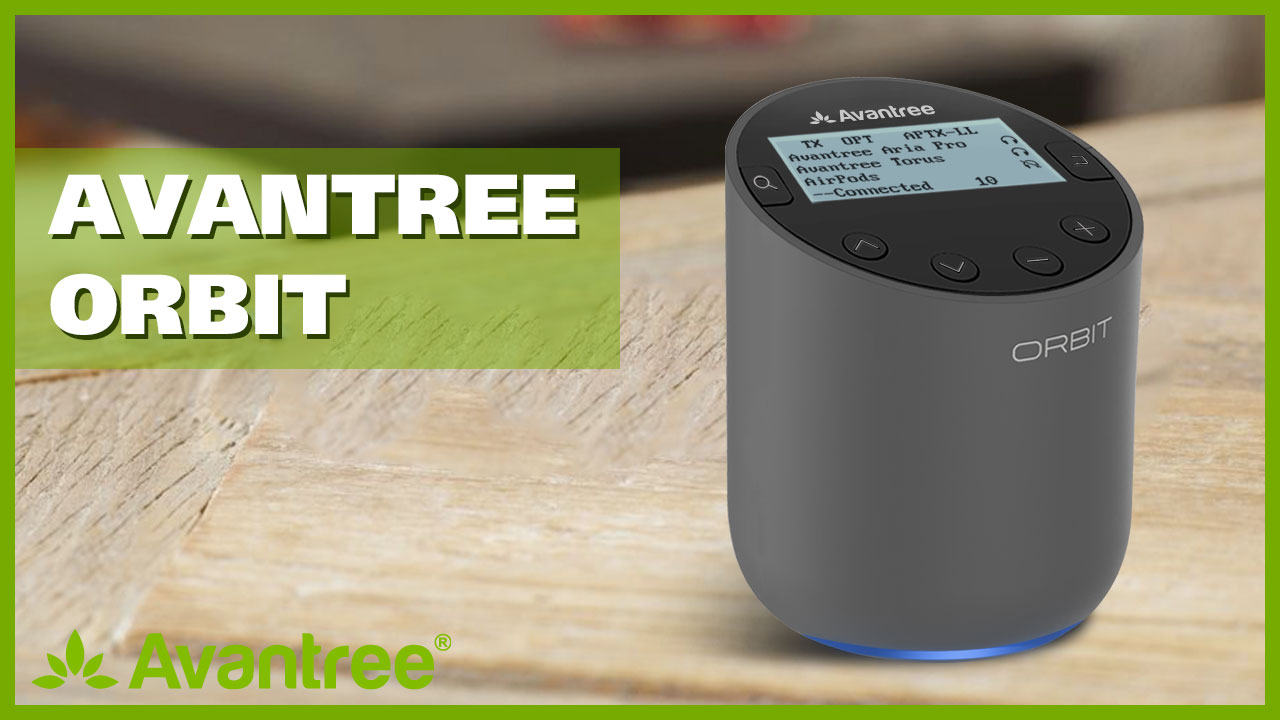
Image: The Avantree Orbit product box, displaying information about warranty registration and support contact details.


