
Introduction
This manual provides detailed instructions for the installation, operation, and maintenance of your XTRONS Android 12 Car Radio, model IA81ATTLH-CA. Please read this manual thoroughly before using the product to ensure proper functionality and safety.
Applicable Models & Compatibility Notes
This unit is designed for the following vehicle models and years:
- Audi TT MK2 8J (2006, 2007, 2008, 2009, 2010, 2011, 2012)
Important Compatibility Notes:
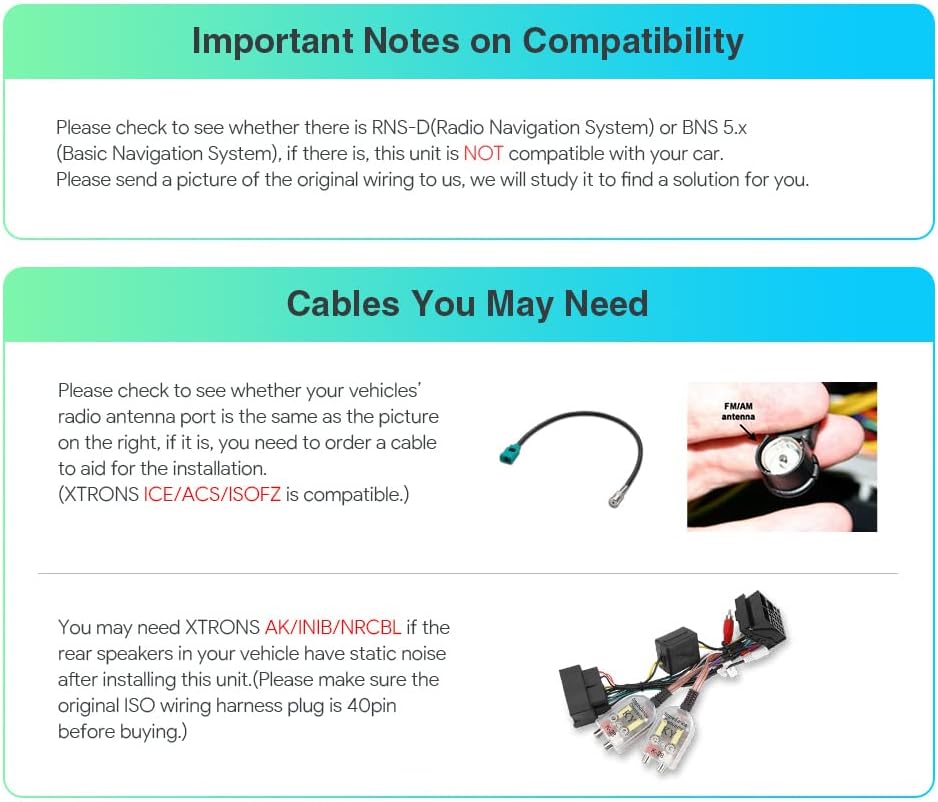
Please verify if your vehicle has an RNS-D (Radio Navigation System) or BNS 5.x (Basic Navigation System). If either of these systems is present, this unit is not compatible with your car. For clarification, please provide a picture of your original wiring to XTRONS support for assistance.
You may need XTRONS AK/INIB/NRCBL if the rear speakers in your vehicle have static noise after installing this unit. Ensure the original ISO wiring harness plug is 40-pin before purchasing.
What's in the Box
The following items are included with your XTRONS Android 12 Car Radio:
- 2 × ISO Wiring Harness
- 1 × RCA Cable
- 1 × 4G Antenna
- 1 × Camera Cable
- 1 × CANbus Box
- 2 × USB Cable
- 1 × GPS Antenna
- 1 × Amplifier Box for BOSE System
- 1 × Radio Antenna Cable
- 1 × CANbus Cable
- 1 × User Manual

Setup
Physical Installation
The XTRONS Android 12 Car Radio is designed for a direct fit in compatible Audi TT MK2 8J models. Installation typically involves removing the factory head unit and connecting the provided wiring harnesses to the vehicle's existing connections. Ensure all connections are secure before reassembling the dashboard.

Wiring Diagram
Refer to the detailed wiring diagram below for correct connections of all components.

Initial Power-On and Wi-Fi Connection
After installation, power on the unit. To access online features and theme updates, connect the device to a Wi-Fi network.
- Navigate to the Wi-Fi settings on the unit.
- Enable Wi-Fi and select your desired network.
- Enter the password if required and connect.
Video: Demonstrates how to connect the XTRONS ID series unit to Wi-Fi and refresh themes from the App Store.
Operating Features
The XTRONS Android 12 Car Radio offers a range of advanced features to enhance your driving experience.

Performance and Display
- Android 12 OS: Features the latest Android 12 operating system for a fast and smooth user experience.
- Octa-Core CPU: Equipped with an Octa Core CPU, 4GB RAM, and 64GB ROM for responsive performance.
- 8.8-inch IPS Touch Screen: A 1280x480 high-definition IPS panel offers a 178° viewing angle, clear visuals, and supports 2K video playback.

Connectivity
- 4G Connectivity: Supports 99% of worldwide carriers. Insert a Micro-SIM card (not included) for direct mobile broadband access.
- Dual Band Wi-Fi: Supports both 2.4GHz and 5GHz bands for faster and more stable internet connection.
- USB Tethering: Connect your smartphone via USB to share its mobile internet connection with the unit.
- Bluetooth 5.0: Enables hands-free calls, phone book synchronization, call logs, contact search, and audio streaming.

Smartphone Integration
- Wireless CarAutoPlay (Apple CarPlay): Connect your iPhone wirelessly via Bluetooth to access apps, make calls, and use voice control (Siri).
- Wired/Wireless Android Auto: Connect your Android phone wirelessly or via cable to use compatible apps and voice commands (Google Assistant).

Audio and Navigation
- Built-in DSP (Digital Signal Processor): Enhances audio quality with features like Smart Bass, Balance, Delay, Equalizer, Loudness, and Filter settings.
- GPS Navigation: Supports various Android-compatible navigation software such as Google Maps, Sygic, and Waze.
- Radio with RDS: The built-in ST TDA7708 radio chip covers AM/FM bands and provides advanced performance with multipath noise mitigation and RDS decoding.

User Interface and Multitasking
- Dual User-friendly UI: Offers optimized menus and intuitive icons for safe driving.
- Split Screen: Run two applications side-by-side, such as navigation on one side and a music player on the other.
- Picture in Picture (PIP): Allows a video player to float over other applications, enabling continuous video playback while multitasking.
Video: Demonstrates various features of the XTRONS Android 12 Car Stereo, including display, 4G connectivity, CarPlay, Android Auto, DSP, Radio, Bluetooth, GPS, USB Tethering, PIP, and Multi-window View.
Maintenance
To ensure the longevity and optimal performance of your XTRONS Android 12 Car Radio, follow these general maintenance guidelines:
- Screen Cleaning: Use a soft, lint-free cloth to gently wipe the touchscreen. Avoid abrasive cleaners or harsh chemicals.
- Software Updates: Periodically check for and install software updates to ensure the system has the latest features and security patches.
- Environmental Care: Avoid exposing the unit to extreme temperatures, direct sunlight for prolonged periods, or excessive moisture.
- Connection Checks: Occasionally check that all cables and connections are secure, especially after any vehicle maintenance.
Troubleshooting
If you encounter issues with your XTRONS Android 12 Car Radio, consider the following general troubleshooting steps:
- No Power: Check the vehicle's fuse box and ensure all power connections to the unit are secure.
- No Sound: Verify speaker connections, check volume levels, and ensure the correct audio source is selected. If using an amplifier, check its power and connections.
- Touchscreen Unresponsive: Try restarting the unit. If the issue persists, a factory reset might be necessary (note: this will erase user data).
- GPS Signal Issues: Ensure the GPS antenna is correctly installed and has a clear view of the sky.
- Bluetooth/Wi-Fi Connectivity Problems: Ensure Bluetooth/Wi-Fi is enabled on both the unit and your device. Try forgetting and re-pairing devices or reconnecting to the network.
- Software Glitches: Restarting the unit often resolves minor software issues. Ensure your unit's software is up to date.
For persistent or complex issues, please contact XTRONS technical support.
Specifications
- Item Model Number: IA81ATTLH-CA
- Display Size: 8.8 inches
- Voice Command: Microphone, Touchscreen
- Operating System: Android 12
- CPU: Octa Core
- RAM: 4GB
- ROM: 64GB
- Connectivity Technology: Bluetooth, Cellular (4G LTE), Wi-Fi (Dual Band 2.4GHz/5GHz)
- Special Features: Built-in DSP, Wireless CarAutoPlay, Wired/Wireless Android Auto, Split Screen, Picture in Picture, Optimized CANbus Decoding
- Map Type: Worldwide (compatible with Android OS navigation software)
- Audio Output Mode: Stereo
- Mounting Type: Panel Mount
- Manufacturer: XTRONS/ShenZhen KaJunDa Technology Co.Ltd
- First Available: July 23, 2020
Warranty and Support
XTRONS provides a 1-year warranty for this unit. For technical assistance or warranty claims, please contact XTRONS customer support via Amazon email. They aim to respond promptly to ensure your rights and interests are protected.
Optional Accessories
Enhance your XTRONS Android 12 Car Radio experience with these optional accessories:
- OBD2 Function: For retrieving real-time data and trouble codes from your vehicle's computer. (Search ASIN: B015MU8UN6 / B08HQ9LQ9X)
- TPMS Function: For Tire Pressure Monitoring System. (Search ASIN: B07WQFKV5G / B07DKB4GD2)
- Front / Reversing Camera: For improved visibility and parking assistance. (Search ASIN: B07HMLYLJJ / B00GY3BVT6)
- External DVR: For dash camera recording. (Search ASIN: B07MBYCG4C / B08MF1ZRJ3)
- DAB+ Tuner: For digital audio broadcasting radio.


