
1. Introduction
This manual provides essential information for the safe and effective operation, maintenance, and troubleshooting of your Travel Buggy Dash Electric Wheelchair. The Dash is a lightweight, foldable electric wheelchair designed for portability and ease of use, offering enhanced mobility for daily activities and travel.
Please read this manual thoroughly before using the wheelchair to ensure proper understanding of its features and to prevent injury or damage.
Important Safety Information
- Always wear the seat belt provided.
- Ensure anti-tip wheels are properly engaged before operation.
- Do not operate the wheelchair on inclines exceeding its rated capacity (9 degrees).
- Avoid operating in extreme weather conditions or on uneven, soft, or slippery surfaces.
- Keep hands and clothing clear of moving parts.
- Always turn off the power when transferring in or out of the wheelchair.
2. Product Overview and Components
The Travel Buggy Dash Electric Wheelchair is engineered for convenience and reliability. Below are the main components of your wheelchair.

Figure 2.1: Front view of the Travel Buggy Dash Electric Wheelchair, showcasing its compact design and joystick controller.

Figure 2.2: Detail showing the quick-release armrest for easy side entry and the foldable footrest for compact storage.
Key Components:
- Joystick Controller: 5-speed, 360° intuitive control for movement and speed adjustment.
- Seat and Backrest: Padded for comfort, with a 19-inch seating width.
- Armrests: Quick-release mechanism for barrier-free side entry and exit.
- Footrest: Foldable for compact storage and easy transfers.
- Rear Wheels: 12-inch wheels with dual shock absorbers for a smoother ride.
- Front Caster Wheels: Provide maneuverability.
- Battery: Lithium battery, designed for fast charging and a cruise range of up to 20km.
- Motors: Dual brushless motors (170 Watt each) for reliable power.
- Anti-Tip Wheels: Enhance stability and safety.
- Seat Belt: Essential safety feature.
3. Setup and Initial Use
The Travel Buggy Dash is designed for quick setup. Follow these steps for initial preparation and use.
3.1 Unfolding the Wheelchair
- Place the folded wheelchair on a flat, stable surface.
- Gently pull the frame apart until the chair fully extends and locks into place.
- Lower the seat and ensure it is securely positioned.
- Unfold the footrest.
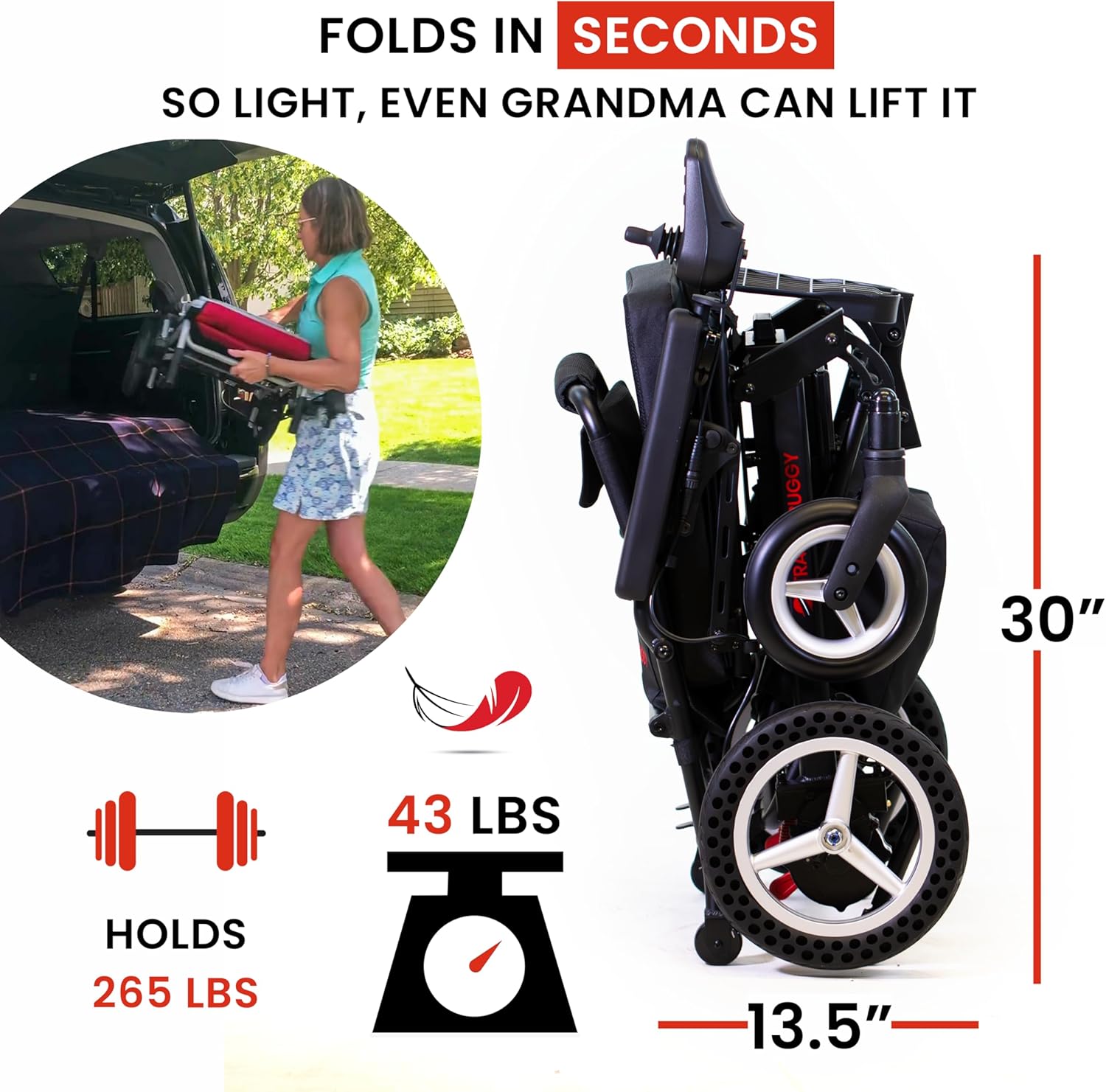
Figure 3.1: The Dash wheelchair in its folded state, highlighting its compact dimensions (30" height, 13.5" width) and lightweight design (43 lbs).

Figure 3.2: The folded wheelchair easily fits into a standard vehicle trunk, demonstrating its portability for travel.
3.2 Battery Charging
Fully charge the battery before first use. The battery can be charged while installed on the wheelchair via the joystick controller, or it can be removed for off-board charging.
- Connect the charger to the charging port on the joystick controller or directly to the battery if removed.
- Plug the charger into a standard electrical outlet.
- The charging indicator light will show the charging status (refer to charger manual for specific light indications).
- Once fully charged, disconnect the charger.
3.3 Attaching the Joystick Controller
The joystick controller is easily attached to either the left or right armrest, depending on user preference.
- Locate the mounting bracket on the armrest.
- Slide the joystick controller onto the bracket until it clicks securely into place.
- Connect the joystick cable to the corresponding port on the wheelchair.
4. Operating Instructions
Operating the Travel Buggy Dash is intuitive with its 360° joystick control.

Figure 4.1: Overview of the wheelchair's controls, fast-charging battery, dual brushless motors, and driving range.
4.1 Basic Operation
- Power On: Press the power button on the joystick controller. The battery indicator will illuminate.
- Speed Adjustment: Use the speed control buttons on the joystick to select one of the 5 available speeds. Start with a lower speed until you are comfortable with the controls.
- Driving: Gently push the joystick in the desired direction (forward, backward, left, right). The further you push, the faster the wheelchair will move (up to the selected speed setting).
- Stopping: Release the joystick, and it will automatically return to the center position, engaging the electromagnetic brakes and bringing the wheelchair to a stop.
- Power Off: Press the power button again to turn off the wheelchair when not in use.
4.2 Manual Mode
The Dash wheelchair can be switched to manual mode for pushing by an attendant.
- Ensure the wheelchair is powered off.
- Locate the red levers near each rear wheel.
- Move the levers to the "up" position (unlocked) to disengage the motors and allow free-wheeling.
- To re-engage power mode, move the levers to the "down" position (locked) and power on the wheelchair.
4.3 Terrain and Environment
- The Dash is suitable for light to moderate terrain, including paved surfaces, sidewalks, and short grass.
- Exercise caution on uneven surfaces, gravel, or soft ground. Ensure grass is level with pavement to avoid getting stuck.
- When ascending or descending inclines, use slower speeds for better control.
- Be mindful of obstacles and tight spaces. The Dash offers excellent maneuverability indoors.
5. Maintenance
Regular maintenance ensures the longevity and optimal performance of your Travel Buggy Dash Electric Wheelchair.
5.1 Cleaning
- Wipe down the frame and components with a damp cloth and mild detergent.
- Avoid using abrasive cleaners or excessive water, especially near electrical components.
- Keep the joystick controller clean and dry.
5.2 Battery Care
- Charge the battery regularly, even if the wheelchair is not in frequent use, to maintain battery health.
- Avoid completely draining the battery before recharging.
- Store the battery in a cool, dry place if removed from the wheelchair for extended periods.
- If replacing the battery, ensure it is a genuine Travel Buggy replacement to maintain compatibility and safety.
5.3 Tires and Wheels
- The Dash features solid tires, eliminating the need for inflation.
- Periodically inspect tires for wear and tear.
- Keep wheels free of debris that could impede movement.
5.4 General Inspection
- Regularly check all nuts, bolts, and fasteners to ensure they are tight.
- Inspect electrical cables for any signs of damage or fraying.
- Ensure the folding mechanism operates smoothly and locks securely.
6. Troubleshooting
This section addresses common issues you might encounter with your Travel Buggy Dash Electric Wheelchair.
| Problem | Possible Cause | Solution |
|---|---|---|
| Wheelchair does not power on. | Battery is not charged or not properly connected. | Ensure battery is fully charged and securely connected. Check joystick cable connection. |
| Wheelchair moves slowly or loses power. | Low battery charge; operating on challenging terrain. | Recharge the battery. Reduce speed setting on inclines or rough terrain. |
| Joystick feels too sensitive. | User unfamiliarity with controls; high-speed setting. | Practice operating at lower speed settings. Gentle movements on the joystick are often sufficient. |
| Wheelchair gets stuck on uneven ground. | Operating on terrain beyond the wheelchair's capability. | Avoid very soft ground, steep unpaved inclines, or significant height differences (e.g., non-level curb cuts). Switch to manual mode if assistance is available. |
| Difficulty folding/unfolding. | Mechanism not aligned or obstructed. | Ensure no objects are obstructing the folding mechanism. Apply gentle, even pressure. Do not force. |
If you experience issues not listed here or if solutions do not resolve the problem, please contact Travel Buggy customer support.
7. Specifications
Detailed technical specifications for the Travel Buggy Dash Electric Wheelchair.
| Feature | Specification |
|---|---|
| Model | Dash |
| Item Weight | 39 Pounds (approx. 17.7 kg) |
| Weight Capacity | Up to 265 lbs (approx. 120 kg) |
| Material | Aluminum Alloy |
| Seating Width | 19 inches (approx. 48 cm) |
| Rear Wheel Size | 12 inches |
| Cruise Range | Up to 20 km (approx. 12.4 miles) |
| Motor Type | Dual Brushless Motors (170 Watt each) |
| Folding Dimensions (approx.) | 30" H x 13.5" W |
| Incline Rating | 9 degrees (as per review, common for similar chairs) |
8. Warranty and Support
Travel Buggy is committed to providing excellent customer support for your Dash Electric Wheelchair.
8.1 Warranty Information
Specific warranty details are typically provided with your purchase documentation. Please refer to the warranty card or contact Travel Buggy directly for comprehensive warranty terms and conditions. Generally, Travel Buggy products are supported by a manufacturer's warranty covering defects in materials and workmanship.
8.2 Customer Support
For any questions, technical assistance, or service requests, please contact Travel Buggy customer support. They offer support with real people on the phone and can provide local service through their network of home medical equipment partners.
You can visit the official Travel Buggy store on Amazon for more information and contact options: Travel Buggy Store


