
1. Introduction
Thank you for choosing the Dylect 80 cm (32 Inches) HD Ready LED TV, Model 32IPS30H. This manual provides essential information for the safe and efficient operation of your television. Please read these instructions thoroughly before use and retain them for future reference.

Figure 1.1: Dylect 32IPS30H TV with key display features.
2. Safety Information
To ensure safe operation and prevent damage, observe the following precautions:
- Power Supply: Connect the TV only to an AC 220-240V, 50Hz power source.
- Ventilation: Ensure adequate ventilation around the TV. Do not block ventilation openings.
- Water and Moisture: Do not expose the TV to rain or moisture. Avoid placing objects filled with liquids on the TV.
- Heat Sources: Keep the TV away from heat sources such as radiators, heat registers, stoves, or other heat-producing appliances.
- Cleaning: Unplug the TV before cleaning. Use a soft, dry cloth. Do not use liquid cleaners or aerosol cleaners.
- Servicing: Do not attempt to service this product yourself. Refer all servicing to qualified service personnel.
3. Package Contents
Verify that all items are present in the box:
- 1 x Dylect 80 cm (32 Inches) HD Ready LED TV
- 1 x Remote Control (requires 2 AAA batteries, included)
- 1 x Table Stand
- 2 x Base Stands (for table stand assembly)
- 1 x User Manual (this document)
- 1 x Warranty Card
4. Setup
4.1 Stand Installation
If you are placing the TV on a table, attach the base stands as follows:
- Carefully place the TV face-down on a soft, flat surface to prevent screen damage.
- Align the base stands with the screw holes on the bottom of the TV.
- Secure each stand with the provided screws. Ensure they are tightened firmly.
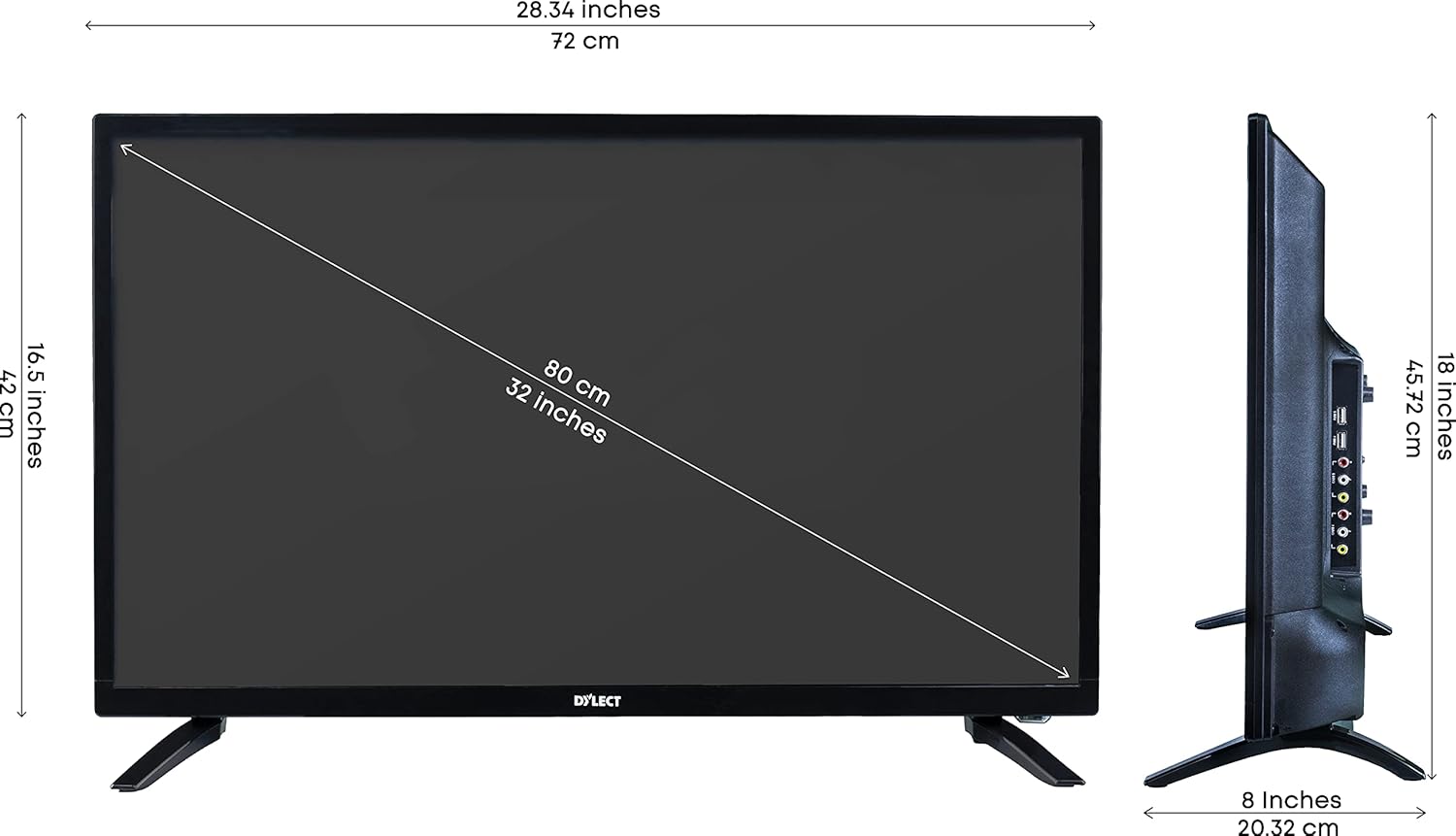
Figure 4.1: TV with table stands and dimensions.
4.2 Wall Mounting
The Dylect 32IPS30H TV is compatible with wall mounts. A wall mount kit is included with your purchase. For detailed installation instructions, please refer to the specific manual provided with your wall mount kit. Ensure the wall mount is suitable for the TV's weight and size, and that installation is performed by qualified personnel if you are unsure.

Figure 4.2: Wall mount kit information.
4.3 Connecting External Devices
Your TV offers multiple connectivity options:
- HDMI Ports (x2): Connect set-top boxes, Blu-ray players, gaming consoles, or other HDMI-enabled devices.
- USB Ports (x2): Connect USB storage devices for media playback.
- VGA Slot (x1): Connect a laptop or PC.
- AV Input Slots (x2): Connect older devices using composite video and stereo audio cables.
- RF Slot (x1): Connect an antenna for terrestrial broadcast reception.
- Headphone Jack (x1): Connect headphones for private listening.

Figure 4.3: Rear connectivity ports.

Figure 4.4: Side connectivity ports.
4.4 Power Connection
After connecting all necessary devices, plug the power cord into the TV's power input and then into a wall outlet.
5. Operating Instructions
5.1 Remote Control
Insert the two AAA batteries into the remote control, observing the correct polarity. The remote control allows you to access all TV functions.

Figure 5.1: Remote Control Layout.
5.2 Basic Functions
- Power On/Off: Press the Power button on the remote or the physical power button on the TV.
- Volume Control: Use the VOL+ and VOL- buttons.
- Channel Selection: Use the CH+ and CH- buttons to change channels.
- Input Source: Press the SOURCE button to cycle through available input sources (HDMI1, HDMI2, AV1, AV2, VGA, TV).
- Menu Navigation: Use the arrow keys and OK button to navigate the on-screen menu.

Figure 5.2: Physical control buttons on the TV.
5.3 Picture Settings
Access the Picture menu to adjust settings such as Brightness, Contrast, Color, and Sharpness. The TV features an IPS Grade Panel with a 178-degree viewing angle and a 60 Hz refresh rate for clear visuals.

Figure 5.3: Wide Viewing Angle.
5.4 Sound Settings
Adjust audio settings through the Sound menu. The TV is equipped with in-built dual speakers providing 24 Watts of output. You can also utilize the 5-band equalizer for customized audio profiles.

Figure 5.4: 5 Band Equalizer.
6. Maintenance
To maintain your TV's performance and appearance:
- Screen Cleaning: Gently wipe the screen with a soft, lint-free cloth. For stubborn marks, slightly dampen the cloth with water or a specialized screen cleaner (apply to cloth, not directly to screen).
- Cabinet Cleaning: Wipe the cabinet with a soft, dry cloth.
- Avoid Chemicals: Do not use abrasive cleaners, waxes, or solvents as they can damage the TV's finish.
7. Troubleshooting
If you encounter issues, refer to the following common solutions:
| Problem | Possible Solution |
|---|---|
| No Power | Check if the power cord is securely plugged into the TV and the wall outlet. Ensure the wall outlet is functioning. |
| No Picture, but Sound is Present | Verify the correct input source is selected. Check cable connections to external devices. |
| No Sound, but Picture is Present | Check the volume level and ensure the TV is not muted. Verify audio cable connections for external devices. |
| Remote Control Not Working | Replace the batteries in the remote control. Ensure there are no obstructions between the remote and the TV's IR sensor. |
| Poor Picture Quality | Adjust picture settings (brightness, contrast, sharpness). Check antenna or cable connections for signal strength. |
8. Specifications
| Feature | Specification |
|---|---|
| Screen Size | 80 cm (32 Inches) |
| Display Technology | LED, IPS Grade Panel |
| Resolution | HD Ready (1366 x 768) / 720p |
| Refresh Rate | 60 Hz |
| Viewing Angle | 178 Degrees |
| Sound Output | 24 Watts (In-Built Dual Speakers) |
| HDMI Ports | 2 |
| USB Ports | 2 |
| VGA Slot | 1 |
| AV Input Slots | 2 |
| RF Slot | 1 |
| Headphone Jack | 1 |
| Power Consumption | 45 Watts |
| Voltage | 220 VAC 50 Hz |
| Model Year | 2020 |
| Mounting Type | Wall Mount (compatible) |

Figure 8.1: Energy Efficiency Rating.
9. Warranty and Support
Your Dylect 32IPS30H LED TV comes with a 1-year standard manufacturer warranty from the date of purchase. This warranty covers manufacturing defects.
For any assistance, technical support, or warranty claims, please contact Dylect customer service:
- Toll-Free Number: 1800-258-6618
- Email: support@bhagwatiproductsltd.com
When contacting support, please provide your product's model name (32IPS30H) and details from your purchase invoice. The service center will assist you with scheduling service if required.