1. Introduction
This manual provides detailed instructions for the installation, operation, and maintenance of your ZOSI 1080p HD-TVI Home Security Camera. This camera is designed for both indoor and outdoor surveillance, offering high-definition video with integrated audio capabilities and robust weather resistance.
Key Features:
- 1080P HD Resolution: Provides clear and detailed images day and night.
- Built-in Microphone: Supports one-way audio for enhanced surveillance.
- Advanced Night Vision: Equipped with 36pcs IR LEDs for up to 100ft night vision in total darkness and 120ft in ambient light.
- IP66 Weatherproof: Durable aluminum metal housing withstands harsh outdoor conditions.
- Wide Viewing Angle: Features a 90° viewing angle for broad coverage.
- Flexible Installation: Adjustable 3-axis camera stand for ceiling or wall mounting.
Package Contents:
Before installation, please verify that all components are present:
- 1 x ZOSI 1080p HD-TVI Security Camera
- 1 x Mounting Screw Bag
- 1 x Mounting Hole Template
- 1 x Quick Start Guide

Figure 1.1: Contents included in the ZOSI 1080p HD-TVI Home Security Camera package.
2. Safety Information
Please read and follow all safety instructions carefully to prevent injury or damage to the product. Keep this manual for future reference.
- Ensure the power supply is disconnected before any installation or maintenance.
- Use only the specified power adapter for this camera.
- Avoid placing the camera in direct sunlight or near heat sources.
- Do not expose the camera to extreme temperatures outside its operating range (-10°C/14°F to 66°C/151°F).
- Handle the camera with care to avoid damage to the lens or housing.
- This camera is IP66 weatherproof, but avoid submerging it in water.
3. Product Overview
The ZOSI 1080p HD-TVI camera is a bullet-style surveillance camera designed for robust performance. It features a durable aluminum housing, a high-definition lens, and infrared LEDs for night vision.

Figure 3.1: ZOSI 1080p HD-TVI Bullet Security Camera.
Components and Connections:
The camera connects to a compatible DVR system. Key components include the video output, power input, and the OSD (On-Screen Display) button for signal mode switching.
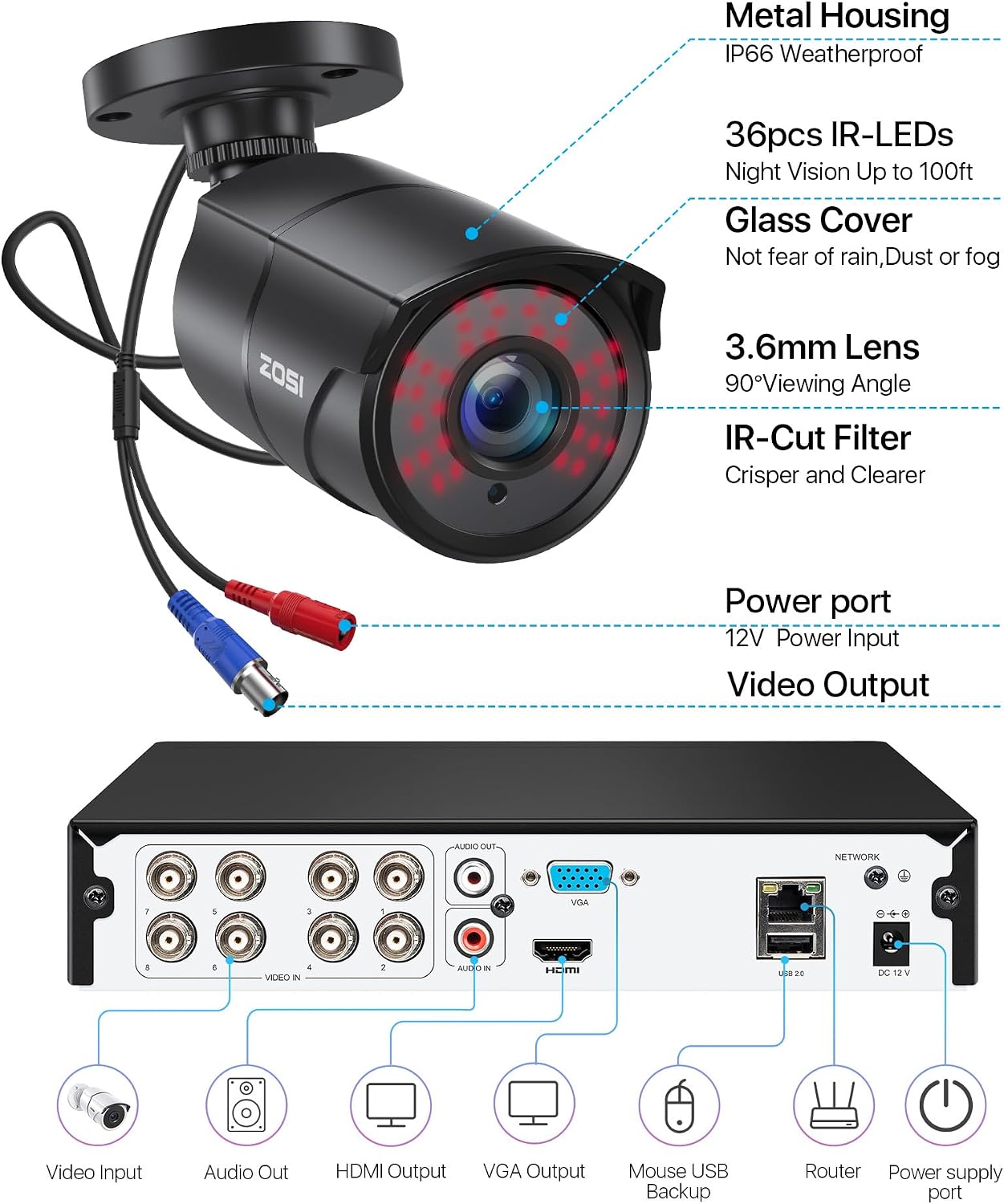
Figure 3.2: Detailed view of camera features and DVR connection ports.
4. Compatibility
This ZOSI HD-TVI security camera is specifically designed for use with HD-TVI analog DVR systems. For audio recording functionality, ensure your DVR supports audio input. It is fully compatible with ZOSI's new DVR recorders, including models ZR08VN and ZR08MN.
This camera cannot operate independently and requires connection to a compatible DVR system.
5. Setup
5.1. Installation
The camera features an adjustable 3-axis stand, allowing for flexible mounting on ceilings or walls. Ensure the mounting surface is strong enough to support the camera.

Figure 5.1: Flexible installation and adjustment options.
Use the provided mounting hole template to mark drill points. Secure the camera firmly using the supplied screws.
5.2. Wiring and Connection
Connect the camera to your ZOSI DVR using a BNC video cable and a power cable (not included). Ensure all connections are secure.

Figure 5.2: Simple connection with ZOSI DVR.
5.3. Initial Configuration (Signal Mode Switching)
Your ZOSI camera supports multiple video signal modes (TVI, AHD, CVI, CVBS/960H). If your DVR supports 4-in-1 or 5-in-1 modes, it is recommended to set the camera to TVI, AHD, or CVI mode for optimal image quality. If no picture is displayed after connecting, you may need to switch the camera's signal mode to match your DVR.
To switch modes, use the OSD button on the camera's cable. Press and hold the button for 5 seconds in the specified direction, then release. The screen will turn blank briefly before displaying the image in the new mode.
- Switch to AHD Mode: Push the OSD button to the left for 5 seconds.
- Switch to TVI Mode: Push the OSD button to the right for 5 seconds.
- Switch to CVBS/960H Mode: Push the OSD button up for 5 seconds.
- Switch to CVI Mode: Push the OSD button down for 5 seconds.
Video 5.1: Instructions on how to switch the camera's signal mode (AHD, TVI, CVI, CVBS/960H) to ensure compatibility with your DVR system. This video demonstrates using the OSD button on the camera cable.
6. Operating Instructions
6.1. Day and Night Vision
The camera automatically switches between color video during the day and black-and-white video at night, utilizing its built-in IR-CUT filter and 36pcs IR LEDs for clear visibility up to 100ft in total darkness.

Figure 6.1: Day and Night Vision capabilities.
6.2. One-Way Audio
The integrated microphone allows for one-way audio recording, enabling you to hear sounds from the camera's vicinity. This feature enhances surveillance by providing additional context to video footage.
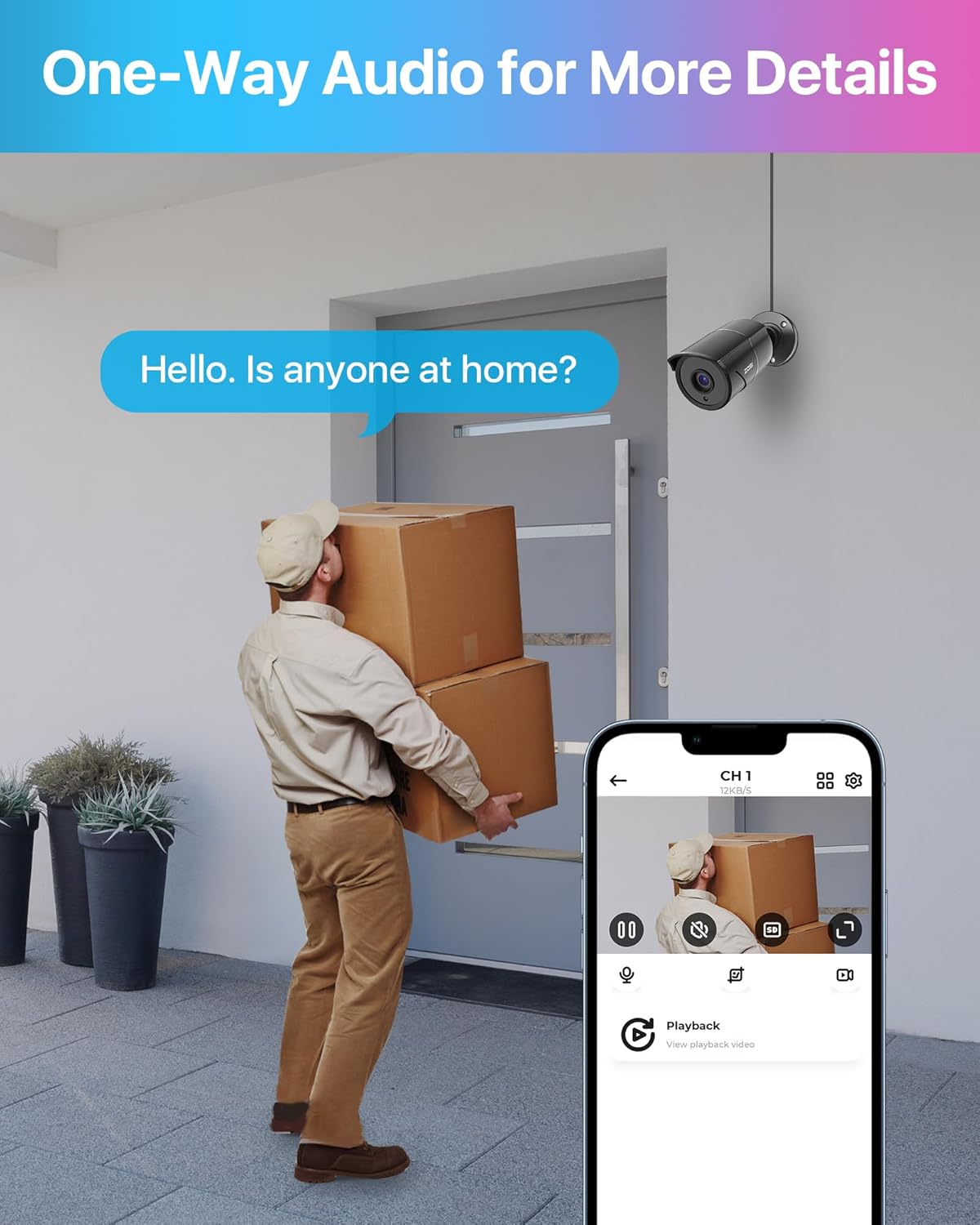
Figure 6.2: One-Way Audio for detailed monitoring.
6.3. Wide Viewing Angle
With a 90° wide viewing angle, the camera captures a broad area, reducing the need for multiple cameras in certain locations.

Figure 6.3: 90° Wide Viewing Angle.
6.4. Indoor and Outdoor Use
The camera's IP66 weatherproof aluminum metal housing ensures reliable operation in various environmental conditions, from 14°F (-10°C) to 151°F (66°C), making it suitable for both indoor and outdoor applications like homes, courtyards, warehouses, and farms.

Figure 6.4: Suitable for various indoor and outdoor environments.
7. Maintenance
Regular maintenance ensures optimal performance and longevity of your security camera.
- Cleaning: Gently wipe the camera lens and housing with a soft, damp cloth. Avoid abrasive cleaners or solvents.
- Connection Check: Periodically inspect all cable connections (video and power) to ensure they are secure and free from corrosion or damage.
- Environmental Monitoring: While weatherproof, ensure the camera is not exposed to prolonged extreme conditions beyond its specified operating range. Clear any debris or obstructions from the camera's view.
8. Troubleshooting
If you encounter issues with your ZOSI camera, refer to the following common problems and solutions:
| Problem | Possible Cause | Solution |
|---|---|---|
| No image/signal on DVR | Incorrect signal mode; Loose cable connection; No power. |
|
| Poor image quality (blurry, distorted) | Dirty lens; Cable interference; Incompatible DVR settings. |
|
| Night vision not working | IR LEDs obstructed; Insufficient power; IR-CUT filter issue. |
|
| No audio recording | DVR does not support audio input; Audio connection issue. |
|
Video 8.1: A brief overview of the ZOSI Smart app interface, demonstrating live view and playback features. This video can assist with basic app navigation for remote viewing.
9. Specifications
| Feature | Detail |
|---|---|
| Model Name | 1AC-2612F-B-N |
| Video Capture Resolution | 1080p (2MP Effective Still Resolution) |
| Connectivity Technology | Wired (HD-TVI) |
| Indoor/Outdoor Usage | Outdoor, Indoor |
| Power Source | Corded Electric |
| Night Vision Range | Up to 100ft (total darkness), 120ft (ambient light) |
| Material | Aluminum |
| Water Resistance Level | IP66 Weatherproof |
| Item Dimensions (L x W x H) | 1 x 1 x 1 inches |
| Item Weight | 15.5 ounces |
| Operating Temperature | 14°F (-10°C) to 151°F (66°C) |
| Special Features | HD Resolution, Night Vision, Built-in Mic (One-Way Audio) |
10. Warranty and Support
ZOSI products typically come with a limited warranty. For specific warranty details, registration, and technical support, please visit the official ZOSI website or contact their customer service directly. Ensure you have your product model number (1AC-2612F-B-N) and purchase information ready when seeking support.
You can find more information and support resources at the ZOSI Store on Amazon.


