
1. Introduction
Thank you for purchasing the TVON Mobile TV Stand. This stand is designed to provide a versatile and portable solution for displaying your 23-60 inch LCD or LED television. It features adjustable height, tilt functionality, and smooth-rolling caster wheels for easy relocation. Please read this manual thoroughly before assembly and use to ensure safe and optimal performance.

Image 1.1: The TVON Mobile TV Stand in an office setting, showcasing its use for presentations or collaborative work. A laptop is placed on the adjustable media shelf.
2. Safety Information
- Ensure all components are securely fastened before mounting the TV.
- Do not exceed the maximum load capacity of 40kg (88 lbs).
- Always lock the caster wheels when the stand is in a stationary position to prevent accidental movement.
- Distribute weight evenly on the media shelf.
- Keep children and pets away from the stand during assembly and movement.
- Avoid placing the stand on uneven surfaces.
3. Package Contents
Verify that all parts are present and undamaged before beginning assembly. If any parts are missing or damaged, please contact customer support.
- Main Stand Pole
- Base with Caster Wheels
- TV Mounting Bracket
- Adjustable Media Shelf
- Hardware Kit (various screws, washers, spacers)
- Assembly Tools (e.g., Allen wrench)
- Instruction Manual

Image 3.1: Illustration of VESA mounting patterns (W x H) and the assortment of screws, washers, and spacers provided to accommodate different TV models. Ensure your TV's VESA pattern is within the supported range of 100x100mm to 400x400mm.
4. Setup and Assembly
Follow these steps carefully for proper assembly. A Japanese instruction manual is included for detailed guidance.
- Attach Caster Wheels to Base: Securely fasten the four 360-degree rotating caster wheels to the stand's base. Ensure the locking mechanisms are functional.
- Assemble Main Pole: Connect the main stand pole sections as indicated in the diagram.
- Install TV Mounting Bracket: Attach the TV mounting bracket to the top of the main pole.
- Mount TV to Bracket: Before mounting, verify your TV's VESA pattern (distance between screw holes on the back of your TV). This stand supports VESA patterns from 100x100mm to 400x400mm. Select the appropriate screws and spacers from the hardware kit. Carefully lift and attach your TV to the mounting bracket. Ensure it is securely fastened.
- Attach Media Shelf: Position the media shelf at your desired height on the main pole and secure it. The shelf height is adjustable and can be removed if not needed.

Image 4.1: The fully assembled TVON Mobile TV Stand, ready for use. This image provides a general overview of the product's structure.
5. Operating Instructions
5.1 Height Adjustment
The TVON Mobile TV Stand allows for 3 levels of height adjustment to achieve an optimal viewing position. Loosen the adjustment screws on the main pole, slide the TV mounting bracket to the desired height, and then securely tighten the screws. Always ensure the TV is stable after adjustment.

Image 5.1: Visual guide demonstrating the three adjustable height levels of the TV stand, suitable for various viewing scenarios from low to high positions.
5.2 Tilt Function
Adjust the viewing angle of your TV for a perfect perspective. The stand allows for an upward tilt of +5° and a downward tilt of -2°. Locate the tilt adjustment knobs on the TV mounting bracket, loosen them, set the desired angle, and then tighten them firmly.
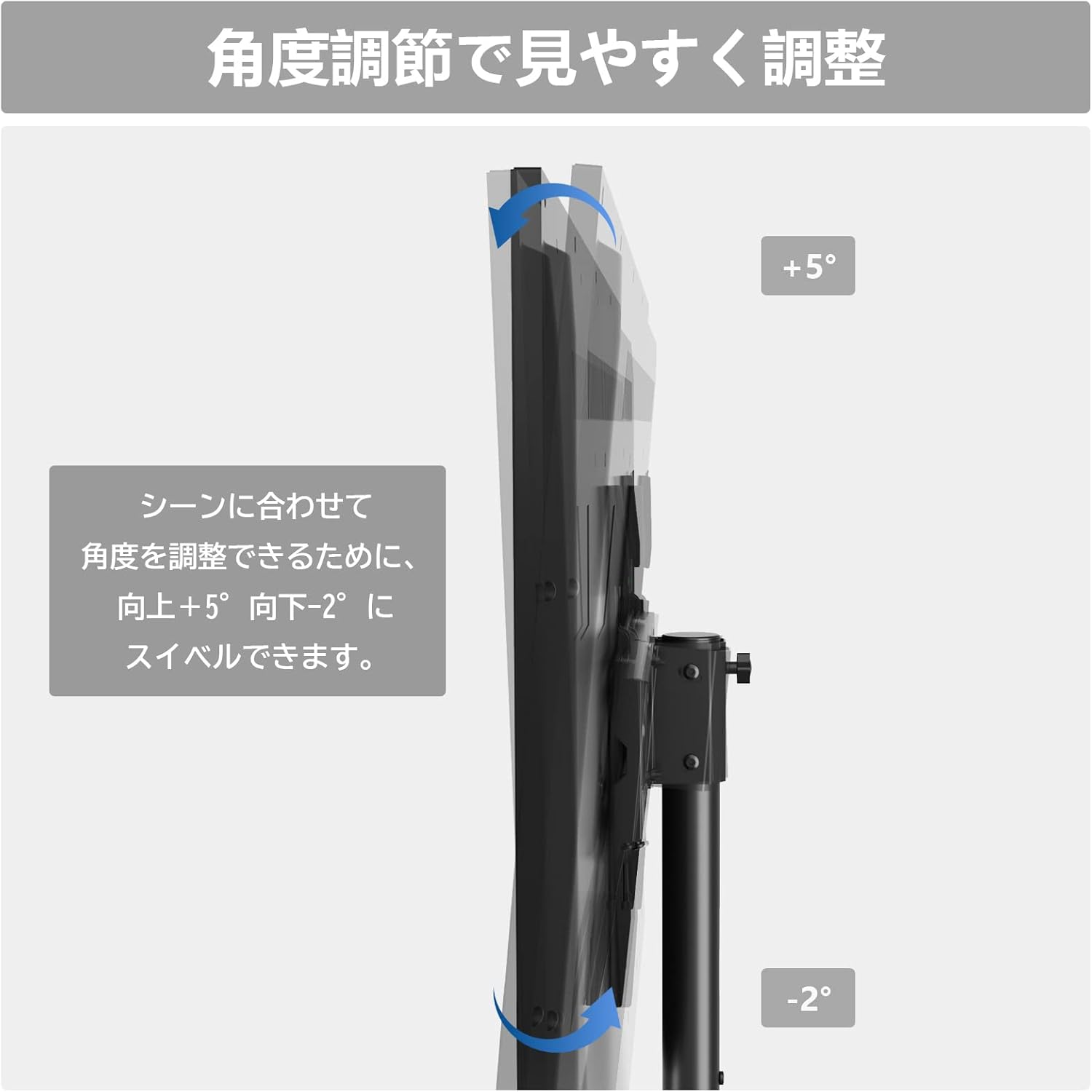
Image 5.2: Illustration detailing the tilt capabilities of the TV stand, allowing for a +5° upward and -2° downward angle adjustment to optimize viewing.
5.3 Mobility and Locking Casters
The stand is equipped with four 360-degree rotating caster wheels, allowing for easy movement across various surfaces. Each caster includes a locking mechanism to secure the stand in place. To move the stand, unlock all casters. To fix the stand in position, press down on the locking levers of all four casters.

Image 5.3: Detail of the 360-degree rotating caster wheel with its integrated locking mechanism, ensuring both mobility and stability.
5.4 Media Shelf Usage
The adjustable media shelf provides convenient storage for peripheral devices such as recorders, HDDs, game consoles, or books. Its height can be adjusted to suit your needs, and it can be removed entirely if desired. The low-profile rear design allows the stand to be placed close to a wall, saving space and enhancing stability.

Image 5.4: The TV stand demonstrating its space-saving design when placed near a wall, along with integrated cable management clips on the main pole for a tidy setup.
6. Maintenance
- Cleaning: Wipe the stand with a soft, dry cloth. For stubborn marks, use a slightly damp cloth and mild detergent, then dry thoroughly. Avoid abrasive cleaners.
- Regular Checks: Periodically inspect all screws and connections to ensure they remain tight and secure.
- Caster Care: Keep caster wheels free of debris to ensure smooth movement.
7. Troubleshooting
- Stand is unstable: Ensure all assembly screws are tightened. Check that the TV's weight does not exceed 40kg and that the VESA mounting is correct. Ensure the stand is on a flat, level surface.
- Difficulty moving the stand: Verify that all caster wheels are unlocked. Check for any obstructions or debris around the wheels.
- TV not tilting: Ensure the tilt adjustment knobs are loosened before attempting to adjust the angle, and then tightened firmly afterward.
- Cable management issues: Utilize the provided cable clips on the main pole to organize cables neatly.
8. Specifications
| Feature | Specification |
|---|---|
| Brand | TVON |
| Model | B08DF9D33T |
| Compatible TV Size | 23-60 inches |
| Maximum Load Capacity | 40 kg (88 lbs) |
| VESA Compatibility | 100x100mm to 400x400mm (W x H) |
| Height Adjustment | 3 levels (133.7 cm to 143.7 cm) |
| Tilt Angle | +5° (up) to -2° (down) |
| Mobility | 4 x 360° rotating caster wheels with locks |
| Material | Alloy steel, Iron |
| Color | Black |
| Product Dimensions (L x W x H) | 53.9 x 40.9 x 143.7 cm |
| GTIN / UPC | 747966797697 |
9. Warranty and Support
The TVON Mobile TV Stand comes with a 5-year quality guarantee from the date of purchase. This warranty covers manufacturing defects and ensures the product meets our quality standards.
If you have any questions, concerns, or require assistance with assembly, operation, or troubleshooting, please do not hesitate to contact our customer support team. We are committed to providing excellent service and support for your product.
Please refer to your purchase documentation for specific contact information.