
Wireless Gear G0687
Wireless Gear True Wireless Case Earbuds User Manual
Model: G0687
Introduction
Thank you for choosing the Wireless Gear True Wireless Case Earbuds. These in-ear headphones are designed for comfort and convenience, offering a seamless audio experience with advanced features. This manual provides detailed instructions on how to set up, operate, maintain, and troubleshoot your new earbuds to ensure optimal performance.
Key features include:
- Hands-Free Microphone: Integrated microphone for seamless transition between music and calls.
- Comfortable Fit: Flexible Fit-Gel ear gels ensure a secure and comfortable fit for extended wear.
- Extended Playtime: Up to 8 hours of continuous play and talk time.
- Portable Charging Case: The included charging case provides 4-5 full recharges, extending total playtime significantly.
- Extreme Bass Sound: High-performance wireless earbuds delivering rich, superior sound with ultra-deep bass.
Package Contents
Please check the box for the following items:
- Wireless Gear True Wireless Case Earbuds (Left and Right)
- Portable Charging Case
- USB Charging Cable
- User Manual
- Multiple sizes of Fit-Gel ear tips
Product Overview
Familiarize yourself with the components of your Wireless Gear True Wireless Case Earbuds.

Image 1: The Wireless Gear True Wireless Earbuds resting inside their open charging case. The earbuds are black with a sleek design, and the case is also black with a translucent lid, showing the charging indicators.

Image 2: Front view of the retail packaging for the Wireless Gear True Wireless Case Earbuds. The box prominently displays the product name, brand logo, and key features such as "8 HRS" playtime, "4-5 RECHARGES PER FULL CASE", and "EXTREME BASS".
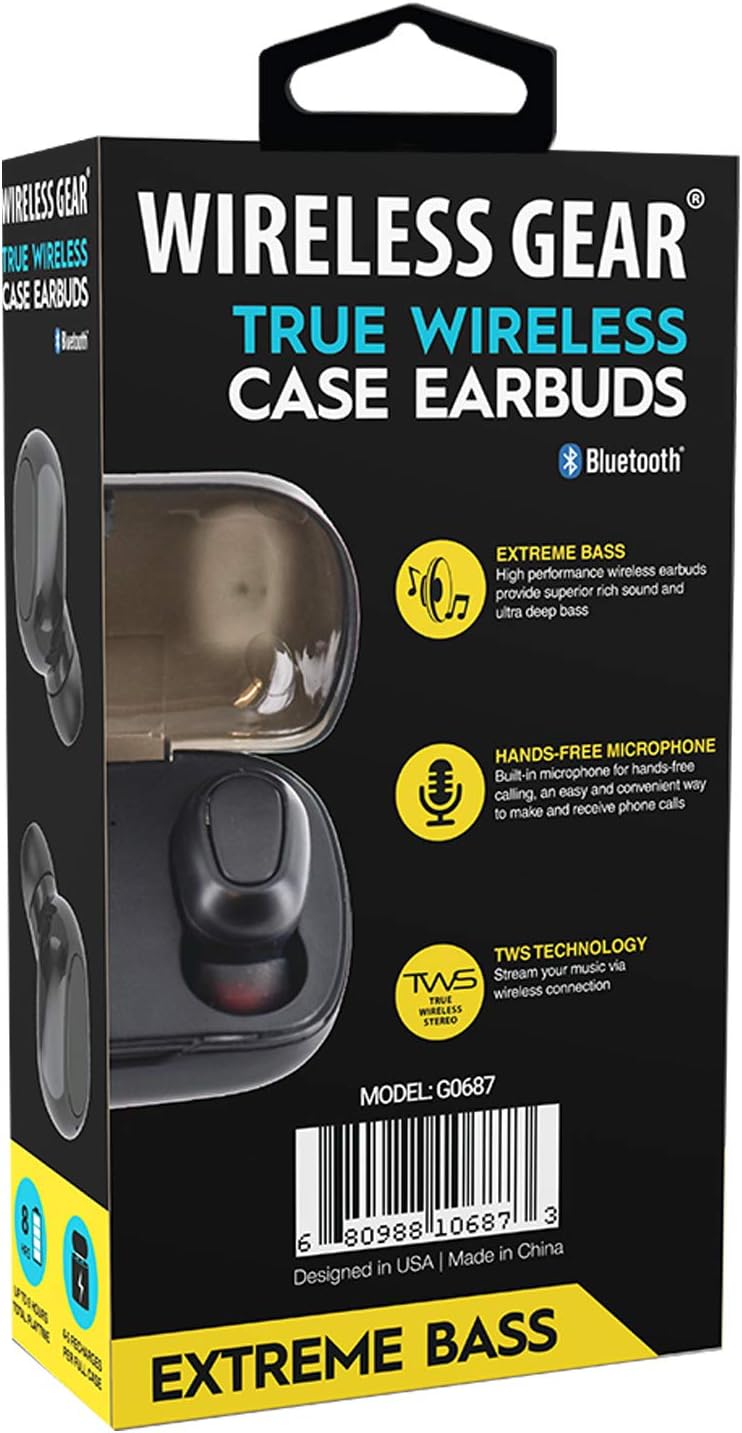
Image 3: Back view of the retail packaging, highlighting additional features like "Hands-Free Microphone" and "TWS Technology". The model number G0687 and UPC 0680988106873 are visible at the bottom.
Earbud Components:
- Multi-function Touch/Button Area: For controlling playback, calls, and voice assistant.
- Microphone: For hands-free calling.
- LED Indicator: Shows pairing status, charging status, and power.
- Charging Contacts: Located at the bottom of each earbud.
Charging Case Components:
- Earbud Charging Slots: Securely hold and charge the earbuds.
- Charging Case LED Indicators: Show the charging status of the case and earbuds.
- USB Charging Port: For charging the case itself.
Setup
1. Initial Charging
- Place both earbuds into the charging case. Ensure they are properly seated so the charging contacts align.
- Connect the USB charging cable to the charging port on the case and the other end to a USB power source (e.g., wall adapter, computer USB port).
- The LED indicators on the earbuds and/or case will illuminate to show charging status. A full charge for the case and earbuds typically takes 1-2 hours.
- Once fully charged, disconnect the charging cable. The case holds enough power for 4-5 full earbud recharges.
2. Pairing with Your Device
- Power On: Open the charging case, or remove the earbuds from the case. They should automatically power on and enter pairing mode. The LED indicator on one earbud will flash, indicating it's ready to pair.
- Activate Bluetooth: On your smartphone, tablet, or other Bluetooth-enabled device, go to the Bluetooth settings and turn on Bluetooth.
- Search for Devices: Your device will scan for available Bluetooth devices. Look for "Wireless Gear Earbuds" or a similar name in the list.
- Connect: Select the earbuds from the list. Once connected, the LED indicator on the earbud will stop flashing or change color. You will hear an audible confirmation.
- Automatic Reconnection: After the initial pairing, the earbuds will automatically connect to the last paired device when removed from the case and Bluetooth is active on your device.
Note: If pairing fails, turn off Bluetooth on your device, place earbuds back in the case, close and reopen, then try again.
Operating Instructions
Basic Controls (Touch/Button Functions):
| Function | Action |
|---|---|
| Power On | Remove from charging case. |
| Power Off | Place back into charging case. |
| Play/Pause Music | Single tap on either earbud. |
| Next Track | Double tap on the Right earbud. |
| Previous Track | Double tap on the Left earbud. |
| Answer/End Call | Single tap on either earbud during an incoming call. |
| Reject Call | Press and hold either earbud for 2 seconds during an incoming call. |
| Activate Voice Assistant | Triple tap on either earbud. |
| Volume Up | Press and hold Right earbud. |
| Volume Down | Press and hold Left earbud. |
Note: Specific touch/button functions may vary slightly. Refer to the quick start guide included in your package for precise controls if different.
Maintenance
Cleaning Your Earbuds and Case:
- Use a soft, dry, lint-free cloth to wipe the earbuds and charging case.
- For stubborn dirt, slightly dampen the cloth with water or a mild, non-abrasive cleaner.
- Do not use harsh chemicals, aerosols, or abrasive cleaners.
- Ensure the charging contacts on both the earbuds and the case are clean and free of debris to ensure proper charging.
- Remove ear tips and clean them separately with water and mild soap if necessary, then dry completely before reattaching.
Storage:
- When not in use, always store the earbuds in their charging case to protect them and keep them charged.
- Store the device in a cool, dry place, away from extreme temperatures, humidity, and direct sunlight.
Battery Care:
- To prolong battery life, avoid fully discharging the earbuds and case frequently.
- Charge the device regularly, even if not in frequent use, to prevent deep discharge.
Troubleshooting
If you encounter issues with your Wireless Gear True Wireless Case Earbuds, try the following solutions:
- Earbuds not pairing with device:
- Ensure Bluetooth is enabled on your device.
- Make sure the earbuds are charged.
- Place earbuds back in the case, close the lid, wait a few seconds, then open the lid and try pairing again.
- Forget/delete the earbuds from your device's Bluetooth list and re-pair.
- Ensure earbuds are within Bluetooth range (typically 10 meters/33 feet).
- Only one earbud working:
- Ensure both earbuds are charged.
- Place both earbuds back into the charging case, close the lid, and then remove them simultaneously. This often re-syncs them.
- Try resetting the earbuds (refer to specific reset instructions if available in the quick start guide, usually involves holding a button for a long time).
- Earbuds not charging:
- Ensure the charging cable is securely connected to both the case and the power source.
- Check if the charging contacts on the earbuds and inside the case are clean and free of debris.
- Try a different USB cable or power adapter.
- Ensure the charging case itself has power.
- Poor sound quality or intermittent connection:
- Move closer to your paired device to reduce interference.
- Avoid obstacles between the earbuds and your device.
- Ensure there are no other strong wireless signals nearby causing interference.
- Clean the ear tips and earbud speakers.
Specifications
| Feature | Detail |
|---|---|
| Model Number | G0687 |
| Wireless Communication Technology | Bluetooth |
| Connectivity Technology | Bluetooth |
| Form Factor | In-Ear (Intraurales) |
| Color | Black |
| Play/Talk Time | Up to 8 hours |
| Charging Case Recharges | 4-5 full recharges |
| Battery Type | Lithium Ion (rechargeable) |
| Special Features | Bluetooth, Wireless, Microphone Included |
| Manufacturer | ESI Wireless Accessories |
| Product Dimensions | 13.97 x 7.62 x 3.81 cm; 226.8 g (Package) |
| ASIN | B08DCTH7DW |
| UPC | 0680988106873 |
Warranty and Support
Warranty Information:
Wireless Gear products are manufactured to the highest quality standards. For specific warranty details, please refer to the warranty card included with your purchase or visit the official Wireless Gear website. Typically, products come with a limited warranty covering manufacturing defects from the date of purchase.
Customer Support:
If you have any questions, require technical assistance, or need to report an issue, please contact Wireless Gear customer support. You can usually find contact information (phone number, email, or support portal) on the product packaging or the official brand website.
For further assistance, please visit: Wireless Gear Support Page (Note: This is a placeholder link. Please refer to your product's official documentation for the correct support URL.)
Related documentsG0687


Ask a question about this manual
Ask about setup, troubleshooting, compatibility, parts, safety, or missing instructions. Manuals+ will review the question and use this page’s manual context to help answer it.