
Logitech G 981-001002
Logitech G333 VR Earphones for Oculus Quest 2
Model: 981-001002
1. Product Overview
The Logitech G333 VR Earphones are specifically designed for the Oculus Quest 2, providing an enhanced audio experience for virtual reality gaming. These earphones direct audio directly into your ears, minimizing external noise and increasing immersion. They feature a custom-length 3.5 mm cable and straps for seamless integration with the Oculus Quest 2 headset, ensuring wires do not interfere with gameplay. Dual dedicated audio drivers deliver rich, detailed sound for an accurate reproduction of virtual environments.
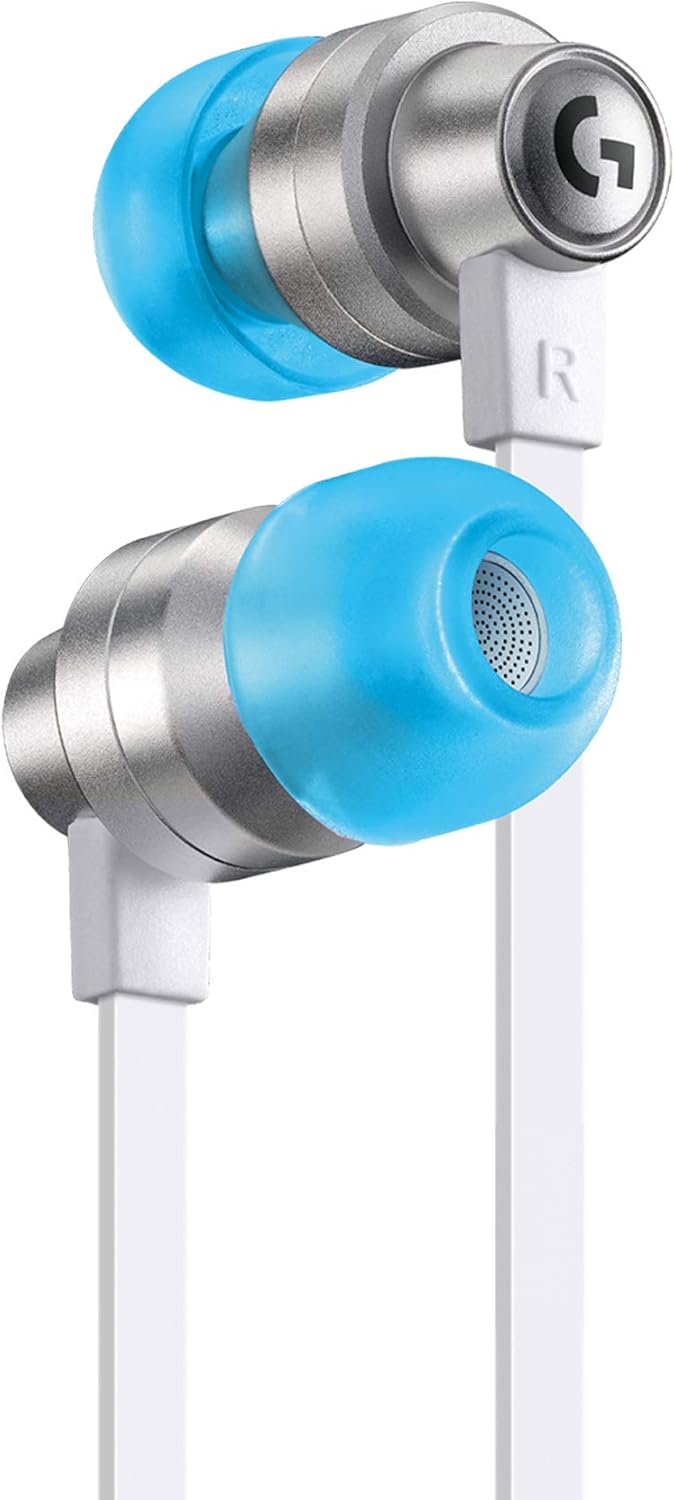
Figure 1: Logitech G333 VR Earphones with blue ear tips and white cable.
The image displays the Logitech G333 VR Earphones, highlighting their sleek design with silver-colored aluminum housing, vibrant blue silicone ear tips, and a white flat cable. The Logitech G logo is visible on the earphone housing.

Figure 2: Close-up of the durable aluminum housing.
A close-up view of the earphone's sturdy aluminum housing, emphasizing its robust construction and premium finish, designed for long-lasting durability during active VR sessions.
2. What's in the Box
The Logitech G333 VR Earphones package includes the following components:
- Logitech G333 VR Earphones
- Three sizes of soft silicone ear tips (Small, Medium, Large)
- User Manual

Figure 3: Contents of the Logitech G333 VR Earphones package.
This image illustrates the product box alongside the earphones, various sizes of ear tips, and the 3.5mm audio jack, illustrating all items included in the package.
3. Setup
Follow these steps to set up your Logitech G333 VR Earphones with your Oculus Quest 2 headset:
- Select the Correct Ear Tips: Choose the soft silicone ear tips (Small, Medium, or Large) that provide the most comfortable and secure fit for your ears. A proper fit is crucial for optimal sound quality and noise isolation.
- Connect to Oculus Quest 2: Locate the 3.5 mm audio jack on your Oculus Quest 2 headset. Insert the angled 3.5 mm plug of the Logitech G333 VR Earphones into this port. The angled design helps prevent accidental disconnections and keeps the cable close to the headset.
- Secure Cable with Straps: Utilize the included cable straps to secure the earphone cables along the headset's strap. This prevents dangling wires that could interfere with your VR experience. Ensure the cables are routed to allow comfortable movement and prevent strain on the connection points.

Figure 4: Available ear tip sizes for personalized comfort.
The image displays the three sizes of soft silicone ear tips (Small, Medium, Large) included with the earphones, allowing users to select the best fit for comfort and sound.

Figure 5: Earphones connected to Oculus Quest 2 with custom cable management.
This image illustrates the Logitech G333 VR Earphones connected to an Oculus Quest 2 headset, showcasing the custom-length cable and integrated straps designed to keep the wires neatly managed and out of the way during use.

Figure 6: Detailed view of earphone components and cable routing.
A detailed diagram showing the soft silicone tips, dual audio drivers, aluminum housing, and the custom-length cable designed for the Oculus Quest 2, along with visual cues for proper cable management.
4. Operating Instructions
Once connected, the Logitech G333 VR Earphones provide high-quality audio for your Oculus Quest 2. The earphones are designed to deliver an immersive sound experience, enhancing your virtual reality gameplay and media consumption.
- Immersive Audio: The dual dedicated audio drivers, with one for highs/mids and one for bass, provide a rich and accurate sound reproduction. This design helps to fully immerse you in the virtual world by delivering clear audio cues and environmental sounds.
- Noise Isolation: The in-ear design and soft silicone tips provide passive noise isolation, reducing distractions from your physical environment and allowing you to focus entirely on the virtual experience.
- Volume Control: Adjust the volume directly through your Oculus Quest 2 headset's built-in volume controls.

Figure 7: User experiencing total VR immersion with the earphones.
This image shows a person wearing the Oculus Quest 2 headset with the Logitech G333 VR Earphones, illustrating how the in-ear audio contributes to total VR immersion by directing sound only to the user's ears.

Figure 8: Exploded view of the dual audio drivers.
An exploded diagram of the earphone's internal components, highlighting the dual drivers optimized for gaming, which separate highs/mids and bass for detailed audio reproduction.
5. Maintenance
Proper maintenance ensures the longevity and optimal performance of your Logitech G333 VR Earphones:
- Cleaning Ear Tips: Regularly remove the silicone ear tips and clean them with a soft, damp cloth. Allow them to air dry completely before reattaching.
- Cleaning Earphones: Wipe the earphone housing and cable with a dry, soft cloth to remove any dust or debris. Avoid using harsh chemicals or abrasive materials.
- Storage: When not in use, store the earphones in a clean, dry place, ideally with the Oculus Quest 2 headset, to prevent tangling or damage to the cables and connectors.
6. Troubleshooting
If you encounter issues with your Logitech G333 VR Earphones, refer to the following common troubleshooting steps:
- No Sound or Low Volume:
- Ensure the 3.5 mm audio plug is fully inserted into the Oculus Quest 2 headset's audio jack.
- Check the volume settings on your Oculus Quest 2 headset.
- Verify that the ear tips are correctly attached and seated properly in your ears. An improper fit can significantly affect sound quality and perceived volume.
- Poor Sound Quality (e.g., lack of bass):
- The most common cause is an improper seal in your ear canal. Try different sizes of ear tips to find the best fit that creates a good seal.
- Ensure the earphones are inserted correctly and securely into your ears.
- Cables Getting in the Way:
- Re-secure the cables using the provided straps along the Oculus Quest 2 headset's head strap.
- Adjust the cable routing to ensure it is tucked away and does not interfere with your movements.
7. Specifications
| Feature | Specification |
|---|---|
| Brand | Logitech G |
| Model Name | G333 Gaming Wired |
| Item Model Number | 981-001002 |
| Connectivity Technology | Auxiliary (3.5 mm Jack) |
| Ear Placement | In Ear |
| Noise Control | Sound Isolation |
| Audio Driver Type | Dynamic Driver (Dual) |
| Frequency Range | 20Hz ~ 20KHz |
| Impedance | 24 Ohm |
| Cable Length | 1.2 Meters |
| Material | Aluminum, Silicone |
| Item Weight | 12 Grams (0.423 ounces) |
| Compatible Devices | Oculus Quest 2 |
8. Warranty and Support
Logitech G products are manufactured to high standards and are designed to provide reliable performance. For detailed warranty information, please refer to the official Logitech G website or the warranty card included with your product.
For further assistance, technical support, or to view the complete user manual in PDF format, please visit the official Logitech G support page or refer to the document linked below:
View Official User Manual (PDF)
You can also contact Logitech G customer support directly for any specific queries or issues not covered in this manual.
Related documents981-001002


Ask a question about this manual
Ask about setup, troubleshooting, compatibility, parts, safety, or missing instructions. Manuals+ will review the question and use this page’s manual context to help answer it.