
1. Introduction
This manual provides detailed instructions for the proper installation and maintenance of the iPecs Ericsson 9002 Wall Mount Bracket Kit (Model: LIP-9002WMB.STGBK). This bracket is designed to securely mount compatible iPecs Ericsson 9002 devices to a wall, optimizing space and ensuring stable placement. Please read this manual thoroughly before beginning installation to ensure safe and correct usage.
2. Safety Information
Always observe the following safety precautions to prevent injury or damage to the product and property:
- Ensure the mounting surface is structurally sound and capable of supporting the weight of the bracket and the device it will hold.
- Use appropriate tools and hardware for your specific wall type (e.g., drywall anchors, wood screws, masonry anchors).
- Verify the location of electrical wires, plumbing, and other utilities within the wall before drilling.
- Do not overtighten screws, as this may damage the bracket or the wall.
- Keep small parts and packaging materials away from children.
- If you are unsure about any part of the installation process, consult a qualified professional.
3. Package Contents
Verify that all components are present before proceeding with installation:
- 1 x iPecs Ericsson 9002 Wall Mount Bracket
- Mounting Hardware (screws, anchors - may vary based on kit version)
- Installation Guide (this document)
4. Setup and Installation
4.1 Tools Required (Not Included)
- Pencil
- Drill with appropriate drill bits
- Phillips head screwdriver
- Level
- Stud finder (recommended for drywall installation)
4.2 Installation Steps
- Select Location: Choose a suitable wall location that is structurally sound and free from obstructions like electrical wiring or plumbing.
- Mark Drilling Points: Hold the wall mount bracket against the wall at the desired height and use a level to ensure it is straight. Mark the positions for the mounting screws through the bracket's keyhole slots.
- Drill Pilot Holes: Drill pilot holes at the marked points. The size of the drill bit will depend on the type of mounting hardware being used (e.g., wood screws, drywall anchors).
- Install Anchors (if necessary): If using drywall anchors, insert them into the pilot holes according to their specific instructions.
- Mount the Bracket: Align the bracket with the drilled holes/anchors. Insert and tighten the mounting screws through the keyhole slots until the bracket is securely fastened to the wall. Do not overtighten.
- Attach Device: Once the bracket is securely mounted, carefully attach your iPecs Ericsson 9002 device to the bracket. Ensure it clicks or locks into place if applicable, following the device's specific mounting instructions.
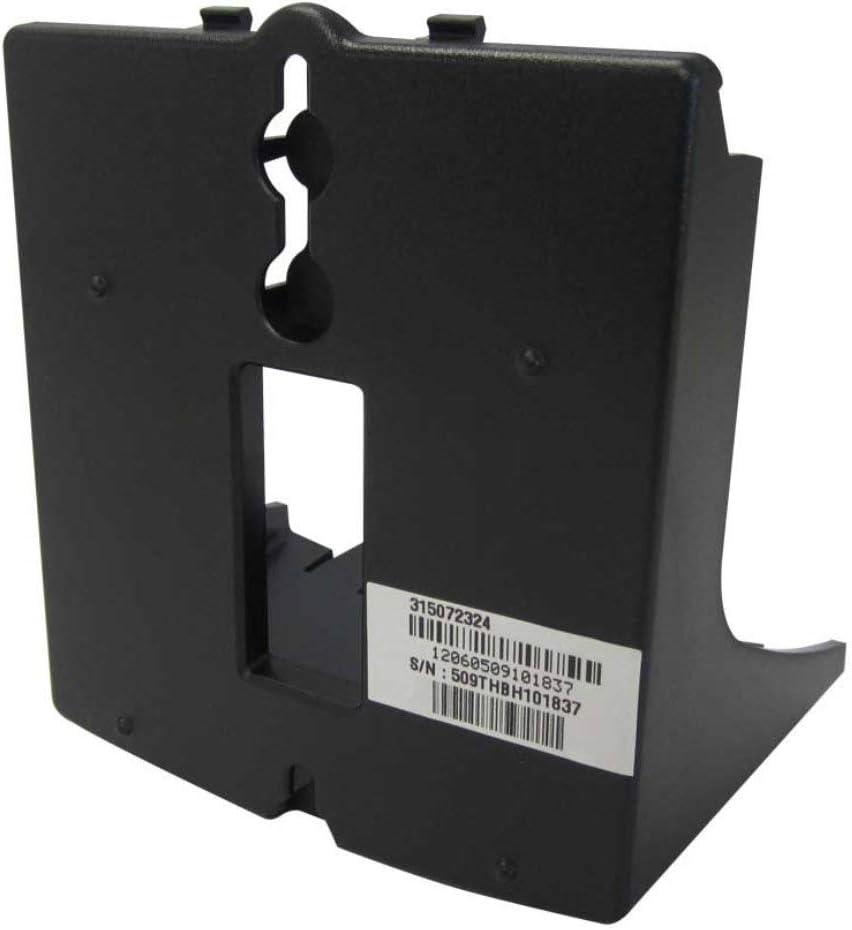
Figure 1: Front view of the iPecs Ericsson 9002 Wall Mount Bracket, highlighting the keyhole slots for wall mounting and the product identification label.
5. Operating Instructions
Once the iPecs Ericsson 9002 device is securely mounted to the bracket, it is ready for use. The bracket provides a stable and elevated position for your device, improving visibility and accessibility. No specific operational steps are required for the bracket itself beyond ensuring the device is properly seated and secure.
6. Maintenance
The iPecs Ericsson 9002 Wall Mount Bracket requires minimal maintenance:
- Cleaning: Wipe the bracket with a soft, dry cloth to remove dust. For stubborn marks, a slightly damp cloth can be used, followed by drying. Avoid abrasive cleaners or solvents.
- Periodic Inspection: Periodically check the mounting screws to ensure they remain tight and secure. Inspect the bracket for any signs of damage or wear.
7. Troubleshooting
If you encounter any issues with your wall mount bracket, consider the following:
- Bracket feels loose: Ensure all mounting screws are properly tightened. If mounted into drywall, verify that the anchors are secure and not stripped. You may need to relocate the bracket or use stronger anchors.
- Device does not fit: Confirm that your device is indeed an iPecs Ericsson 9002 model, as this bracket is specifically designed for it.
- Bracket is not level: Re-check the installation steps, ensuring a level was used during marking and installation. Adjust screws as needed, or remount if significantly off.
8. Specifications
| Feature | Detail |
|---|---|
| Model | LIP-9002WMB.STGBK |
| Brand | Sony Ericsson |
| Mounting Type | Wall Mount |
| Movement Type | Tilt (inherent to device, not bracket) |
| Manufacturer | Ericsson |
| UPC | 702479180275 |
9. Warranty and Support
For warranty information and technical support, please refer to the documentation provided with your iPecs Ericsson 9002 device or contact Sony Ericsson customer service directly. Keep your purchase receipt as proof of purchase for any warranty claims.
For further assistance, you may also contact the seller, Dotcom Computers, through the platform where the purchase was made.