
Tecno Minipod M1
Tecno Minipod M1 User Manual
Model: Minipod M1
Introduction
Thank you for choosing the Tecno Minipod M1 True Wireless Stereo (TWS) Earbuds. This manual provides detailed instructions on how to set up, operate, and maintain your Minipod M1 earbuds to ensure optimal performance and longevity. The Minipod M1 offers a seamless audio experience with its portable charging case, long playback time, IPX4 water resistance, and smart touch controls.
What's in the Box
- 1 x Tecno Minipod M1 TWS Earphone (Left and Right)
- 1 x Portable Charging Case
- 1 x USB Charging Cable
- 1 x User Manual
- 2 x Pairs of Eartips (various sizes)
- 1 x Silicone Protective Cover
- 1 x Hook (Carabiner)

Image: Infographic highlighting key features of the Tecno Minipod M1, including 18 hours non-stop music, ENC Noise Reduction Technology, Bluetooth 5.0, cool touch controls, portable charging case, IPX4 water resistance, and 4.2gm ultra-light body.
Product Overview
The Tecno Minipod M1 consists of two lightweight earbuds and a compact charging case. The case not only protects the earbuds but also provides additional battery life for extended listening.
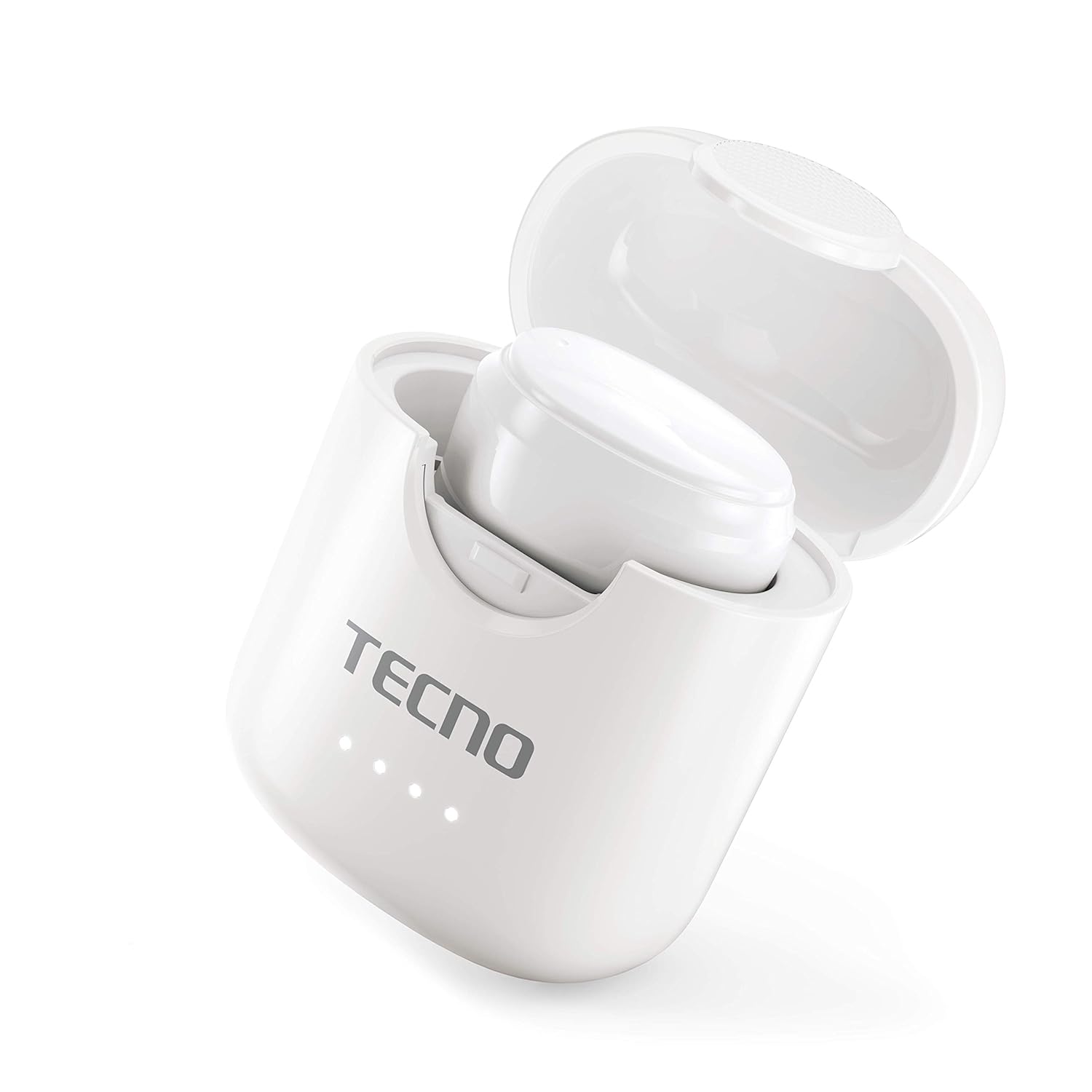
Image: The Tecno Minipod M1 earbud securely placed inside its open charging case, showing the compact design and charging indicators.

Image: A detailed close-up of a single Tecno Minipod M1 earbud, highlighting its ergonomic shape and touch-sensitive surface.
Components:
- Earbuds: Left and Right, each with touch controls and built-in microphone.
- Charging Case: Houses and charges the earbuds, with LED indicators for battery status.
- USB Charging Port: Located on the charging case for power input.
Setup
1. Initial Charging:
Before first use, fully charge the Tecno Minipod M1 earbuds and their charging case.
- Place both earbuds into the charging case. Ensure they are correctly seated in their respective slots.
- Connect the provided USB charging cable to the charging port on the case and the other end to a USB power source (e.g., computer, wall adapter).
- The LED indicators on the charging case will illuminate to show charging status. Once fully charged, the indicators may change color or turn off.

Image: The Tecno Minipod M1 charging case in a closed position, showing the LED indicators on the front that display charging status.
2. Pairing with Your Device:
The Minipod M1 earbuds use Bluetooth 5.0 for a stable and quick connection.
- Open the charging case. The earbuds will automatically enter pairing mode.
- On your smartphone or Bluetooth-enabled device, go to the Bluetooth settings.
- Search for available devices and select "Tecno Minipod M1" from the list.
- Once connected, you will hear a confirmation tone, and the earbuds' indicator lights will change.
- For subsequent uses, the earbuds will automatically connect to the last paired device when taken out of the case.
Operating
Smart Touch Controls:
The Tecno Minipod M1 features intuitive touch controls on each earbud.
| Action | Control |
|---|---|
| Play/Pause Music | Single tap on either earbud |
| Next Track | Double tap on the Right earbud |
| Previous Track | Double tap on the Left earbud |
| Answer/End Call | Single tap on either earbud |
| Reject Call | Press and hold either earbud for 2 seconds |
| Activate Voice Assistant | Triple tap on either earbud |
Wearing the Earbuds:
Choose the correct size of eartips for a comfortable and secure fit. Insert the earbuds gently into your ear canal and twist slightly to ensure a snug fit. A proper fit enhances sound quality and noise cancellation.
Maintenance
Cleaning:
- Regularly clean the earbuds and charging case with a soft, dry, lint-free cloth.
- Do not use abrasive cleaners, alcohol, or chemical solvents.
- Gently remove any earwax or debris from the eartips and speaker mesh using a small, soft brush or cotton swab.
Storage:
- When not in use, always store the earbuds in their charging case to protect them and keep them charged.
- Store the device in a cool, dry place, away from extreme temperatures and direct sunlight.
Water Resistance (IPX4):
The Tecno Minipod M1 earbuds are IPX4 water resistant, meaning they are protected against splashing water from any direction. This makes them suitable for workouts and light rain. However, they are not designed for swimming or submersion in water. Do not charge the earbuds or case if they are wet.

Image: The Tecno Minipod M1 charging case shown with various colorful silicone protective covers, emphasizing the included accessory for better protection and portability.
Troubleshooting
| Problem | Possible Solution |
|---|---|
| Earbuds not charging | Ensure the charging cable is securely connected. Check if the charging case has power. Clean the charging contacts on both earbuds and the case. |
| Cannot pair with device | Make sure Bluetooth is enabled on your device. Ensure earbuds are in pairing mode (open case). Forget "Tecno Minipod M1" from your device's Bluetooth list and try pairing again. Move closer to your device. |
| Only one earbud playing sound | Place both earbuds back into the charging case, close the lid, wait a few seconds, then open the lid and try again. Ensure both earbuds are charged. |
| Low volume or poor sound quality | Adjust the volume on your device. Ensure earbuds are properly seated in your ears. Clean any debris from the speaker mesh and eartips. |
| Microphone not working during calls | Ensure the earbuds are connected as a "headset" profile in your device's Bluetooth settings. Check for any obstructions on the microphone opening. |
Specifications
| Feature | Detail |
|---|---|
| Model Name | Tecno Minipod M1 |
| Bluetooth Version | 5.0 |
| Total Playback Time | Up to 18 hours (6 hours on earbuds + 12 hours with charging case) |
| Water Resistance | IPX4 (Sweat and splash resistant) |
| Noise Cancellation | Environmental Noise Cancellation (ENC) |
| Controls | Smart Touch Controls |
| Earbud Weight | Approx. 4.2g per earbud |
| Dimensions (Product) | 2.4 x 1.7 x 2.7 cm |
| Material | Polycarbonate (PC), Acrylonitrile Butadiene Styrene (ABS) |
| Operating System Compatibility | iOS, Android |
Warranty and Support
The Tecno Minipod M1 comes with a 6-month warranty from the date of purchase. This warranty covers manufacturing defects. Please retain your proof of purchase for warranty claims.
For technical support, warranty claims, or any other inquiries, please contact Tecno customer service through their official website or the contact information provided with your purchase documentation. You can also visit the Tecno Store on Amazon for more information.
Ask a question about this manual
Ask about setup, troubleshooting, compatibility, parts, safety, or missing instructions. Manuals+ will review the question and use this page’s manual context to help answer it.