
1. Introduction
Thank you for choosing the NJSJ H112 Computer Speakers. These 2.0 wired desktop speakers are designed to provide enhanced stereo sound and dynamic RGB lighting for your PC, laptop, and other compatible devices. This manual provides detailed instructions for setup, operation, maintenance, and troubleshooting to ensure optimal performance and longevity of your speakers.
2. Package Contents
Please check the package to ensure all items are present:
- 2 × Wired Speakers
- 1 × User Manual
3. Product Features
- Outstanding Sound Quality: Equipped with a 10W advanced sound drive unit, delivering full-range 2.0 channel enhanced stereo audio. Ideal for online meetings, video chats, music, audiobooks, gaming, and movies.
- Automatically Cycle RGB Lights: Speakers feature RGB cycle lights that automatically change colors during use, enhancing the atmosphere. The lights can be turned on/off via a dedicated switch, but individual color customization is not available.
- Plug and Play & Broad Compatibility: Comes with a 5.24 ft USB cable for power and a 3.5mm AUX cable for audio. No drivers are required. Compatible with any device featuring a standard 3.5mm headphone jack, including desktops, laptops, cellphones, tablets, Mac, projectors, monitors, TVs, Echo Dot, Xbox, and PS4.
- Space-saving Size: Each speaker measures 4.1 x 3.2 x 3.6 inches (LxWxH), making them compact and suitable for placement under computer screens to maintain a tidy desktop. The cable connecting the right and left speakers is 100cm/39.4 inches.

Image: NJSJ H112 Speakers showcasing dynamic RGB lighting effects.
4. Setup Instructions
Follow these steps to connect your NJSJ H112 Computer Speakers:
- Connect Power: Insert the USB plug into an available USB port on your computer, laptop, or a 5V/2A USB power adapter.
- Connect Audio: Insert the 3.5mm AUX audio plug into the headphone jack of your computer, laptop, cellphone, or other audio source.
- Position Speakers: Place the speakers on either side of your monitor or device, ensuring the cables are not strained.
- Power On: Use the in-line control box to turn on the speakers.
- Adjust Volume: Adjust the volume using the in-line controller or your device's volume controls.

Image: Illustration of connecting the USB and 3.5mm AUX cables for power and audio.
Video: A demonstration of the NJSJ H112 Desktop Speakers, showing their design and functionality.
5. Operating Instructions
The NJSJ H112 speakers feature a convenient in-line control box for easy operation:
- Power ON/OFF Button: Press this button to turn the speakers on or off.
- LED Light ON/OFF Button: Press this button to toggle the RGB cycle lights on or off.
- Volume Controller: Slide the wheel up or down to adjust the audio volume.
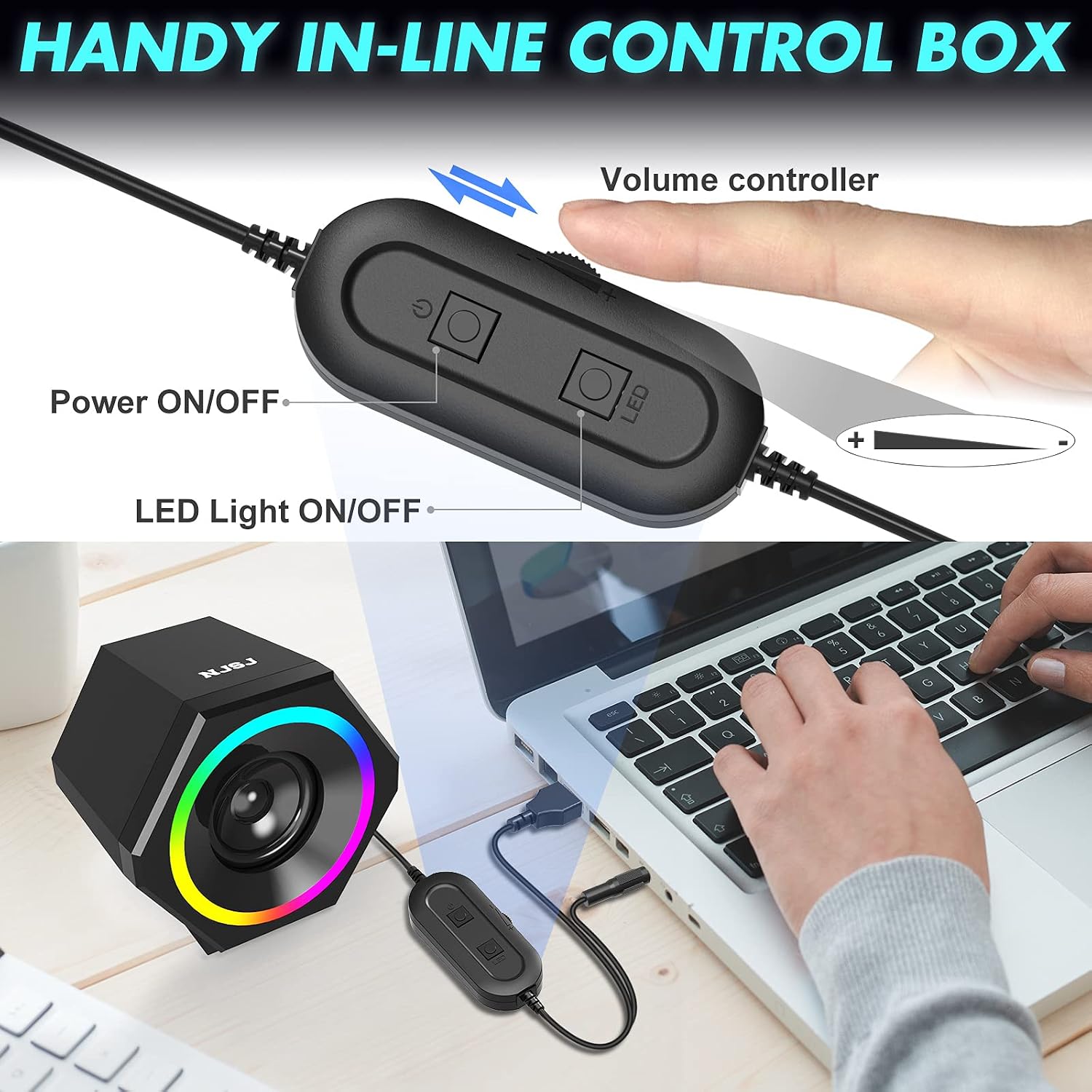
Image: Close-up of the in-line control box, highlighting the power, LED light, and volume controls.
Video: A demonstration of the NJSJ V-138 RGB Computer Speaker, showcasing its features and controls.
6. Maintenance
To ensure the longevity and optimal performance of your speakers, follow these maintenance guidelines:
- Cleaning: Use a soft, dry cloth to clean the speaker surfaces. Avoid using abrasive cleaners, solvents, or harsh chemicals.
- Liquid Exposure: Keep the speakers away from water and other liquids. Do not immerse them in water.
- Storage: Store the speakers in a cool, dry place when not in use. Avoid extreme temperatures.
- Handling: Handle the speakers with care. Avoid dropping them or subjecting them to strong impacts.
7. Troubleshooting
If you encounter any issues with your NJSJ H112 speakers, please refer to the following troubleshooting tips:
| Problem | Possible Cause | Solution |
|---|---|---|
| No sound from speakers |
|
|
| RGB lights not working |
|
|
| Distorted or poor sound quality |
|
|
8. Specifications
| Feature | Specification |
|---|---|
| Brand | NJSJ |
| Model Name | H112 |
| Speaker Type | Dual Speaker |
| Connectivity Technology | Auxiliary, USB |
| Audio Output Mode | Stereo (2.0 Channel) |
| Speaker Maximum Output Power | 10 Watts |
| Input Voltage | 5 Volts |
| Special Feature | LED Light (Cycle RGB) |
| Product Dimensions | 4.1"D x 3.19"W x 3.62"H |
| Item Weight | 1.33 pounds |
| Compatible Devices | Laptop, Personal Computer, Projector, Smartphone, Television |
| Mounting Type | Tabletop Mount |
9. Warranty and Support
NJSJ provides a 24-month product after-sales support for your H112 Computer Speakers. If you have any questions, concerns, or require assistance with your speakers, please contact NJSJ customer service. Refer to the product packaging or the official NJSJ website for specific contact details.