
1. Introduction
This manual provides detailed instructions for the setup, operation, and maintenance of your Metronic 477039 Digital Alarm Clock. Please read this manual thoroughly before using the device to ensure proper function and to maximize your user experience. Keep this manual for future reference.
2. Safety Information
- Ensure the power adapter is compatible with your local power supply.
- Do not expose the device to water, moisture, or extreme temperatures.
- Avoid placing the device near heat sources or in direct sunlight.
- Do not attempt to disassemble or repair the unit yourself. Refer all servicing to qualified personnel.
- Keep out of reach of children.
- Use only the specified battery type (2 x AAA LR3, 1.5V) for backup. Ensure correct polarity when inserting batteries.
3. Package Contents
Verify that all items are present in the package:
- Metronic 477039 Digital Alarm Clock
- Power Adapter
- User Manual (this document)
Note: AAA LR3 batteries for backup are not included and must be purchased separately.
4. Product Overview and Features
The Metronic 477039 is a versatile digital alarm clock designed for convenience and functionality. Key features include:
- AM/FM Tuner: Access up to 10 preset FM radio stations (frequency: 87.5 to 108.0MHz) with automatic search.
- 180° Projector: Project the time onto a wall or ceiling. The projection angle is adjustable from -90° to 90° for optimal viewing.
- Dual Alarm: Set two independent alarms, choosing to wake up to a traditional buzzer or your favorite radio station.
- Sleep/Snooze Functions: The sleep timer allows you to fall asleep to the radio, which will automatically turn off after a set duration (10 to 90 minutes). The snooze function provides temporary alarm suspension.
- Adjustable Backlight: The large red LED display offers adjustable brightness settings (strong, medium, or off) for comfortable viewing.
- Battery Backup: Optional 2x AAA LR3 (1.5V) batteries (not included) preserve time and alarm settings during power outages.

Figure 1: Front view of the Metronic 477039 Digital Alarm Clock, displaying the time 8:00 in red LED digits.
5. Setup
5.1 Power Connection
- Connect the provided power adapter to the DC input port on the back of the alarm clock.
- Plug the power adapter into a standard electrical outlet. The display will illuminate.
5.2 Battery Backup Installation
For uninterrupted timekeeping during power interruptions, install backup batteries:
- Locate the battery compartment on the bottom of the unit.
- Open the battery compartment cover.
- Insert two (2) AAA LR3 (1.5V) batteries, observing the correct polarity (+/-) as indicated inside the compartment.
- Close the battery compartment cover securely.
Note: Batteries are for backup only and do not power the main functions of the clock.
5.3 Initial Time Setting
Upon first power-up or after a prolonged power outage without backup batteries, you may need to set the time:
- Press and hold the TIME SET button (location may vary, refer to device diagram if available).
- While holding TIME SET, use the HOUR and MINUTE buttons (often labeled with arrows or +/-) to adjust the hour and minute respectively.
- Release the TIME SET button to confirm the time.
6. Operating Instructions
6.1 Time Display and Brightness
- The current time is displayed on the large red LED screen.
- To adjust display brightness, press the DIMMER button (or similar labeled button). Cycle through strong, medium, and off settings.
6.2 Radio Operation (AM/FM)
- Turn On/Off: Press the RADIO button to turn the radio on or off.
- Select Band: If applicable, press the BAND button to switch between AM and FM. (This model specifies FM only, 87.5-108.0MHz).
- Automatic Station Search: Press and hold the SCAN or TUNE +/- button for a few seconds to automatically search for and store available FM stations. The device can store up to 10 stations.
- Manual Tuning: Briefly press the TUNE +/- buttons to manually adjust the frequency.
- Recall Presets: Press the PRESET or MEMORY button, then use TUNE +/- to cycle through stored stations.
- Volume Adjustment: Use the VOLUME +/- dial or buttons to adjust the sound level.
6.3 Alarm Settings
The device supports two independent alarms (AL1 and AL2).
- Set Alarm Time:
- Press and hold the ALARM 1 or ALARM 2 button.
- Use the HOUR and MINUTE buttons to set the desired alarm time.
- Release the alarm button to confirm.
- Select Alarm Source (Buzzer/Radio):
- After setting the alarm time, briefly press the ALARM 1 or ALARM 2 button repeatedly to cycle through alarm modes: Buzzer, Radio, or Off. An indicator icon (e.g., bell for buzzer, radio tower for radio) will appear on the display.
- Snooze Function: When the alarm sounds, press the SNOOZE button to temporarily silence it. The alarm will sound again after a few minutes (typically 9 minutes).
- Stop Alarm: To turn off the alarm completely until the next set time, press the ALARM OFF button or the corresponding ALARM 1/2 button once.
6.4 Projection Function
The integrated projector displays the time onto a surface.

Figure 2: The alarm clock projecting the time onto a surface, illustrating the projection feature.
- Activate/Deactivate: Press the PROJECTOR button (or similar icon) to turn the projection on or off.
- Adjust Angle: Manually rotate the projector lens barrel (located on top of the unit) to adjust the projection angle up to 180 degrees.
- Adjust Focus: Rotate the focus ring around the projector lens to sharpen the projected image.

Figure 3: Close-up view of the projector lens on the Metronic 477039, showing the adjustable focus ring.
6.5 Sleep Timer
The sleep timer allows the radio to play for a set duration before automatically turning off.
- While the radio is playing, press the SLEEP button repeatedly to cycle through available sleep timer durations (e.g., 10, 20, 30, 60, 90 minutes, or OFF).
- The radio will automatically turn off after the selected time.
7. Maintenance
- Cleaning: Wipe the unit with a soft, dry cloth. Do not use abrasive cleaners or solvents.
- Battery Replacement: If using backup batteries, replace them annually or when the display shows signs of instability during power outages.
- Storage: If storing the unit for an extended period, remove the backup batteries to prevent leakage.
8. Troubleshooting
| Problem | Possible Cause | Solution |
|---|---|---|
| No display/Unit not powering on | Power adapter not connected or faulty. Power outlet not working. | Check power adapter connection. Try a different power outlet. |
| Alarm does not sound | Alarm not activated. Alarm volume too low (if radio alarm). Incorrect alarm time set. | Ensure alarm is set to Buzzer or Radio mode. Increase radio volume. Verify alarm time. |
| Poor radio reception | Antenna not extended or positioned correctly. Interference from other electronics. | Extend and adjust the FM wire antenna for better reception. Move the unit away from other electronic devices. |
| Projected time is blurry | Projection focus not adjusted. | Rotate the focus ring around the projector lens until the image is clear. |
| Time loses accuracy | Internal clock drift. | This may indicate a unit defect. If persistent, contact customer support. Regularly reset the time if necessary. |
9. Specifications
| Model Number | 477039 |
| Brand | Metronic |
| Display Type | Digital LED (Red) |
| Radio Frequency | FM: 87.5 - 108.0 MHz |
| Power Source | AC Power Adapter (main), 2 x AAA LR3 1.5V batteries (backup, not included) |
| Product Dimensions (L x W x H) | 18.8 x 6.2 x 8.2 cm (approx.) |
| Weight | 440 g (approx.) |
| Special Features | 180° Projector, Dual Alarm, Sleep Timer, Snooze Function, Adjustable Display Brightness, 10 FM Presets |
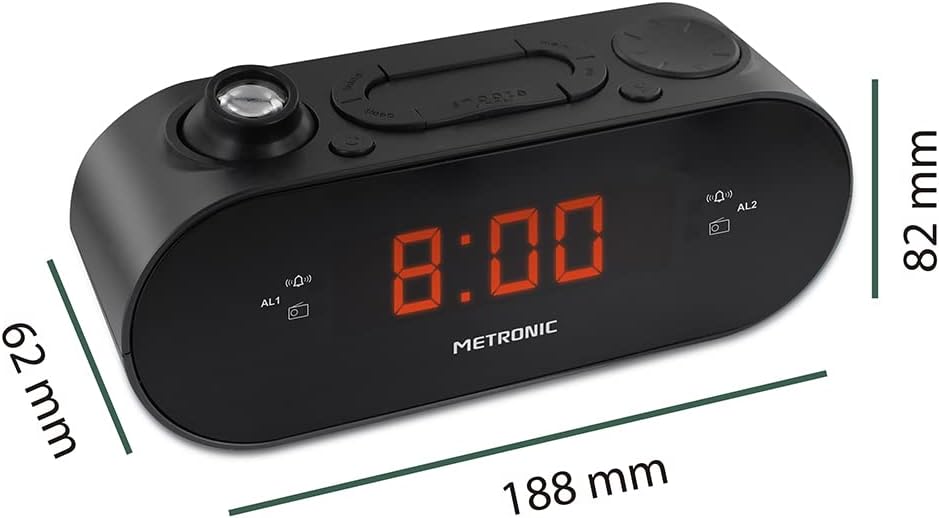
Figure 4: Diagram showing the dimensions of the Metronic 477039 Digital Alarm Clock: 188mm length, 62mm width, and 82mm height.
10. Warranty and Support
Metronic products are designed for reliability and performance. For warranty information or technical support, please refer to the warranty card included with your purchase or visit the official Metronic website. Please have your model number (477039) and purchase details ready when contacting support.
For further assistance, you may visit the Metronic Brand Store on Amazon.