
Introduction
Thank you for choosing Mlambert 132Ft 400 LEDs Multicolor Rope String Lights. This manual provides comprehensive instructions for the safe and effective use of your new lighting product. Please read it thoroughly before installation and operation, and retain it for future reference.
What's in the Box
- 1 x 132ft String Lights with 400 LEDs
- 1 x Adapter
- 2 x Remote Controllers (Battery Included)
- 1 x User Manual

Image: The complete package contents, including the coiled string lights, two remote controls, and the power adapter.
Product Features
- Length & Brightness: 132 feet (40 meters) with 400 bright LEDs, suitable for extensive indoor or outdoor decoration.
- Color Options: Features 17 vibrant single colors and 8 multi-color options.
- Lighting Modes: Offers 8 dynamic lighting modes including Fade, Jump, Asyn Fade, Asyn Jump, In Waves, Strobe, Twinkle, and Breathing.
- Waterproof Design: IP68 rated copper wire wrapped in a transparent pipe ensures durability for outdoor use, even in rain. The controller is IP44 rated; avoid submerging it in water.
- Flexibility: Super flexible and thin design allows for easy bending and shaping to suit various decorative needs.
- Remote Control: Convenient operation within 23 feet (7 meters) to control power, brightness, speed, colors, and modes.
- Timer Function: Built-in timer settings for 4, 6, or 8 hours ON.
- Dual Control: Lights can be controlled via the remote or a small button on the string itself.

Image: The string lights illuminated on a tree during rainfall, demonstrating their IP68 waterproof capability. Note: The controller is IP44 and should not be submerged.

Image: An indoor setting showcasing the 8 dynamic lighting modes, including 'In Waves', 'Strobe', 'Twinkle', 'Breathing', 'Fade (Synchronous/Asynchronous)', and 'Jump (Synchronous/Asynchronous)'.
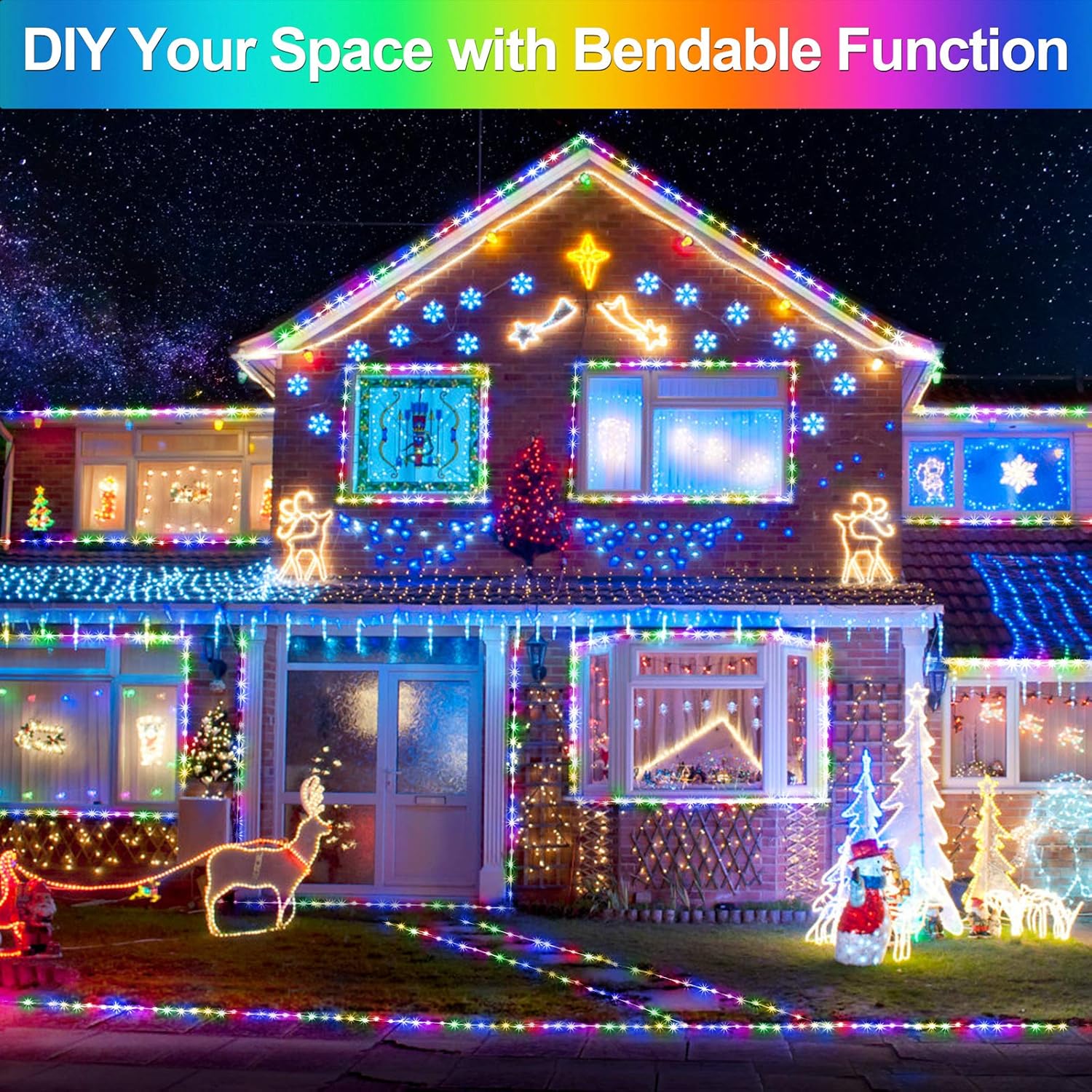
Image: A house exterior adorned with the flexible Mlambert rope lights, illustrating how they can be bent and shaped for creative DIY decorations.
Setup Instructions
- Unpack: Carefully remove all components from the packaging.
- Inspect: Check the string lights, adapter, and remote controls for any visible damage. Do not use if damaged.
- Placement: Determine your desired installation location. The flexible design allows for various applications, such as wrapping around trees, outlining architectural features, or draping along fences. Ensure the location is within reach of a power outlet.
- Secure: Secure the string lights in place using appropriate fasteners (not included) that will not damage the transparent pipe. Ensure the lights are stable and not prone to falling.
- Connect Power: Connect the string lights to the provided adapter. Plug the adapter into a standard 120V power outlet. Ensure the connection is secure.
- Controller Placement: Position the controller (the small box on the string) in a location where it is accessible for the remote control signal and protected from direct water exposure, as it is IP44 rated.
Operating Instructions
Using the Remote Control
The remote control allows for easy operation of your Mlambert string lights from up to 23 feet (7 meters) away. Ensure the remote is pointed directly at the receiver box on the string for optimal performance.
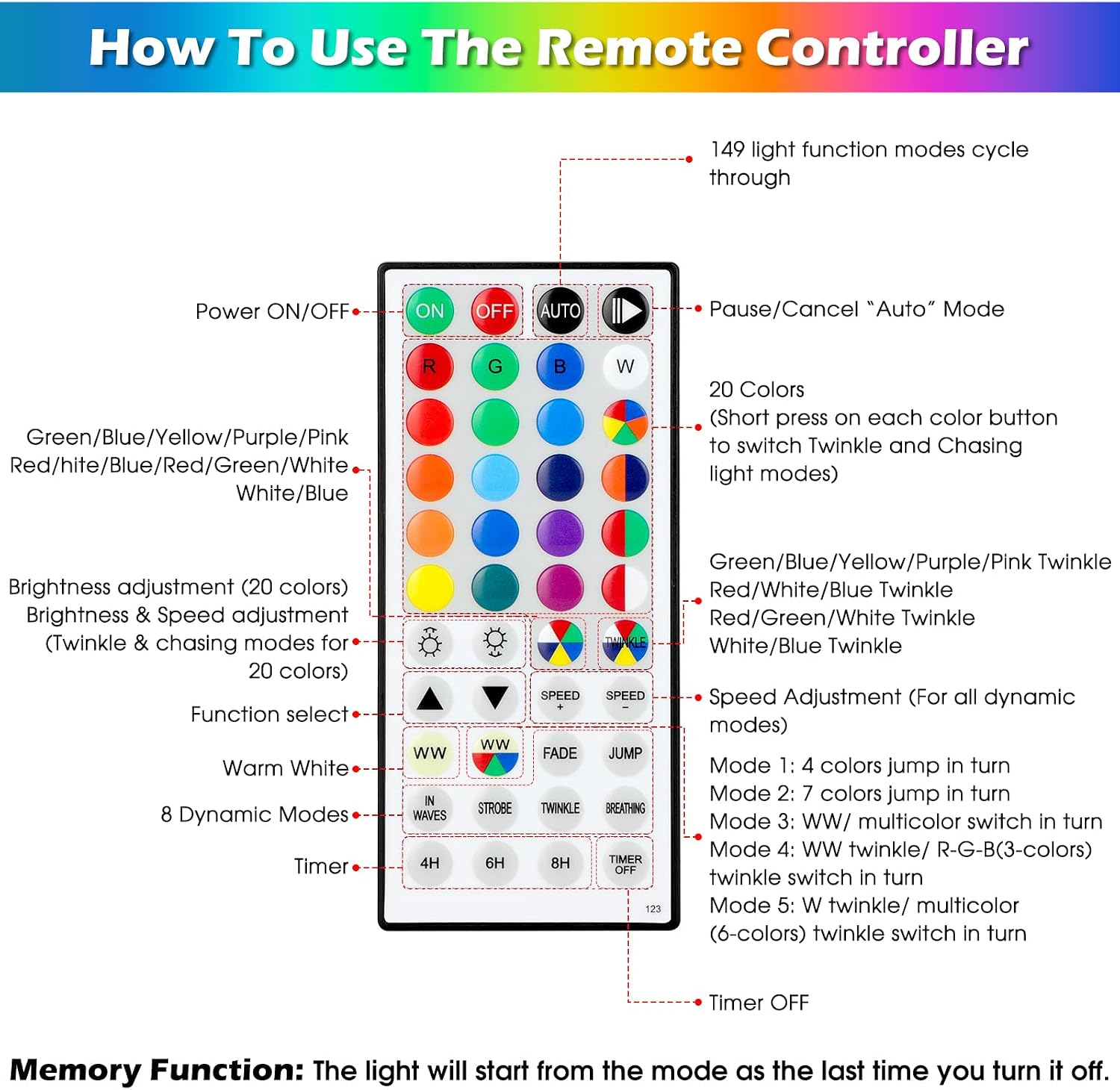
Image: A detailed diagram of the remote control, illustrating the various buttons and their corresponding functions for controlling the lights.
- ON/OFF: Press the ON button to turn the lights on, and OFF to turn them off.
- AUTO: Press the AUTO button to cycle through all available lighting modes automatically. Press again to pause/cancel auto mode.
- Color Selection: Use the 20 color buttons to select a single color or a multi-color option. Short press a color button to switch between twinkle and chasing light modes for that color.
- Brightness Adjustment: Use the ▲ (up arrow) and ▼ (down arrow) buttons to adjust the brightness of the lights.
- Speed Adjustment: For dynamic modes, use the ▲ (up arrow) and ▼ (down arrow) buttons under "SPEED" to increase or decrease the speed of the effect.
- Function Select: Buttons like IN WAVES, STROBE, TWINKLE, BREATHING, FADE, and JUMP allow direct selection of specific lighting modes.
- Warm White (WW): Dedicated buttons for Warm White color options.
- Timer: Set the lights to automatically turn off after a set period. Options include 4H (4 hours), 6H (6 hours), and 8H (8 hours). Press TIMER OFF to deactivate the timer.
Memory Function
The lights feature a memory function. When you turn the lights off and then back on, they will resume the last selected mode and color setting.
Manual Control Button
In addition to the remote, a small button on the string's controller allows you to cycle through the various lighting modes and colors manually.
Maintenance
- Cleaning: To clean the string lights, ensure they are unplugged from the power source. Wipe gently with a soft, damp cloth. Do not use harsh chemicals or abrasive cleaners.
- Storage: When not in use for extended periods, unplug the lights and coil them neatly. Store them in a cool, dry place away from direct sunlight and extreme temperatures.
- Water Resistance: The string lights are IP68 waterproof, meaning they are protected against continuous immersion in water. However, the adapter and controller box are IP44 rated and should be protected from direct heavy rain or submersion.
- Handling: While the lights are flexible, avoid excessive bending or sharp creases that could damage the internal wiring.
Troubleshooting
| Problem | Possible Cause | Solution |
|---|---|---|
| Lights do not turn on. | No power, loose connection, faulty adapter. | Ensure the adapter is securely plugged into a working outlet. Check all connections. Try a different outlet. |
| Remote control not working. | Remote battery low/dead, remote not pointed at receiver, obstruction. | Ensure the remote control battery is functional (it comes with batteries included). Point the remote directly at the small receiver box on the string. Remove any obstructions between the remote and the receiver. |
| Some LEDs display wrong colors or blink out of order. | Internal synchronization issue. | To reset the string of lights, hold down a button on the remote until you see the lights flash quickly in unison. This should re-synchronize the LEDs. |
| Lights are dim or some sections are out. | Power fluctuation, damage to the string. | Ensure stable power supply. If sections remain out or dim after resetting, the string may be damaged. Contact customer support. |
Specifications
| Brand | Mlambert |
| Model Number | DY-0A08-400-1 |
| Length | 132 Feet (40 meters) |
| Number of LEDs | 400 |
| Color Options | 17 Single Colors + 8 Multi-color Options |
| Lighting Modes | 8 (Fade, Jump, Asyn Fade, Asyn Jump, In Waves, Strobe, Twinkle, Breathing) |
| Water Resistance Level (Lights) | IP68 |
| Water Resistance Level (Controller) | IP44 |
| Power Source | Corded Electric |
| Voltage | 120 Volts |
| Wattage | 19.92 watts |
| Control Method | Remote Control, On-string Button |
| Special Features | Blinking, Color Changing, Dimmable, Timer, Twinkling |
| Material | Copper, Plastic |
| Item Weight | 14.9 ounces |
| Package Dimensions | 6.81 x 5 x 2.64 inches |
Warranty and Support
Mlambert products are designed for quality and durability. For any questions, concerns, or warranty inquiries regarding your string lights, please contact Mlambert customer support. Refer to the product packaging or the Mlambert brand store on Amazon for contact information.
You can visit the official Mlambert store for more information: Mlambert Store.