
Important Safety Information
Please read this manual thoroughly before installation and operation. Keep this manual for future reference.
- This water filter system is designed for standard faucets only. It is not compatible with pull-out, handheld, spray-style, or sensor-activated faucets.
- Operating Temperature: 41–100°F (5–38°C). Do not use with water outside this temperature range.
- Operating Pressure: 15–100 psi (100–689 kPa). Ensure your water pressure is within this range.
- This filter does not reduce TDS (Total Dissolved Solids) as it retains beneficial minerals.
- Always use the provided wrench for filter replacement.
- Do not attempt to modify the system or use non-Waterdrop replacement parts.
Product Overview
The Waterdrop WD-CTF-01 is a countertop water filter system designed to provide clean, healthy, and great-tasting drinking water directly from your sink faucet. It features a durable 304 food-grade stainless steel housing and a multi-stage filtration process.

Image: The Waterdrop WD-CTF-01 countertop water filter system, showcasing its stainless steel design and compact size, alongside its product packaging.
Key Features:
- 5-Stage Filtration: Effectively reduces common tap water impurities including chlorine, sediments, heavy metals, and hydrogen sulfide, while retaining beneficial minerals like calcium, magnesium, and potassium.
- Durable Construction: Crafted from 304 food-grade stainless steel, featuring a brushed, fingerprint-resistant, and BPA-free finish.
- High Flow Rate: Delivers up to 1.6 gallons per minute (GPM) of filtered water.
- Long Filter Life: Provides up to 12 months or 8,000 gallons of filtered water (actual performance may vary based on water quality).
- Easy Installation: Designed for standard taps, no drilling or plumbing required.
Compatibility
This system is designed for specific faucet types. Please verify your faucet's compatibility before installation.
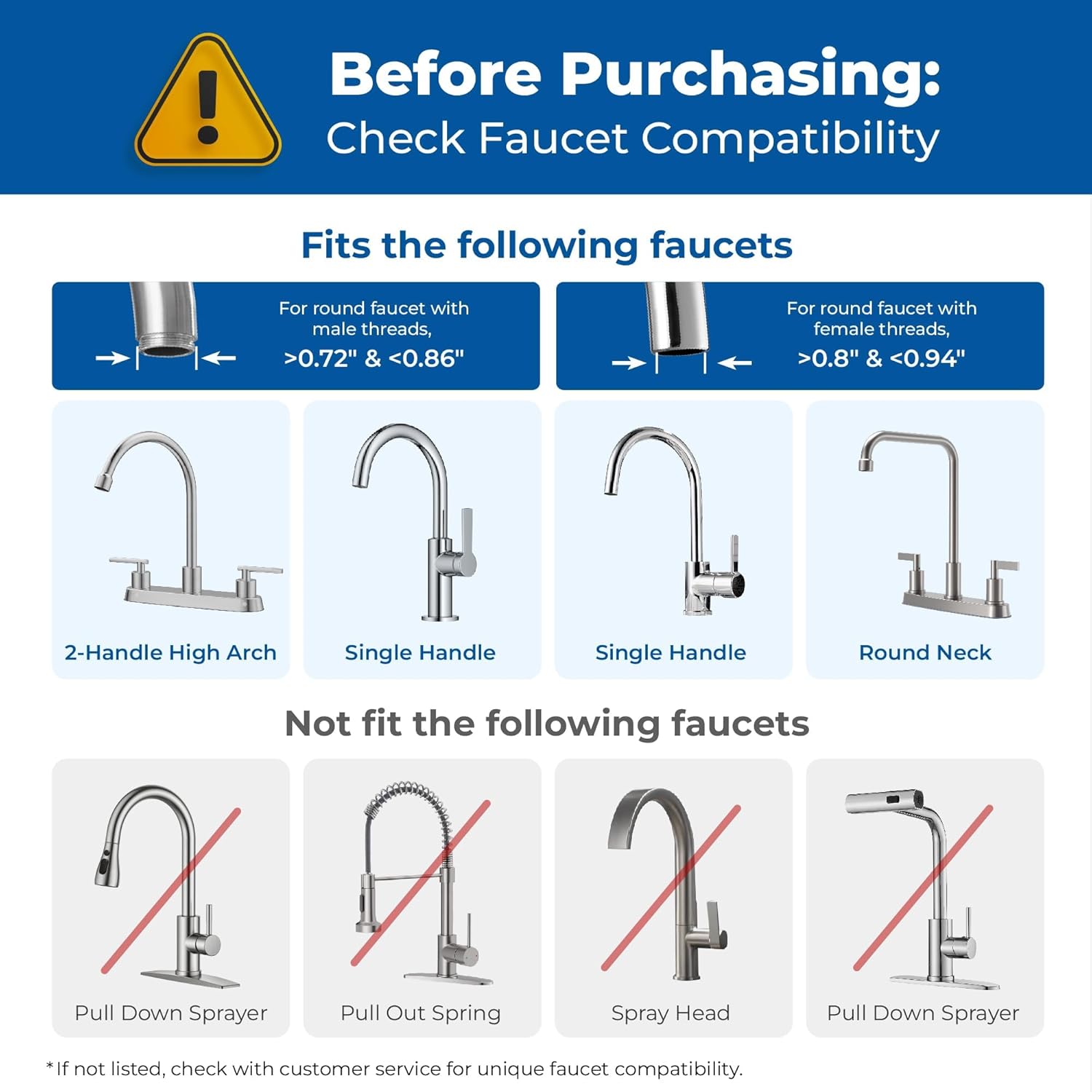
Image: A chart illustrating compatible faucet types (round faucets with male threads 0.72"-0.86" and female threads 0.8"-0.94") and incompatible types (pull-down, pull-out spring, spray head, sensor-activated faucets).
Compatible Faucets:
- Round faucets with male threads: 0.72" < diameter < 0.86"
- Round faucets with female threads: 0.8" < diameter < 0.94"
- Examples include 2-handle high arch, single handle, and round neck standard kitchen faucets.
Incompatible Faucets:
- Pull-down sprayers
- Pull-out spring faucets
- Spray head faucets
- Sensor-activated faucets
- Any non-standard or irregularly shaped faucets.
If you are unsure about your faucet's compatibility, please consult the product images or contact Waterdrop customer service with a photo of your faucet.
Setup & Installation
The Waterdrop WD-CTF-01 is designed for easy, tool-free installation on most standard kitchen faucets. All necessary hardware, including a wrench and various adapters, is included.

Image: A diagram illustrating how to install the filter system on female and male threaded faucets using various adapters (A3, A4, A5, B3, B4).
Installation Steps:
- Prepare Your Faucet: Unscrew and remove the existing aerator from your faucet.
- Identify Faucet Thread Type: Determine if your faucet has male (threads on the outside) or female (threads on the inside) threads.
- Select Adapter:
- For female threaded faucets, choose from adapters A3 (15/16"-27), A4 (13/16"), or A5 (M18.5).
- For male threaded faucets, choose from adapters B3 (55/64") or B4 (M18.5). Note: One adapter (B3) is typically pre-installed on the diverter valve.
- Use the provided coin size comparison (Quarter dollar ≈ A3, 5 cents ≈ A4, A5, B3, 1 cent ≈ B4) if unsure about adapter size.
- Attach Diverter Valve: Screw the appropriate adapter onto your faucet, then attach the diverter valve to the adapter. Ensure a tight, leak-free connection.
- Connect Filter Unit: Connect the hose from the diverter valve to the inlet on the side of the filter unit.
- Position Filter Unit: Place the filter unit on your countertop. Ensure it is stable and the hose is not kinked.
- Flush the Filter: Turn on your cold water faucet and switch the diverter valve to the filtered water setting. Let water run through the filter for 5-10 minutes to flush out any carbon fines and air.
Note: Please keep the provided wrench for future filter replacements.
Operating Instructions
The Waterdrop WD-CTF-01 allows for easy switching between unfiltered tap water and filtered water.

Image: A visual guide demonstrating the diverter valve, allowing users to easily switch between unfiltered tap water and filtered water with a simple lever movement.
Using the System:
- Filtered Water: To dispense filtered water, turn on your cold water faucet and then rotate the lever on the diverter valve to direct water through the filter unit.
- Unfiltered Tap Water: To dispense unfiltered tap water, turn on your cold water faucet and ensure the lever on the diverter valve is set to bypass the filter unit.
The system provides a fast flow rate of up to 1.6 GPM, ensuring quick access to filtered water.
Filtration Technology
The Waterdrop WD-CTF-01 employs a sophisticated 5-stage filtration process to ensure high-quality drinking water.

Image: An exploded view diagram illustrating the five distinct filtration layers: Non-woven fabric, Carbon block, KDF, Mineralization filter media, and PP membrane, showing what each stage targets.
5-Stage Efficient Filtration:
- Non-woven Fabric: Filters out larger particles like sediment and rust.
- Carbon Block: Reduces chlorine, taste, and odor.
- KDF (Kinetic Degradation Fluxion): Further reduces chlorine, heavy metals, and inhibits bacterial growth.
- Mineralization Filter Media: Adds beneficial minerals such as potassium, calcium, sodium, and magnesium, which contribute to a naturally higher TDS level and improved taste.
- PP Membrane: Provides final filtration, removing remaining fine particles and ensuring water clarity.
This comprehensive filtration system is designed to deliver safe, fresh, and great-tasting water by reducing up to 99% of chlorine, heavy metals, hydrogen sulfide, and fluoride, while retaining essential minerals.
Maintenance
Regular filter replacement is crucial for maintaining optimal performance and water quality.

Image: Visual representation of the 1-year replacement cycle and 8,000-gallon capacity, emphasizing zero wastewater and electric-free operation.
Filter Replacement:
- The filter cartridge should be replaced every 12 months or after filtering 8,000 gallons of water, whichever comes first.
- Actual filter life may vary depending on your local water quality and usage.
- To replace the filter, use the wrench provided during initial installation to unscrew the filter housing. Remove the old filter and insert a new Waterdrop WD-CTF-01 replacement filter. Screw the housing back on tightly using the wrench.
- After replacement, flush the new filter for 5-10 minutes to remove any air and carbon fines.
Replacement filters can be found by searching for "WD-CFF-01".
Troubleshooting
If you encounter issues with your Waterdrop WD-CTF-01 system, please refer to the following common problems and solutions:
| Problem | Possible Cause | Solution |
|---|---|---|
| Low Water Flow |
|
|
| Water Leaks |
|
|
| Unpleasant Taste/Odor |
|
|
| TDS Reading is High |
|
|
If the problem persists, please contact Waterdrop customer support for further assistance.
Specifications
| Feature | Detail |
|---|---|
| Brand | Waterdrop |
| Model Name | WD-CTF-01 |
| Product Dimensions | 4.92"L x 3.51"W x 12.51"H |
| Installation Type | Countertop |
| Item Weight | 4.07 Pounds |
| Lower Temperature Rating | 41 Degrees Fahrenheit (5°C) |
| Upper Temperature Rating | 100 Degrees Fahrenheit (38°C) |
| Maximum Flow Rate | 1.6 Gallons Per Minute |
| Operating Pressure Range | 15-100 PSI (100-689 kPa) |
| Supported Water TDS Level Maximum | 1000 PPM |
| Filter Life | Up to 12 months or 8,000 gallons |
| Certifications | NSF/ANSI 42 & 372 Certified |

Image: Features highlighting the durability of the filter, including 100,000 pulse tests, 72H compression tests, 1mm thickened 304 food-grade stainless steel, lead-free, BPA-free, and fingerprint-proof design.

Image: Information on NSF/ANSI 42 & 372 certifications, indicating the system's compliance with standards for chlorine reduction and lead-free materials.
Warranty and Support
Waterdrop provides a standard manufacturer's warranty for its products. For specific warranty terms and conditions, please refer to the warranty card included with your product or visit the official Waterdrop website.
Customer Support:
If you have any questions, require technical assistance, or need to purchase replacement parts, please contact Waterdrop customer support. Contact information can typically be found on the product packaging, the official Waterdrop website, or through your retailer.
For replacement filters, search for model WD-CFF-01.