
1. Introduction
Thank you for purchasing the MUSITREND M316 Bluetooth Turntable. This manual provides essential information for the safe and efficient operation of your record player. Please read it thoroughly before use and retain it for future reference.
2. Package Contents
- MUSITREND M316 Bluetooth Turntable
- Power Adapter
- User Manual
- 45 RPM Adapter
- USB Cable
3. Product Overview
3.1 Controls and Features
Familiarize yourself with the turntable's controls and features:
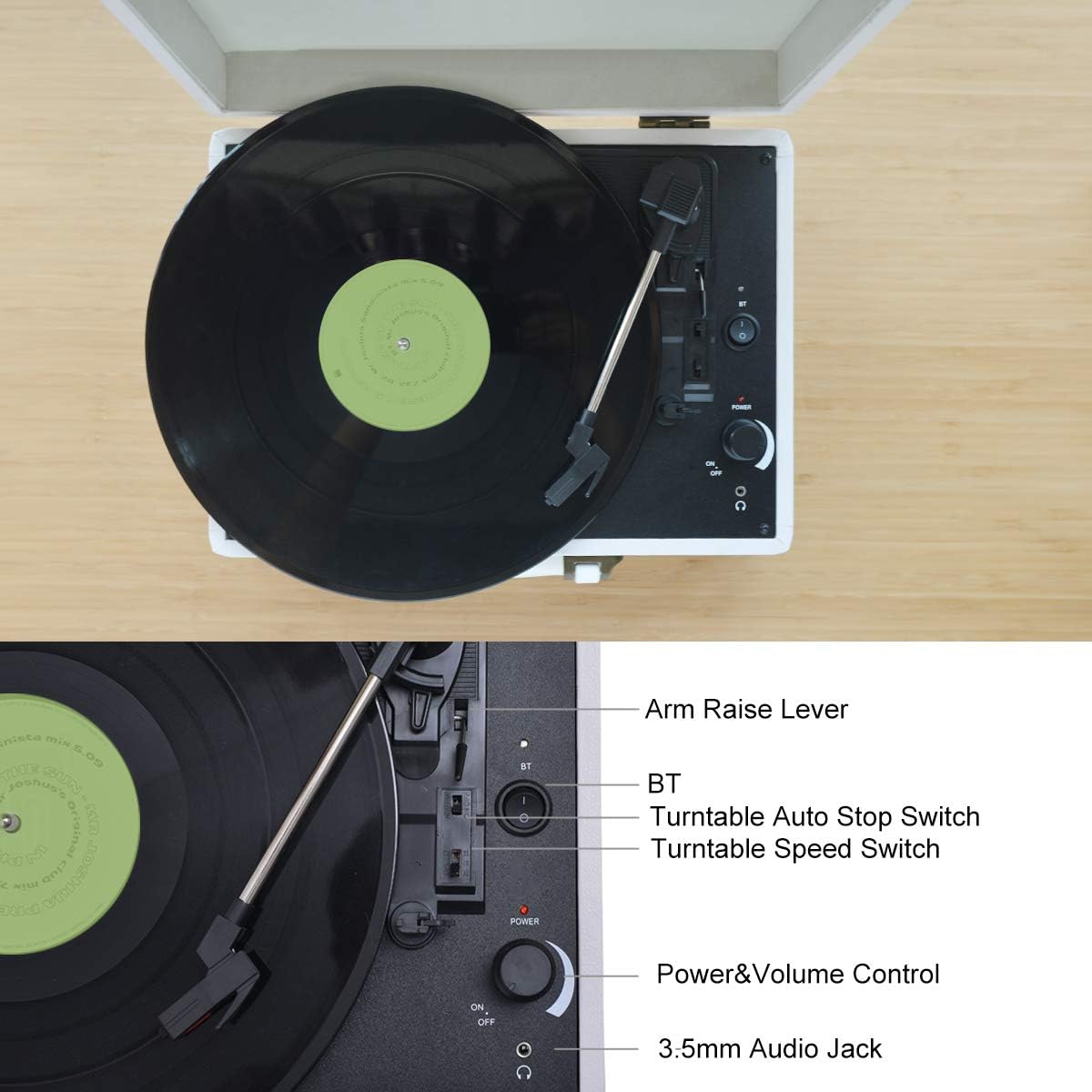
Image 3.1: Top View Controls
This image displays the top panel of the turntable, highlighting key controls such as the Arm Raise Lever, Bluetooth (BT) switch, Turntable Auto Stop Switch, Turntable Speed Switch, Power & Volume Control knob, and 3.5mm Audio Jack.
- Arm Raise Lever: Lifts and lowers the tonearm.
- BT Switch: Activates Bluetooth pairing mode.
- Turntable Auto Stop Switch: Enables or disables automatic stopping of the platter at the end of a record.
- Turntable Speed Switch: Selects playback speed (33, 45, or 78 RPM).
- Power & Volume Control: Turns the unit on/off and adjusts speaker volume.
- 3.5mm Audio Jack: For connecting headphones.
3.2 Rear Panel Connections
The rear panel provides various input and output options:
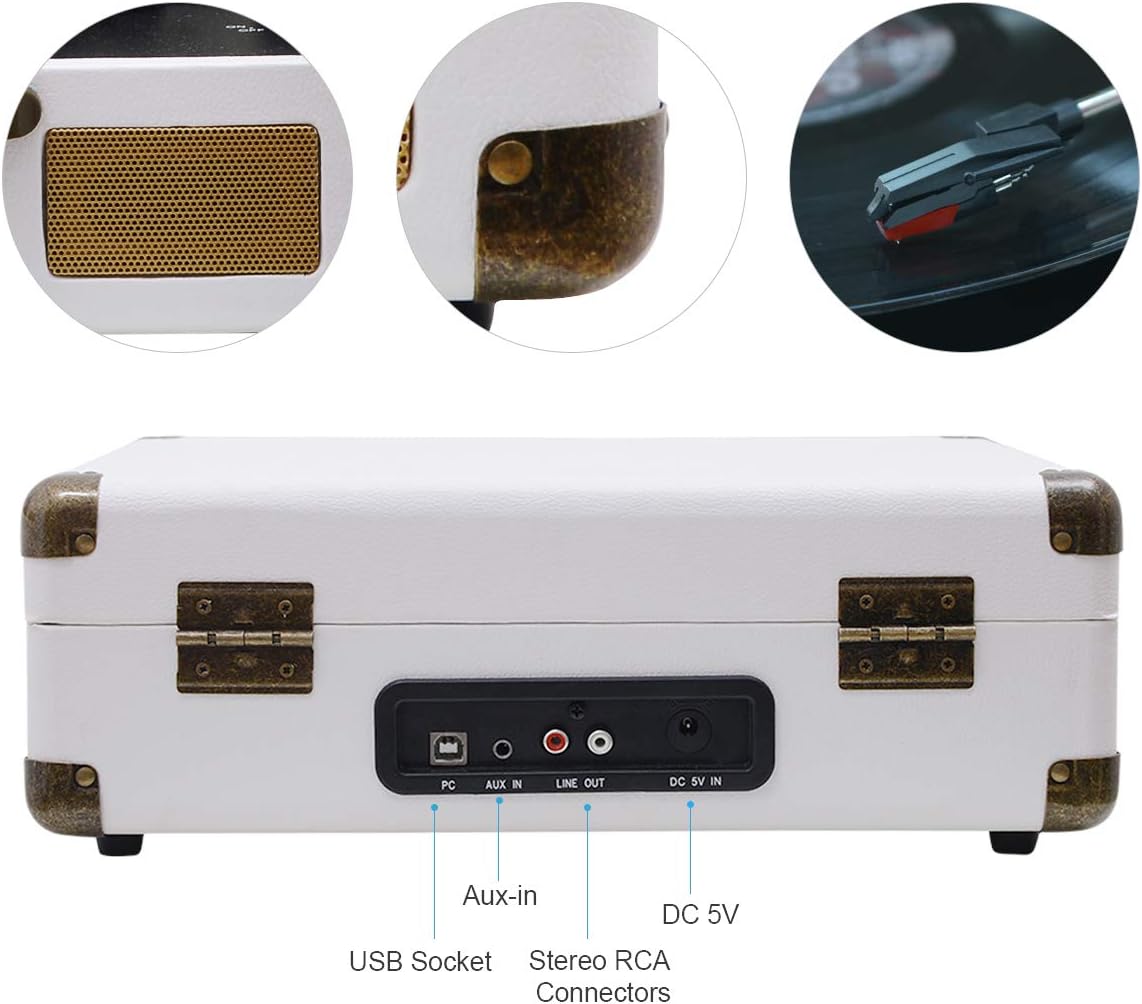
Image 3.2: Rear Panel Connections
This image shows the rear of the turntable, indicating the USB Socket, Aux-in port, Stereo RCA Connectors (Line Out), and DC 5V In power input.
- USB Socket: For connecting to a computer for recording vinyl to digital files.
- Aux-in: 3.5mm input for connecting external audio devices.
- Stereo RCA Connectors (Line Out): For connecting to external amplifiers or powered speakers.
- DC 5V In: Power input for the included adapter.

Image 3.3: Connectivity Options
A closer look at the headphone jack, RCA output, and 3.5mm Aux-in port, illustrating their functions for connecting various audio equipment.
4. Setup
- Unpack: Carefully remove the turntable from its packaging.
- Placement: Place the turntable on a stable, level surface away from direct sunlight, heat sources, and excessive dust or vibrations.
- Power Connection: Connect the DC 5V power adapter to the 'DC 5V In' port on the rear of the turntable and plug the adapter into a wall outlet.
- Dust Cover: Open the dust cover. Remove any protective packaging materials from the platter and tonearm.
- Stylus Protection: Remove the stylus protective cap.
5. Operating Instructions
5.1 Playing Vinyl Records
- Power On: Turn the Power & Volume Control knob clockwise to power on the unit.
- Select Speed: Set the Turntable Speed Switch to the appropriate speed (33, 45, or 78 RPM) for your record. Use the 45 RPM adapter for 7-inch singles if needed.
- Place Record: Place a vinyl record on the turntable platter.
- Auto Stop: If desired, set the Auto Stop Switch to ON for the platter to stop automatically at the end of the record. Set to OFF for continuous play or for records with short lead-out grooves.
- Position Tonearm: Use the Arm Raise Lever to lift the tonearm. Manually move the tonearm over the desired track of the record.
- Lower Tonearm: Gently lower the tonearm onto the record using the Arm Raise Lever. The music will begin to play through the integrated speakers.
- Adjust Volume: Adjust the volume using the Power & Volume Control knob.
- End Playback: At the end of the record (if Auto Stop is ON), the platter will stop. If Auto Stop is OFF, manually lift the tonearm using the lever and return it to the tonearm rest.
5.2 Bluetooth Playback
Connect your Bluetooth-enabled device to the turntable for wireless audio streaming.

Image 5.1: Bluetooth Pairing
This image illustrates the process of pairing a mobile phone with the MUSITREND turntable via Bluetooth for instant wireless audio streaming.
- Power On: Turn the Power & Volume Control knob clockwise to power on the unit.
- Activate Bluetooth: Set the BT Switch to the 'BT' position. The Bluetooth indicator light will flash, indicating pairing mode.
- Pair Device: On your Bluetooth-enabled device (e.g., smartphone, tablet), enable Bluetooth and search for 'MUSITREND'. Select it to pair.
- Confirmation: Once paired, the Bluetooth indicator light will stop flashing and remain solid.
- Play Music: Start playing music on your device. The audio will stream through the turntable's speakers.
- Adjust Volume: Adjust the volume using the Power & Volume Control knob on the turntable and/or your connected device.
5.3 Aux-in Playback
Connect external audio sources using the 3.5mm Aux-in port.
- Power On: Turn the Power & Volume Control knob clockwise to power on the unit.
- Connect Cable: Connect a 3.5mm audio cable (not included) from your external audio device's headphone jack or line-out to the 'Aux-in' port on the turntable.
- Play Music: Start playing music on your external device.
- Adjust Volume: Adjust the volume using the Power & Volume Control knob on the turntable and/or your connected device.
5.4 USB Recording (MP3/WAV Conversion)
Convert your vinyl records into digital MP3/WAV files on your computer.

Image 5.2: USB Recording Setup
This diagram illustrates how to connect the turntable to a computer via USB to convert vinyl records into MP3/WAV format music files.
- Connect to PC: Connect the turntable to your computer using the supplied USB cable.
- Software Installation: Install appropriate recording software on your computer (e.g., Audacity, often available as a free download).
- Software Configuration: Follow the software's instructions to select the turntable as the audio input device.
- Start Recording: Begin recording in the software, then start playing your vinyl record on the turntable (refer to section 5.1).
- Save File: Once the record finishes, stop recording in the software and save the digital audio file in your desired format (MP3, WAV, etc.).
6. Maintenance
6.1 Cleaning the Turntable
- Use a soft, dry cloth to wipe the turntable's exterior.
- Do not use abrasive cleaners, waxes, or solvents.
- Keep the dust cover closed when not in use to prevent dust accumulation.
6.2 Stylus Care
- Handle the stylus with extreme care. Avoid touching the stylus tip.
- Clean the stylus regularly with a soft brush, brushing gently from back to front.
- Replace the stylus approximately every 300-500 hours of playback, or if you notice a decrease in sound quality.
6.3 Record Care
- Keep records clean and free of dust. Use a carbon fiber brush before each play.
- Store records vertically in their sleeves, away from heat and direct sunlight.
7. Troubleshooting
| Problem | Possible Cause | Solution |
|---|---|---|
| No power | Power adapter not connected or faulty. | Ensure power adapter is securely connected to the turntable and a working power outlet. |
| No sound from speakers | Volume too low; Aux-in or Bluetooth mode active; external speakers connected. | Increase volume. Ensure BT switch is in correct position for vinyl playback. Disconnect external speakers if using internal ones. |
| Turntable speed is incorrect | Incorrect speed selected. | Adjust the Turntable Speed Switch to 33, 45, or 78 RPM as required by the record. |
| Skipping or distorted sound | Dirty record; dirty or worn stylus; turntable not level. | Clean the record. Clean or replace the stylus. Ensure the turntable is on a level surface. |
| Bluetooth not pairing | Turntable not in pairing mode; device too far; device already paired. | Ensure BT switch is in 'BT' position and indicator is flashing. Move device closer. Forget 'MUSITREND' on your device and try pairing again. |
8. Specifications
| Feature | Specification |
|---|---|
| Model Name | M316White-EU |
| Product Dimensions (L x W x H) | 39.79 x 37.7 x 16.4 cm |
| Item Weight | 3.02 Kilograms |
| Color | White |
| Material Type | Vinyl |
| Power Type | Electric Cable, Wireless |
| Maximum Rotation Speed | 78 RPM |
| Included Components | Speakers |
| Special Features | Integrated Speaker, Portable, Adjustable Speed |
| Compatible Devices | Headphones, Speaker |
| Motor Type | DC Motor |
| Signal Format | Analog |
9. Warranty and Support
MUSITREND products are designed and manufactured to the highest quality standards. For warranty information or technical support, please refer to the documentation included with your purchase or visit the official MUSITREND website. Please have your model number (M316) and purchase date ready when contacting support.
