
Magic Sing E5+
Magic Sing E5+ Karaoke System User Manual
New Magic Sing E5+ 5000+ Tagalog English Built-in Songs + WiFi Karaoke Two Wireless Mics
Introduction
Welcome to the Magic Sing E5+ Karaoke System. This manual provides detailed instructions for setting up, operating, and maintaining your new karaoke system. The E5+ offers a vast library of built-in songs, Wi-Fi connectivity for streaming, and two wireless microphones for an enhanced karaoke experience. Please read this manual thoroughly to ensure proper usage and to maximize your enjoyment of the product.
What's in the Box
Upon unboxing your Magic Sing E5+ system, please verify that all the following components are included:
- Magic Sing E5+ Main Unit (Karaoke System Base)
- Two (2) Wireless Microphones
- Power Adapter
- Remote Control
- HDMI Cable
- Audio/Video (RCA) Cable
- Song List Book
- 4 AA Batteries (for microphones)

Image: The Magic Sing E5+ main unit with two wireless microphones in their charging/storage slots.
Setup Guide
1. Power Connection
- Connect the provided Power Adapter to the DC IN port on the back of the Magic Sing E5+ main unit.
- Plug the Power Adapter into a standard electrical outlet.
2. Connecting to a Display (TV/Monitor)
The Magic Sing E5+ supports both HDMI and RCA connections.
- HDMI Connection (Recommended for best quality): Connect one end of the HDMI cable to the HDMI OUT port on the main unit and the other end to an HDMI IN port on your TV or monitor.
- RCA Connection: Connect the red, white, and yellow RCA cables to the corresponding AUDIO/VIDEO OUT ports on the main unit and to the AUDIO/VIDEO IN ports on your TV or audio system.
3. Microphone Setup
- Open the battery compartment of each wireless microphone.
- Insert the 4 AA batteries (included) into each microphone, ensuring correct polarity.
- Close the battery compartment securely. The microphones are pre-paired with the main unit.
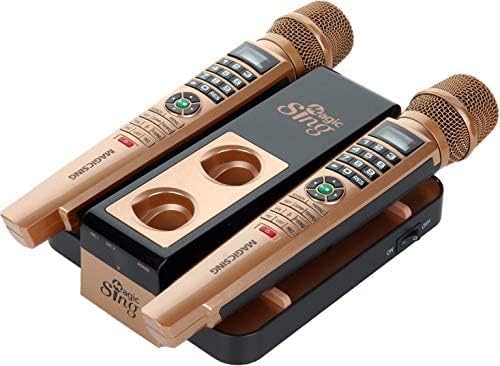
Image: Rear view of the Magic Sing E5+ base unit, highlighting the HDMI, USB, and Audio output ports for connection to a display or sound system.
4. App Download and Connection
Download the free Magic Sing Karaoke app from the Google Play Store (for Android) or the Apple App Store (for iOS) to enhance your experience with song selection and control.
Operating Instructions
1. Power On/Off
To power on the system, ensure the main unit is connected to power and the switch on the side of the base unit is in the 'ON' position. To power off, switch it to 'OFF'.
2. Song Selection
- Using the Remote Control: Use the numeric keypad to enter song numbers from the song list book or navigate through menus.
- Using the Mobile App: Connect your smartphone or tablet to the Magic Sing E5+ via Wi-Fi. Use the app to browse, search, and select songs.
3. Adjusting Audio Settings
Use the remote control or the microphone buttons to adjust the following:
- Volume (VOL): Adjust microphone and music volume.
- Key (KEY): Change the musical key of the song to suit your vocal range.
- Tempo (TEMPO): Adjust the speed of the song.
- Vocal Guide: Enable or disable the vocal guide for assistance during singing.
4. Duet Singing
The system comes with two wireless microphones, allowing for duet performances. Ensure both microphones are powered on and within range of the main unit.
Maintenance
- Cleaning: Use a soft, dry cloth to clean the main unit and microphones. Avoid using liquid cleaners or abrasive materials.
- Battery Replacement: Replace microphone batteries when the low battery indicator appears or when performance degrades. Always use new AA alkaline batteries.
- Storage: When not in use, store the system in a cool, dry place away from direct sunlight and extreme temperatures. It is recommended to remove batteries from microphones if storing for extended periods.
Troubleshooting
| Problem | Possible Cause | Solution |
|---|---|---|
| No sound from TV/speakers | Incorrect audio cable connection; TV input not selected; volume too low. | Check HDMI/RCA connections. Ensure TV input matches the connected port. Increase volume on the system and TV. |
| Microphone not working | Low or dead batteries; microphone not powered on; out of range. | Replace batteries. Ensure microphone power switch is ON. Move closer to the main unit. |
| App not connecting to system | Wi-Fi issue; app not updated. | Ensure both devices are on the same Wi-Fi network. Restart the app and system. Check for app updates. |
| Sound delay (echo) | TV audio processing; incorrect audio settings. | Disable any sound enhancements or processing on your TV. Connect directly to an external audio system if possible. |
Specifications
- Model: E5+
- Item Weight: 4.6 pounds
- Product Dimensions: 12 x 8 x 8 inches
- Country of Origin: China
- Batteries: 4 AA batteries required (included for microphones)
- Color: Brown, Black
- Compatible Devices: Home Theater, Television
- Connector Type: RCA, USB, HDMI
- Speaker Count: 6 (internal to unit, for vocal guide/basic sound)
- Battery Type: Alkaline
- Media Format: Karaoke
- Power Source: Battery Powered (microphones), AC (main unit)
- Voltage: 110V (AC)
- Special Feature: Wireless Microphones
- Recommended Uses: Home Karaoke
Warranty and Support
For detailed warranty information, technical support, or service inquiries, please refer to the warranty card included in your product packaging or visit the official Magic Sing website. Keep your purchase receipt as proof of purchase for warranty claims.
Related documentsE5+


Ask a question about this manual
Ask about setup, troubleshooting, compatibility, parts, safety, or missing instructions. Manuals+ will review the question and use this page’s manual context to help answer it.