
Introduction
This manual provides detailed instructions for installing the Scosche GM0516DDCS Double DIN Radio Install Dash Kit. This kit is designed to facilitate the installation of an aftermarket stereo in select 2004-2021 Buick, Chevrolet, GMC, Hummer, Pontiac, Saturn, and Suzuki vehicles. It includes a dash kit, mounting brackets, a radio replacement interface with a Steering Wheel Control (SWC) harness, and an antenna adapter to ensure a seamless integration with your vehicle's factory systems.
Setup and Installation
Before beginning the installation, ensure you have all necessary tools, including a panel removal tool, screwdriver, wire strippers, and crimpers. Always disconnect the vehicle's battery before starting any electrical work.
1. Disconnect Vehicle Battery
For safety, disconnect the negative terminal of your vehicle's battery. This prevents electrical shorts and potential damage during installation.
Video: Demonstrates disconnecting the negative battery terminal.
2. Review Components and Instructions
Familiarize yourself with all components included in the kit and review the specific radio removal instructions provided for your vehicle model. The kit includes the radio bezel, mounting brackets, a single DIN pocket, a radio replacement interface with SWC harness, and an antenna adapter.

Image: Scosche dash kit components with dimensions for single and double DIN radios. Verify your aftermarket stereo's dimensions against these to ensure compatibility.
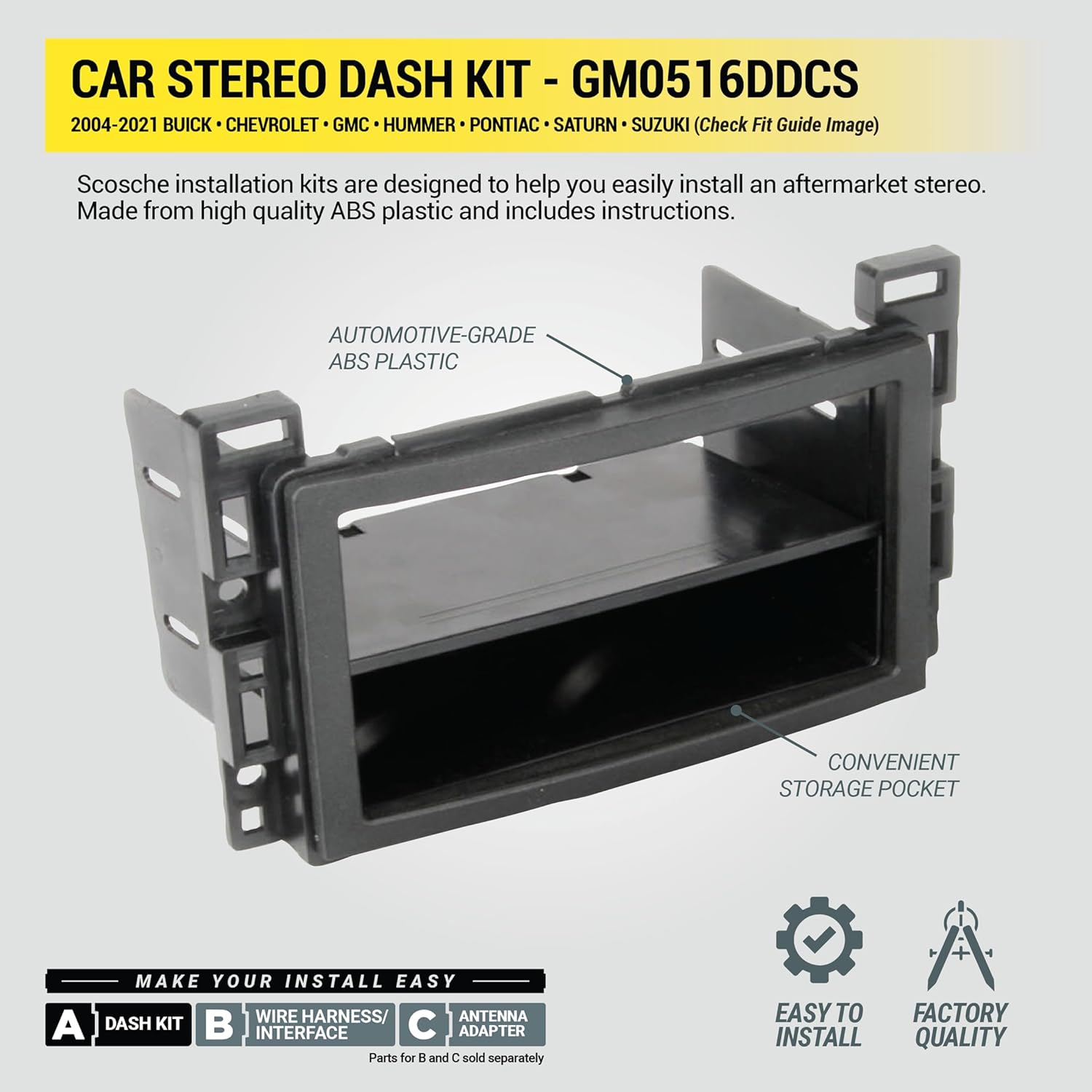
Image: Dash kit, wire harness, and antenna adapter components. These are essential for a complete installation.

Image: Radio replacement interface and SWC harness. This module connects your new stereo to the vehicle's electrical system and retains steering wheel controls.
3. Prepare the Dash Kit
Based on the instructions for your specific application, break off and remove any tabs from the dash kit that are not required for your installation. This ensures a custom fit for your aftermarket stereo.
Video: Demonstrates preparing the dash kit and installing the new stereo into it.
4. Wire the Aftermarket Radio Harness
Connect the aftermarket stereo's harness to the Scosche interface module using splice connectors. Match the wire colors according to the provided wiring diagrams. Some wires, such as amplifier turn-on, parking sense, and Steering Wheel Control connections, may require specific connections not directly part of the main vehicle harness.
5. Remove Factory Stereo
Carefully remove the trim panels surrounding your factory stereo using a panel removal tool. Unscrew and remove the factory radio, then unplug all harnesses from its rear.
6. Install Aftermarket Stereo into Dash Kit
Mount your new aftermarket stereo into the Scosche dash kit using the screws provided with your stereo. Ensure it is securely fastened.
7. Connect Harnesses
Plug the vehicle's factory harness into the Scosche interface module, and then connect the module's output harness to your aftermarket radio. Connect the antenna adapter to the vehicle's antenna cable and the aftermarket radio.
8. Reinstall Dash Trim
Once all connections are made and secured, carefully reinstall the dash trim panels around the new stereo, ensuring all clips are properly engaged.
9. Reconnect Battery and Test
Reconnect the negative battery terminal. Turn on your vehicle and test the functions of your new radio, including audio, steering wheel controls, and any other integrated features.
Operating the Interface Kit
The Scosche GM0516DDCS kit includes a radio replacement interface with a Steering Wheel Control (SWC) harness. This interface allows your aftermarket stereo to communicate with your vehicle's factory systems, retaining essential features such as:
- Steering Wheel Controls: Continue to use your vehicle's steering wheel buttons to control volume, track changes, and other audio functions.
- Factory Chimes: Retains audible safety and warning chimes.
- Accessory Power: Provides a reliable 12V accessory power source for your aftermarket radio.
Refer to your aftermarket stereo's manual for specific operating instructions related to its features and how it interacts with the retained vehicle functions.
Maintenance
The Scosche GM0516DDCS dash kit and interface module are designed for long-term durability and typically require minimal maintenance.
- Cleaning: Clean the dash kit and surrounding areas with a soft, damp cloth. Avoid harsh chemicals or abrasive cleaners that could damage the finish.
- Connection Checks: Periodically check the wiring connections behind the stereo to ensure they remain secure, especially if you experience intermittent issues.
- Software Updates: If your aftermarket stereo or interface module supports firmware updates, refer to the manufacturer's instructions for performing these to ensure optimal performance and compatibility.
Troubleshooting
If you encounter issues after installing your Scosche GM0516DDCS kit, consider the following common troubleshooting steps:
- Radio Not Turning On:
- Ensure the negative battery terminal is securely reconnected.
- Verify the switched 12V accessory wire (typically red) is correctly connected. Some vehicles may require finding an alternative switched 12V source if the factory harness does not provide one directly.
- Check all power and ground connections for continuity and secure crimps.
- Steering Wheel Controls Not Working:
- Confirm the SWC harness is properly connected to both the vehicle and the aftermarket radio.
- Ensure your aftermarket radio is configured to recognize external steering wheel controls. Refer to your radio's manual for setup instructions.
- Some vehicles may require programming the interface module; consult the specific instructions for the interface.
- Oversized Aftermarket Radio:
- While Scosche Double DIN Kits fit true Double DIN stereos (max faceplate opening of 96.8mm x 173mm), some radios labeled as Double DIN are oversized. Minor trimming of the dash kit may be necessary to accommodate larger units.
- No Audio or Poor Sound Quality:
- Check all speaker wire connections for proper polarity and secure connections.
- Ensure any amplifier turn-on wires are correctly connected.
- Vehicle Chimes or Warning Sounds Missing:
- Verify the data interface module is correctly installed and functioning. In some cases, an additional data interface may be required to retain these features, especially in newer vehicles with complex CAN-BUS systems.
Specifications
| Feature | Detail |
|---|---|
| Product Dimensions | 2.7 x 8.5 x 16.25 inches |
| Item Weight | 15.7 ounces |
| Model Number | GM0516DDCS |
| Manufacturer | Scosche |
| Compatibility | Select 2004-2021 Buick, Chevrolet, GMC, Hummer, Pontiac, Saturn, Suzuki vehicles |
| Kit Contents | Radio Bezel and Mounting Brackets, Single DIN Pocket, Radio Replacement Interface with SWC Harness, Antenna Adapter, Instruction Manual |
Warranty Information
The Scosche GM0516DDCS Double DIN Radio Install Dash Kit is backed by Scosche's Limited Lifetime Warranty. This warranty covers defects in materials and workmanship under normal use. Please retain your proof of purchase for warranty claims. For full details on warranty coverage and limitations, refer to the official Scosche warranty policy available on their website or contact customer support.
Customer Support
For technical assistance, troubleshooting, or any questions regarding the installation or operation of your Scosche GM0516DDCS kit, please contact Scosche's Lifetime Tech Support. You can find contact information on the official Scosche website or within the product packaging.
Scosche Website: www.scosche.com


