
ZTE Blade A5 2020 (ZTEA5)
ZTE Blade A5 2020 User Manual
Model: ZTEA5 | Brand: ZTE

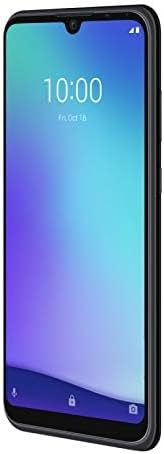
Front view of the ZTE Blade A5 2020 smartphone, showcasing its 6.09-inch HD+ display.
1. Introduction
The ZTE Blade A5 2020 is a smartphone designed for everyday use, featuring a 6.09-inch HD+ display and powered by a Unisoc SC9863A chipset. It comes with 2 GB of RAM and 32 GB of internal storage, running on Android OS v9.0 (Pie). The device is equipped with a 3200 mAh non-removable Li-Ion battery, offering reliable performance for communication and multimedia. Its IPS display provides optimal viewing angles and color accuracy.
2. What's in the Box
Upon unboxing your ZTE Blade A5 2020, you should find the following items:
- ZTE Blade A5 2020 Smartphone
- Adapter
- USB Cable
- Handsfree (Earphones)

The ZTE Blade A5 2020 smartphone displayed alongside its standard accessories: charger adapter, USB cable, and handsfree earphones.
3. Setup
3.1. Inserting SIM and SD Card
Locate the SIM card tray on the side of your device. Use the provided SIM ejector tool to open the tray. Carefully place your Nano-SIM card(s) and/or microSD card into the designated slots. Ensure the cards are correctly oriented before reinserting the tray firmly into the phone.
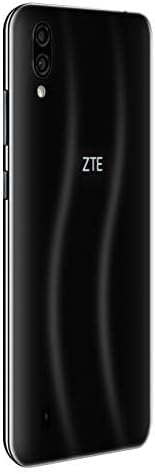
Rear view of the ZTE Blade A5 2020, indicating the location of the dual camera setup and ZTE branding. The SIM tray is typically located on the side edge.
3.2. Initial Power On and Language Selection
Press and hold the power button located on the side of the phone until the ZTE logo appears. Upon the first startup, you will be prompted to select your preferred language. Follow the on-screen instructions to complete the initial setup process, including connecting to Wi-Fi and setting up your Google account.
3.3. Charging the Battery
Before first use, it is recommended to fully charge the device. Connect the USB cable to the phone's micro USB 2.0 port and the other end to the provided adapter. Plug the adapter into a power outlet. The battery indicator on the screen will show charging progress. The phone features a 3200mAh non-removable battery.
4. Operating Instructions
4.1. Power On/Off
- Power On: Press and hold the Power button until the screen lights up.
- Power Off: Press and hold the Power button until the power options appear, then select 'Power off'.
4.2. Basic Navigation
The ZTE Blade A5 2020 operates on Android 9 Pie with a touchscreen interface. Navigate by tapping, swiping, pinching, and spreading fingers on the display. Use the on-screen navigation buttons (Back, Home, Recent Apps) at the bottom of the screen.
4.3. Camera Usage
The phone features a 13MP AF + 2MP FF dual rear camera and an 8MP front camera. Open the Camera app from your home screen or app drawer. Tap to focus, pinch to zoom, and press the shutter button to capture photos or videos. Various modes and settings are available within the camera application.
4.4. Connectivity
The device supports 2G, 3G, and 4G LTE networks. It also includes Bluetooth 4.2 and Wi-Fi for wireless communication. To connect to Wi-Fi, go to Settings > Network & internet > Wi-Fi, then select your desired network and enter the password. For Bluetooth, go to Settings > Connected devices > Bluetooth to pair with other devices.
5. Maintenance
To ensure the longevity and optimal performance of your ZTE Blade A5 2020, follow these maintenance guidelines:
- Cleaning: Use a soft, lint-free cloth to clean the screen and body of the phone. Avoid using harsh chemicals or abrasive materials.
- Temperature: Do not expose the phone to extreme temperatures (hot or cold) or direct sunlight for prolonged periods.
- Water Exposure: The phone is not water-resistant. Avoid contact with liquids.
- Battery Care: While the battery is non-removable, avoid completely draining it frequently. Charge it regularly using the original charger.
- Software Updates: Keep your phone's software updated to benefit from the latest features, security patches, and performance improvements.
6. Troubleshooting
This section addresses common issues you might encounter with your ZTE Blade A5 2020.
6.1. Network Connectivity Issues
The ZTE Blade A5 2020 is an International Model and is primarily compatible with GSM carriers in the US such as T-Mobile, AT&T, and MetroPCS. It will NOT work with CDMA carriers like Verizon, Sprint, or Boost. If you experience network issues, ensure your carrier is GSM-based and that your SIM card is properly inserted and activated.
6.2. Limited Language Options
Some international models may have a limited selection of pre-installed languages. If your desired language is not available during initial setup, check the phone's language settings (Settings > System > Languages & input > Languages) to see if it can be added. If not, third-party language packs or custom ROMs are not officially supported and may void your warranty.
6.3. Screen Unresponsiveness or Glitches
If the touchscreen becomes unresponsive or exhibits glitches, try restarting the phone. Press and hold the power button until the device reboots. If the issue persists, ensure your software is up to date. Persistent issues may indicate a hardware problem.
6.4. Slow Performance
If the phone feels slow or sluggish, try the following:
- Close unused apps running in the background.
- Clear cache data for frequently used apps.
- Ensure sufficient storage space is available (at least 15-20% free).
- Restart the device regularly.
7. Specifications
Detailed technical specifications for the ZTE Blade A5 2020:
| Feature | Detail |
|---|---|
| Product Dimensions | 6 x 4 x 4 inches |
| Item Weight | 5.5 ounces (155 Grams) |
| ASIN | B08D6XNKRC |
| Item Model Number | ZTEA5 |
| Batteries | 1 Lithium Ion batteries required (included) |
| Operating System | Android 9.0 (Pie) |
| RAM | 2 GB |
| Memory Storage Capacity | 32 GB |
| Wireless Communication Technologies | Bluetooth, Cellular |
| Connectivity Technologies | Bluetooth, Wi-Fi, USB |
| GPS | True |
| Display Technology | LCD |
| Human Interface Input | Touchscreen |
| Scanner Resolution | 720 x 1560 pixels |
| Other Camera Features | Rear, Front |
| Audio Jack | 3.5 mm |
| Form Factor | Smartphone |
| Color | Black |
| Battery Capacity | 3200 Milliamp Hours |
| Phone Talk Time | 16 Hours |
| Manufacturer | ZTE |
| Date First Available | July 16, 2020 |
| Standing Screen Display Size | 6.09 Inches |
| CPU Speed | 1.6 GHz |
| Wireless Carrier | Unlocked |
| Cellular Technology | 4G |
A detailed overview of the ZTE Blade A5 2020's technical specifications, including network bands, platform, display, camera, and battery information.
8. Warranty and Support
Please note that the ZTE Blade A5 2020 is an International Model and typically comes with No Warranty in the US. For warranty claims or technical support, it is recommended to contact ZTE's official support channels in the region where the device was originally intended for sale or purchased from an authorized international reseller.
For general inquiries or to find international support contacts, please visit the official ZTE website or refer to the documentation provided with your device at the time of purchase.
Related documentsBlade A5 2020 (ZTEA5)


Ask a question about this manual
Ask about setup, troubleshooting, compatibility, parts, safety, or missing instructions. Manuals+ will review the question and use this page’s manual context to help answer it.