
Introduction
This manual provides instructions for the UBay RM-YD103 replacement remote control, designed for use with various Sony Smart LED TV models. This remote offers a direct replacement solution, requiring no complex programming or pairing for most compatible models. Simply install batteries to begin operation.
Setup and Battery Installation
The UBay RM-YD103 remote control is designed for immediate use with compatible Sony Smart LED TVs. No programming or pairing is required. Follow these steps to install batteries:
- Locate the battery compartment on the back of the remote control.
- Slide the battery compartment cover downwards or in the direction indicated by an arrow to open it.
- Insert two (2) AAA batteries, ensuring the positive (+) and negative (-) terminals align correctly with the markings inside the compartment.
- Replace the battery compartment cover by sliding it back into position until it clicks securely.
Once batteries are installed, the remote is ready for operation.

Basic Operation
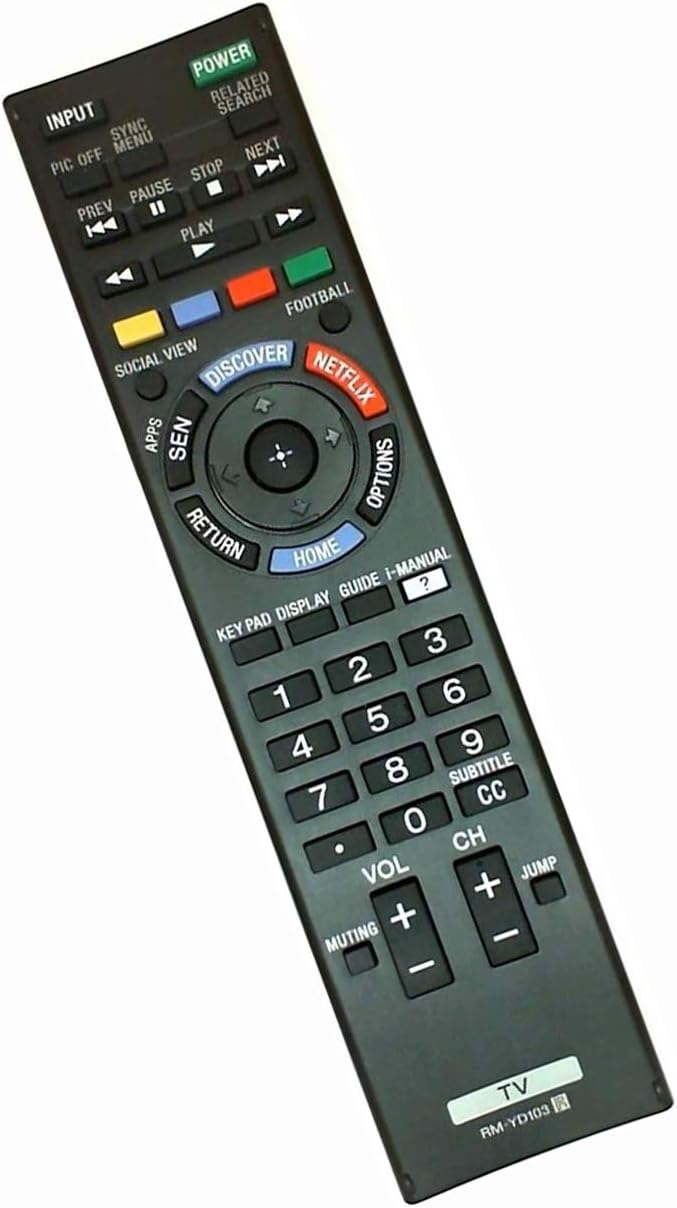
Point the remote control directly at your Sony Smart LED TV. Ensure there are no obstructions between the remote and the TV's infrared receiver.
- Power Button: Press to turn the TV on or off.
- Input Button: Cycles through available input sources (HDMI, AV, etc.).
- Number Pad (0-9): Directly enter channel numbers.
- Volume Up/Down (+/-): Adjusts the TV's volume.
- Channel Up/Down (+/-): Changes TV channels.
- Muting Button: Mutes or unmutes the TV audio.
- Navigation Pad (Up/Down/Left/Right/Enter): Used to navigate menus and select options.
- HOME Button: Accesses the TV's main menu or Smart TV interface.
- RETURN Button: Goes back to the previous screen or menu.
- NETFLIX Button: Provides direct access to the Netflix application.
- DISCOVER Button: Accesses the TV's discovery features.
- SEN Button: Accesses the Sony Entertainment Network.
- OPTIONS Button: Displays context-sensitive options for the current screen.
- Media Control Buttons (Play, Pause, Stop, Prev, Next): Controls media playback.
Compatible Sony TV Models
The UBay RM-YD103 remote control is compatible with the following Sony Smart LED TV models:
- KDL-32W700B
- KDL-40W580B
- KDL-40W600B
- KDL-42W700B
- KDL-48W580B
- KDL-48W590B
- KDL-48W600B
- KDL-50W700B
- KDL-55W700B
- KDL-60W590B
- KDL-60W600B
- KDL-60W610B
- KDL-60W630B
- KDL-60W630B/2
- KDL-60W630B/Z
- XBR-55X800B
- XBR-65X800B
Specifications
| Model Number | UBay RM-YD103 |
| Product Dimensions | 7.8 x 1.8 x 0.7 inches |
| Item Weight | 2.89 ounces |
| Compatible Devices | Television (Sony Smart LED TVs) |
| Special Feature | Universal (for specified Sony models) |
| Color | Black |
| Power Source | 2 x AAA Batteries (not included) |
Troubleshooting
- Remote not responding:
- Ensure new batteries are correctly installed with proper polarity.
- Check for any obstructions between the remote and the TV's infrared sensor.
- Verify that the remote is pointed directly at the TV.
- Confirm your TV model is listed in the compatibility section.
- Specific buttons not working:
- Clean the remote's surface and buttons to ensure no debris is interfering with button presses.
- Replace batteries with fresh ones, even if other buttons appear to work, as low power can affect certain functions.
Care and Maintenance
- Keep the remote control dry. Avoid exposure to liquids.
- Do not expose the remote to extreme temperatures or direct sunlight.
- Clean the remote with a soft, dry cloth. Do not use abrasive cleaners or solvents.
- Remove batteries if the remote will not be used for an extended period to prevent leakage.
Warranty and Support
For any questions, technical support, or warranty inquiries regarding your UBay RM-YD103 remote control, please contact UBay customer service through your original point of purchase or the manufacturer's official support channels. Please retain your purchase receipt for warranty validation.