
1. Introduction
This manual provides essential information for the proper installation, operation, and maintenance of your Axiom ONS-SE-155-1510-AX CWDM SFP Network Transceiver Module. Please read this manual thoroughly before using the product to ensure optimal performance and safety.
2. Product Overview
The Axiom ONS-SE-155-1510-AX is a high-performance CWDM Small Form-Factor Pluggable (SFP) transceiver module designed for optical data communication applications. It provides a fiber optic interface for network devices, enabling reliable and efficient data transmission over optical fiber.
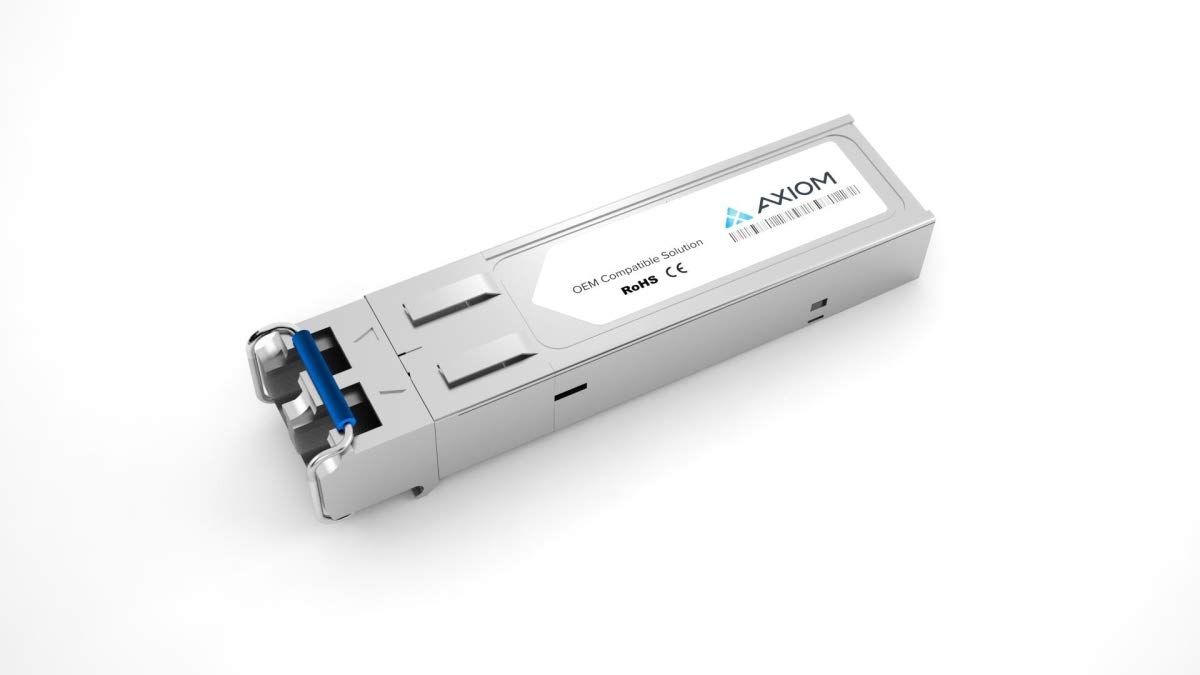
Figure 1: Axiom ONS-SE-155-1510-AX CWDM SFP Network Transceiver Module. This image displays the compact gray fiber optic module with an LC connector, illustrating its physical form factor.
Key Features:
- 100% Guaranteed Compatibility in all OEM applications.
- Fully compliant with the Multi-Source Agreement (MSA) standards, ensuring broad compatibility with MSA-compliant platforms.
- Designed for OC-3/STM-1 applications, operating at a 1510nm CWDM wavelength.
- Fiber optic interface type: SFP with LC connector.
- Compact dimensions: 2.22" (56.5 mm) width, 0.528" (13.4 mm) depth, 0.335" (8.5 mm) height.
3. Safety Information
Observe the following safety precautions to prevent injury and damage to the product:
- Laser Safety: This product contains a laser. Do not stare directly into the optical port when the module is powered on, as this can cause eye damage.
- Electrostatic Discharge (ESD): Always handle the SFP module with proper ESD precautions. Use an anti-static wrist strap and work on an ESD-safe surface.
- Handling: Avoid touching the electrical contacts or optical interfaces. Hold the module by its metal casing.
- Environment: Operate the module within its specified environmental conditions (temperature, humidity) to prevent malfunction.
4. Package Contents
Verify that your package contains the following item:
- 1 x Axiom ONS-SE-155-1510-AX CWDM SFP Transceiver Module
5. Setup
Follow these steps to install the SFP transceiver module into a compatible network device:
- Prepare the Device: Ensure the network device (switch, router, etc.) is powered off or the SFP port is disabled, if possible, to prevent accidental damage.
- Remove Protective Cap: Carefully remove the protective dust cap from the SFP module's optical port. Store the cap for future use.
- Insert SFP Module: Orient the SFP module correctly with the label facing up (or as indicated by your device's SFP slot). Gently slide the SFP module into the designated SFP slot until it clicks into place. Ensure it is fully seated.
- Connect Fiber Optic Cable: Remove the protective dust caps from your LC fiber optic cable. Connect the LC connector of the fiber optic cable to the SFP module's optical port. Ensure a secure connection.
- Power On/Enable Port: Power on the network device or enable the SFP port.
6. Operating Instructions
Once installed, the SFP module operates automatically. Verify its status using the network device's interface:
- Link Status Indicators: Check the link/activity LEDs on your network device's SFP port. A solid green or amber light typically indicates a successful link, while a blinking light indicates data activity. Refer to your network device's manual for specific LED interpretations.
- Device Management Interface: Access your network device's command-line interface (CLI) or web-based management interface to check the SFP module's status, link speed, and optical power levels.
7. Maintenance
The Axiom SFP module requires minimal maintenance. Follow these guidelines:
- Keep Clean: Always keep the optical ports clean. Use only approved fiber optic cleaning tools and methods. Dust and contaminants on the optical interface can significantly degrade performance.
- Protect Ports: When the SFP module is not connected to a fiber optic cable, always keep the protective dust cap on the optical port to prevent contamination.
- Storage: Store the module in a dry, dust-free environment within its specified temperature range when not in use.
8. Troubleshooting
If you encounter issues with your SFP module, consider the following:
- No Link Light:
- Ensure the SFP module is fully seated in the slot.
- Verify the fiber optic cable is correctly connected at both ends and is not damaged.
- Check if the fiber optic cable type (e.g., single-mode) matches the SFP module requirements.
- Clean the optical connectors on both the SFP module and the fiber optic cable.
- Confirm the remote device is powered on and its corresponding SFP port is active.
- Poor Performance/Intermittent Connection:
- Inspect fiber optic cables for bends, kinks, or damage.
- Clean all optical connectors.
- Check the optical power levels via the network device's management interface. Ensure they are within the SFP module's specified operating range.
- Module Not Recognized:
- Re-seat the SFP module.
- Ensure your network device's firmware is up to date and supports the SFP module.
- Try the module in a different SFP slot or a different compatible device, if available.
9. Specifications
| Feature | Specification |
|---|---|
| Brand | Axiom |
| Model Number | ONS-SE-155-1510-AX |
| SFP Transceiver Type | Fiber Optic |
| Interface Type | SFP |
| Fiber Optic Connector | LC |
| Wavelength | 1510 nm (CWDM) |
| Compatibility | MSA Compliant, Cisco OC-3/STM-1 |
| Product Color | Gray |
| Width | 2.22" (56.5 mm) |
| Depth | 0.528" (13.4 mm) |
| Height | 0.335" (8.5 mm) |
| Item Weight | 0.64 ounces |
| Manufacturer | AXIOM MEMORY SOLUTION,LC |
| Date First Available | July 17, 2020 |
10. Warranty and Support
Axiom products are designed for reliability and performance. For specific warranty information pertaining to your ONS-SE-155-1510-AX module, please refer to the warranty documentation included with your purchase or visit the official Axiom website.
For technical support, troubleshooting assistance beyond this manual, or to inquire about product service, please contact Axiom customer support through their official channels. Have your product model number (ONS-SE-155-1510-AX) and purchase details ready when contacting support.