
1. Product Overview
The Infinity Reference-7005A is a 5-channel car audio amplifier designed to power a complete car stereo system. It features variable electronic crossovers and a bass boost circuit for audio fine-tuning. Its compact, low-profile design allows for installation in various vehicle types with limited space. The amplifier includes on-board protection circuitry against shorts, temperature fluctuations, overvoltage, and undervoltage, indicated by an LED.
Key Features:
- Integrated 5-channel amplification for a full stereo system.
- Variable electronic crossovers and bass boost for precise audio adjustment.
- Low-profile chassis and small footprint for versatile installation.
- Built-in protection circuitry with LED indicator for shorts, temperature, overvoltage, and undervoltage.
- Includes an RBC wired remote for convenient bass level adjustment.
2. Package Contents
Verify that all items are present in the package before installation.
- One Reference 7005A five-channel amplifier
- Four bare wire-to-RCA adapters
- Six 30A ATO fuses (three installed, three spare)
- Remote bass control module
- 16.5' Remote control cable (RJ-25 plugs on both ends)
- Two self-tapping screws for remote (M3 x 15mm)
- Four mounting screws (M4 x 53mm)
- Owner's Manual
- Two Infinity decals
- One logo badge

Image: Bare wire-to-RCA adapters and the remote bass control module included with the amplifier.
3. Setup and Installation
Proper installation is crucial for optimal performance and safety. If you are unsure about any steps, consult a professional installer.
3.1 Mounting the Amplifier
- Choose a mounting location that is dry, well-ventilated, and protected from direct sunlight or excessive heat.
- Ensure the location allows for adequate air circulation around the amplifier's heat sink.
- Use the provided mounting screws to secure the amplifier firmly to a solid surface.
3.2 Wiring Connections
Refer to the diagram below for proper wiring of power, ground, remote, input, and output connections.
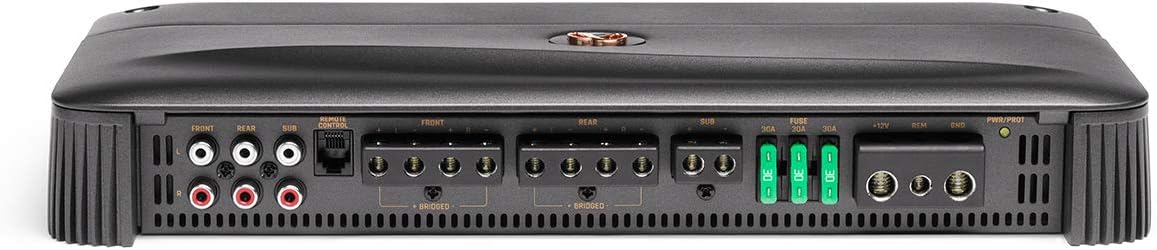
Image: Rear panel of the amplifier detailing all connection terminals.
- Power Connection (+12V): Connect a heavy-gauge power cable directly from the vehicle's positive battery terminal to the +12V terminal on the amplifier. Ensure an appropriate fuse is installed within 18 inches of the battery.
- Ground Connection (GND): Connect a heavy-gauge ground cable from the GND terminal on the amplifier to a clean, unpainted metal surface on the vehicle's chassis. Ensure a solid electrical connection.
- Remote Turn-On (REM): Connect a remote turn-on wire from your head unit's remote output to the REM terminal. This activates the amplifier when the head unit is turned on. The amplifier also features a DC offset sensing turn-on for head units without a dedicated remote output.
- Input Connections: Connect RCA cables from your head unit's pre-amp outputs (Front, Rear, Sub) to the corresponding RCA input jacks on the amplifier. If your head unit lacks RCA outputs, use the bare wire-to-RCA adapters for high-level input.
- Speaker Output Connections: Connect your speakers to the amplifier's speaker output terminals (FRONT, REAR, SUB). Observe correct polarity (+ and -) for each speaker.
3.3 Remote Bass Control Installation
The RBC wired remote allows for convenient adjustment of the subwoofer level from the driver's seat.
- Mount the remote bass control module in an accessible location using the provided self-tapping screws.
- Connect the 16.5' remote control cable from the module to the 'REMOTE CONTROL' port on the amplifier.
4. Operation and Adjustments
After installation, fine-tune the amplifier settings for optimal audio performance.

Image: Top panel of the amplifier displaying various control settings for gain, crossover, and bass boost.
4.1 Gain Adjustment
The gain controls (GAIN MIN/MAX) match the amplifier's input sensitivity to the output of your head unit. Start with the gain set to minimum and slowly increase it until you hear distortion, then back off slightly. This ensures maximum clean signal from your head unit.
4.2 Crossover Settings
The amplifier features variable electronic crossovers for the front, rear, and subwoofer channels:
- FRONT/REAR X-OVER: Adjust the high-pass filter (HPF) frequency to prevent low frequencies from reaching your full-range speakers.
- SUB X-OVER: Adjust the low-pass filter (LPF) frequency to ensure only low frequencies are sent to your subwoofer.
4.3 Bass Boost
The BASS BOOST control allows you to increase the bass output at a specific frequency for the subwoofer channel. Use this sparingly to avoid distortion.
4.4 Phase Switch (SUB)
The PHASE switch (0°/180°) for the subwoofer channel helps to align the subwoofer's output with the rest of your speakers. Experiment with both settings to find the one that provides the most impactful bass.
4.5 Remote Bass Control
Use the wired remote bass control to adjust the subwoofer output level conveniently while listening to music.
5. Maintenance
To ensure the longevity and optimal performance of your amplifier, follow these maintenance guidelines:
- Cleaning: Periodically wipe the amplifier's exterior with a soft, dry cloth. Avoid using harsh chemicals or abrasive cleaners.
- Ventilation: Ensure that the amplifier's cooling fins are free from dust and debris to maintain proper heat dissipation. Do not block any ventilation openings.
- Connections: Regularly check all power, ground, remote, and speaker connections to ensure they are secure and free from corrosion. Loose connections can lead to poor performance or damage.
- Fuses: If the amplifier stops working, check the fuses. Replace blown fuses only with fuses of the same type and rating (30A ATO).
6. Troubleshooting
The Infinity Reference-7005A amplifier includes built-in protection features. If the protection LED illuminates or the amplifier stops functioning, refer to the following table:
| Symptom | Possible Cause | Solution |
|---|---|---|
| No power / Power LED off | Blown fuse, loose power/ground connection, no remote turn-on signal. | Check and replace fuses. Verify all power, ground, and remote connections are secure. Ensure head unit is on and sending a remote signal. |
| Protection LED on | Short circuit in speaker wiring, amplifier overheating, overvoltage/undervoltage. | Check speaker wires for shorts to ground or each other. Ensure proper ventilation. Verify vehicle's charging system voltage (12-14V). Allow amplifier to cool down. |
| No audio output | Loose RCA/speaker connections, incorrect gain settings, head unit issue. | Verify all input and output connections. Adjust gain settings. Test head unit with another amplifier or speakers. |
| Distorted audio | Gain set too high, incorrect crossover settings, poor quality input signal. | Reduce gain. Adjust crossover frequencies. Ensure head unit output is clean. |
| Weak bass | Low-pass filter set too high/low, phase incorrect, bass boost too low. | Adjust LPF frequency. Experiment with subwoofer phase (0°/180°). Increase bass boost or remote bass control. |
7. Specifications
Detailed technical specifications for the Infinity Reference-7005A amplifier.
| Specification | Value |
|---|---|
| Model Number | Reference-7005A |
| Number of Channels | 5 |
| Output Power | 600 Watts (Total) |
| Maximum Supply Voltage | 14 Volts |
| Minimum Supply Voltage | 12 Volts |
| Item Dimensions (L x W x H) | 8.94 x 14.96 x 4.45 inches |
| Item Weight | 6 pounds |
| Mounting Type | Ground |
| Specification Met | CEA-2006 |
| Date First Available | July 8, 2020 |
8. Warranty and Support
Infinity products are designed for reliability and performance. For warranty information, please refer to the warranty card included with your product or visit the official Infinity website. For technical support or service inquiries, contact Infinity customer service through their official channels.
Keep your proof of purchase for any warranty claims.


