
Fastrack NN38054PM03
Fastrack Mean Machines Analog-Digital Watch User Manual
Model: NN38054PM03
1. Introduction
This manual provides comprehensive instructions for the Fastrack Mean Machines Analog-Digital Watch, Model NN38054PM03. It covers setup, operation, maintenance, and troubleshooting to ensure optimal performance and longevity of your timepiece. This watch features a robust design with both analog and digital displays, offering versatile timekeeping capabilities and 5 ATM / 50 m water resistance.
2. Product Overview
The Fastrack Mean Machines Analog-Digital Watch is designed for durability and functionality. It features a black dial, a metal strap, and a stainless steel back cover. The watch combines high-precision quartz movement for the analog display with a digital movement for additional features.
- Analog-Digital Display: Combines traditional hands with a clear digital readout.
- Water Resistance: Rated for 5 ATM / 50 meters, suitable for splashes, rain, and brief immersion.
- Durable Construction: Features a metal strap and stainless steel back cover for enhanced longevity.
- Multi-functional: Includes various digital functions such as alarm, stopwatch, and date display.

Figure 2.1: Front view of the Fastrack Mean Machines Analog-Digital Watch, showcasing its black dial and metal strap.
3. Setup
3.1 Initial Time Setting (Analog)
- Pull out the crown (the knob on the side of the watch) to the first click position.
- Rotate the crown clockwise or counter-clockwise to set the analog hour and minute hands to the correct time.
- Push the crown back into its normal position to start the analog movement.
3.2 Digital Display Setup
The digital display typically has multiple modes (Time, Date, Alarm, Stopwatch). Refer to the buttons on the watch for navigation and setting.
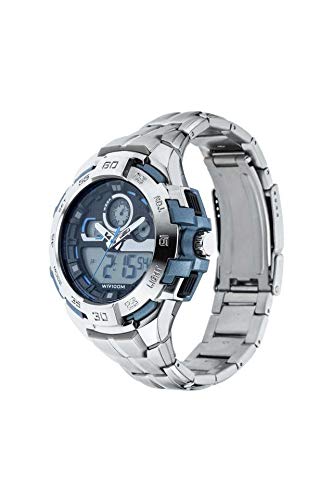
Figure 3.1: Side view of the watch, highlighting the control buttons used for digital display settings.
- Identify the "MODE" button (usually on the left side). Press it repeatedly to cycle through modes (Time, Alarm, Stopwatch).
- To set the digital time/date, press the "SET" button (usually top-left) while in the time display mode. Digits will flash.
- Use the "ADJUST" or "LIGHT" button (usually on the right side) to change the flashing value.
- Press "MODE" again to move to the next setting (e.g., minutes, hour, date, month, day).
- Once all settings are correct, press "SET" again to exit the setting mode.
3.3 Adjusting the Metal Strap
The metal strap may require adjustment for a comfortable fit. This typically involves removing or adding links. It is recommended to have this done by a professional watch repair service or jeweler to avoid damage to the strap or watch.
4. Operating the Watch
4.1 Analog Time Display
The analog hands continuously display the current time. Ensure the crown is fully pushed in for accurate timekeeping.
4.2 Digital Time and Date Display
Press the "MODE" button to switch between the digital time display and other functions. The digital display typically shows hours, minutes, seconds, and the day of the week.
4.3 Alarm Function
To set the alarm:
- Press "MODE" until the alarm setting appears (often indicated by "AL").
- Press "SET" to activate the setting mode.
- Use "ADJUST" to set the desired alarm time.
- Press "MODE" to confirm and exit.
- To turn the alarm on/off, typically press "ADJUST" while in the alarm display mode.
4.4 Stopwatch Function
To use the stopwatch:
- Press "MODE" until the stopwatch display appears (often indicated by "ST" or "STOP").
- Press "ADJUST" to start/stop the stopwatch.
- Press "SET" to reset the stopwatch to zero.
4.5 Water Resistance (5 ATM / 50 m)
Your Fastrack watch is water resistant to 5 ATM or 50 meters. This means it is suitable for everyday use and can withstand splashes, rain, and brief immersion in water. It is not suitable for swimming, diving, or showering with hot water, as steam and pressure changes can compromise the seals. Do not operate buttons or the crown when the watch is wet or submerged.
5. Maintenance
5.1 Cleaning Your Watch
Wipe the watch case and strap regularly with a soft, dry cloth to remove dirt and perspiration. For the metal strap, a slightly damp cloth can be used, followed by immediate drying. Avoid using chemical cleaners, solvents, or abrasive materials.
5.2 Battery Replacement
When the watch stops or the digital display fades, the battery may need replacement. It is highly recommended to have the battery replaced by an authorized service center or a qualified watch technician to ensure proper sealing and maintain water resistance.
5.3 Water Resistance Care
To maintain the water resistance of your watch:
- Ensure the crown is always pushed in completely.
- Do not operate buttons or the crown when the watch is wet or submerged.
- Avoid exposing the watch to extreme temperature changes (e.g., hot showers, saunas).
- Have the water resistance seals checked periodically (e.g., every 2-3 years) by a professional, especially after battery replacement.
6. Troubleshooting
6.1 Analog Hands Not Moving
- Check if the crown is fully pushed in.
- The battery may be depleted. Refer to Section 5.2 for battery replacement.
6.2 Digital Display Faint or Blank
- The battery for the digital module may be low. Refer to Section 5.2 for battery replacement.
- Ensure the watch has not been exposed to extreme temperatures.
6.3 Incorrect Time/Date Display
- Re-set the time and date following the instructions in Section 3.1 and 3.2.
- If the issue persists, the watch may require professional inspection.
6.4 Water Inside the Watch
If you notice condensation or water droplets inside the watch, immediately take it to an authorized service center. Do not attempt to dry it yourself, as this can cause further damage.
7. Specifications
| Feature | Detail |
|---|---|
| Model Number | NN38054PM03 |
| Brand | Fastrack |
| Movement Type | Quartz (Analog) and Digital |
| Water Resistance | 5 ATM / 50 meters |
| Case Diameter | 51.5 Millimetres |
| Band Material Type | Stainless Steel |
| Band Colour | Silver |
| Item Weight | 200 Grams |
| Product Dimensions | 14 x 10 x 7 cm |
| Manufacturer | Titan Company Ltd |
8. Warranty and Support
8.1 Manufacturer's Warranty
This Fastrack watch comes with a manufacturer's warranty. Please refer to the warranty card included with your purchase for specific terms, conditions, and duration of the warranty. The warranty typically covers manufacturing defects under normal use.
8.2 Customer Support
For any queries, service requests, or technical assistance, please contact Fastrack customer support or visit an authorized Fastrack service center. Contact details can usually be found on the Fastrack official website or on the warranty documentation.
Ask a question about this manual
Ask about setup, troubleshooting, compatibility, parts, safety, or missing instructions. Manuals+ will review the question and use this page’s manual context to help answer it.