
1. Product Overview
The ILC LED Light Bulb offers versatile lighting solutions with its color-changing capabilities and remote control functionality. Designed as an 85W incandescent equivalent, this 12W LED bulb provides 1050 lumens of 2700K warm white light, ensuring high brightness with low power consumption. It features 10 static colors, 6 dynamic mood modes, dimmable brightness, a 24-hour cycle timing function, and a memory function to recall the last used setting. The included remote control allows for easy operation and synchronization of multiple bulbs.

Figure 1: ILC LED Light Bulbs and included remote controls.

Figure 2: Visual comparison highlighting the brightness of the ILC LED bulb (1050 Lumens) against a standard 60W 800LM bulb.
2. Setup
2.1 Bulb Installation
- Ensure the power to the light fixture is turned off at the switch before installation.
- Carefully screw the ILC LED light bulb into a standard E26 screw base socket. Do not overtighten.
- Turn on the power to the light fixture. The bulb should illuminate in its default warm white setting.
2.2 Remote Control Preparation
The remote control is typically ready for use out of the box. If the remote does not respond, ensure any plastic battery separator tabs are removed from the battery compartment. The remote operates via infrared (IR) and requires a direct line of sight to the bulb for optimal performance.

Figure 3: Remote control in use, demonstrating its range and line-of-sight requirement.
3. Operating Instructions
The ILC LED Light Bulb is controlled using the provided remote. One remote can control multiple bulbs simultaneously, making it ideal for fixtures with several bulbs or for synchronizing lighting across a room.
3.1 Basic Functions
- On/Off: Press the ON or OFF buttons on the remote to turn the bulb on or off.
- Color Selection: The remote features 10 commonly used static color buttons (e.g., Red, Green, Blue, Yellow, Pink, Orange, Cyan, Purple, Warm White). Press any color button to change the bulb's color.
- Brightness Adjustment: Use the brightness up (+) and down (-) buttons to adjust the light intensity. The bulb supports multiple dimming levels, including 100%, 50%, and 1%.
- Memory Function: The bulb will remember the last color or mode used when turned off and back on.

Figure 4: Illustration of dimmable brightness settings (100%, 50%, 1%).
3.2 Dynamic Modes
The remote offers 6 dynamic mood modes suitable for various scenes:
- Flash: Rapid color changes.
- Strobe: Quick, intermittent flashes of light.
- Smooth: Gradual transitions between colors.
- Passionate: A vibrant, energetic color sequence.
- Relaxed: Softer, calming color transitions.
- Romantic: Warm and gentle color shifts.
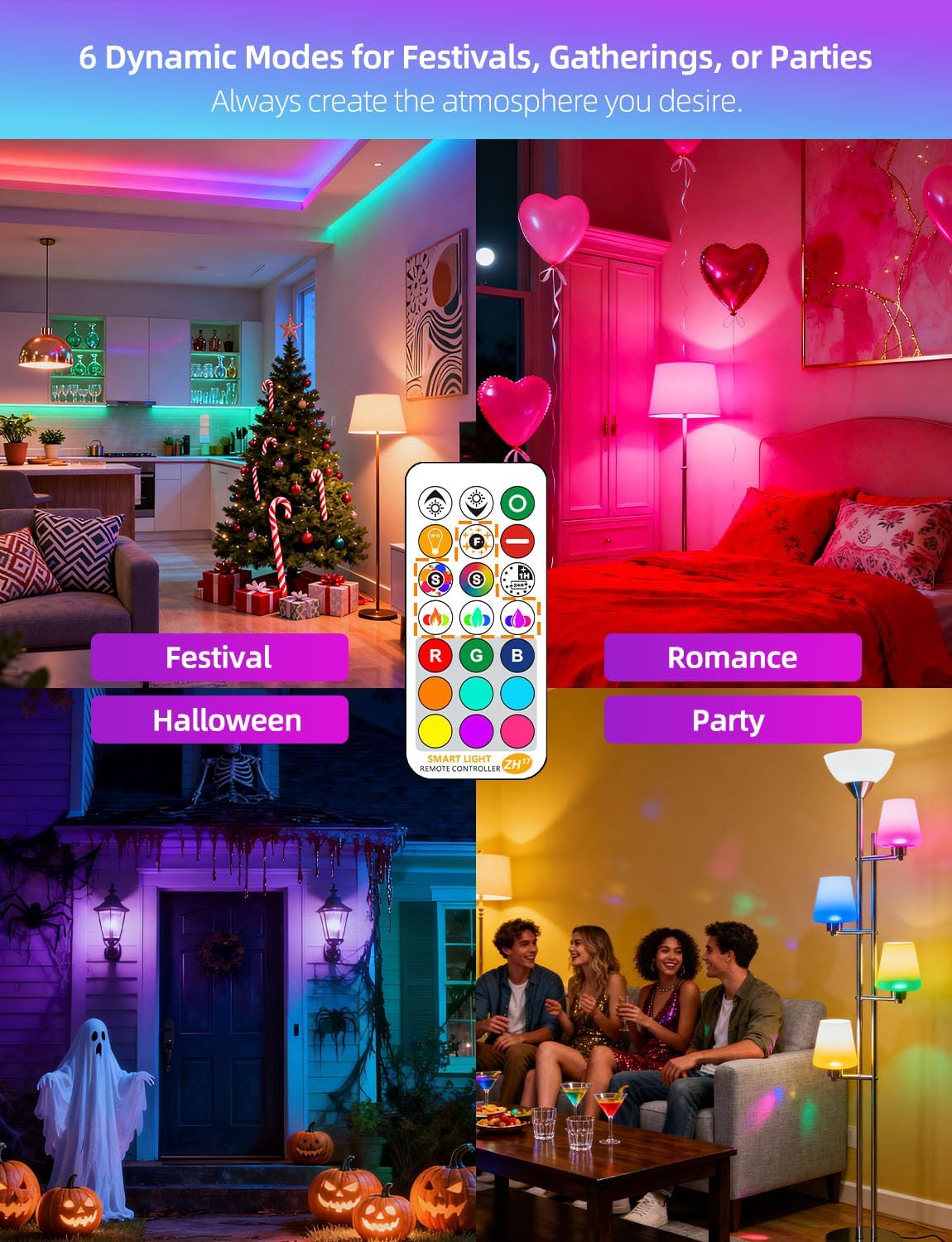
Figure 5: Examples of the 6 dynamic mood modes in various room settings.
3.3 Timing Function
The 24-hour cycle timing function allows you to set the bulb to automatically turn on and off at specific times each day. This is particularly useful for outdoor environments like porches or patios.
- Press the TIMER button on the remote.
- Select the desired on/off time. The bulb will then follow this schedule daily.

Figure 6: Example of the daily recurring timer function for automated lighting.
3.4 Synchronization
The innovative synchronization feature ensures that when multiple ILC LED bulbs are used together (e.g., in fan lights, chandeliers), their color-changing rhythm in dynamic modes remains consistent. One remote control can manage all bulbs within its range.
Video 1: Demonstration of changing colors and modes using the remote control.
Video 2: Overview of the RGB LED color-changing light bulb's features and effects.
Video 3: Quick demonstration of remote control functionality.
4. Maintenance
ILC LED Light Bulbs are designed for long-lasting performance with minimal maintenance. To ensure optimal operation and longevity:
- Cleaning: Ensure the bulb is cool and the power is off before cleaning. Wipe the bulb with a soft, dry cloth. Do not use liquid cleaners or abrasive materials.
- Storage: If storing bulbs, keep them in their original packaging in a cool, dry place.
- Handling: Avoid dropping the bulbs or subjecting them to strong impacts.
5. Troubleshooting
- Bulb not responding to remote:
- Ensure the remote has fresh batteries and any battery separator tabs are removed.
- Verify there is a clear line of sight between the remote and the bulb.
- Confirm the bulb is securely screwed into the socket and receiving power.
- Bulb flickering or not displaying correct colors:
- Important: These bulbs are not compatible with dimmer switches. Using them with a dimmer switch can cause flickering or malfunction. Ensure the fixture is controlled by a standard on/off switch.
- Check for stable power supply.
- Bulb stopped working prematurely:
- While designed for long life, unexpected failures can occur. Refer to the warranty information for replacement options.

Figure 7: The ILC LED bulb is not rechargeable and incompatible with dimmer switches.
Video 4: User-submitted video showing a bulb malfunctioning after a short period, highlighting potential issues.
6. Specifications
| Feature | Specification |
|---|---|
| Brand | ILC |
| Model Number | B08D3RFKWR |
| Light Type | LED |
| Wattage | 12 Watts |
| Incandescent Equivalent | 85 Watts |
| Brightness | 1050 Lumens |
| Color Temperature | 2700 Kelvin (Warm White) |
| Light Color | RGB, Warm White |
| Bulb Base | E26 |
| Bulb Shape Size | A19 |
| Control Method | Remote Control |
| Voltage | 100 to 240 Volts |
| Frequency | 50 Hertz to 60 Hertz |
| Color Rendering Index (CRI) | 85Ra |
| Beam Angle | 270 Degrees |
| Average Life | 25,000+ Hours |
| Indoor/Outdoor Usage | Outdoor |
| Material | Iron |
| Included Components | Light bulb, Remote control, User manual |
7. Warranty & Support
7.1 Warranty Information
The ILC LED Light Bulb comes with a 2-year warranty. Please retain your proof of purchase for warranty claims.
7.2 Customer Support
For further assistance, technical support, or warranty claims, please contact ILC customer service through the retailer where the product was purchased or visit the official ILC website for contact information.