
1. Introduction
This instruction manual provides detailed guidance for the assembly, operation, and maintenance of your ZINUS Avery Platform Bed with Reclining Headboard. Please read all instructions carefully before beginning assembly and retain this manual for future reference. This platform bed is designed to provide comfortable support for your mattress without the need for a box spring, featuring an adjustable headboard for enhanced lounging comfort.

Image: Fully assembled ZINUS Avery Platform Bed with its reclining headboard.
2. Safety Information
- Always follow assembly instructions carefully. Incorrect assembly can lead to instability and injury.
- Ensure all bolts and screws are securely tightened before use. Periodically check and re-tighten as necessary.
- Do not exceed the maximum weight recommendation: 350 lbs for Twin size, 700 lbs for other sizes.
- Keep small parts and packaging materials away from children to prevent choking hazards.
- Use the bed on a flat, level surface.
- Avoid standing or jumping on the bed frame.
3. Package Contents
Before beginning assembly, verify that all components are present and undamaged. All necessary parts, tools, and instructions are efficiently packed within one box.
- Headboard Cushion
- Bed Frame Components (Alloy Steel)
- Wood Slats
- Assembly Hardware (bolts, washers, nuts)
- Assembly Tool (ratchet wrench)
- Instruction Manual
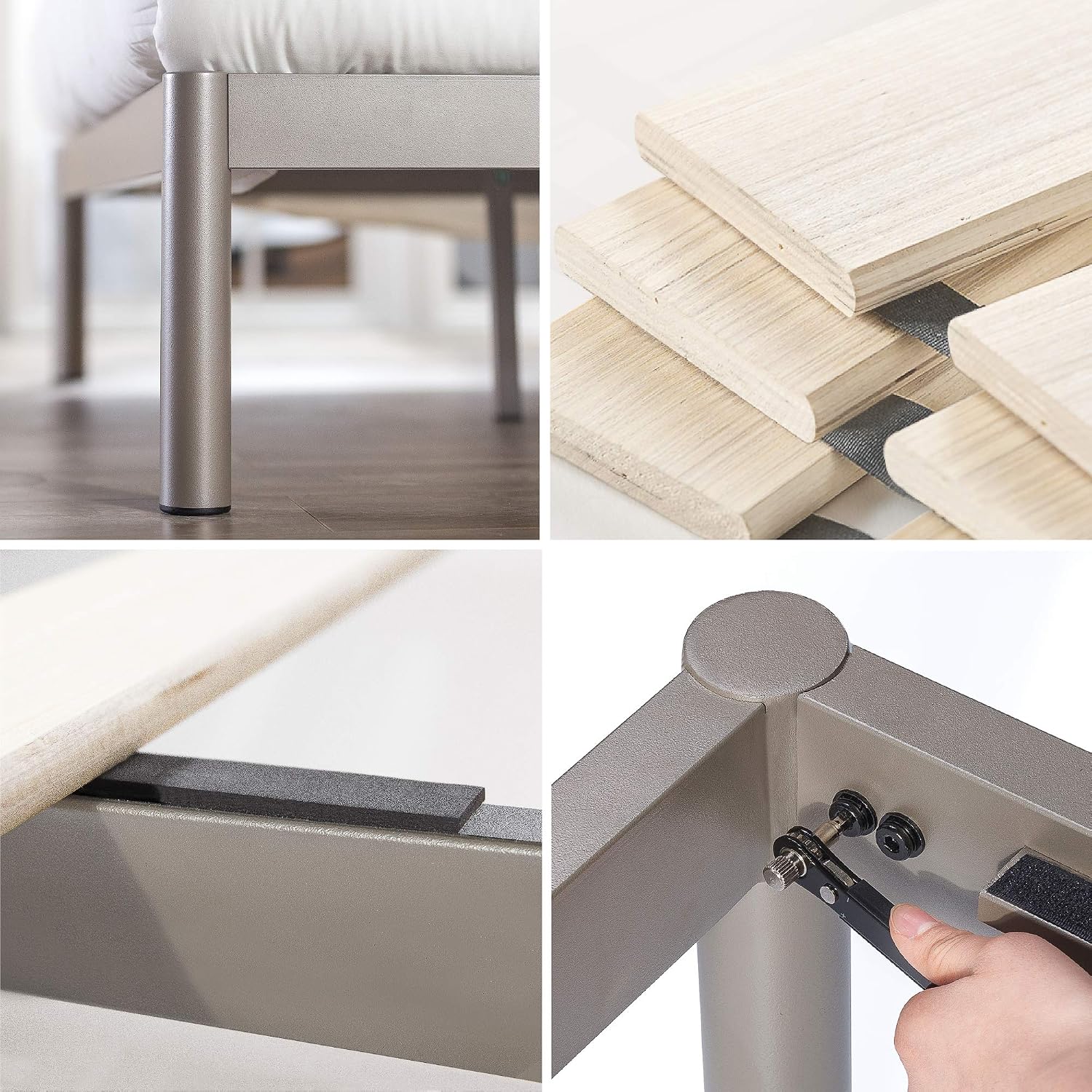
Image: Detailed view of bed frame components, including the provided ratchet tool and wooden slats.
4. Setup and Assembly
Assembly typically requires two people and can be completed in under an hour. The instructions are designed to be straightforward, with numbered pieces corresponding to steps. Washers are often pre-inserted onto screws for convenience.
- Unpack Components: Carefully remove all parts from the packaging. Lay them out on a clean, soft surface to prevent scratches.
- Assemble Frame: Follow the numbered steps in the included instruction booklet to connect the main bed frame components using the provided hardware and ratchet tool. Ensure all connections are snug but do not overtighten until the frame is fully assembled.
- Install Slats: Place the wooden slats across the frame. Many Zinus slats include hook-and-loop fasteners or plastic caps to secure them in place. Ensure even spacing.
- Attach Headboard: Secure the headboard to the frame. The headboard height is adjustable during this step, allowing you to customize it to your mattress thickness.
- Final Tightening: Once the entire frame is assembled, go back and securely tighten all bolts and screws.

Image: Dimensional diagram of the bed frame, illustrating overall length, width, and height.
For a visual guide to assembly and features, please watch the official product video:
Video: Official ZINUS product video demonstrating the features and potentially assembly of the Avery Platform Bed.
5. Operating Instructions: Adjustable Headboard
The ZINUS Avery Platform Bed features a cushioned headboard designed for adjustable comfort. It can be tilted to four different angles and its height can be customized.
Adjusting Headboard Recline:
- The headboard cushions are designed to recline by hand. Gently push or pull the top portion of the headboard to select one of the four available tilted positions.
- Ensure both sides of the headboard are adjusted evenly for balanced support.
- This feature allows for comfortable positioning whether you are reading, watching television, or working from bed.

Image: Visual representation of the headboard's reclining mechanism and height adjustment range.
Adjusting Headboard Height:
- The overall height of the headboard can be adjusted during assembly or by partially disassembling and reassembling the headboard attachment points.
- The headboard height is customizable from 34 to 42 inches to accommodate various mattress thicknesses.

Image: A user demonstrating the comfortable reclined position of the headboard while reading.
6. Maintenance
- Cleaning Fabric: For routine cleaning of the upholstered headboard, use a soft brush or vacuum cleaner with an upholstery attachment to remove dust and debris. For spills, blot immediately with a clean, dry cloth. For tougher stains, use a mild fabric cleaner according to its instructions, testing on an inconspicuous area first.
- Cleaning Frame: Wipe the metal frame with a damp cloth and mild detergent if necessary. Dry thoroughly to prevent rust.
- Hardware Check: Periodically (e.g., every 3-6 months) check all bolts and screws to ensure they remain tight. Re-tighten if any looseness is detected to maintain stability and safety.
- Slats Inspection: Inspect wooden slats for any signs of damage or wear. Replace damaged slats promptly to ensure proper mattress support.
7. Troubleshooting
| Problem | Possible Cause | Solution |
|---|---|---|
| Bed frame feels unstable or wobbly. | Loose hardware. Uneven floor. | Ensure all bolts and screws are fully tightened. Move the bed to a level surface or use shims under legs if necessary. |
| Squeaking noises from the bed. | Loose connections. Slats rubbing against frame. | Re-tighten all hardware. Check if slats are properly seated and not rubbing. Applying felt pads between slats and frame can help. |
| Headboard does not recline smoothly. | Mechanism obstruction. | Check for any fabric or debris obstructing the reclining mechanism. Ensure the headboard is correctly installed. |
| Missing parts during assembly. | Packaging error. | Carefully check all packaging materials. If parts are genuinely missing, contact Zinus Customer Support immediately. |
8. Specifications
- Model: FBMTMA-12T
- Brand: Zinus
- Size: Twin (Other sizes available: Full, Queen, King)
- Product Dimensions (Twin): 77"L x 40"W x 34"H
- Adjustable Headboard Height: 34 to 42 inches
- Material: Alloy Steel, Engineered Wood, Fabric, Fiber
- Maximum Weight Recommendation (Twin): 350 Pounds
- Included Components: Headboard Cushion, Foundation, Adjustable Headboards
- Assembly Required: Yes
- UPC: 841550291407
9. Warranty Information
The ZINUS Avery Platform Bed includes a Worry-free 5-year limited warranty. This warranty covers manufacturing defects and workmanship under normal use. Please retain your proof of purchase for warranty claims. For full details regarding warranty coverage and terms, refer to the official Zinus warranty documentation or contact customer support.
10. Customer Support
If you have any questions, require assistance with assembly, or need to report missing/damaged parts, please contact Zinus Customer Support. You can typically find contact information on the Zinus website or through the retailer where you purchased the product.
For more information, visit the official Zinus Store on Amazon.


