
Kessil 924043
Kessil AP9X LED Aquarium Light User Manual
Model: AP9X (924043)
Introduction
This manual provides comprehensive instructions for the setup, operation, and maintenance of your Kessil AP9X LED Aquarium Light. The Kessil AP9X is an advanced lighting solution designed for marine aquariums, offering powerful illumination and precise control for optimal coral growth and coloration. It is the successor to the Kessil AP700, featuring significant improvements in design, LED technology, and connectivity.
The AP9X is rated at 180 watts and is capable of covering a 4-foot by 2-foot mixed reef or a 3-foot by 2-foot SPS (Small Polyp Stony) reef. Its lighter weight and lower profile design make it easier to mount and integrate into your aquarium setup. Key enhancements include new LED colors with a dedicated Violet Channel for enhanced coral pop and growth, built-in WiFi for seamless app control, and K-link/0-10v ports for compatibility with other Kessil lighting models.
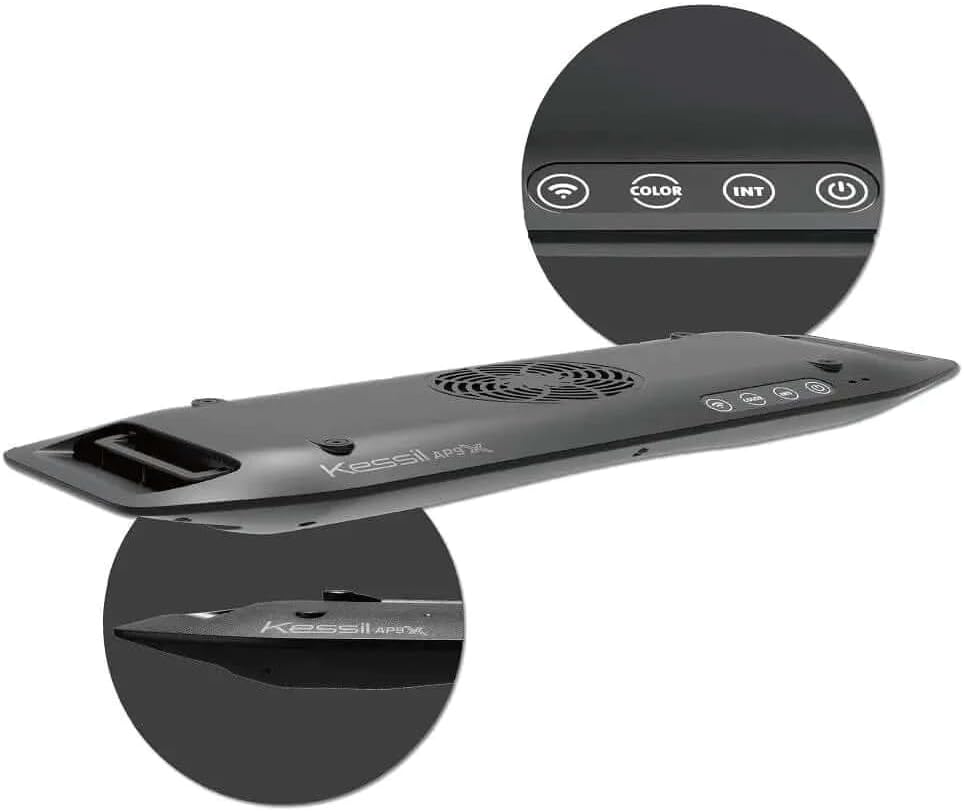
Figure 1: Kessil AP9X LED Aquarium Light. The image shows the top view of the light fixture, highlighting the fan and control buttons (WiFi, Color, Intensity, Power). A magnified inset shows the control buttons clearly. Another inset shows the sleek side profile of the light.
Safety Instructions
- Always disconnect power before performing any maintenance or installation.
- Do not operate the light if the power cord or plug is damaged.
- Ensure the light is securely mounted to prevent accidental falls.
- This product is designed for indoor use and is water resistant, but not submersible. Avoid direct water immersion.
- Keep out of reach of children.
- Do not look directly into the LEDs when the light is on, as it may cause eye strain.
- Ensure proper ventilation around the fixture to prevent overheating.
Setup
Unpacking
Carefully remove all components from the packaging. Verify that all parts are present:
- Kessil AP9X LED Aquarium Light fixture
- Power Adapter
- Mounting hardware (if included with your specific package, otherwise sold separately)
Note: The Kessil AP9X Mounting Arm is sold separately.
Mounting the Light
The AP9X is designed for pole mount installation. Follow the instructions provided with your Kessil AP9X Mounting Arm (sold separately) for secure installation. Ensure the light is positioned to provide optimal coverage for your aquarium, considering its 4-foot by 2-foot coverage area for mixed reefs or 3-foot by 2-foot for SPS reefs. The mounting arms allow for swiveling to reduce shadows and light bleed.
Power Connection
- Connect the power adapter to the AP9X light fixture.
- Plug the power adapter into a standard 120V AC outlet.
- The light will power on and enter standby mode.
Operating Instructions
Control Methods
The Kessil AP9X can be controlled via its integrated buttons or through the Kessil WiFi app.
On-Board Controls
The light features several buttons on its top surface for basic control:
- Power Button: Turns the light on or off.
- Color Button: Adjusts the color spectrum.
- Intensity (INT) Button: Adjusts the light intensity.
- WiFi Button: Activates or deactivates the WiFi module for app connectivity.
Kessil WiFi App Control
The AP9X features new built-in WiFi and a redesigned app interface for detailed control and programming. The app uses the same software as the Kessil WiFi Dongle for increased reliability.
- Download the Kessil app from your device's app store.
- Ensure your mobile device is connected to a 2.4GHz WiFi network. The AP9X only works on 2.4GHz networks.
- Open the Kessil app and follow the on-screen instructions to connect to your AP9X light.
- Once connected, you can adjust color, intensity, set schedules, and access advanced features.
The AP9X can also act as a hub to control other Kessil light models (A80s, A160s, A360s, A360Xs, H series refugium lights) via K-link and 0-10v ports. Use the Kessil X-Series LED Light 90 Degree K-Link Cable for connection.
Maintenance
Regular maintenance ensures optimal performance and longevity of your Kessil AP9X LED Aquarium Light.
- Cleaning: Periodically wipe the exterior of the light fixture with a soft, damp cloth to remove dust and salt creep. Ensure the light is unplugged before cleaning. Do not use abrasive cleaners or solvents.
- Fan Maintenance: The AP9X features an integrated fan for cooling. Ensure the fan vents are clear of obstructions to allow for proper airflow. If dust accumulates, gently clean with a soft brush or compressed air.
- Lens Inspection: Regularly inspect the LED lenses for any buildup that might obstruct light output. Clean gently if necessary.
- Cable Inspection: Check all power and K-link cables for any signs of wear, damage, or corrosion. Replace damaged cables immediately.
Troubleshooting
| Problem | Possible Cause | Solution |
|---|---|---|
| Light does not turn on. | No power supply; faulty power adapter; loose connection. | Check power outlet. Ensure power adapter is securely connected to both the light and the wall outlet. Try a different outlet. |
| Cannot connect to WiFi app. | Incorrect WiFi network (5GHz instead of 2.4GHz); app issues; light's WiFi module off. | Ensure your device is connected to a 2.4GHz WiFi network. Restart the app and the light. Press the WiFi button on the light to ensure the module is active. Refer to the app's help section for specific connection steps. |
| Light intensity or color not changing. | Controls unresponsive; app connection issue. | Try using both on-board buttons and the app. If using the app, ensure a stable connection. Restart the light. |
| Light is overheating. | Blocked ventilation; excessive ambient temperature. | Ensure fan vents are clear of obstructions. Provide adequate airflow around the fixture. Reduce ambient room temperature if possible. |
Specifications
| Feature | Detail |
|---|---|
| Model Number | 924043 |
| Dimensions (D x W x H) | 16.46" x 5.71" x 1.42" |
| Weight | 6.44 pounds |
| Wattage | 180 watts |
| Voltage | 120 Volts |
| Control Method | App (WiFi) |
| Mounting Type | Pole Mount |
| Water Resistance Level | Water Resistant |
| Light Source Type | LED |
| Material | Aluminum |
Related documents924043


Ask a question about this manual
Ask about setup, troubleshooting, compatibility, parts, safety, or missing instructions. Manuals+ will review the question and use this page’s manual context to help answer it.