
1. Product Overview
The Satisfyer Double Joy Connect App is a U-shaped partner vibrator designed for simultaneous internal and external stimulation. It features two powerful motors and is controlled via the Satisfyer Connect App or directly on the device. Made from skin-friendly silicone, it is waterproof (IPX7) and rechargeable.

Image 1.1: The Satisfyer Double Joy Connect App, emphasizing its app connectivity and powerful vibration capabilities. Designed for couples, it stimulates both partners.
This device offers 10 distinct vibration programs, providing a range of sensations from gentle to intense. Its ergonomic and flexible design ensures comfortable use. The Satisfyer Connect App enhances the experience with features like Remote Play, Vibration Creator, and Playlist Vibration.

Image 1.2: The Satisfyer Double Joy Connect App, showcasing its waterproof (IPX7) design, skin-friendly silicone material, and ease of cleaning.
2. Setup
2.1 Charging the Device
Before first use, fully charge your Satisfyer Double Joy. Use the included magnetic USB charging cable. Connect the magnetic pins to the charging contacts on the device. A full charge typically takes approximately 2 hours.
2.2 Downloading the Satisfyer Connect App
To unlock the full range of features, download the free Satisfyer Connect App. It is available on the Apple App Store for iOS devices and Google Play Store for Android devices.
- Search for "Satisfyer Connect" in your device's app store.
- Download and install the app.
2.3 Bluetooth Pairing
To pair your device with the Satisfyer Connect App:
- Ensure the device is charged.
- Press and hold the power button on the device for 5 seconds until you feel a double pulse. The LED light will start flashing, indicating it is ready for pairing.
- Open the Satisfyer Connect App on your smartphone and follow the on-screen instructions to connect.
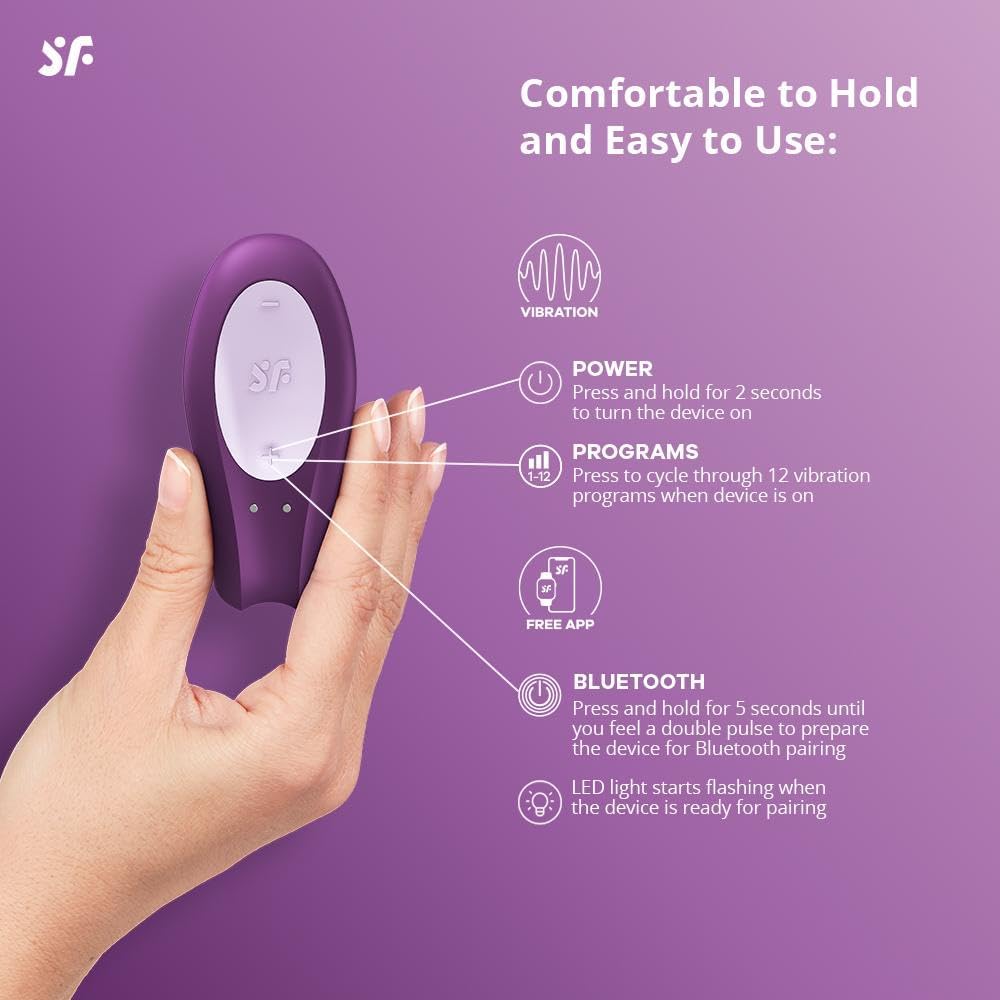
Image 2.1: Controls on the Satisfyer Double Joy Connect App, illustrating the power button, program selection, and Bluetooth pairing function.
3. Operating Instructions
3.1 Power On/Off
- To turn the device on, press and hold the power button for 2 seconds.
- To turn the device off, press and hold the power button for 2 seconds.
3.2 Changing Vibration Programs
While the device is on, press the program button to cycle through the 10 available vibration programs. Each press will switch to the next program.
3.3 Using the Satisfyer Connect App
Once paired, the app provides advanced control and customization:
- Remote Control: Control the device from your smartphone.
- Vibration Creator: Design and save custom vibration patterns.
- Playlist Vibration: Sync vibrations to your favorite music.
- Chat Function: Connect with partners for shared experiences.
- Data Security: The app is designed with 100% data security.

Image 3.1: The Satisfyer Connect App interface, demonstrating features like chat, remote control, vibration creation, and playlist vibration.
Video 3.1: Official product video for the Satisfyer Double Joy (Purple), demonstrating its features, app connectivity, and design. This video highlights the device's functionality and ease of use.
4. Maintenance
4.1 Cleaning
The Satisfyer Double Joy is waterproof (IPX7) and made of medical-grade silicone, making it easy to clean. After each use, clean the device with warm water and a mild, toy-friendly soap or a specialized toy cleaner. Rinse thoroughly and allow it to air dry.
4.2 Storage
Store the device in a clean, dry place away from direct sunlight and extreme temperatures. Avoid storing it with other silicone products to prevent material degradation.
5. Troubleshooting
- Device not turning on: Ensure the device is fully charged. If it still doesn't turn on, try a different USB power source for charging.
- App connection issues:
- Ensure Bluetooth is enabled on your smartphone.
- Make sure the device is in pairing mode (LED flashing).
- Restart both the device and the app.
- Check if the app is updated to the latest version.
- If issues persist, try unpairing and re-pairing the device in your phone's Bluetooth settings.
- Charging problems: If the device is not charging, verify that the magnetic charging cable is properly connected to both the device and a working USB power source. Inspect the cable for any damage.
- Buttons changing settings accidentally: When using the device, ensure your grip does not inadvertently press the control buttons. The Satisfyer Connect App allows you to lock the buttons to prevent accidental changes during use.
6. Specifications
| Feature | Detail |
|---|---|
| Model Name | Satisfyer Double Joy with app |
| Item Model Number | SATDJL |
| Color | Violet |
| Material | Silicone |
| Waterproof Rating | IPX7 |
| Power Source | Rechargeable Lithium Ion Battery (included) |
| Product Dimensions | 4.72 x 3.15 x 7.87 inches |
| Weight | 5.3 ounces |
| App Compatibility | Satisfyer Connect App (iOS & Android) |
7. Warranty
The Satisfyer Double Joy Connect App comes with a 15-year guarantee, ensuring long-lasting satisfaction and product quality. Please retain your proof of purchase for warranty claims.
8. Support
For further assistance, technical support, or warranty inquiries, please visit the official Satisfyer website or contact their customer service department. Refer to the packaging for specific contact details.
