
Introduction
Thank you for choosing the Voupuoda WS-858 Portable Wireless Karaoke Microphone. This 3-in-1 device combines a microphone, Bluetooth speaker, and recording function, designed for various entertainment and audio needs. Please read this manual carefully to ensure proper use and to maximize your experience with the product.

Image: The Voupuoda WS-858 Portable Wireless Karaoke Microphone, showcasing its sleek blue design and integrated control panel.
Package Contents
Upon unpacking, please ensure all items listed below are present:
- 1 x WS-858 Karaoke Microphone
- 1 x USB Charging Cable
- 1 x Audio Cable
- 1 x User Manual (this document)
Product Overview
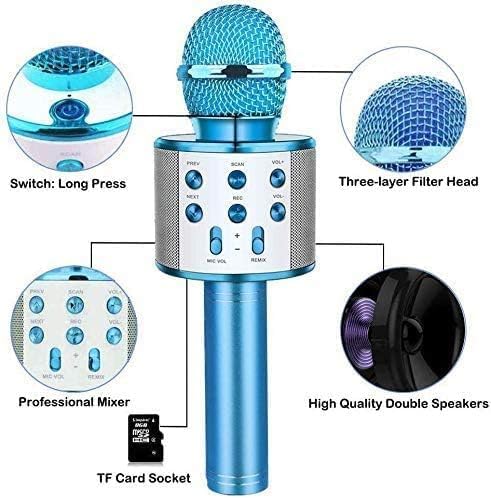
Image: A detailed diagram highlighting key components of the WS-858 microphone, including the power switch, three-layer filter head, professional mixer controls, high-quality double speakers, and TF card socket.
Key Features:
- 3-in-1 Functionality: Microphone, Bluetooth Speaker, and Recording device.
- Significant KTV Echo Effect: High-quality chipset with two-channel stereo headphones for an immersive KTV sound experience.
- Multi-functional Buttons: Adjust treble, bass, reverberation, accompaniment, and playback volume. Navigate between previous and next songs.
- Noise Reduction: Microphone head features a three-layer noise reduction handle for clear voice capture.
- Durable Construction: Advanced aluminum-magnesium alloy shell.
- Professional Audio Processing: Smart mixing chip and professional audio processor for high-density noise reduction.
Setup
1. Charging the Microphone
- Connect the provided USB charging cable to the microphone's charging port.
- Connect the other end of the USB cable to a DC 5V power source (e.g., a USB wall adapter, computer USB port).
- The charging indicator light will illuminate. Once fully charged, the light may change color or turn off, depending on the model.
- A full charge typically takes a few hours. The built-in 1800mAh Li-18650 battery provides extended usage time.
2. Powering On/Off
- To power on, long press the power button (usually located near the base of the microphone head).
- To power off, long press the power button again.
3. Bluetooth Pairing
- Ensure the microphone is powered on. It will automatically enter Bluetooth pairing mode, indicated by a flashing light or an audible prompt.
- On your mobile device (smartphone, tablet, laptop), enable Bluetooth.
- Search for available Bluetooth devices. The microphone will appear as "WS-858" or a similar name.
- Select "WS-858" to pair. Once paired, you will hear a confirmation sound, and the indicator light will stop flashing.
- The microphone is now connected and ready to play audio from your device.

Image: The WS-858 microphone demonstrating its broad compatibility with various devices such as smartphones, laptops, desktops, and tablets, all connecting wirelessly via Bluetooth.
Operating Instructions
1. Basic Controls
- PREV / NEXT: Press to skip to the previous or next track when playing music.
- VOL+ / VOL-: Adjust the main speaker volume.
- MIC VOL: Adjust the microphone's input volume.
- REMIX: Adjust the reverberation (echo) effect level.
- SCAN: Used for scanning FM radio stations (if applicable) or switching modes.
- REC: Press to initiate recording (requires a TF card).
2. Karaoke Function
- Connect the microphone to your smartphone or tablet via Bluetooth.
- Open your preferred karaoke application or music player on your device.
- Play a song with or without vocals.
- Adjust the MIC VOL and REMIX (echo) controls on the microphone to achieve your desired vocal and effect levels.
- Sing into the microphone. Your voice will be amplified through the built-in speakers with the selected echo effect.
3. Recording Function
- Insert a TF (MicroSD) card into the TF Card Socket on the microphone.
- Ensure the microphone is connected to a music source (e.g., via Bluetooth).
- Press the REC button to start recording. Press it again to stop recording.
- Recordings will be saved to the TF card.
4. Selfie Function (if supported)
Some versions of the WS-858 may include a selfie function. If available, after pairing via Bluetooth, open your phone's camera app and press the SCAN button (or another designated button) to trigger the camera shutter.
Maintenance
- Cleaning: Use a soft, dry cloth to clean the microphone's exterior. Do not use harsh chemicals or abrasive cleaners.
- Storage: Store the microphone in a cool, dry place away from direct sunlight and extreme temperatures.
- Battery Care: To prolong battery life, avoid fully discharging the battery frequently. Charge the device regularly, even if not in use for extended periods.
- Handling: Handle the microphone with care. Avoid dropping it, as internal components can be fragile and susceptible to damage.
Troubleshooting
- Microphone does not turn on:
- Ensure the battery is charged. Connect the microphone to a power source and allow it to charge for at least 30 minutes before attempting to power on again.
- Confirm you are long-pressing the power button.
- No sound from speakers:
- Check the main volume (VOL+) and microphone volume (MIC VOL) levels on the device.
- Ensure your connected device's volume is turned up.
- Verify that the microphone is successfully paired via Bluetooth. Try re-pairing if necessary.
- Bluetooth connection issues:
- Make sure the microphone is within the Bluetooth range (typically 10 meters) of your device.
- Turn off and on Bluetooth on both the microphone and your device.
- Forget the device "WS-858" from your phone's Bluetooth settings and attempt to pair again.
- Ensure no other devices are actively connected to the microphone.
- Poor sound quality or excessive noise:
- Adjust the REMIX control to reduce excessive echo.
- Ensure you are speaking directly into the microphone head.
- Check for environmental noise interference.
- Recording not working:
- Ensure a TF (MicroSD) card is properly inserted into the slot.
- Check if the TF card has sufficient free space.
- Verify the TF card is formatted correctly (FAT32 is usually recommended).
Important Safety Note: This device contains a lithium-ion battery. If you observe any unusual behavior such as overheating, swelling, or smoke, immediately disconnect the device from power and discontinue use. Contact customer support for assistance. Avoid dropping the device, as it can be fragile and impact its functionality.
Specifications
| Model | WS-858 |
| Output Power | 5W |
| Frequency Range | 100Hz ~ 10KHz |
| Maximum Sound Pressure Level | > 115dB 1KHz TDH <1% |
| Reverberation Mode | Sound effect reverberation |
| Power Supply | Built-in Li-18650 Battery |
| Battery Capacity | 1800mAh |
| Charging Power | DC 5V |
| Dimensions (L x W x H) | 26 x 11 x 9 cm |
| Weight | 300 g |
| Material | Aluminum |
| Connectivity | Bluetooth |
| Compatible Devices | Speaker, Smartphone, Tablet, Laptop, Desktop |
| Included Components | Microphone, Charging Cable, Audio Cable, User Manual |
| Certification | ANATEL: 09266-23-14726 |
Warranty and Support
This product is covered by a standard manufacturer's warranty. For specific warranty terms and conditions, please refer to the documentation provided at the time of purchase or contact your retailer.
If you encounter any issues or require technical assistance, please contact Voupuoda customer support or your point of purchase. Please have your product model (WS-858) and purchase details ready when contacting support.
Optional extended warranty plans may be available for purchase. Please check with your retailer for details.