
RADIANT RA561605
Radiant Digital RA561605 Watch User Manual
Model: RA561605
Introduction
This manual provides comprehensive instructions for the Radiant Digital RA561605 women's watch. Designed for daily wear, this digital watch features a quartz movement, a durable plastic casing, and a comfortable silicone strap. Please read this manual carefully to ensure proper use and maintenance of your watch.
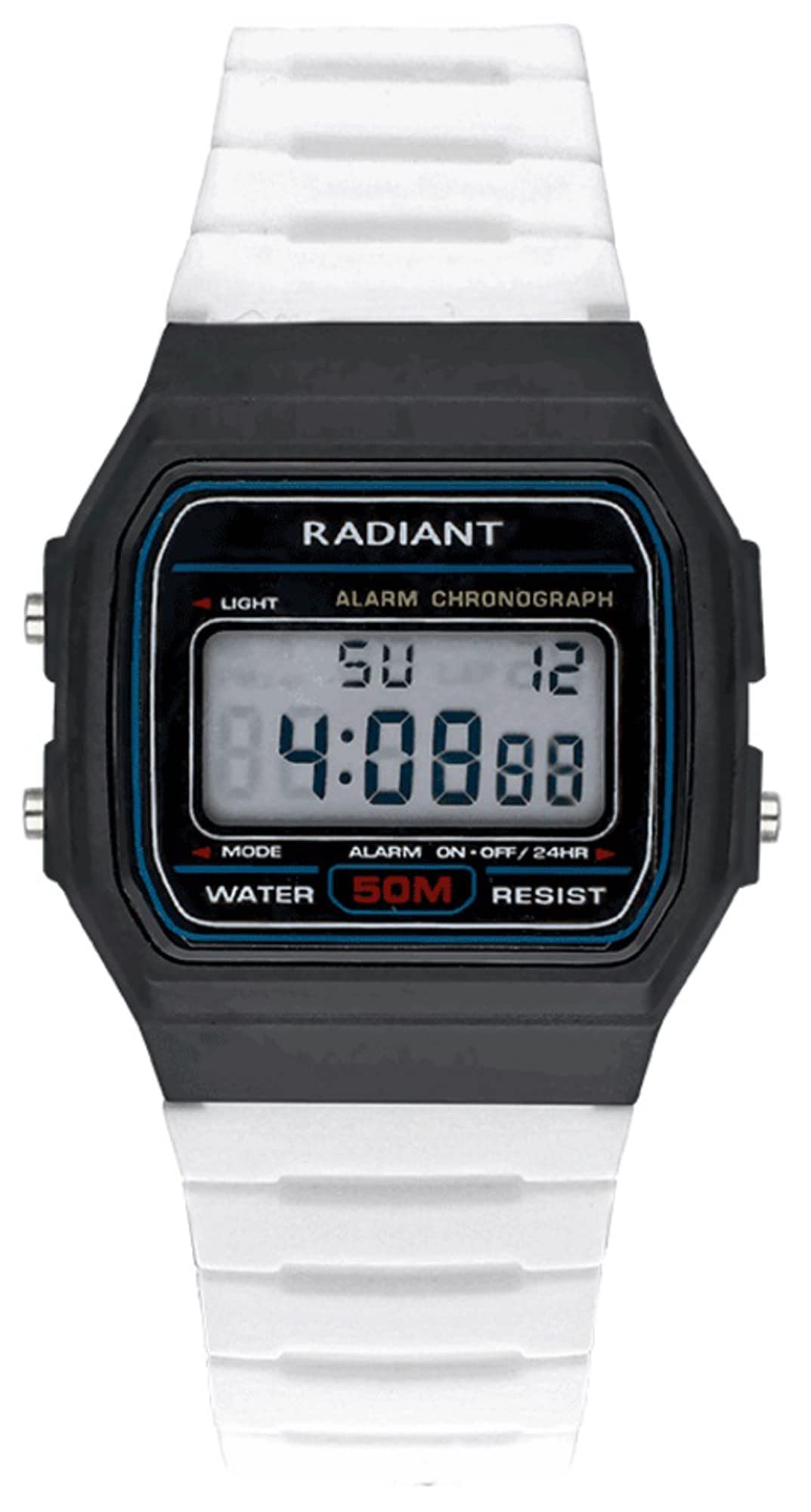
Figure 1: Front view of the Radiant Digital RA561605 watch, featuring a white silicone strap, a round black digital display, and a plastic casing.
Setup
Battery Installation/Activation
The Radiant Digital RA561605 watch requires one product-specific battery. If the display is not active upon unboxing, it may be in a power-saving mode or require battery activation. Consult a professional watch technician for battery replacement or initial activation if needed. Avoid attempting to open the watch case yourself to prevent damage and maintain water resistance.
Initial Time Setting
- Identify Buttons: Locate the control buttons on the side of the watch case. Typically, there are buttons for MODE, SET, START/STOP, and RESET/LIGHT. Refer to the watch's physical markings if available.
- Enter Time Setting Mode: Press the MODE button repeatedly until the time setting display (e.g., flashing hours or minutes) appears.
- Adjust Time: Use the SET or START/STOP button to adjust the flashing digit (hours, minutes, seconds). Press MODE again to cycle through the different time units.
- Confirm Settings: Once the desired time is set, press the MODE button one last time to exit the setting mode.
Operating Instructions
Your Radiant Digital RA561605 watch includes several functions:
- Time Display: Shows current time (hours, minutes, seconds).
- Date Display: Shows current date (day, month, year).
- Alarm: Set a specific time for an audible alert.
- Chronograph (Stopwatch): Measure elapsed time with start, stop, and reset functions.
- GMT (Greenwich Mean Time): Potentially displays a second time zone or universal time.
- Compass: Provides basic directional indication.
Using the Chronograph
- Enter Chronograph Mode: Press the MODE button until the chronograph display (usually showing "00:00:00") appears.
- Start/Stop: Press the START/STOP button to begin timing. Press it again to pause.
- Reset: While the chronograph is stopped, press the RESET button to clear the time to "00:00:00".
- Exit: Press the MODE button to return to the normal time display.
Setting the Alarm
- Enter Alarm Mode: Press the MODE button until the alarm setting display appears (often indicated by an alarm icon or "AL").
- Adjust Alarm Time: Use the SET or START/STOP button to adjust the flashing digits for hours and minutes. Press MODE to switch between hours and minutes.
- Activate/Deactivate Alarm: There is usually a separate button (sometimes RESET or a dedicated alarm button) to toggle the alarm ON/OFF. An icon on the display typically indicates if the alarm is active.
- Exit: Press the MODE button to return to the normal time display.
Maintenance
Cleaning Your Watch
To clean your Radiant Digital RA561605 watch, wipe it gently with a soft, damp cloth. Avoid using harsh chemicals, solvents, or abrasive cleaners, as these can damage the plastic casing and silicone strap. Ensure the watch is dry before storing or wearing.
Water Resistance
This watch is water-resistant up to 50 meters (5 ATM). This means it is suitable for short periods of recreational swimming, but not for diving or snorkeling. Avoid pressing buttons while the watch is submerged, as this can compromise the water seal. Exposure to hot water (e.g., in showers or saunas) should also be avoided, as temperature changes can affect the seals.
Battery Replacement
When the battery needs replacement, the display may dim or cease to function. It is recommended to have the battery replaced by a qualified watch technician to ensure the watch's water resistance is maintained and to prevent damage to internal components.
Troubleshooting
- Watch not displaying time: Check if the battery needs replacement. If recently replaced, ensure it was installed correctly.
- Display is dim or flickering: This often indicates a low battery. Replace the battery.
- Buttons are unresponsive: Ensure the watch is not in a locked mode (if applicable). If the issue persists, a professional inspection may be required.
- Water inside the watch: Immediately take the watch to a professional for inspection and repair to prevent further damage. Avoid exposing it to water again.
Specifications
| Feature | Specification |
|---|---|
| Model Number | RA561605 |
| Brand | Radiant |
| Display Type | Digital |
| Movement | Quartz |
| Case Material | Plastic |
| Case Diameter | 35 mm |
| Strap Material | Silicone |
| Strap Color | White |
| Dial Color | Black (digital display area) |
| Water Resistance | 50 meters (5 ATM) |
| Power Source | Battery (1 product-specific battery required) |
| Special Features | Alarm, Chronograph, GMT, Compass, Date |
Warranty and Support
For warranty information and customer support, please refer to the documentation provided with your purchase or visit the official Radiant website. Keep your proof of purchase for any warranty claims.
If you encounter issues not covered in this manual, contact Radiant customer service for assistance.
Ask a question about this manual
Ask about setup, troubleshooting, compatibility, parts, safety, or missing instructions. Manuals+ will review the question and use this page’s manual context to help answer it.