
1. Introduction
The Massive Audio Primo Series P8 Monoblock Mega Amplifier is a high-performance Class D amplifier designed for car audio systems. This manual provides essential information for proper installation, operation, and maintenance of your P8 amplifier to ensure optimal performance and longevity.

Image 1.1: Top view of the Massive Audio Primo Series P8 Monoblock Amplifier, showcasing its sleek design and compact form factor.
2. Safety Instructions
Please read and understand all safety instructions before installing or operating this amplifier. Failure to follow these guidelines may result in injury or damage to the product or vehicle.
- Always disconnect the vehicle's battery negative terminal before making any electrical connections.
- Ensure proper ventilation around the amplifier to prevent overheating.
- Use appropriate gauge wiring for power, ground, and speaker connections as specified in this manual.
- Mount the amplifier securely to prevent movement during vehicle operation.
- Avoid installing the amplifier in areas exposed to moisture or excessive vibration.
- Professional installation is recommended for optimal safety and performance.
3. Package Contents
Verify that all items are present upon unpacking:
- One (1) Massive Audio Primo Series P8 Monoblock Mega Amplifier
- User Manual (this document)
- Mounting Hardware (if included)
4. Key Features
The P8 amplifier incorporates advanced features for superior audio performance and reliability:
- Input Sensitivity Low Level: 400mVrms ~ 10Vrms
- Auto Hi-Level Input via RCA Input
- 12v Remote Output When Hi-level Signal is Used
- Parametric EQ with 0 - 12 dB Boost
- All Models Linkable with Single RCA for easy upgrade
- Short Circuit, Thermal, Reverse Voltage, and Over Voltage Protection
- N-Channel Circuitry for High-Efficiency
- 24 dB Low Pass Crossovers with an adjustable range of 30Hz - 220Hz
- Heavy Duty Power Supply
- Illuminated Logo
- Heavy-Duty Aluminum Heat Sink
- Designed and Engineered in the U.S.A.
- Proprietary "Bass Kompressor" Circuitry provides Low-Frequency Enhancement
- Extreme Power in a Small Footprint
- "Q Control" to fine-tune the curve on the bass boost
- "Clip Limit Switch" allows the amplifier to take up to 16.5 volts
- Adjustable Low Pass 18dB Sub Harmonic Filter with a range of 0Hz - 60Hz
- Adjustable center frequency range of 30-80 Hz
- Nickel-Plated Connectors
- High-Efficiency Class "D" Design
5. Setup and Installation
Proper installation is crucial for the performance and safety of your amplifier. Consult a professional installer if you are unsure about any steps.
5.1. Mounting Location
- Choose a dry, well-ventilated area away from direct sunlight or heat sources.
- Ensure the mounting surface is sturdy enough to support the amplifier's weight.
- Allow sufficient space around the amplifier for air circulation.
5.2. Wiring Connections
Refer to the diagram below for proper wiring of power, ground, remote, and speaker connections.

Image 5.1: Rear panel of the P8 amplifier showing power, ground, remote, and speaker terminals.
5.2.1. Power Connection (+12V)
Connect a heavy-gauge power cable (e.g., 4 AWG or larger) from the amplifier's +12V terminal to the positive terminal of the vehicle's battery. Install an appropriate fuse (not supplied) within 18 inches (45 cm) of the battery.
5.2.2. Ground Connection (GND)
Connect a heavy-gauge ground cable (e.g., 4 AWG or larger) from the amplifier's GND terminal to a clean, unpainted metal surface of the vehicle chassis. Ensure a solid, low-resistance connection.
5.2.3. Remote Turn-On (REM IN/OUT)
Connect a 18-gauge wire from your head unit's remote output to the amplifier's REM IN terminal. The REM OUT terminal can be used to daisy-chain the remote signal to other amplifiers.
5.2.4. Speaker Connection (SPEAKER)
Connect your subwoofer(s) to the SPEAKER terminals. Ensure the total impedance of the connected speakers is not below 0.5 Ohm. Observe correct polarity (+ to + and - to -).
5.2.5. Signal Input (LINE IN)
Connect RCA cables from your head unit's pre-amp output to the amplifier's LINE IN RCA inputs. The amplifier also supports auto hi-level input via the RCA inputs.
6. Operation and Adjustments
The P8 amplifier features various controls to fine-tune your audio system. Familiarize yourself with these controls for optimal sound.
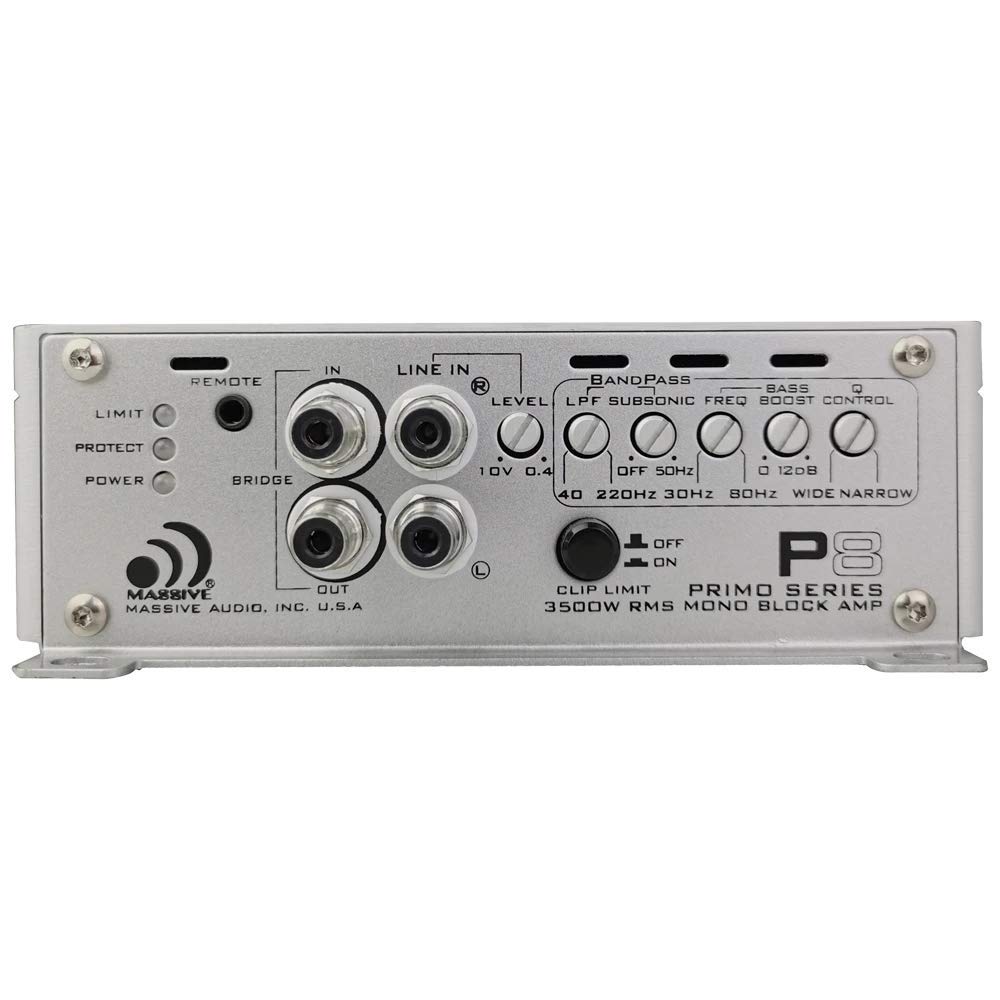
Image 6.1: Front panel of the P8 amplifier displaying the control layout for audio adjustments.
6.1. Control Panel Overview
- REMOTE: Input for optional remote bass control knob.
- LIMIT/PROTECT/POWER Indicators: LEDs indicating amplifier status.
- LINE IN: RCA inputs for audio signal.
- LEVEL (Input Sensitivity): Adjusts the input gain to match the head unit's output. Range: 400mVrms - 10Vrms.
- LPF (Low Pass Filter): Adjusts the upper frequency limit for the subwoofer. Range: 30Hz - 220Hz (24 dB/octave).
- SUBSONIC FREQ (High Pass Filter): Filters out ultra-low frequencies below the audible range to protect subwoofers. Range: 0Hz - 60Hz (18 dB/octave).
- BASS BOOST: Increases bass output at a specific frequency. Range: 0 - 12 dB.
- Q CONTROL: Fine-tunes the bandwidth of the bass boost.
- CLIP LIMIT SWITCH: Allows the amplifier to handle up to 16.5 volts, preventing clipping at high input levels.
6.2. Initial Setup and Adjustments
- Set all amplifier controls (LEVEL, LPF, SUBSONIC, BASS BOOST) to their minimum or off positions.
- Turn your head unit volume to about 75% of its maximum.
- Slowly increase the amplifier's LEVEL control until you hear slight distortion, then back off slightly.
- Adjust the LPF to suit your subwoofers and personal preference, typically between 60Hz and 100Hz for subwoofers.
- Set the SUBSONIC FREQ to protect your subwoofers from frequencies below their resonant frequency, usually around 20Hz to 30Hz.
- Use the BASS BOOST and Q CONTROL sparingly to enhance bass, avoiding excessive boost that can lead to distortion or speaker damage.
7. Maintenance
Regular maintenance helps ensure the longevity and performance of your amplifier.
- Keep the amplifier clean and free of dust and debris. Use a soft, dry cloth for cleaning.
- Periodically check all wiring connections for tightness and corrosion.
- Ensure that the amplifier's cooling fins are not obstructed to maintain proper heat dissipation.
8. Troubleshooting Guide
If you experience issues with your amplifier, refer to the table below for common problems and solutions.
| Problem | Possible Cause | Solution |
|---|---|---|
| No Power / Power LED Off | Blown fuse, poor power/ground connection, faulty remote wire. | Check inline fuse near battery. Verify +12V, GND, and REM connections. Ensure remote wire has +12V when head unit is on. |
| No Sound / Protect LED On | Speaker short circuit, impedance too low, overheating, faulty RCA cables. | Check speaker wiring for shorts. Verify speaker impedance is 0.5 Ohm or higher. Ensure adequate ventilation. Check RCA cable integrity. |
| Distorted Sound | Gain set too high, improper LPF/Subsonic settings, poor signal quality, low voltage. | Reduce LEVEL (gain) control. Adjust LPF and Subsonic filters. Check RCA cables. Verify vehicle's electrical system. |
| Amplifier Overheats | Insufficient ventilation, impedance too low, prolonged high output. | Relocate amplifier for better airflow. Check speaker impedance. Reduce listening volume or duration. |
9. Technical Specifications
| Specification | Value |
|---|---|
| RMS Power (1 Ohm) | 2300w x 1 |
| RMS Power (2 Ohms) | 1400w x 1 |
| RMS Power (0.5 Ohm) | 3500w x 1 |
| PEAK Power | 7000w x 1 |
| Minimum Impedance | 0.5 Ohm |
| Bass Boost Frequency | 30Hz - 120Hz |
| Total Harmonic Distortion (THD) | Less Than 0.03% |
| Signal-to-Noise Ratio (S/N) | More Than 100dB |
| Subsonic Filter (HPF) | 0-60Hz |
| RCA Input Voltage | 400mV - 10V |
| Frequency Response | 10Hz - 220Hz |
| Dimensions (L x W x H) | 19.9" x 6.5" x 2.1" |
| Voltage | 12 Volts (DC) |
| Maximum Supply Voltage | 12 Volts |
| Mounting Type | Freestanding |
| Model Number | P8 |
| Manufacturer | Massive Audio |
10. Warranty Information
Massive Audio products typically come with a limited manufacturer's warranty. Please refer to the official Massive Audio website or your purchase documentation for specific warranty terms and conditions, including coverage period and claim procedures. Keep your proof of purchase for warranty validation.
11. Customer Support
For technical assistance, service, or further inquiries regarding your Massive Audio Primo Series P8 Monoblock Amplifier, please visit the official Massive Audio website or contact their customer support department. You can also visit the Massive Audio Store on Amazon for product information: