
UpStart Components AP-5303918344-DL806
UpStart Components 5303918344 Refrigerator Ice Maker Instruction Manual
Model: AP-5303918344-DL806
Compatible with Frigidaire FGHC2331PFAA and other specified models.
1. Introduction
Thank you for choosing the UpStart Components 5303918344 Refrigerator Ice Maker. This manual provides essential information for the safe and effective installation, operation, and maintenance of your new replacement ice maker. This product is designed as a compatible replacement part for various Frigidaire refrigerator models, including FGHC2331PFAA.
Please read these instructions thoroughly before beginning installation or use. Keep this manual for future reference.
2. Important Safety Information
WARNING: To reduce the risk of electric shock, fire, or injury to persons, read all instructions before installing or using this appliance part.
- Disconnect Power: Always disconnect power to the refrigerator before attempting any installation, repair, or maintenance. Failure to do so can result in serious injury or death.
- Professional Installation Recommended: Installation of refrigerator components can be complex. If you are unsure about any step, it is recommended to seek assistance from a qualified technician.
- Water Supply: Ensure the refrigerator's water supply is turned off before disconnecting any water lines.
- Sharp Edges: Be aware of potential sharp edges on refrigerator components during installation. Wear appropriate protective gloves.
- Proper Tools: Use only appropriate tools for the task to prevent damage to the ice maker or refrigerator.
3. Package Contents
Please verify that all components are present and undamaged upon opening the package:
- One (1) UpStart Components 5303918344 Refrigerator Ice Maker

Figure 1: The UpStart Components 5303918344 Refrigerator Ice Maker unit.
4. Setup and Installation
This section outlines the general steps for replacing your refrigerator's ice maker. Specific procedures may vary slightly depending on your refrigerator model. Always refer to your refrigerator's original service manual for detailed instructions if available.
- Prepare for Installation:
- Disconnect Power: Unplug the refrigerator from the wall outlet or turn off the circuit breaker supplying power to the refrigerator.
- Turn Off Water Supply: Locate and turn off the water supply valve to the refrigerator. This is typically located behind the refrigerator or under the sink.
- Empty Ice Bin: Remove any existing ice from the ice storage bin.
- Access the Old Ice Maker:
- Open the freezer door and locate the existing ice maker. It is usually mounted on the left wall of the freezer compartment.
- Carefully remove any shelves or bins that obstruct access to the ice maker.
- Disconnect the Old Ice Maker:
- Electrical Connector: Disconnect the electrical wire harness from the old ice maker. This usually involves pressing a tab and pulling the connector apart.
- Mounting Screws: Remove the screws that secure the ice maker to the freezer wall. There are typically two or three screws.
- Water Fill Tube: Gently pull the ice maker away from the water fill tube. Ensure no water drips into the freezer.
- Carefully remove the old ice maker from the freezer.
- Install the New Ice Maker:
- Align the new UpStart Components ice maker with the mounting holes in the freezer wall.
- Ensure the water fill tube is properly seated into the new ice maker's inlet.
- Secure the new ice maker with the mounting screws removed earlier. Do not overtighten.
- Connect the electrical wire harness to the new ice maker. Ensure it clicks securely into place.
- Final Steps:
- Replace any shelves or bins that were removed.
- Turn on the water supply valve to the refrigerator. Check for any leaks around the water fill tube connection.
- Plug the refrigerator back into the wall outlet or turn on the circuit breaker.
- Initial Operation:
- The ice maker will typically perform an initial fill cycle within a few minutes of restoring power.
- Allow several hours (up to 24 hours) for the freezer to reach the correct temperature and for the ice maker to produce its first batch of ice. Discard the first few batches of ice to flush the water lines.
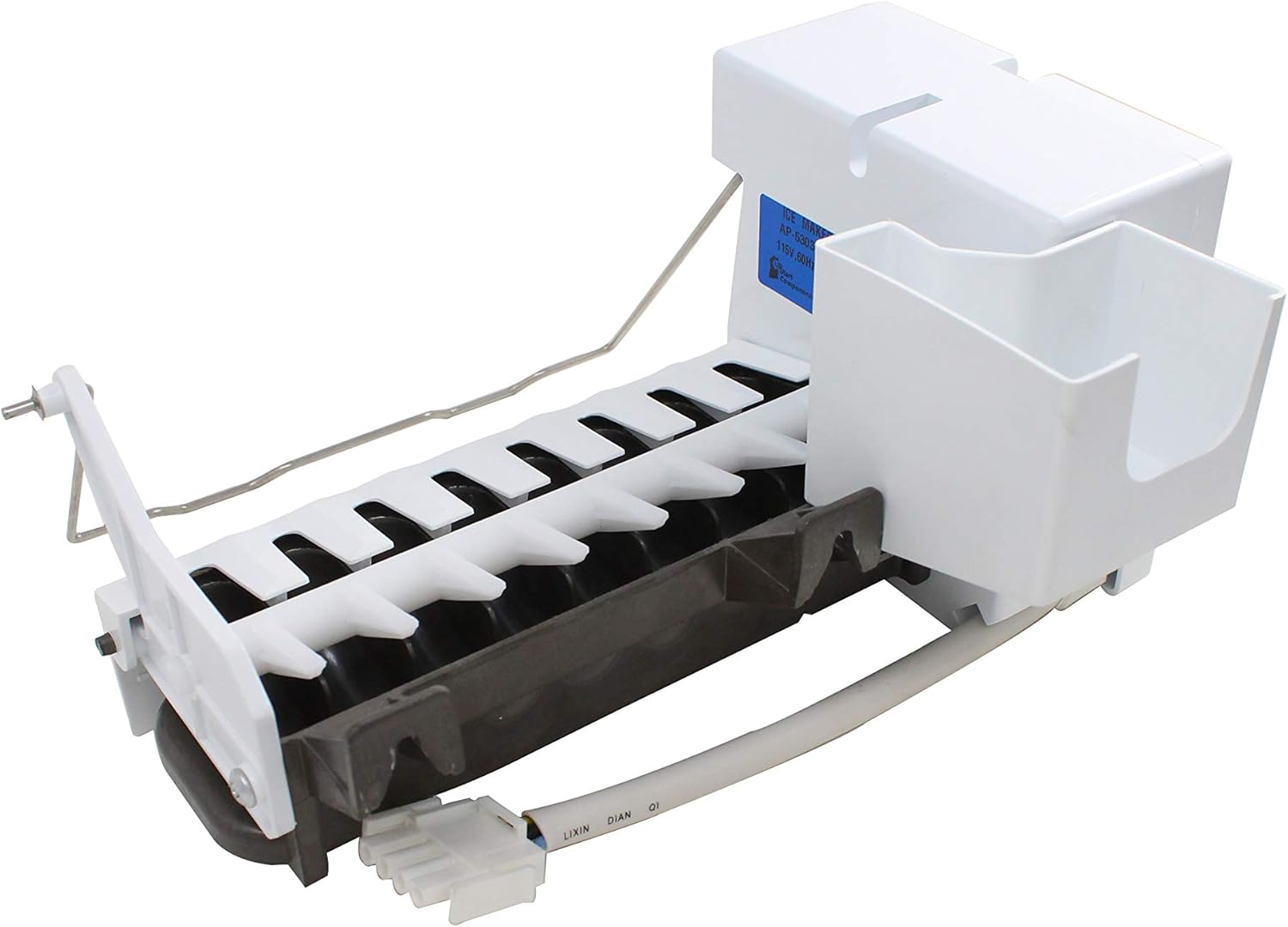
Figure 2: Underside view of the ice maker, illustrating the ice tray and auger mechanism.
5. Operating Instructions
Once installed, the ice maker operates largely automatically. Here are key aspects of its operation:
- Power Switch: The ice maker typically has an ON/OFF switch located on the front or side of the unit. Ensure this switch is in the "ON" position for the ice maker to function.
- Ice Level Arm: The ice maker uses a sensing arm (bail arm) to detect the ice level in the storage bin. When the bin is full, the arm rises, and the ice maker stops producing ice. When the ice level drops, the arm lowers, and ice production resumes. Do not obstruct this arm.
- Initial Ice Production: After installation or a power outage, it may take several hours for the ice maker to produce its first full batch of ice. The first few batches should be discarded to ensure water line cleanliness.
6. Maintenance
Regular maintenance helps ensure optimal performance and longevity of your ice maker.
- Cleaning the Ice Bin: Periodically remove and wash the ice storage bin with mild soap and warm water. Rinse thoroughly and dry completely before returning it to the freezer.
- Cleaning the Ice Maker: If mineral deposits or residue build up on the ice maker components, disconnect power to the refrigerator and gently wipe down accessible surfaces with a damp cloth. Do not use abrasive cleaners or harsh chemicals.
- Water Filter (Refrigerator): If your refrigerator has a water filter, ensure it is replaced according to the refrigerator manufacturer's recommendations. A clogged water filter can affect ice production and quality.
- Inspect Water Line: Periodically check the water supply line for kinks, leaks, or damage.
7. Troubleshooting
Before contacting support, please review the following common issues and their solutions:
| Problem | Possible Cause | Solution |
|---|---|---|
| No ice production |
|
|
| Slow ice production |
|
|
| Small or hollow ice cubes |
|
|
| Ice tastes bad or has odor |
|
|
8. Specifications
| Brand | UpStart Components |
| Model Number | AP-5303918344-DL806 |
| Part Number | 5303918344 |
| Compatible Part Numbers | 241696501, 241627701, AP4299334, 1260019, 240599901, 241680601, 241709801, 5304436617, 7241709801, 75303918344, AH1992700, EA1992700, PS1992700 |
| Compatible Refrigerator Models (Partial List) | Frigidaire FGHC2331PFAA, FGHC2355PFBB, FGSS2335TF6, FGSS2335TF7, FGSS2335TF9, FGSS2335TFA |
| Date First Available | July 10, 2020 |
9. Warranty and Support
This UpStart Components replacement part is covered by a warranty provided solely by UpStart Components. For specific warranty terms, duration, and to initiate a warranty claim, please contact UpStart Components directly or the retailer from whom you purchased this product.
For technical assistance or further inquiries, please contact the seller or UpStart Components customer support.
Ask a question about this manual
Ask about setup, troubleshooting, compatibility, parts, safety, or missing instructions. Manuals+ will review the question and use this page’s manual context to help answer it.