1. Product Overview
The PARKSIDE PBSA 12 D2 12V Cordless Drill Driver is a versatile tool designed for both drilling and screwdriving tasks. It is part of the PARKSIDE X 12 V Team series, ensuring compatibility with other tools and batteries within this range. This manual provides essential information for the safe and efficient operation, maintenance, and troubleshooting of your device.
Key features include:
- Quick and tool-free switching between drilling and screwdriving functions.
- Quick-release chuck for easy bit changes.
- Integrated magnetic bit holder on the spindle.
- 2-speed drive with continuously adjustable speed and quick stop.
- 19 torque settings plus 1 drilling position for precise control.
- Automatic SPINDLE LOCK for secure operation.
- Integrated LED light for illuminating the work area.
- Non-slip soft grip for comfortable handling.
2. Setup
2.1 Charging the Battery
Your PARKSIDE PBSA 12 D2 12V Cordless Drill Driver comes with a battery and charger. Before first use, ensure the battery is fully charged. Connect the charger to a power outlet and insert the battery into the charger. The charger's indicator light will show the charging status. Once fully charged, remove the battery from the charger.

Figure 2.1: Parkside 12V battery and charger. Ensure the battery is fully charged before use.
2.2 Attaching and Detaching the Chuck / Bits
The drill driver features a quick-release chuck for easy attachment and detachment. To attach the chuck, align it with the spindle and push it firmly until it clicks into place. To detach, pull the chuck away from the spindle while holding the tool body.
For screwdriving, you can use the integrated magnetic bit holder directly on the spindle. For drilling or larger screwdriving bits, use the quick-release chuck.

Figure 2.2: The Parkside PBSA 12 D2 12V Cordless Drill Driver showing the detachable chuck and the integrated magnetic bit holder.

Figure 2.3: The drill driver with the quick-release chuck fully attached and a drill bit inserted.
3. Operating Instructions
3.1 Speed and Torque Settings
The drill driver features a 2-speed gearbox and 19 torque settings plus a drilling position. Use the gear selector switch (typically on top of the tool) to choose between 1st gear (lower speed, higher torque for screwdriving and larger drilling) and 2nd gear (higher speed, lower torque for faster drilling).
The torque collar allows you to adjust the torque output. Select a lower torque setting for screwdriving into softer materials or with smaller screws to prevent overtightening. For drilling, set the collar to the drill icon position for maximum power.
3.2 Using the Drill Driver
To operate the tool, press the trigger switch. The speed is continuously adjustable by varying the pressure on the trigger. The integrated LED light will illuminate the work area when the trigger is pressed, improving visibility.
The automatic SPINDLE LOCK ensures that the spindle is locked when the trigger is released, allowing for manual tightening or loosening of the chuck and preventing accidental rotation.

Figure 3.1: A user holding the Parkside drill driver, demonstrating its ergonomic design and non-slip soft grip.
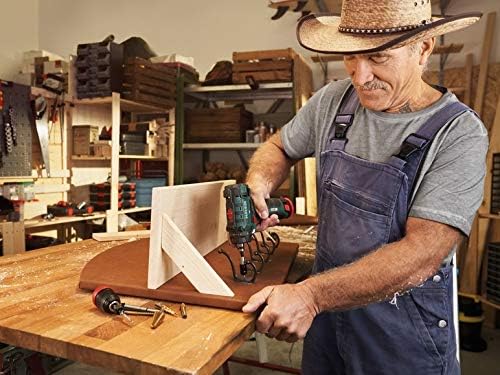
Figure 3.2: The drill driver in use, demonstrating its application for drilling into wood. Note the integrated LED light illuminating the work surface.
4. Maintenance
Regular maintenance ensures the longevity and optimal performance of your drill driver.
- Cleaning: After each use, wipe down the tool with a clean, damp cloth. Do not use harsh chemicals or abrasive cleaners. Ensure ventilation openings are free from dust and debris.
- Battery Care: Store batteries in a cool, dry place away from direct sunlight. Do not store fully discharged batteries for extended periods. Charge batteries regularly, even if not in use, to maintain their health.
- Storage: When not in use, store the drill driver, battery, and charger in a clean, dry environment, preferably in its original case.
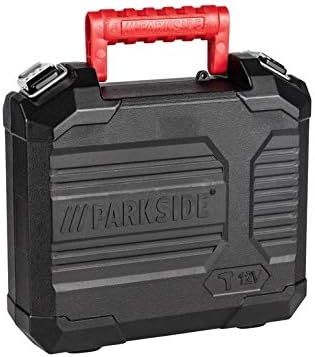
Figure 4.1: The durable carrying case for the Parkside drill driver, ideal for storage and transport.
5. Troubleshooting
If you encounter issues with your drill driver, refer to the following common troubleshooting steps:
- Tool does not turn on:
- Check if the battery is properly inserted and fully charged.
- Ensure the trigger switch is fully depressed.
- Reduced power or speed:
- The battery may be low; recharge it.
- Ensure the correct gear (1st or 2nd) is selected for the task.
- Check if the torque setting is too low for the material or screw size.
- Chuck not holding bit securely:
- Ensure the chuck is fully tightened.
- Check if the bit shank is clean and free of debris.
If problems persist after following these steps, please contact Parkside customer support.
6. Specifications
| Specification | Value |
|---|---|
| Brand | Parkside |
| Model Number | IAN-100388837 |
| Voltage | 12 Volts |
| Max. Torque | 28 Nm |
| Rotation Speed (1st Gear) | 0-350 rpm |
| Rotation Speed (2nd Gear) | 0-1300 rpm |
| Torque Positions | 19 + 1 drilling position |
| Chuck Clamping Range | 0.8 - 10 mm |
| Max. Drilling Diameter (Wood) | 25 mm |
| Max. Drilling Diameter (Steel) | 8 mm |
| Product Dimensions (L x W x H) | 20 x 10 x 20 cm |
| Weight | 2.72 kg |
| Material | Metal |
| Color | Green |
| Included Components | Battery charger |
| Special Features | Removable, Automatic, Adjustable |
7. Warranty and Support
Parkside products are manufactured with high-quality standards and come with a manufacturer's warranty. For specific warranty details, including duration and coverage, please refer to the warranty card included with your product or visit the official Parkside website.
For technical support, spare parts, or any inquiries regarding your PARKSIDE PBSA 12 D2 12V Cordless Drill Driver, please contact Parkside customer service. Contact information can typically be found on the product packaging or the manufacturer's website.


