
Introduction
This manual provides detailed instructions for the proper setup, operation, and maintenance of your GOLDEN HOUR GH-133 Military Tactical Analog Digital Wrist Watch. Please read this manual thoroughly to ensure optimal performance and longevity of your watch.
Product Overview
The GOLDEN HOUR GH-133 watch features a dual analog and digital display, designed for durability and functionality. It includes various features such as a stopwatch, countdown timer, alarm, and backlight.
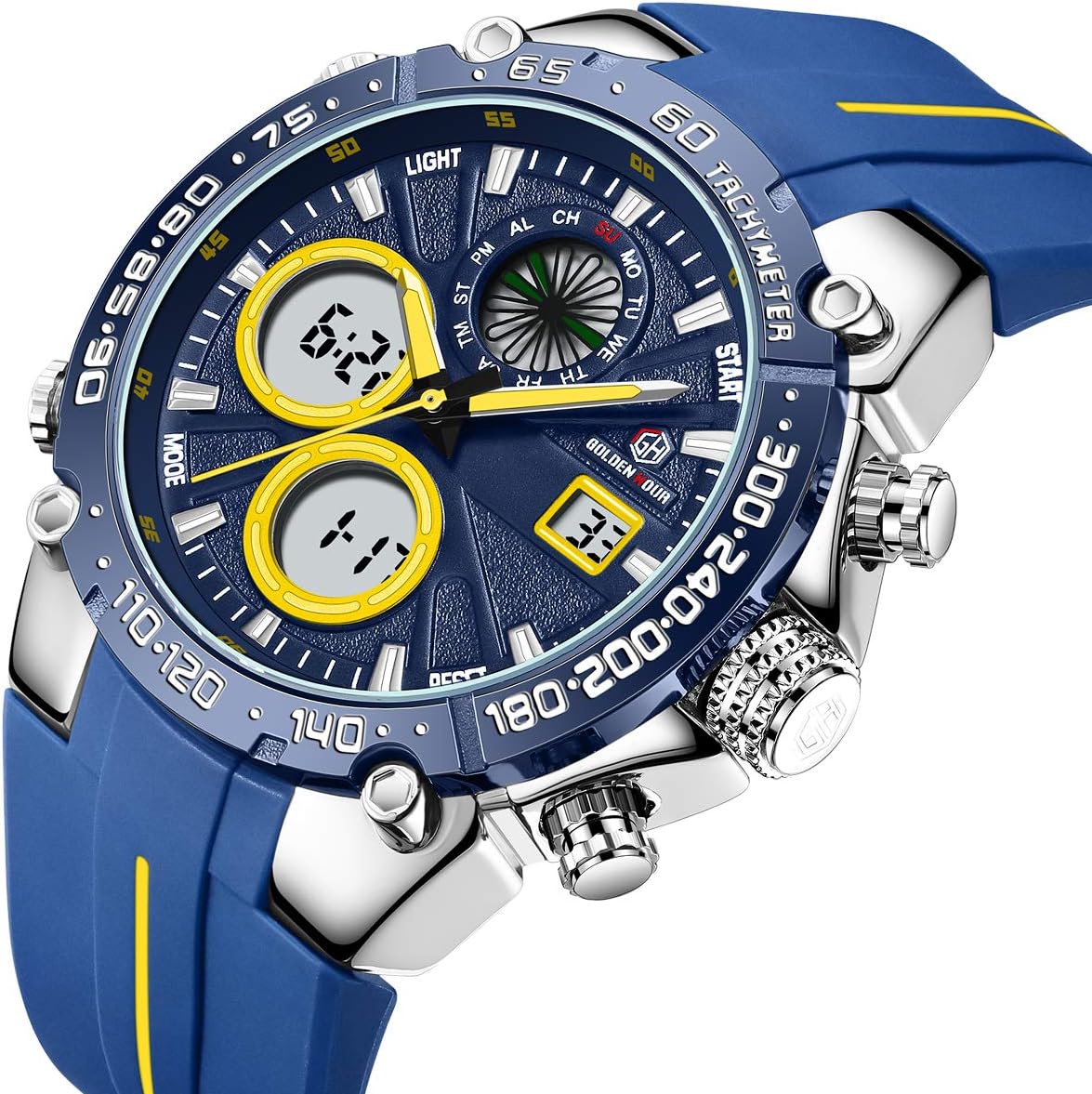
Image: Front view of the GOLDEN HOUR GH-133 Military Tactical Watch, showcasing its dual analog and digital display with a blue rubber strap.

Image: Diagram illustrating the functions and button layout of the GOLDEN HOUR GH-133 watch, including Week, Time, Calendar, Light, Mode, Start, Reset, and Time Adjustment.
Key Components:
- Analog Display: Traditional hour and minute hands.
- Digital Displays: Two digital windows for time, date, and other functions.
- Buttons:
- LIGHT: Activates the backlight.
- MODE: Cycles through different digital modes (Time, Alarm, Stopwatch, Countdown).
- START: Used for starting/stopping functions in certain modes.
- RESET: Used for resetting functions or adjusting settings.
- Crown: Used for setting analog time.
Setup Instructions
Setting Analog Time:
- Pull out the crown (the knob on the right side of the watch) to the outermost position.
- Rotate the crown to adjust the analog hour and minute hands to the desired time.
- Once the time is set, push the crown back in to its original position to start the analog movement.
Setting Digital Time and Date:
- Press the MODE button repeatedly until the digital display shows the time setting mode (usually indicated by flashing digits).
- Use the START button to select the digit or setting you wish to adjust (e.g., hours, minutes, year, month, day).
- Use the RESET button to change the value of the selected digit or setting.
- Continue pressing START and RESET until all desired time and date parameters are set.
- Press the MODE button again to exit the setting mode and return to the normal time display.
Operating Instructions
Mode Selection:
Press the MODE button to cycle through the following functions:
- Normal Time Display (Hour, Minute, Second, Day, Date, Week)
- Stopwatch
- Countdown Timer
- Alarm Setting
- Second Time Zone (if applicable)
Using the Stopwatch:
- Press MODE until the stopwatch display appears (usually "00:00:00").
- Press START to begin timing.
- Press START again to pause timing.
- Press RESET to clear the stopwatch to zero.
- To resume from a paused state, press START.
Setting and Using the Alarm:
- Press MODE until the alarm setting display appears.
- Use START to select the hour or minute digit to adjust.
- Use RESET to change the value.
- Once the alarm time is set, press MODE to exit.
- To activate/deactivate the alarm, typically a combination of START and RESET buttons while in alarm mode is used (refer to on-screen indicators for alarm ON/OFF).
Using the Backlight:
Press the LIGHT button (usually located on the top left side of the watch) to illuminate the digital display for a few seconds, making it visible in low-light conditions.

Image: Comparison showing the watch display in normal light and with the backlight activated for visibility in the dark.
Maintenance and Care
Water Resistance:
This watch is rated for 3ATM (30 meters) water resistance. This means it is suitable for daily use, splashes, and brief immersion in water. However, it is not suitable for swimming, diving, or prolonged water activities.
- Do not press any buttons while the watch is submerged in water.
- Avoid exposing the watch to hot water or steam, such as during hot baths or saunas, as this can compromise the water seals.

Image: Illustration demonstrating the 30M water resistance of the GOLDEN HOUR GH-133 watch, suitable for splashes and daily water exposure.
Cleaning:
Wipe the watch case and strap regularly with a soft, dry cloth. For stubborn dirt, a slightly damp cloth can be used, followed by immediate drying. Avoid using harsh chemicals or abrasive materials.
Battery Replacement:
When the digital display dims or the watch stops functioning, the battery may need replacement. It is recommended to have the battery replaced by a qualified watch technician to ensure proper sealing and water resistance.
Troubleshooting
- Digital display is blank or dim: The battery may be low or depleted. Replace the battery.
- Analog hands are not moving: Check if the crown is pushed in completely. If it is, the battery for the analog movement might be depleted.
- Time is inaccurate: Ensure both analog and digital times are set correctly. If the issue persists after setting, the battery may be low or the watch may require servicing.
- Water inside the watch: Immediately cease use and seek professional servicing. Do not attempt to dry it yourself, as this can cause further damage.
Specifications
| Feature | Detail |
|---|---|
| Model Number | GH-133 |
| Brand | GOLDEN HOUR |
| Display Type | Analog-Digital |
| Movement Type | Quartz |
| Case Material | Stainless Steel |
| Band Material | Rubber |
| Band Color | Blue |
| Dial Color | Black |
| Case Diameter | 45 mm (1.79 inch) |
| Case Thickness | 16.5 mm (0.65 inch) |
| Band Width | 22 mm (0.86 inch) |
| Water Resistance Depth | 30 Meters (3ATM) |
| Special Features | Stopwatch, Countdown, Alarm, Date and Day, Year, 12/24 Hour, Hourly Alarms, Backlight |
Warranty and Support
Warranty Information:
For warranty-related inquiries, please contact the seller of record directly. The warranty terms and conditions are provided by the seller at the time of purchase.
Customer Support:
If you encounter any issues not covered in this manual or require further assistance, please refer to the contact information provided with your purchase or reach out to the GOLDEN HOUR customer support channels.