
Introduction
Thank you for choosing the Masterforce 18" Oscillating Floor Fan. This manual provides important information regarding the safe operation, assembly, maintenance, and troubleshooting of your new fan. Please read this manual thoroughly before using the product and retain it for future reference.
Important Safety Instructions
When using electrical appliances, basic precautions should always be followed to reduce the risk of fire, electric shock, and injury to persons, including the following:
- Read all instructions before using this fan.
- This fan is for indoor use only. Do not use outdoors or in wet locations.
- Do not operate any fan with a damaged cord or plug. Discard fan or return to an authorized service facility for examination and/or repair.
- Do not run cord under carpeting. Do not cover cord with throw rugs, runners, or similar coverings. Do not route cord under furniture or appliances. Arrange cord away from traffic area and where it will not be tripped over.
- To disconnect fan, turn controls to OFF, then remove plug from outlet.
- Do not insert or allow fingers or foreign objects to enter any ventilation or exhaust opening as this may cause an electric shock or fire, or damage the fan.
- Do not block air openings or operate with any opening blocked.
- Always place the fan on a stable, flat surface to prevent tipping.
- This fan is equipped with a polarized plug (one blade is wider than the other). To reduce the risk of electric shock, this plug is intended to fit in a polarized outlet only one way. If the plug does not fit fully in the outlet, reverse the plug. If it still does not fit, contact a qualified electrician. Do not attempt to defeat this safety feature.
- Do not use this fan with any solid-state speed control device.
- The fan is designed to meet OSHA specifications.
Package Contents
Please check the contents of the package to ensure all items are present and undamaged:
- Masterforce 18" Oscillating Floor Fan Unit
- Remote Control
- User Manual (this document)
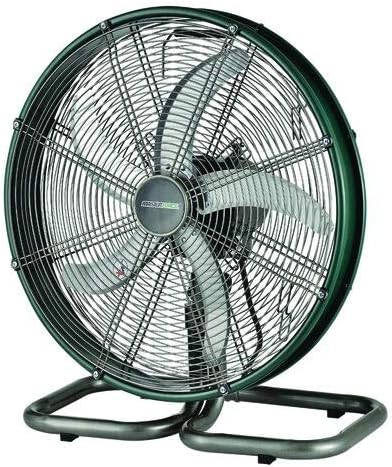
Figure 1: Front view of the Masterforce 18" Oscillating Floor Fan, showing the fan blades and protective grille.
Setup
The Masterforce 18" Oscillating Floor Fan comes largely pre-assembled. Follow these steps for initial setup:
- Carefully remove the fan from its packaging.
- Place the fan on a firm, level surface where it will not tip over. Ensure there is adequate space around the fan for proper air circulation and oscillation.
- Ensure the power cord is not tangled or obstructed.
- Plug the power cord into a standard 120V AC electrical outlet.
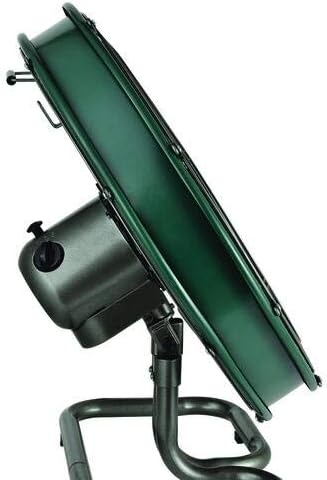
Figure 2: Side view of the Masterforce 18" Oscillating Floor Fan, illustrating its sturdy base and adjustable tilt mechanism.
Operating Instructions
Your Masterforce fan can be operated using the controls on the fan unit or the included remote control.
Power On/Off
- To turn the fan ON, press the Power button on the fan control panel or the remote control.
- To turn the fan OFF, press the Power button again.
Speed Settings
The fan features 3 power levels (speeds): Low, Medium, and High.
- Press the Speed button on the fan or remote to cycle through the available speeds.
- The fan will typically start at the lowest speed setting.
Oscillation Function
The oscillation feature allows the fan head to sweep from side to side, distributing air over a wider area.
- To activate oscillation, press the Oscillation button on the fan or remote.
- To stop oscillation, press the Oscillation button again. The fan will stop in its current position.
Tilt Adjustment
The fan head can be manually tilted up or down to direct airflow as desired.
- Grasp the fan head firmly and gently tilt it to the desired angle. The fan head will hold its position.
Maintenance
Regular cleaning and maintenance will help prolong the life of your fan.
Cleaning
- Always unplug the fan from the power outlet before cleaning.
- Use a soft, damp cloth to wipe the exterior surfaces of the fan. Do not use abrasive cleaners or solvents.
- To clean the fan blades, use a vacuum cleaner with a brush attachment or a soft cloth to remove dust and debris from the grille and blades.
- Ensure no water or liquids enter the motor housing.
- Allow the fan to dry completely before plugging it back in.
Storage
- When not in use, store the fan in a cool, dry place.
- It is recommended to cover the fan to protect it from dust.
Troubleshooting
If your fan is not operating correctly, please consult the following common issues and solutions:
| Problem | Possible Cause | Solution |
|---|---|---|
| Fan does not turn on. | Not plugged in; Power outlet not working; Fan switch is off. | Ensure fan is securely plugged into a working outlet; Check household circuit breaker; Press the Power button on the fan or remote. |
| Fan is noisy. | Fan not on a level surface; Loose parts; Dust buildup on blades. | Place fan on a flat, stable surface; Check for any loose components (do not attempt to disassemble); Clean fan blades and grille as per maintenance instructions. |
| Oscillation not working. | Oscillation function not activated; Obstruction. | Press the Oscillation button; Ensure nothing is blocking the fan's movement. |
If the problem persists after trying these solutions, please contact customer support.
Specifications
| Feature | Detail |
|---|---|
| Brand | Masterforce |
| Model Name | HVODF-18S-MF |
| Electric Fan Design | Floor Fan |
| Power Source | Corded Electric |
| Style | Modern |
| Room Type | Living Room, Bedroom |
| Special Feature | High Velocity, Oscillating |
| Recommended Uses | Air Circulation |
| Finish Type | Painted |
| Number of Blades | 3 |
| Included Components | Remote Control, Oscillating Mechanism |
| Indoor/Outdoor Usage | Indoor |
| Specification Met | OSHA |
| Control Method | Remote |
| Blade Material | Aluminum |
| Is Cordless? | No |
| Number of Power Levels | 3 |
| UPC | 308175593199 |
| ASIN | B08CMQXQBG |
| Date First Available | July 9, 2020 |
Warranty and Support
For warranty information, please refer to the warranty card included with your purchase or visit the official Masterforce website. Keep your purchase receipt as proof of purchase for warranty claims.
For technical support or service inquiries, please contact Masterforce customer service. Contact details can typically be found on the product packaging or the manufacturer's official website.