Introduction
Thank you for choosing the LeCuag Ionic Foot Bath Detox Machine. This professional-grade system is designed to provide a convenient and effective detoxification experience in the comfort of your home. This manual provides essential information for the safe and proper operation, maintenance, and troubleshooting of your device. Please read it thoroughly before first use.
Important Safety Information
To ensure safe operation and prevent damage to the device or injury, please adhere to the following guidelines:
- Do not use distilled water; tap water is recommended for optimal performance.
- Add salt gradually and in small amounts. Excessive salt can cause the machine to beep and cease operation.
- Always wear the wristband during use. The machine will not function if the wristband is not worn correctly or if the metal panel does not make proper contact with the skin.
- Ensure your feet are placed in the foot bath and the metal panel of the wristband touches your skin throughout the session.
- If an "E" number is displayed, the machine is operating normally. If an error message appears, verify all connections, especially the wristband.
Package Contents
Upon opening your LeCuag Ionic Foot Bath Detox Machine package, please verify that all the following components are present:
- 1 x Ionic Foot Bath Detox Machine Unit
- 1 x Far Infrared Waist Belt
- 2 x Ion Arrays
- 1 x Wrist Strap
- 10 x Foot Bath Liners (disposable)
- 1 x Power Cord
- 1 x Aluminum Carrying Case
- Keys for Carrying Case
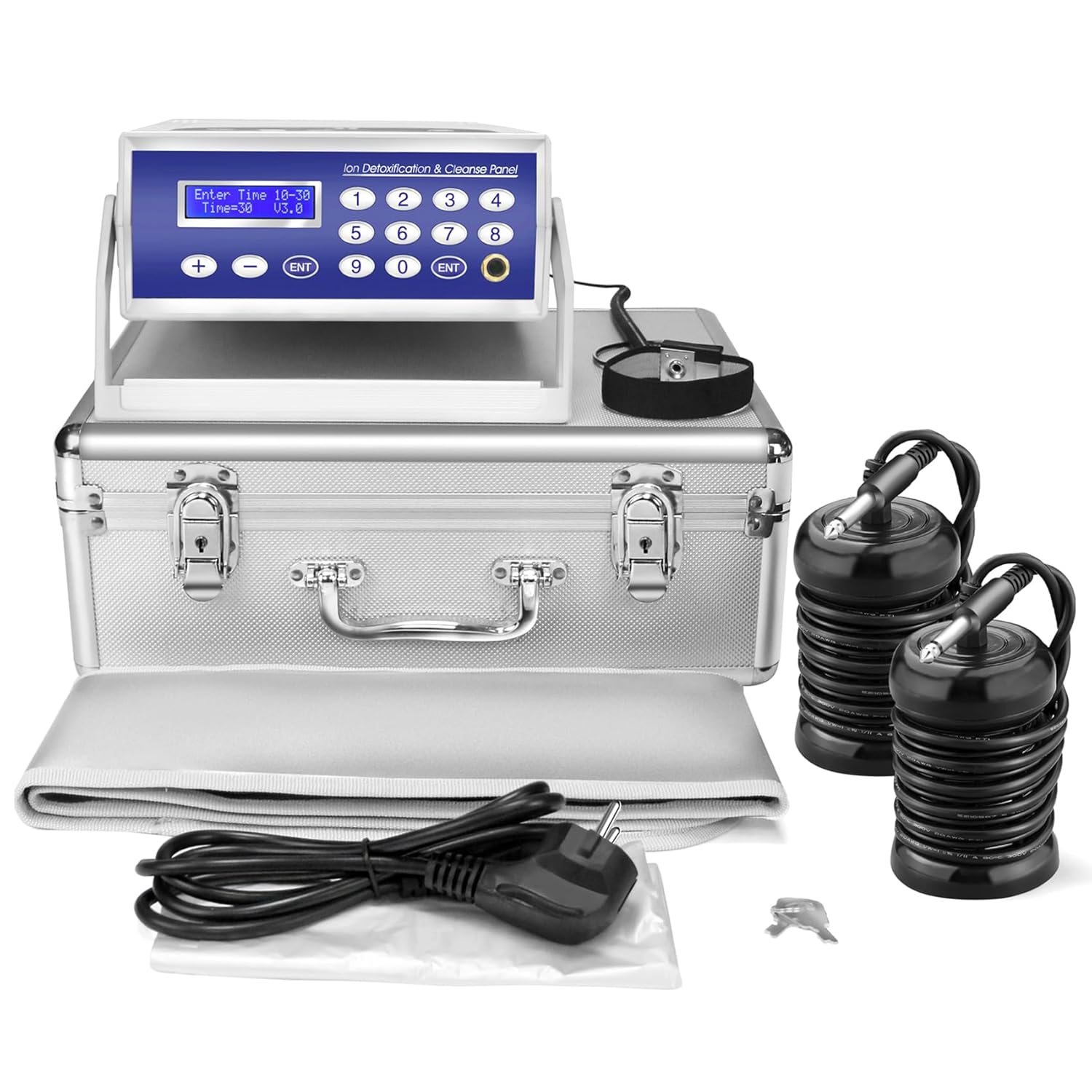
Image: The complete LeCuag Ionic Foot Bath Detox Machine kit, including the main unit, ion arrays, wrist strap, power cord, and the aluminum carrying case.
Setup Guide
Follow these steps to set up your Ionic Foot Bath Detox Machine:
- Place the main machine unit on a stable, flat surface near an electrical outlet.
- Open the aluminum carrying case and remove all components.
- Prepare a basin or foot tub with warm tap water. Do not use distilled water.
- Place one disposable foot bath liner into the basin, if desired, for easier cleanup.
- Connect one ion array to the "Array interface" port on the back of the main unit. Submerge the ion array completely in the water within the basin.
- Connect the wrist strap to the "Wrist strap interface" port on the back of the main unit. Securely wear the wrist strap on your wrist, ensuring the metal panel makes direct contact with your skin.
- Plug the power cord into the "Power socket" on the back of the main unit, then plug the other end into a standard electrical outlet.

Image: Detailed view of the machine's control panel and rear connections, including the power socket, wrist strap interface, and waist belt interface.

Image: Illustration demonstrating the correct way to wear the wrist strap for proper machine function and the far infrared waist belt.
Operating Instructions
Once the machine is set up, follow these steps to begin your foot detox session:
- Turn on the main power switch, usually located on the back or side of the unit.
- The LED display will illuminate. Use the "+" and "-" buttons to set your desired session time. A typical session lasts 30 minutes.
- Add a small amount of non-iodized salt (e.g., Epsom salt) to the water in the basin. Start with a pinch and add more gradually if needed. The water conductivity is crucial; too much salt will cause an error.
- Immerse your feet into the water, ensuring they are comfortable and fully submerged.
- Press the "ENT" (Enter) button to start the detoxification process. The display will show an "E" number, indicating the machine is working.
- Relax for the duration of your session. The machine will automatically stop when the set time expires.
- After the session, press "ESC" to return to standby status. Remove your feet from the basin, dry them thoroughly, and unplug the machine.

Image: Visual progression of water color change during a 5, 15, 25, and 30-minute foot detox session, illustrating the process.
Far Infrared Waist Belt Usage
The LeCuag Ionic Foot Bath Detox Machine includes a versatile far infrared waist belt that can be used independently or concurrently with your foot detox session for additional benefits.
- Connect the waist belt to the "Waist belt interface" port on the back of the main unit.
- Wrap the waist belt comfortably around your waist or any other area requiring heat therapy.
- Use the "L/M/H" button on the control panel to select the desired intensity level: L (Low), M (Medium), or H (High). These correspond to different temperature settings.
- The far infrared heat can help relieve muscle aches, menstrual pain, and improve circulation.

Image: A user demonstrating the application of the far infrared heating waist belt, with a list of its benefits such as increased oxygen delivery, enhanced immune response, toxin removal, and improved metabolism.
Maintenance
Proper maintenance ensures the longevity and optimal performance of your device:
- After Each Use:
- Unplug the machine from the power outlet.
- Remove the ion array from the water. Clean the ion array thoroughly with warm water and a soft brush to remove any residue. Dry it completely before storage.
- Discard the foot bath liner and empty the basin. Clean the basin with soap and water.
- Wipe down the main unit and wrist strap with a soft, damp cloth. Do not immerse the main unit in water.
- Storage: Store all components in the provided aluminum carrying case in a cool, dry place away from direct sunlight.
- Ion Array Lifespan: The ion arrays have a limited lifespan. Replace them when you notice a significant decrease in performance or if they appear damaged. The machine comes with 2 ion arrays.
Troubleshooting
If you encounter any issues with your LeCuag Ionic Foot Bath Detox Machine, refer to the following common problems and solutions:
| Problem | Possible Cause | Solution |
|---|---|---|
| Machine beeps and stops working. | Too much salt added to the water, leading to excessive conductivity. | Empty some water and add fresh tap water, or dilute the water to reduce salt concentration. Add salt gradually next time. |
| Machine does not start or display an "E" number. | Wristband not worn correctly or not making skin contact. | Ensure the wristband is securely fastened and the metal panel is in direct contact with your skin. Check the wristband connection to the machine. |
| Error message displayed. | Connection issue with wristband or ion array. | Check all cable connections, especially the wristband and ion array, to ensure they are firmly plugged in. |
| Water does not change color significantly. | Insufficient salt in the water or worn-out ion array. | Add a small amount of salt gradually. If the issue persists, consider replacing the ion array. |
Specifications
| Feature | Detail |
|---|---|
| Product Dimensions | 14.6 x 11.9 x 6.6 inches |
| Item Weight | 10.45 Pounds |
| Model Number | LC-003 |
| UPC / GTIN | 738631326724 |
| Brand | LeCuag |
| Manufacturer | Lecaung |
| Power Source | Corded Electric |
| Material | Aluminum, Metal, Plastic |
| Use For | Feet |

Image: A visual comparison of the ion array's dimensions (height 5.94 inches, diameter 2.7 inches) next to an iPhone 11 for scale.

Image: A person carrying the premium aluminum case, highlighting its portability and protective qualities for the detox machine.
Warranty and Support
For any questions, technical support, or warranty inquiries regarding your LeCuag Ionic Foot Bath Detox Machine, please contact the manufacturer directly through their official channels. Refer to the product packaging or the manufacturer's website for specific contact information.
Please note that protection plans are available for purchase separately through Amazon, offering extended coverage beyond the manufacturer's standard warranty. These plans are optional and managed by third-party providers.


