
GreenForest B08CKVW5HM
GreenForest L Shaped Computer Desk Instruction Manual
Model: B08CKVW5HM | Brand: GreenForest
Introduction
This manual provides comprehensive instructions for the assembly, usage, and maintenance of your GreenForest L Shaped Computer Desk. Designed for optimal space utilization and functionality, this desk offers a spacious workstation with integrated storage shelves, suitable for home offices, gaming setups, and study areas.
For additional support, please refer to the official PDF installation manual available here.
Safety Instructions
- Keep all small parts and packaging materials away from children and pets to prevent choking hazards.
- Assemble the desk on a clean, flat, and soft surface (e.g., carpet or cardboard) to prevent scratches and damage.
- Do not fully tighten screws until all components are properly aligned and in place. This allows for minor adjustments during assembly.
- Ensure all screws are securely tightened before using the desk to guarantee stability and safety.
- Do not overload the desk or shelves beyond the recommended weight capacity of 300 lbs (136 kg).
- Regularly check all connections and tighten screws as needed to maintain structural integrity.
- Avoid placing hot items directly on the desktop surface. Use coasters or protective pads.
Package Contents
Before beginning assembly, verify that all parts and hardware listed below are present. If any items are missing or damaged, please contact customer support.

Image: Overview of the GreenForest L Shaped Computer Desk.
Parts List:
- Part 1: Left Desktop Panel (x1)
- Part 2: Right Desktop Panel (x1)
- Part 3: Left Leg Frame (x1)
- Part 4: Right Leg Frame (x1)
- Part 5: Shelf Support Frame (x1)
- Part 6: Upper Left Horizontal Bar (x1)
- Part 7: Middle Left Horizontal Bar (x1)
- Part 8: Lower Left Horizontal Bar (x1)
- Part 9: Upper Right Horizontal Bar (x1)
- Part 10: Middle Right Horizontal Bar (x1)
- Part 11: Lower Right Horizontal Bar (x1)
- Part 12: Left Shelf Vertical Bar (x1)
- Part 13: Right Shelf Vertical Bar (x1)
- Part 14: Shelf Support Brackets (x2)
- Part 15: Shelf Boards (x2)
- Part 16: Back Braces (x2)
Hardware List:
- Screw A: M6x40 (x7)
- Screw B: M6x40 (x20)
- Screw C: M6x35 (x26)
- Part D: Adjustable Foot Pads (x8)
- Part E: Assembly Tool (Allen Wrench/Screwdriver) (x1)
Assembly Instructions
Please follow these steps carefully. It is recommended to have a second person assist with assembly for easier handling of larger components.
Video: Official GreenForest L-Shaped Desk Assembly Guide. This video provides a visual walkthrough of the entire assembly process.
Step 1: Attach Adjustable Foot Pads to Leg Frames
Screw the adjustable foot pads (Part D) into the pre-drilled holes at the bottom of the Left Leg Frame (Part 3) and Right Leg Frame (Part 4). Ensure they are securely fastened but do not overtighten.
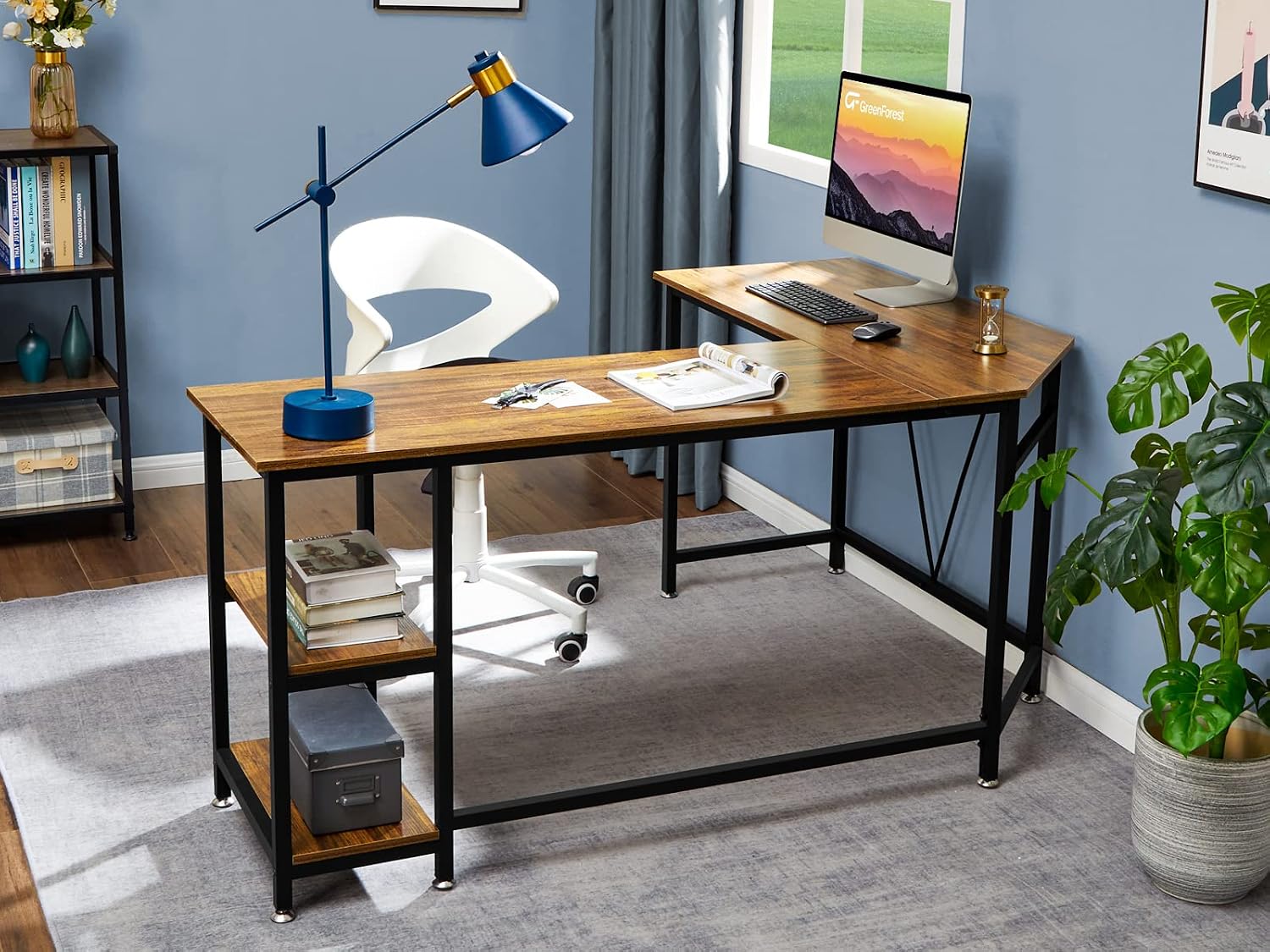
Image: Close-up of the adjustable foot pads on the desk legs, providing stability on uneven surfaces.
Step 2: Assemble Shelf Unit Frame
Attach the Shelf Support Frame (Part 5) to the Left Shelf Vertical Bar (Part 12) and Right Shelf Vertical Bar (Part 13) using screws (Part B). Ensure the holes align correctly. Then, attach the two Shelf Support Brackets (Part 14) to the Shelf Boards (Part 15) using screws (Part C).

Image: Detail of the adjustable shelf, demonstrating its capacity to hold a PC tower or other items.
Step 3: Construct the Right Side Desk Frame
Connect the assembled shelf unit (from Step 2) to the Right Leg Frame (Part 4). Then, attach the Upper Right Horizontal Bar (Part 9) and Lower Right Horizontal Bar (Part 11) to complete the right side of the desk frame. Ensure the oval holes on the horizontal bars are facing upwards. Secure all connections with screws (Part B and C).
Step 4: Construct the Left Side Desk Frame
Attach the Upper Left Horizontal Bar (Part 6), Middle Left Horizontal Bar (Part 7), and Lower Left Horizontal Bar (Part 8) to the Left Leg Frame (Part 3). Ensure that the holes on these bars are parallel to each other. Secure all connections with screws (Part B).
Step 5: Connect the Left and Right Desk Frames
Carefully align and connect the assembled left and right desk frames. Use the remaining horizontal bars (Parts 9, 10, and 11) to bridge the corner connection. Secure all connection points with screws (Parts A, B, and C). Do not fully tighten all screws until the entire frame is assembled.
Step 6: Install Back Braces
Attach the two Back Braces (Part 16) to the designated points on the rear of the left desk frame. These braces provide additional stability. Secure them with screws (Parts A and C).
Step 7: Place and Secure Desktop Panels
Carefully place the Left Desktop Panel (Part 1) and Right Desktop Panel (Part 2) onto the assembled metal frame. Align the pre-drilled holes on the desktop panels with the holes on the frame. Secure the desktop panels to the frame using screws (Part C). Once all panels are in place, go back and fully tighten all screws on the entire desk structure to ensure maximum stability.

Image: The fully assembled L-shaped desk, ready for use in a home office environment.
Usage and Features
The GreenForest L Shaped Computer Desk is designed to maximize your workspace and provide efficient storage solutions.
- Spacious L-Shaped Design: The 65.7 (Long Side) x 47.2 (Short Side) inch desktop offers ample surface area for multiple monitors, laptops, and other office essentials, making it ideal for working, gaming, or studying.
- Adjustable Storage Shelves: Features two-tier storage shelves with adjustable height, allowing you to customize the space to fit books, files, devices, or even a PC tower.
- Sturdy Construction: Constructed from waterproof and anti-scratch particle board with a robust metal frame, ensuring durability and stability. It can support up to 300 lbs.
- Adjustable Foot Pads: Equipped with non-slip foot pads that protect your floor and ensure stability on uneven surfaces.
- Space-Saving Functionality: The L-shaped design fits perfectly into corners, optimizing room space while providing a large functional area.
Video: A brief overview showcasing the GreenForest L-Shaped Desk in various settings, highlighting its spaciousness and design.

Image: Detailed dimensions of the L-shaped desk, including length, width, and height measurements.
Maintenance and Care
- Cleaning: Wipe the desk surface with a dry, soft cloth. For stubborn marks, use a slightly damp cloth and dry immediately. Avoid harsh chemicals or abrasive cleaners.
- Protection: Use coasters for drinks and protective pads under hot items or sharp objects to prevent damage to the desktop.
- Stability Check: Periodically check all screws and connections to ensure they remain tight. Re-tighten if necessary to maintain the desk's stability.
- Environment: Avoid prolonged exposure to direct sunlight or extreme temperature changes, which can affect the material's integrity.
Troubleshooting
Issue: Desk is wobbly after assembly.
- Solution 1: Ensure all screws are fully and evenly tightened. Loosen all screws slightly, gently shake the desk to settle it, then re-tighten all screws starting from the center outwards.
- Solution 2: Adjust the foot pads (Part D) on the bottom of the legs. Rotate them clockwise or counter-clockwise to compensate for uneven flooring until the desk is stable.
Issue: Missing or damaged parts.
- Solution: Refer to the "Package Contents" section to identify the specific missing or damaged part. Contact GreenForest customer support with the part number and your purchase information for assistance.
Issue: Difficulty aligning holes during assembly.
- Solution: Do not fully tighten any screws until all components for a section are loosely assembled. This allows for minor adjustments and alignment. Once all parts are in place, then proceed to tighten all screws.
Specifications
| Feature | Detail |
|---|---|
| Brand | GreenForest |
| Model Name | GreenForest L Shaped Computer Desk |
| Product Dimensions | 65.7"D x 47.2"W x 29.5"H |
| Color | Walnut |
| Style | Rustic |
| Top Material Type | Engineered Wood |
| Base Material | Engineered Wood |
| Furniture Leg Material | Metal |
| Maximum Weight Recommendation | 300 Pounds |
| Number Of Shelves | 2 (Adjustable) |
| Required Assembly | Yes |
| Recommended Number of People for Assembly | 1 (2 recommended for ease) |
Warranty and Support
GreenForest stands behind the quality of its products. For specific warranty information regarding your L Shaped Computer Desk, please refer to the documentation included with your purchase or visit the official GreenForest website.
If you encounter any issues, require replacement parts, or have questions not covered in this manual, please contact GreenForest customer support. Have your model number (B08CKVW5HM) and purchase date ready for faster service.
You can also find additional support and resources on the GreenForest Store on Amazon.
Related documentsB08CKVW5HM

Ask a question about this manual
Ask about setup, troubleshooting, compatibility, parts, safety, or missing instructions. Manuals+ will review the question and use this page’s manual context to help answer it.