
Xilin OPSM
Xilin Mini Order Picker Electric Powered Platform Lift
Model: OPSM
Brand: Xilin
1. Introduction
This manual provides essential information for the safe and efficient operation, maintenance, and troubleshooting of your Xilin Mini Order Picker Electric Powered Platform Lift, Model OPSM. Please read this manual thoroughly before operating the equipment to ensure proper usage and to prevent injury or damage.

Figure 1.1: The Xilin Mini Order Picker Electric Powered Platform Lift.
2. Safety Guidelines
Operating industrial equipment requires strict adherence to safety protocols. Failure to follow these guidelines can result in serious injury or death.
- Always perform a pre-operation check before each use.
- Ensure the work area is clear of obstructions and hazards.
- Never exceed the maximum load capacities for the operator, load tray, or loading dock.
- Keep both feet properly positioned on the platform's dual foot pedal sensors during operation.
- Do not operate the order picker on uneven or unstable surfaces.
- Wear appropriate personal protective equipment (PPE).
- Ensure the safety gate is properly engaged before lifting.
3. Product Overview and Components
The Xilin Mini Order Picker is designed for efficient material handling at elevated heights. Key components include:
- Operator Platform: The main standing area for the operator.
- Load Tray: A platform for carrying items, with a capacity of up to 198 lbs.
- Loading Dock: A lower platform for additional items, with a capacity of up to 330 lbs.
- Mast: The vertical structure that extends to lift the platform.
- Control Handle: Equipped with hand sensors for travel, lift, and lower functions.
- Dual Foot Pedal Sensors: Detects operator presence on the platform for safety.
- Safety Gate: A rubber gate providing protection for the operator.
- On-board Battery Charger: For convenient charging.

Figure 3.1: Key components of the Xilin Mini Order Picker, including the load tray, safety gate, loading dock, and dual foot pedal sensor.

Figure 3.2: Detailed view highlighting the safety gate, dual foot pedal sensor, load tray, loading dock, and the flashing light & charging plug.
4. Specifications
| Feature | Specification |
|---|---|
| Model Number | OPSM |
| Item Weight | 1653 Pounds |
| Max. Reachable Height | 197 inches |
| Max. Lift Height of Platform | 118 inches |
| Operator Capacity | Up to 286 lbs |
| Load Tray Capacity | Up to 198 lbs |
| Loading Dock Capacity | Up to 330 lbs |
| Turning Radius | 51.2 inches |
| Material | Alloy Steel |
| Color | Yellow |
| Overall Length | 59 inches |
| Overall Width | 29.5 inches |
| Lowered Height | 13.2 inches |

Figure 4.1: Key specifications including platform lifting height, max reachable height, and load capacities.

Figure 4.2: Dimensional overview of the order picker, showing max lift height, extended height, lowered height, overall length, and overall width.

Figure 4.3: Elevation diagram illustrating different mast heights and corresponding travel speeds.
5. Setup and Assembly
The Xilin Mini Order Picker typically arrives largely pre-assembled. Follow these steps for initial setup:
- Unpacking: Carefully remove the order picker from its packaging. Inspect for any shipping damage.
- Initial Charge: Before first use, fully charge the battery using the on-board charger. Refer to Section 7 for charging instructions.
- Safety Checks: Ensure all safety mechanisms, such as the safety gate and foot pedal sensors, are functioning correctly.
- Familiarization: Take time to familiarize yourself with all controls and their functions before operating the unit with a load or at height.
6. Operating Instructions
Operating the Xilin Mini Order Picker involves controlling movement and lift functions. Always ensure you are on a stable, level surface and within the rated capacities.
6.1. Controls Overview
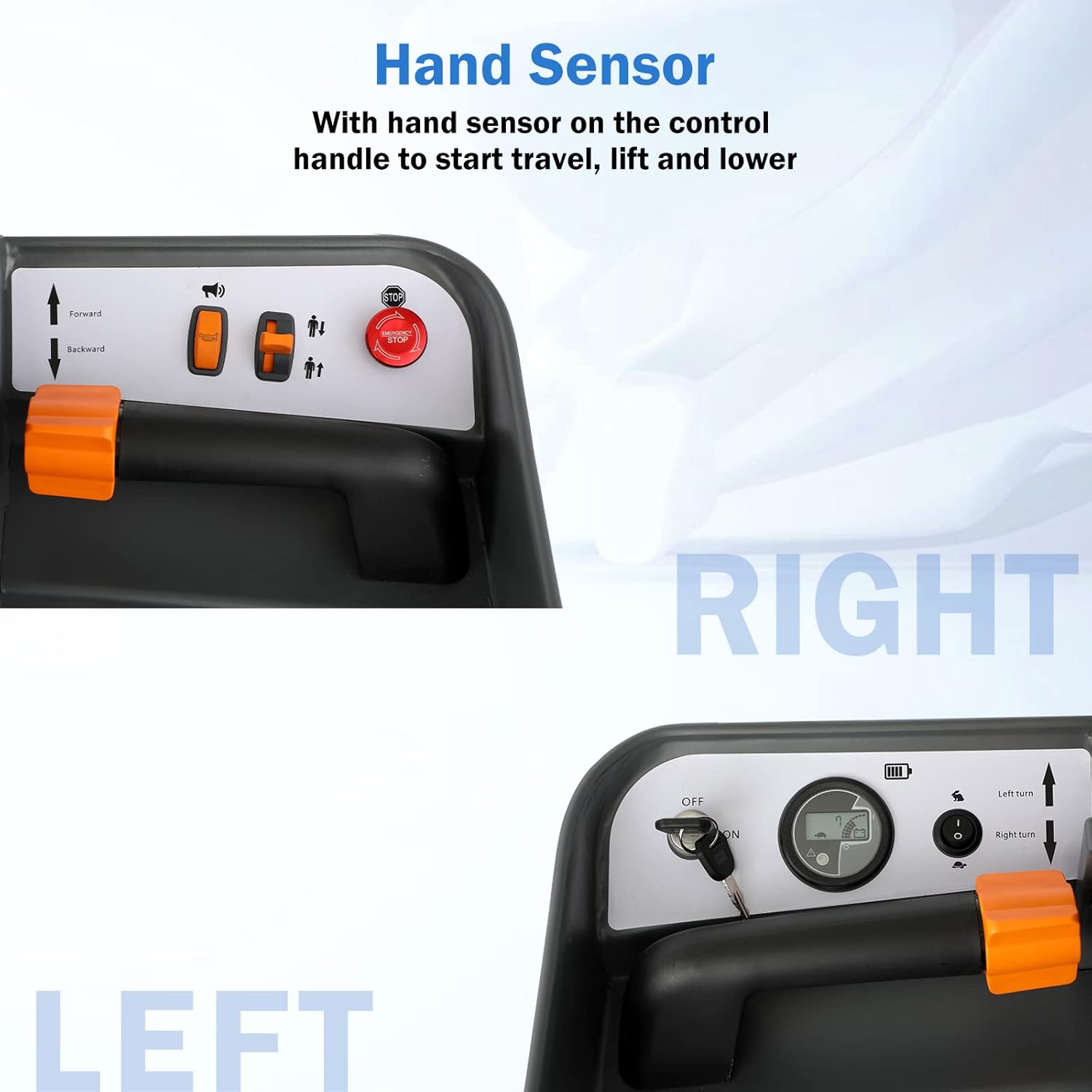
Figure 6.1: The control handle features hand sensors for travel, lift, and lower functions, along with a key switch and battery indicator.
- Key Switch: Turn the key to the 'ON' position to power on the unit.
- Hand Sensors: Engage the hand sensors on the control handle to enable travel and lift/lower operations.
- Forward/Backward Lever: Push forward or pull backward to move the order picker in the desired direction.
- Lift/Lower Buttons: Use these buttons to raise or lower the operator platform.
- Emergency Stop Button: Press this red button to immediately halt all operations in an emergency.
- Battery Indicator: Displays the current battery charge level.
6.2. Starting and Moving
- Ensure the safety gate is closed and secured.
- Step onto the operator platform, ensuring both feet are firmly placed on the dual foot pedal sensors. The unit will not operate without operator presence detected.
- Turn the key switch to the 'ON' position.
- Grasp the control handle and engage the hand sensors.
- Use the forward/backward lever to move the order picker. Steer by rotating the control handle left or right.

Figure 6.2: Dual foot pedals detect if the operator has both feet properly positioned on the platform, a critical safety feature.
6.3. Lifting and Lowering
- Position the order picker correctly at the desired location.
- Ensure the area above and around the mast is clear of obstructions.
- While standing on the platform with hand sensors engaged, press the 'Lift' button to raise the platform.
- Press the 'Lower' button to descend the platform.
- Always lower the platform completely before moving the unit over long distances or when parking.

Figure 6.3: An operator utilizing the Xilin Mini Order Picker to access items on high shelving in a warehouse environment.
7. Charging and Battery Maintenance
The Xilin Mini Order Picker is equipped with an on-board battery charger for convenience.
- Charging Procedure: Connect the power cord from the on-board charger to a standard electrical outlet (e.g., 110V). The charging indicator will illuminate.
- Charging Location: Charge the unit in a well-ventilated area, away from flammable materials.
- Charging Time: Allow sufficient time for a full charge, typically indicated by the charger's status light.
- Battery Care: Avoid completely draining the battery. Regular charging helps prolong battery life.

Figure 7.1: The on-board battery charger allows for convenient charging whenever needed.
8. General Maintenance
Regular maintenance ensures the longevity and safe operation of your order picker.
- Daily Checks: Inspect tires, controls, and safety features for any visible damage or malfunction.
- Cleaning: Keep the unit clean, especially the mast and platform, to prevent debris from interfering with operation.
- Lubrication: Periodically lubricate moving parts as specified in the detailed service manual (if applicable).
- Fasteners: Check all bolts and fasteners for tightness. Tighten as necessary.
- Professional Service: For complex repairs or annual inspections, contact qualified service personnel.
9. Troubleshooting
This section addresses common issues you might encounter with your Xilin Mini Order Picker.
| Problem | Possible Cause | Solution |
|---|---|---|
| Unit does not power on | Key switch off, low battery, emergency stop engaged | Turn key to ON, charge battery, disengage emergency stop button |
| Platform does not lift | Operator not on foot sensors, hand sensors not engaged, overload | Ensure feet are on sensors, engage hand sensors, reduce load |
| Unit does not move | Operator not on foot sensors, hand sensors not engaged, emergency stop engaged | Ensure feet are on sensors, engage hand sensors, disengage emergency stop |
| Slow operation | Low battery charge | Charge the battery fully |
10. Warranty and Support
The Xilin Mini Order Picker comes with a one-year warranty from the date of purchase. This warranty covers manufacturing defects under normal use conditions.
For warranty claims, technical support, or service inquiries, please contact Xilin customer service. Ensure you have your model number (OPSM) and purchase details available when contacting support.
Manufacturer: Xilin
Date First Available: July 8, 2020
Ask a question about this manual
Ask about setup, troubleshooting, compatibility, parts, safety, or missing instructions. Manuals+ will review the question and use this page’s manual context to help answer it.