
Nologo Ou Rui Ka Ke Ji+027
NewRixing NR106 Mini Portable Bluetooth Speaker User Manual
Model: NR106
1. Introduction
Thank you for purchasing the NewRixing NR106 Mini Portable Bluetooth Speaker. This manual provides important information regarding the setup, operation, and maintenance of your device. Please read it carefully before use and keep it for future reference.
2. Package Contents
- NewRixing NR106 Mini Portable Bluetooth Speaker x 1
- USB Charging Cable x 1
- 3.5mm Audio Cable x 1
- User Manual x 1
3. Product Overview
The NewRixing NR106 is a versatile portable speaker designed for various audio needs. It features Bluetooth connectivity, FM radio, TF card support, and AUX input. Its compact design and robust features make it ideal for both indoor and outdoor use.

Figure 3.1: Front view of the NewRixing NR106 speaker, showcasing its grille and compact design.
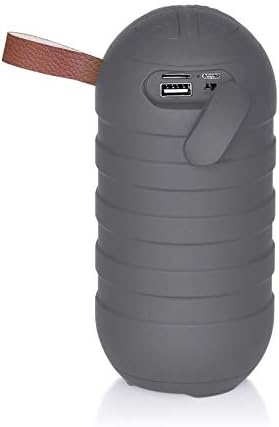
Figure 3.2: Rear view of the speaker, showing the USB port, TF card slot, and charging port.
4. Key Features
- Bluetooth 5.0 Connectivity: Seamless wireless audio streaming.
- Multiple Playback Modes: Supports FM radio, TF card, AUX input, and USB drive.
- Hands-Free Calling: Built-in microphone for convenient call management.
- High-Fidelity Sound: Dual magnetic subwoofer and high-fidelity speakers for natural and delicate sound.
- Portable Design: Compact and lightweight with a durable plastic body.
- Long Battery Life: Integrated 1200mAh lithium battery for extended use.
- TWS Connection: Supports True Wireless Stereo for connecting two speakers for enhanced sound.
- Splash-Resistant Design: IPX4 splash water design for outdoor use.

Figure 4.1: Illustration of True Wireless Stereo (TWS) connection, allowing two speakers to be paired for a stereo experience.

Figure 4.2: The speaker demonstrating its IPX4 splash-resistant design, suitable for outdoor use.
5. Specifications
| Model | NR106 |
| Bluetooth Version | 5.0 |
| Output Power | 3W |
| Speaker Size | 4Ω 3W / 45mm |
| Signal-to-Noise Ratio (SNR) | ≥ 80 dB |
| Battery Capacity | 1200mAh Lithium Battery |
| Frequency Response | 100Hz - 18KHz |
| FM Broadcast Band | 87MHz - 108MHz |
| Product Dimensions (L x W x H) | 78 x 78 x 168 mm |
| Product Weight | 0.285 kg |
| Connectivity Technology | Bluetooth |
| Special Features | Bluetooth, Built-in Microphone, Portable, IPX4 Splash-resistant |

Figure 5.1: Product dimensions (78mm diameter, 168mm height) and packaging box.
6. Setup and First Use
6.1 Charging the Speaker
Before first use, fully charge the speaker. Connect the supplied USB charging cable to the speaker's charging port and the other end to a USB power adapter (not included) or a computer's USB port. The charging indicator light will illuminate during charging and turn off when fully charged.
6.2 Powering On/Off
Press and hold the Power button for approximately 3 seconds to turn the speaker ON or OFF. A voice prompt will indicate the power status.
7. Operating Instructions
7.1 Bluetooth Pairing
- Turn on the speaker. It will automatically enter Bluetooth pairing mode, indicated by a flashing LED light and a voice prompt.
- Enable Bluetooth on your mobile device (smartphone, tablet, etc.).
- Search for "NR106" in the list of available Bluetooth devices.
- Select "NR106" to connect. Once paired, the LED light will stop flashing, and a voice prompt will confirm the connection.
- You can now play audio from your device through the speaker.
7.2 FM Radio Mode
- Press the 'M' (Mode) button to switch to FM radio mode.
- Press the Play/Pause button once to automatically scan and save available FM stations.
- Use the 'Previous' and 'Next' buttons to navigate between saved stations.
7.3 TF Card / USB Drive Playback
- Insert a TF (microSD) card or a USB drive into the respective slot on the speaker.
- The speaker will automatically switch to TF card or USB mode and begin playing audio files.
- Use the Play/Pause, Previous, and Next buttons to control playback.
7.4 AUX Input Mode
- Connect one end of the 3.5mm audio cable to the speaker's AUX input port.
- Connect the other end to the audio output jack of your external device (e.g., MP3 player, computer).
- The speaker will automatically switch to AUX mode.
7.5 Hands-Free Calling
- When a call comes in while connected via Bluetooth, press the Play/Pause button once to answer the call.
- Press the Play/Pause button again to end the call.
- Press and hold the Play/Pause button to reject an incoming call.
7.6 True Wireless Stereo (TWS) Connection
To connect two NR106 speakers for a stereo sound experience:
- Ensure both speakers are turned ON and not connected to any Bluetooth device.
- On one of the speakers (this will be the primary speaker), double-press the 'Next' (>>) button.
- The speakers will automatically search and pair with each other. A voice prompt will confirm the successful TWS connection.
- Once TWS is established, connect your mobile device to the primary speaker via Bluetooth as described in section 7.1. Audio will now play in stereo through both speakers.
- To disconnect TWS, double-press the 'Next' (>>) button on either speaker again.
8. Maintenance and Care
- Clean the speaker with a soft, dry cloth. Do not use abrasive cleaners or solvents.
- Avoid exposing the speaker to extreme temperatures, direct sunlight, or high humidity.
- While the speaker has an IPX4 splash-resistant design, do not submerge it in water or expose it to heavy rain.
- Store the speaker in a cool, dry place when not in use for extended periods.
- Charge the battery at least once every three months to maintain its lifespan if not used regularly.

Figure 8.1: The speaker's portable design allows for easy attachment to various objects, such as a bicycle, for on-the-go use.
9. Troubleshooting
| Problem | Possible Cause | Solution |
|---|---|---|
| Speaker does not turn on. | Low battery. | Charge the speaker fully. |
| Cannot pair with Bluetooth device. | Speaker is not in pairing mode. Bluetooth is off on your device. Device is too far from speaker. | Ensure speaker is in pairing mode (flashing LED). Turn on Bluetooth on your device. Move device closer to the speaker (within 10 meters). |
| No sound. | Volume is too low. Incorrect mode selected. Device not connected properly. | Increase volume on both speaker and connected device. Press 'M' button to select correct mode (Bluetooth, FM, TF, AUX). Reconnect Bluetooth or check audio cable connection. |
| FM radio reception is poor. | Weak signal. Interference. | Move the speaker to a location with better signal. Extend the charging cable (can act as an antenna). |
10. Warranty and Support
This product comes with a standard manufacturer's warranty. Please refer to the warranty card included in your package for specific terms and conditions. For technical support or customer service inquiries, please contact your retailer or the manufacturer directly using the contact information provided on the product packaging or the official brand website.
Please retain your proof of purchase for warranty claims.
Ask a question about this manual
Ask about setup, troubleshooting, compatibility, parts, safety, or missing instructions. Manuals+ will review the question and use this page’s manual context to help answer it.