
Introduction
This manual provides instructions for the ALLIMITY DR0337 replacement remote control, designed for various Sharp Aquos FHD TV models. Please read this manual carefully before use to ensure proper operation and longevity of your remote control.
Setup
1. Battery Installation
The remote control requires two AAA alkaline batteries (not included). Ensure correct polarity when inserting the batteries.
- Open the battery compartment cover on the back of the remote control.
- Insert two AAA alkaline batteries, matching the (+) and (-) terminals correctly.
- Close the battery compartment cover securely.
Note: Use alkaline batteries. Rechargeable batteries are not compatible with this remote control.
2. Initial Pairing (If Remote Does Not Function)
If the remote control does not function with your TV upon first installation, it may need to be paired. Follow these steps:

Image: Front view of the ALLIMITY DR0337 remote control, highlighting the yellow and blue buttons used for pairing, alongside text instructions.
- Remote control does not work with the TV set when first time installation is on the TV screen:
During first-time installation, press and hold the YELLOW and BLUE buttons on the remote control for a few seconds. The power light will blink 5 times to confirm the TV and remote control are paired.
- Remote control does not power on the TV set:
Switch the TV on using the standby button on the TV set (not the remote control). Once switched on, press the standby button on the TV set once. This will prompt the 'pairing menu' to appear. Scroll through and highlight 'Pair your remote' by pressing the CH+/CH- TV button (scroll up/down function in the menu). Then press the TV set's standby button (OK function in the menu) to confirm your selection. With the remote control, press and hold the YELLOW and BLUE buttons for a few seconds. The power light will blink 5 times to confirm the TV and remote control are paired.
Operation
The ALLIMITY DR0337 remote control provides direct access to common TV functions. Most buttons are self-explanatory. Below is a general overview of key functions:
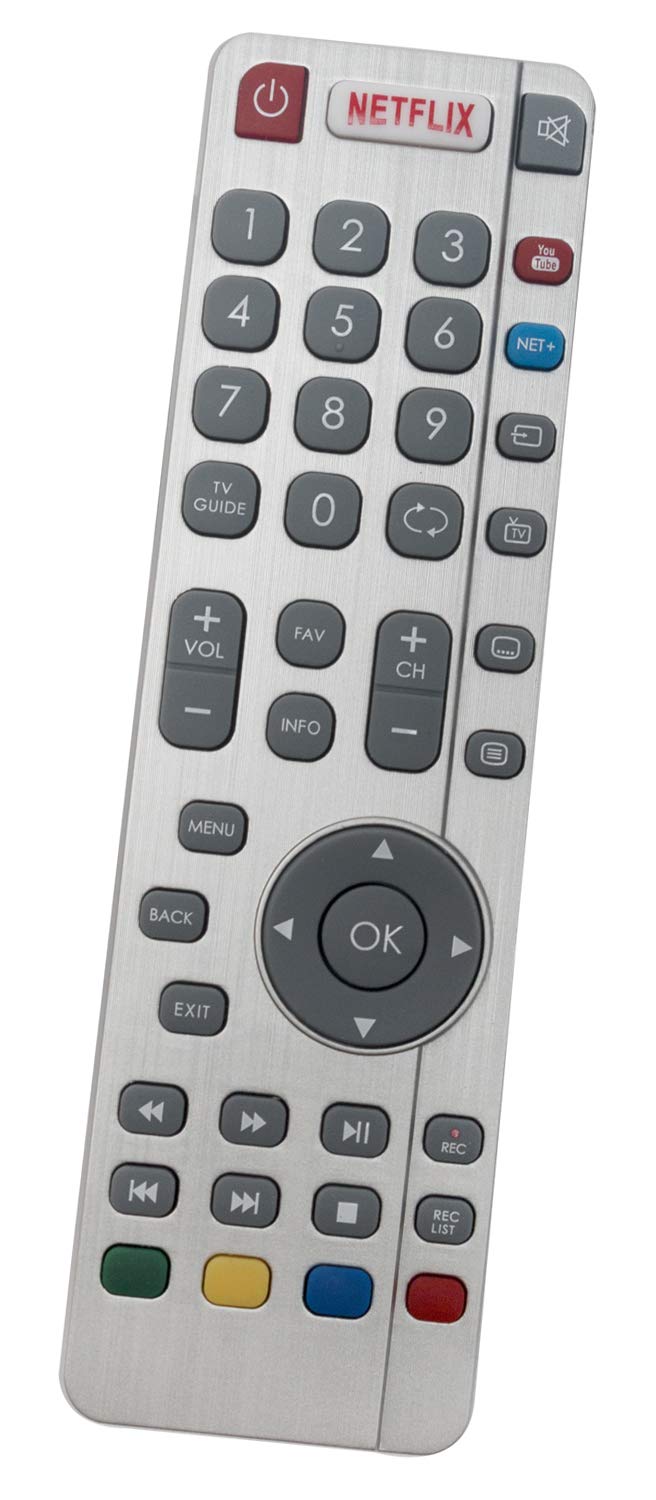
Image: Front view of the ALLIMITY DR0337 remote control, showing all buttons and their labels.
- Power Button (⏻): Turns the TV on or off.
- Netflix Button: Direct access to the Netflix application.
- Number Buttons (0-9): For direct channel selection.
- VOL +/-: Adjusts the volume level.
- CH +/-: Changes the TV channel.
- Menu: Opens the TV's main menu.
- OK Button: Confirms selections within menus.
- Arrow Buttons (Up, Down, Left, Right): Navigates through menus and options.
- Back: Returns to the previous screen or menu.
- Exit: Closes the current menu or application.
- Playback Controls (Play, Pause, Stop, Rewind, Fast Forward): Controls media playback.
- Colored Buttons (Red, Green, Yellow, Blue): Functionality varies depending on the TV model and current context (e.g., teletext, special features).
Maintenance
Cleaning
To clean the remote control, use a soft, dry cloth. Do not use liquid cleaners or abrasive materials, as these can damage the remote's surface or internal components.
Battery Replacement
Replace batteries when the remote control's response becomes sluggish or stops working. Always replace both batteries at the same time with new AAA alkaline batteries. Do not mix old and new batteries or different types of batteries.
Troubleshooting
- Remote control is not responding:
- Check if the batteries are inserted correctly with the correct polarity.
- Replace the batteries with fresh AAA alkaline batteries.
- Ensure there are no obstructions between the remote control and the TV's infrared sensor.
- Confirm the remote is pointed directly at the TV.
- If the issue persists, refer to the "Initial Pairing" section to re-pair the remote control with your TV.
- Limited range or intermittent response:
- Ensure the batteries are not low. Replace them if necessary.
- Reduce the distance between the remote control and the TV. The maximum effective range is approximately 10 meters.
- Avoid strong light sources (like direct sunlight or bright fluorescent lights) that might interfere with the infrared signal.
Specifications
| Brand: | ALLIMITY |
| Model Number: | DR0337 (WXZY-SHW-RMC-0116-ACEF) |
| Connectivity Technology: | Infrared |
| Compatible Devices: | Sharp Aquos FHD TVs including models: LC-32CFG6351K, LC-40CUG8052K, LC-43CFG6452K, LC-32CHG6022K, LC-40CFG6022E, LC-49CUG8461KS, LC-55CFG6451K, LC-40CFG6452K, LC-49CFG6241K, LC-32CHG6451K, LC-40CFG6352K, LC-55CFG6022K, LC-43CFG6352E, LC-43CFG6241K, LC-49CFG6452E, LC-32CFG6352E, LC-32CHG6352E, LC-43CUG8361KS, LC-49CFG6352K, LC-55CFG6021K, LC-32CFG6021K, LC-32CFG6452K, LC-32CHG6452K, LC-40CFG6452E, LC-43CFG6451K, LC-49CFG6022K, LC-49CUG8362KS, LC-43CUG8461KS, LC-32CHG6021K, LC-40CFG6021E, LC-49CFG6022E, LC-49CUG8361KS, LC-55CFG6352E, LC-32CFG6242K, LC-32CHG6242K, LC-40CFG6241K, LC-43CFG6022K, LC-43CUG8362KS, LC-49CFG6451K, LC-55CFG6242K, LC-32CFG6022E, LC-43CFG6022E, LC-32CFG6451K, LC-32CHG6351K, LC-40CFG6242K, LC-55CFG6021E, LC-32CFG6021E, LC-43CFG6021K, LC-49CFG6352E, LC-32CFG6022K, LC-32CHG6241K, LC-40CFG6351K, LC-43CFG6242K, LC-24DHG6131K, LC-32CFG6241K, LC-40CFG6451K, LC-43CFG6352K, LC-32CHG6021E, LC-32DHG6021K, LC-49CUG8062K, LC-55CFG6351K, LC-43CFG6452E, LC-49CFG6021K, LC-43CUG8062K, LC-32CFG6452E, LC-32CHG6452E, LC-40CFG6022K, LC-43CUG8462KS, LC-49CFG6242K, LC-49CFG6452K, LC-49CUG8462KS, LC-55CFG6241K, LC-55CFG6452E, LC-32CFG6032E, LC-32CFG6352K. |
| Special Feature: | Ergonomic design |
| Number of Buttons: | 20 |
| Maximum Range: | 10 Meters |
| Battery Type: | AAA Alkaline (2 required) |
Warranty & Support
For warranty information or technical support, please refer to the product packaging or contact the seller directly. Keep your purchase receipt as proof of purchase.
