
1. Product Overview
The Lasko LP200 HEPA Desktop Air Purifier is designed to enhance your home environment by providing TotalProtect Filtration™. This system targets common airborne irritants, including allergens, smoke, odors, VOCs, pet dander, pollen, dust, and mold spores. Featuring true HEPA filtration, it captures 99.97% of airborne particles as small as 0.3 microns. The unit includes user-friendly electronic controls, three fan speeds, and an 8-hour timer for convenient operation. An auto-check filter reminder ensures timely filter replacement, maintaining optimal performance. Ideal for rooms up to 109 square feet, this compact air purifier efficiently cleans indoor air.
Key Features:
- TotalProtect Filtration™: 2-Stage Filtration process captures 99.97% of airborne irritants.
- Activated Carbon Filter: Removes smoke, cooking, pet, and other household odors.
- True HEPA Filter: Captures virus-sized particles, mold, pet dander, pollen, dust mites, and other allergens down to 0.3 microns.
- Electronic Controls: Simple and intuitive operation.
- 3 Quiet Speeds: Adjustable airflow for various needs.
- 8-Hour Timer: Programmable shutdown for energy efficiency.
- Auto Check Filter Reminder: Indicator light for filter replacement.
- Compact Design: Small footprint (10.3"D x 7.3"W x 14.75"H) suitable for desktops, nightstands, or small rooms.
- Effective Room Coverage: Cleans air in rooms up to 109 sq. ft. (5.3x per hour in 10'x10' office, 2.3x per hour in 15'x15' room).

Figure 1: Lasko LP200 HEPA Desktop Air Purifier, front view.
2. Safety Information
Please read and save these important safety instructions before using this product. Failure to follow these instructions may result in fire, electric shock, injury to persons, or property damage.
- Always place the air purifier on a firm, level surface.
- Do not operate the air purifier with a damaged cord or plug.
- Keep the power cord away from heated surfaces.
- Do not use the air purifier in wet or damp locations, such as bathrooms.
- Never insert fingers or foreign objects into any openings.
- Unplug the air purifier from the power outlet before cleaning or performing any maintenance.
- Ensure the air intake and outlet are not blocked.
- This appliance has a polarized plug (one blade is wider than the other). To reduce the risk of electric shock, this plug is intended to fit in a polarized outlet only one way. If the plug does not fit fully in the outlet, reverse the plug. If it still does not fit, contact a qualified electrician. Do not attempt to defeat this safety feature.
3. Package Contents
Upon unpacking, ensure all items are present and in good condition. If any items are missing or damaged, contact Lasko customer support.
- Lasko LP200 HEPA Desktop Air Purifier Unit
- 1 Filter Pack (includes True HEPA filter and Activated Carbon filter, designed to last up to 1 year)
4. Setup
4.1 Unpacking and Placement
- Carefully remove the air purifier from its packaging.
- Place the unit on a flat, stable surface. Ensure there is at least 6 inches of space around the air intake and outlet for optimal airflow.
- Plug the power cord into a standard 120V AC electrical outlet.
4.2 Filter Installation
The air purifier comes with a filter pack that needs to be installed before first use.
- Locate the filter access panel on the back of the unit.
- Gently pull the panel open to reveal the filter compartment.
- Remove the new filter pack from its protective plastic packaging.
- Insert the filter pack into the compartment, ensuring it is seated correctly. The Activated Carbon filter should be facing outwards (towards the access panel).
- Close the filter access panel securely until it clicks into place.

Figure 2: Accessing the filter compartment.
5. Operating Instructions
The Lasko LP200 features intuitive electronic touch controls located on the top of the unit.
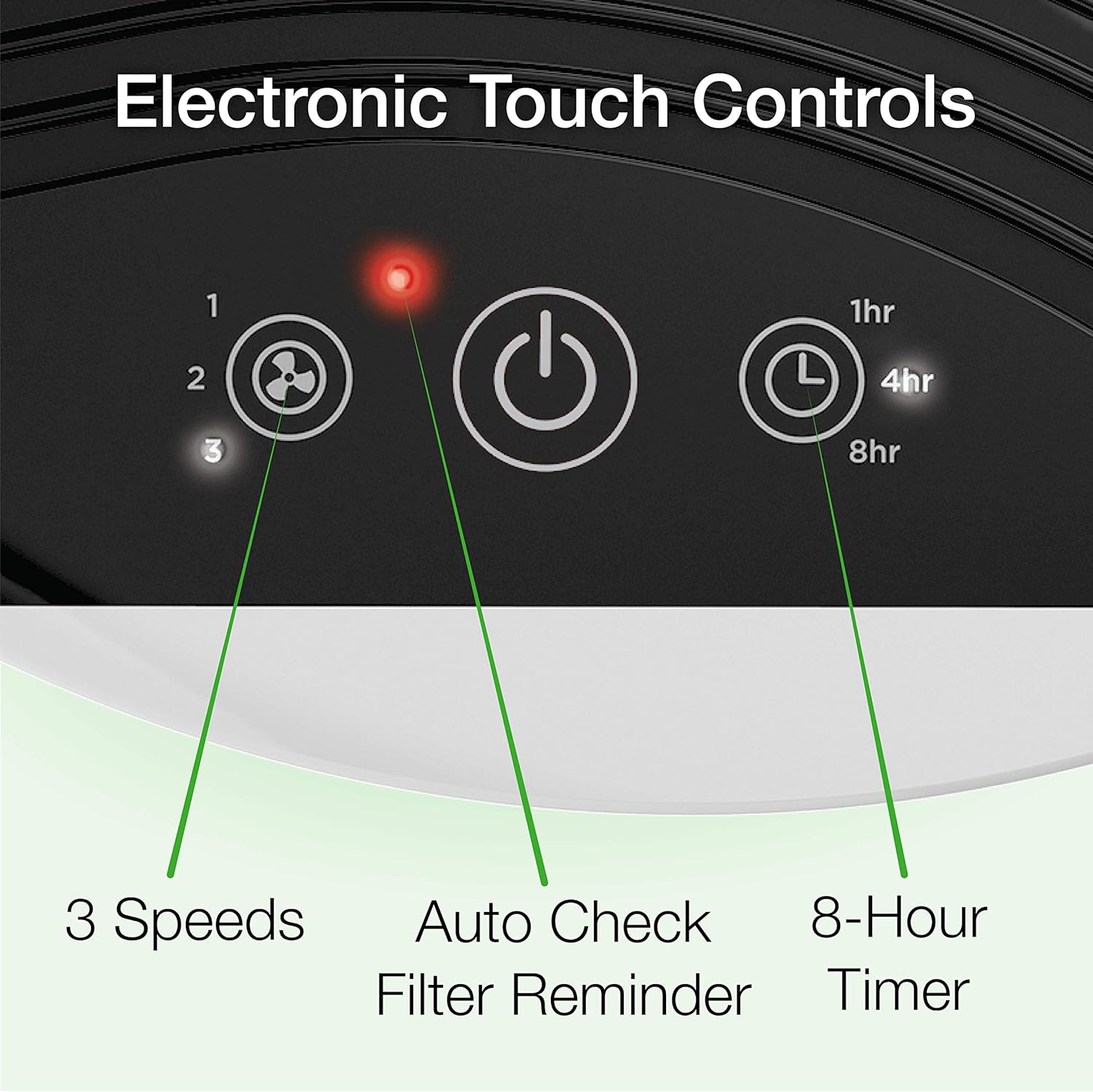
Figure 3: Electronic Touch Controls.
5.1 Power On/Off
- To turn the unit ON, press the Power Button (circle with vertical line) once. The unit will start on the lowest fan speed.
- To turn the unit OFF, press the Power Button again.
5.2 Fan Speed Settings
The air purifier has 3 fan speeds: Low (1), Medium (2), and High (3).
- To adjust the fan speed, press the Fan Speed Button (fan icon). Each press will cycle through the speeds (1-2-3-1...).
5.3 Timer Function
The unit can be set to operate for 1, 4, or 8 hours before automatically shutting off.
- To activate the timer, press the Timer Button (clock icon). Each press will cycle through the available timer settings (1hr-4hr-8hr-OFF).
5.4 Auto Check Filter Reminder
A red indicator light will illuminate on the control panel when it's time to check or replace the filter.
- Refer to the Maintenance section for filter replacement instructions.
Video 1: Official Lasko LP200 HEPA Desktop Air Purifier with Timer overview, demonstrating features and controls.
6. Maintenance
6.1 Filter Replacement
The filter pack should be replaced approximately every 12 months, or when the Auto Check Filter Reminder light illuminates.
- Ensure the air purifier is turned OFF and unplugged from the power outlet.
- Open the filter access panel on the back of the unit.
- Remove the old filter pack and dispose of it properly.
- Unwrap a new Lasko YY200 Replacement Filter Pack from its plastic packaging.
- Insert the new filter pack into the compartment, ensuring the Activated Carbon filter faces outwards.
- Close the filter access panel securely.
- Plug the unit back in and turn it ON. To reset the filter reminder, press and hold the Auto Check Filter Reminder Button (red light icon) for 3 seconds until the light turns off.
6.2 Cleaning the Unit
- Always unplug the air purifier before cleaning.
- Use a soft, damp cloth to wipe the exterior surfaces of the unit. Do not use abrasive cleaners or solvents.
- Gently vacuum the air intake and outlet grilles to remove any accumulated dust.
- Do not immerse the air purifier in water or allow water to drip into the interior.
7. Troubleshooting
If your air purifier is not operating correctly, please refer to the following common issues and solutions:
| Problem | Possible Cause | Solution |
|---|---|---|
| Unit does not turn ON | No power supply; Power button not pressed; Safety fuse activated. | Ensure unit is plugged into a working outlet; Press the Power Button; Check household circuit breaker or contact Lasko support. |
| Reduced airflow | Clogged filter; Blocked air intake/outlet. | Replace filter pack; Clear any obstructions from grilles. |
| Unusual noise | Unit not on a level surface; Foreign object inside; Filter not installed correctly. | Place on a flat surface; Unplug and check for obstructions; Reinstall filter pack. |
| Filter Reminder light stays ON after replacement | Reminder not reset. | Press and hold the Auto Check Filter Reminder Button for 3 seconds. |
8. Specifications
- Model Number: LP200
- Product Dimensions: 10.3"D x 7.3"W x 14.75"H
- Item Weight: 8 Pounds
- Power Source: Corded Electric
- Color: White
- Room Size: Ideal for rooms up to 109 square feet
- Filtration: True HEPA and Activated Carbon (2-Stage Filtration)
- CADR (Clean Air Delivery Rate): 73 (Smoke), 81 (Dust), 83 (Pollen) for 109 sq. ft. room
9. Warranty and Support
Lasko Products provides a limited warranty for this air purifier against defects in material and workmanship under normal household use. Please refer to the warranty card included in your package for specific terms and conditions.
For technical support, replacement parts, or general inquiries, please visit the official Lasko website or contact their customer service department.
- Manufacturer: Lasko Products
- Website: www.lasko.com (Example URL, please refer to actual product documentation)
- Customer Service: Refer to product packaging or website for contact details.


