
1. Introduction
Thank you for choosing the KAIWEETS HT206D Digital Clamp Meter and KET01 Soft Silicone Electrician Test Leads Kit. This comprehensive bundle provides accurate and reliable measurements for various electrical parameters, suitable for professional electricians, laboratories, factories, and household use. This manual will guide you through the proper setup, operation, maintenance, and troubleshooting of your device.
The HT206D clamp meter is a True-RMS device capable of measuring AC/DC Current, AC/DC Voltage, Frequency, Resistance, Capacitance, Diode, Continuity, and Temperature. It features LowZ and LPF functions for enhanced accuracy. The KET01 test leads are designed for safety and durability, made from soft silicone with CAT III 1000V & CAT IV 600V ratings.
2. Safety Information
Always adhere to safety precautions when using electrical testing equipment. Failure to do so may result in injury or damage to the meter or equipment under test.
- Do not exceed the maximum input limits for any function.
- Use caution when working with voltages above 30V AC RMS, 42V peak, or 60V DC. These voltages pose a shock hazard.
- Always disconnect power to the circuit before making resistance, capacitance, or diode measurements.
- Ensure the test leads are in good condition, without any cracks or damaged insulation.
- Do not operate the meter if it appears damaged or if the case is open.
- Always use the correct function and range for measurements.
- When measuring current with the clamp, ensure only one conductor is inside the clamp jaw.

3. Product Overview and Components
The KAIWEETS HT206D Digital Clamp Meter and KET01 Test Leads Kit includes the main clamp meter unit, a pair of soft silicone test leads, alligator clips, and a K-type thermocouple for temperature measurements.
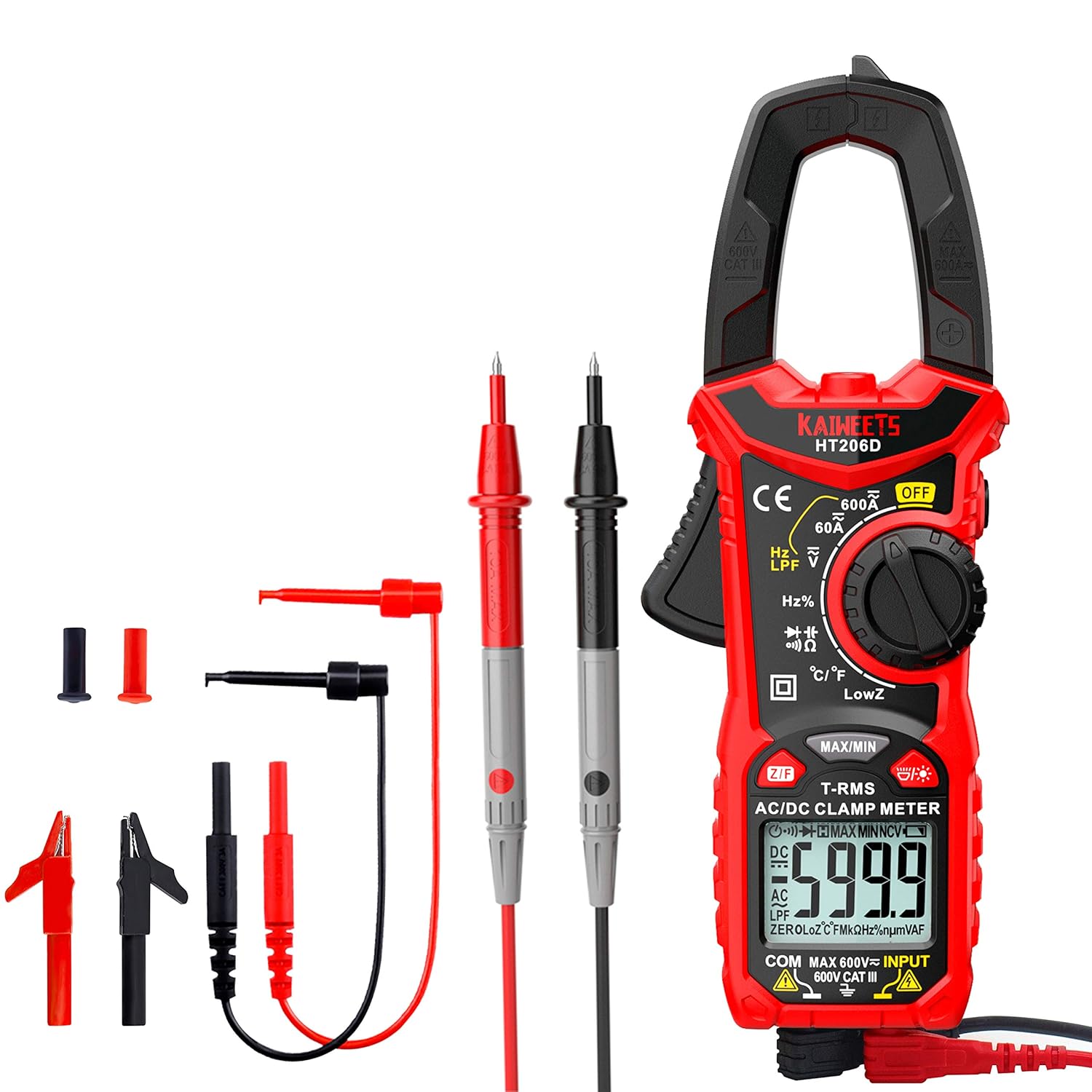
3.1. Key Features
- True-RMS Measurement: Provides accurate readings for non-linear loads.
- Wide Measurement Range: Up to 600A AC/DC Current, 600V AC/DC Voltage, 100mF Capacitance.
- LowZ (Low Impedance): Helps prevent false readings from ghost voltages.
- LPF (Low Pass Filter): For accurate measurements of variable frequency drive signals.
- NCV (Non-Contact Voltage) Detection: Safely detects AC voltage without physical contact.
- Temperature Measurement: With included K-type thermocouple.
- 6000 Counts Display: High resolution for precise readings.
- Durable Test Leads: KET01 soft silicone leads designed for flexibility and safety.

4. Setup
4.1. Battery Installation
The KAIWEETS HT206D is battery powered. Before first use, or when the low battery indicator appears, install or replace the batteries. Refer to the battery compartment on the back of the meter for specific battery type and orientation.
4.2. Connecting Test Leads
To perform voltage, resistance, capacitance, diode, continuity, or temperature measurements, connect the test leads to the meter's input jacks.
- Insert the red test lead into the 'VΩHzCAP' input jack.
- Insert the black test lead into the 'COM' (common) input jack.
For temperature measurements, connect the K-type thermocouple to the appropriate input jacks, ensuring correct polarity.

5. Operating Instructions
Turn the rotary dial to select the desired measurement function. Ensure the test leads are connected correctly for the chosen function.
5.1. AC/DC Current Measurement (Clamp Function)
To measure current, rotate the dial to the '60A' or '600A' AC/DC current range. Open the clamp jaw and enclose only one conductor of the circuit. The display will show the current reading. For accurate AC current readings on non-linear loads, the True-RMS feature is active.

5.2. AC/DC Voltage Measurement
Select the 'V' (Voltage) function on the rotary dial. Connect the test leads in parallel to the circuit or component you wish to measure. The meter will automatically detect AC or DC voltage.
5.3. Resistance, Capacitance, Diode, Continuity
Select the 'Ω/CAP/Diode/Continuity' function. The meter will auto-range. For resistance, connect leads across the component. For capacitance, ensure the capacitor is discharged before connecting leads. For diode, connect leads across the diode. For continuity, the meter will beep if resistance is below a certain threshold.
5.4. Frequency or Duty Cycle
Select the 'Hz/%' function. Connect the test leads to the circuit to measure frequency or duty cycle.
5.5. Temperature Measurement
Select the '°C/°F' function. Connect the K-type thermocouple to the meter's input jacks. Place the thermocouple probe at the point where temperature needs to be measured. The display will show the temperature in Celsius or Fahrenheit.

5.6. LowZ (Low Impedance) Function
The LowZ function is designed to eliminate 'ghost voltages' which can cause false readings. When measuring voltage in circuits with induced voltages, select the LowZ setting to get a more accurate reading by providing a low impedance path.
5.7. LPF (Low Pass Filter) Function
The LPF function is crucial for accurate measurements on variable frequency drives (VFDs) and other noisy electrical environments. It filters out high-frequency noise, allowing the meter to measure the fundamental frequency of the signal more accurately.

5.8. NCV (Non-Contact Voltage) Detection
The NCV function allows for safe detection of AC voltage without direct contact. Press the NCV button (located on the right side of the meter) and move the meter close to the conductor. The meter will indicate the presence of AC voltage through audible beeps and visual indicators.
5.9. Data Hold Function
To freeze the current reading on the display, short press the 'HOLD' button. Press it again to release the hold and resume live readings.

6. Maintenance
6.1. Cleaning
Wipe the meter's case with a damp cloth and mild detergent. Do not use abrasives or solvents. Keep the input terminals free of dirt and moisture.
6.2. Battery Replacement
When the battery indicator appears on the display, replace the batteries immediately to ensure accurate readings. Refer to the battery compartment on the back of the meter for instructions on opening and replacing batteries.
6.3. Test Lead Care
Inspect test leads for any damage, cuts, or frayed insulation before each use. Replace damaged leads immediately. Store leads neatly to prevent tangling and damage.

7. Troubleshooting
If the meter does not function correctly, check the following common issues:
- No Display/Faint Display: Check battery level and replace if necessary. Ensure batteries are inserted with correct polarity.
- Incorrect Readings: Ensure the correct function and range are selected. Verify test lead connections are secure and undamaged. Check for external interference.
- No Continuity Beep: Ensure the circuit is de-energized. Check if the resistance is within the continuity threshold.
- Clamp Meter Not Reading Current: Ensure only one conductor is inside the clamp jaw. Verify the AC/DC current function is selected.
If problems persist, contact KAIWEETS customer support.
8. Specifications
| Specification | Value |
|---|---|
| Brand | KAIWEETS |
| Model | HT206D |
| Measurement Type | Multimeter |
| Power Source | Battery Powered |
| Color | Red, Black |
| Style | Clamp Meter and Test Leads |
| Safety Rating | CAT III 1000V & CAT IV 600V (for test leads) |
| Display Counts | 6000 Counts |
| AC/DC Current Range | Up to 600A |
| AC/DC Voltage Range | Up to 600V |
| Capacitance Range | Up to 100mF |
| Temperature Range | -4°F ~ 1832°F (with K-type thermocouple) |
9. Warranty and Support
KAIWEETS products are designed for reliability and performance. For warranty information or technical support, please refer to the official KAIWEETS website or contact their customer service directly. Keep your purchase receipt as proof of purchase for any warranty claims.
For further assistance, visit the KAIWEETS Store on Amazon.


