
Ansmann 1001-0092
ANSMANN Comfort Smart Battery Charger Instruction Manual
Model: 1001-0092
1. Introduction
Thank you for choosing the ANSMANN Comfort Smart Battery Charger. This manual provides essential information for the safe and efficient operation of your new charger. Please read these instructions carefully before first use and keep them for future reference.
2. Safety Instructions
To ensure safe operation, please observe the following safety precautions:
- This charger is designed for indoor use only. Do not expose it to rain or moisture.
- Only charge NiMH (Nickel-Metal Hydride) AA and AAA rechargeable batteries. Do not attempt to charge primary (non-rechargeable) batteries or other battery types (e.g., Alkaline, Lithium-Ion, NiCd), as this may lead to explosion, rupture, or leakage.
- Do not short-circuit the battery contacts.
- Keep the charger away from heat sources, direct sunlight, and flammable materials.
- Do not disassemble, modify, or repair the charger yourself. Refer all servicing to qualified personnel.
- Ensure proper polarity when inserting batteries.
- Unplug the charger from the power source when not in use or before cleaning.
- Keep out of reach of children.
3. Package Contents
Verify that all items are present in your package:
- ANSMANN Comfort Smart Battery Charger
- USB Charging Cable (1 meter)
- Instruction Manual
4. Product Overview
The ANSMANN Comfort Smart charger is an intelligent charging device designed for NiMH AA and AAA batteries. It features four independent charging slots and LED indicators for each slot to show the charging status.

Image: The ANSMANN Comfort Smart Battery Charger, showing its four battery slots and the included USB charging cable.
5. Setup
Setting up your ANSMANN Comfort Smart charger is simple:
- Connect the included USB charging cable to the micro USB input port on the back of the charger.
- Plug the other end of the USB cable into a suitable USB power source (e.g., a USB wall adapter, power bank, laptop USB port, or car USB port). The charger is designed to be powered by various USB sources for convenience.
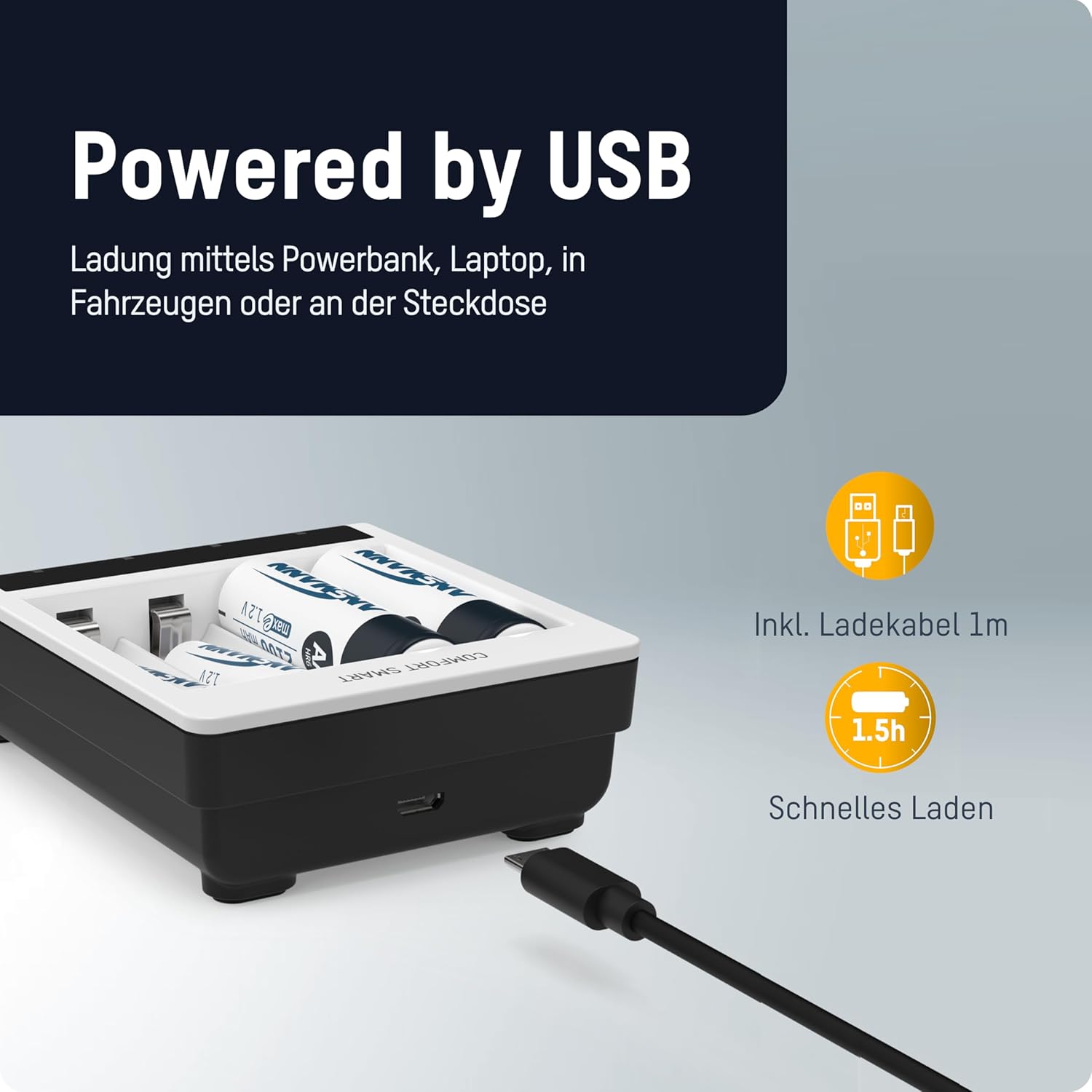
Image: The ANSMANN Comfort Smart Charger connected via its micro USB input, illustrating its compatibility with various USB power sources like power banks or laptops.
6. Operating Instructions
The Comfort Smart charger is designed for easy operation: simply plug in, insert batteries, and start charging.
6.1 Inserting Batteries
Insert 1 to 4 NiMH AA or AAA rechargeable batteries into the independent charging slots. Ensure correct polarity (+ and -) as indicated on the charger and the batteries.

Image: The ANSMANN Comfort Smart Charger with batteries inserted, highlighting its independent slots, LED indicators (red for charging, green for ready), and compatibility with AA/AAA NiMH batteries.
6.2 LED Indicators
- RED LED: Indicates that the battery in the corresponding slot is currently charging.
- GREEN LED: Indicates that the battery in the corresponding slot is fully charged and ready for use.
6.3 Perfect 7 Charging Technology
The ANSMANN Comfort Smart charger utilizes advanced Perfect 7 Charging Technology for optimal battery care and longevity. This fully automatic 7-stage charging process ensures efficient and safe charging:
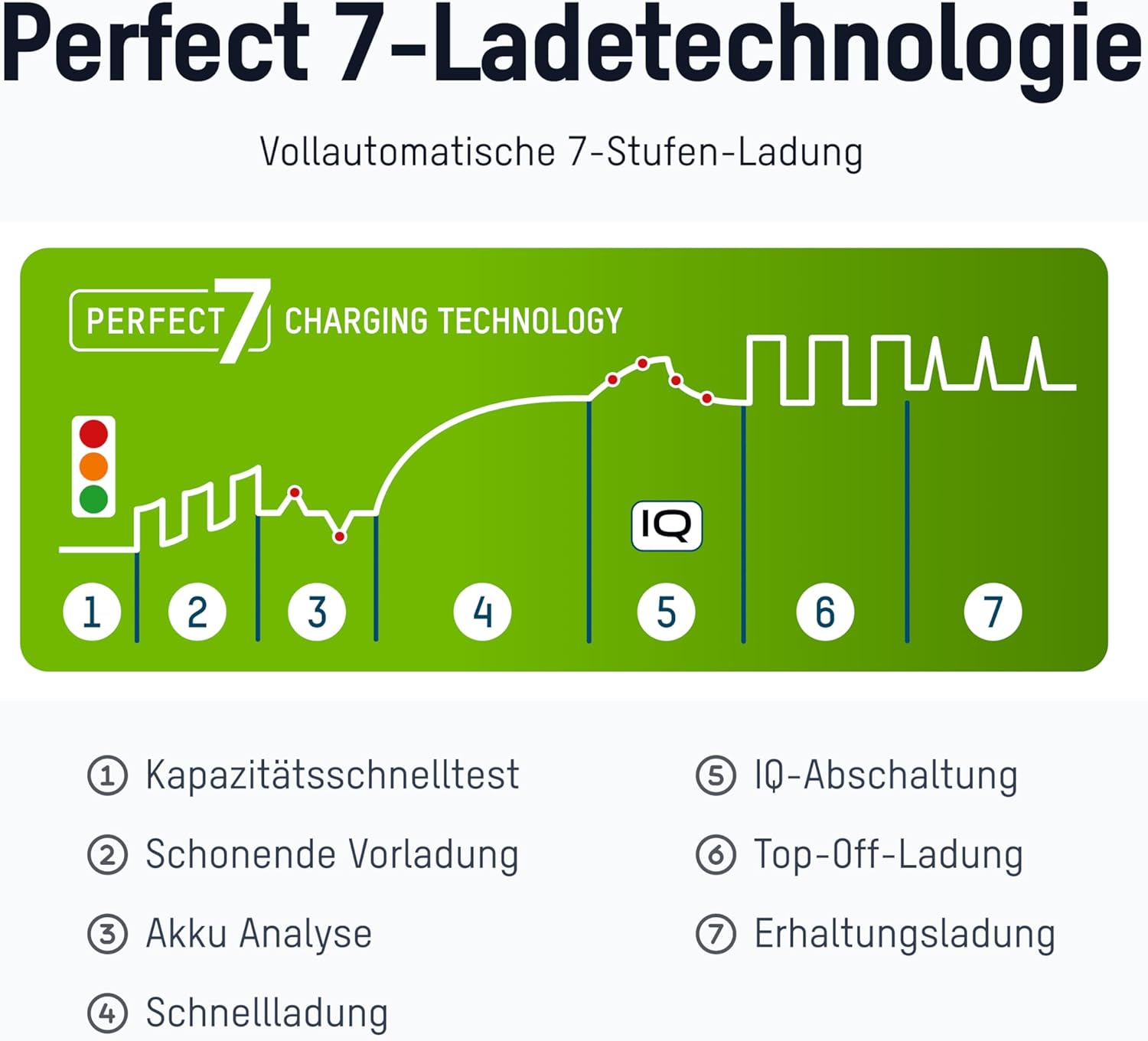
Image: A diagram illustrating the seven stages of the Perfect 7 Charging Technology, showing the charging curve and key steps.
 Quick Capacity Test: Checks the battery's initial charge level.
 Gentle Pre-charging: Slowly charges deeply discharged batteries to a safe level.
 Battery Analysis: Assesses the battery's condition to determine optimal charging parameters.
 Fast Charging: Charges the battery quickly and efficiently.
 IQ Cut-off: Intelligent termination of the main charging process to prevent overcharging.
 Top-Off Charging: Ensures the battery reaches its full capacity.
 Trickle Charging: Maintains the battery's charge level, keeping it ready for use.
7. Maintenance
To ensure the longevity and proper functioning of your charger:
- Cleaning: Disconnect the charger from the power source before cleaning. Use a soft, dry cloth to wipe the exterior. Do not use abrasive cleaners or solvents.
- Storage: Store the charger in a cool, dry place away from direct sunlight and extreme temperatures when not in use.
8. Troubleshooting
If you encounter issues with your charger, refer to the following common problems and solutions:
- Battery not charging / LED not lighting up:
- Ensure the USB cable is securely connected to both the charger and the power source.
- Verify that the power source is active and providing sufficient power.
- Check that the battery is inserted with correct polarity.
- Ensure the battery type is NiMH AA or AAA. The charger will not charge other battery types.
- The battery might be defective. The charger has a defective cell detection feature.
- Charger feels warm during operation:
- It is normal for the charger and batteries to become slightly warm during charging. If it becomes excessively hot, disconnect immediately and contact support.
8.1 Protection Functions
The ANSMANN Comfort Smart charger incorporates multiple safety features to protect both the charger and your batteries:

Image: A visual representation of the protection functions of the ANSMANN Comfort Smart Charger, including a shield icon symbolizing safety.
- Reverse Polarity and Overcharge Protection: Prevents damage from incorrect battery insertion or excessive charging.
- Automatic Shutdown: The charger automatically stops charging when batteries are full.
- Individual Slot Monitoring: Each charging slot is monitored independently for optimal charging.
- Safety Timer after 5.5 h: A built-in timer acts as an additional safety measure.
- Defective Cell Detection: Identifies and prevents charging of faulty batteries.
9. Specifications
| Feature | Specification |
|---|---|
| Product Dimensions | 3.35 x 1.46 x 7.8 inches |
| Item Weight | 3 ounces |
| Model Number | 1001-0092 |
| Compatible Battery Types | NiMH AA, NiMH AAA |
| Number of Charging Slots | 4 (independent) |
| Input Voltage | 9 Volts |
| Output Voltage | 9 Volts (DC) |
| Charging Time (approx.) | 3.75 Hours |
| Date First Available | July 9, 2020 |
10. Warranty and Support
ANSMANN products are manufactured with high quality standards. For information regarding warranty terms and conditions, please refer to the warranty card included with your product or visit the official ANSMANN website. For technical support or customer service inquiries, please contact your retailer or the ANSMANN support team directly.
Related documents1001-0092


Ask a question about this manual
Ask about setup, troubleshooting, compatibility, parts, safety, or missing instructions. Manuals+ will review the question and use this page’s manual context to help answer it.